



logan2z
Subscriber
I was a bit worried I'd have trouble loading the film onto the Jobo reel but I had absolutely no issues - in fact it seemed even easier than loading 35mm.
I developed the roll in a Jobo 1520 tank using HC-110 Dilution H for 9 minutes.
The negatives look pretty good with only one exception: There are a handful of circular spots of lower density on two adjacent negatives that I'm guessing are caused by air bells. I followed my usual protocol of 30 seconds of continuous agitation at the start of developing, and 4 inversions in 5 seconds every 30 seconds thereafter. I also rapped the tank on the counter after each agitation cycle, but still these circular areas are visible, if fairly subtle.
I've included an image below and circled an area that contains these spots. The circled area near the top contains an area of lower density that seems a bit different than the others in that it is not circular, so its cause may be different. I've darkened the image to make these spots more obvious.
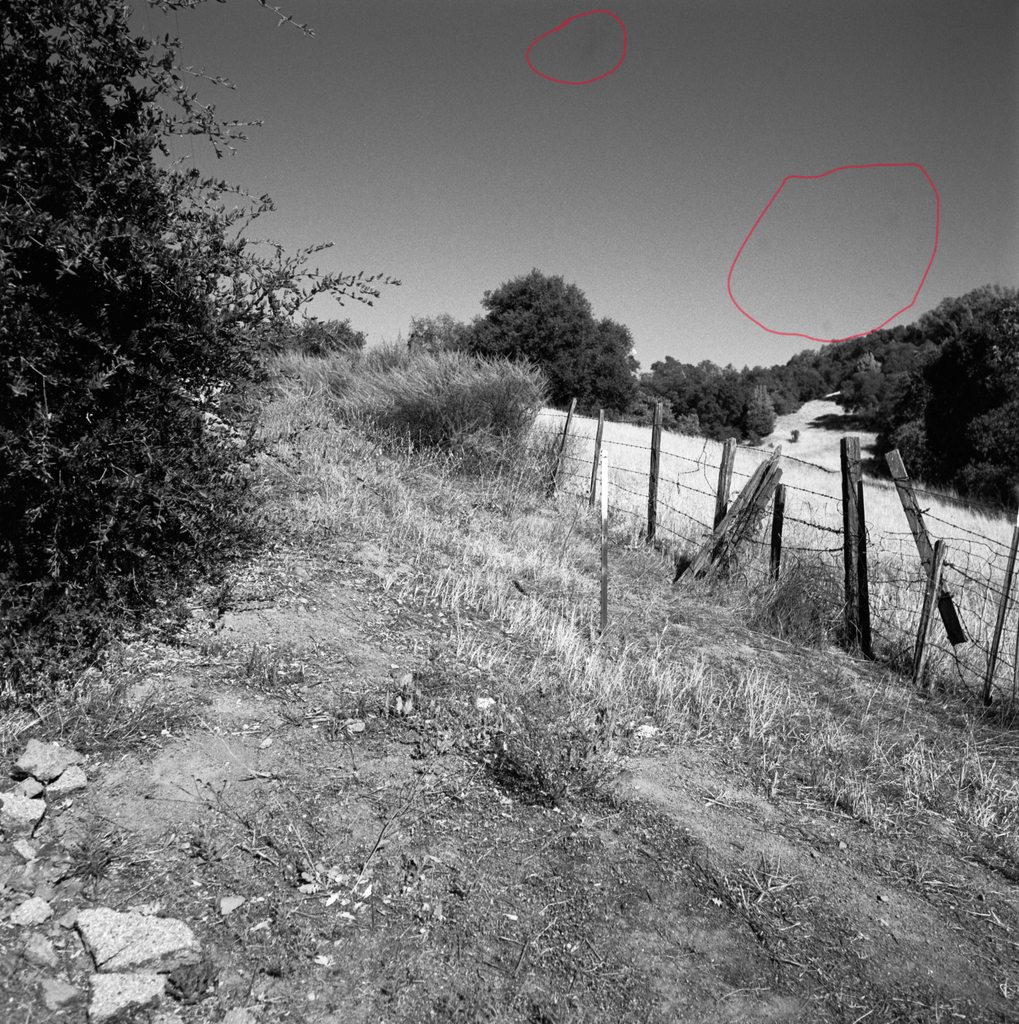
Note that I can see these spots on the negative if I look really closely, so these are not scanning artifacts. I don't see any drying marks when I look directly at the negatives, but I guess that's another possibility. I might wash the negatives again just to make sure. The final rinse was done with distilled water and photoflo diluted according to Kodak's instructions, and I haven't seen drying marks on my other negatives.
Does anyone have an opinion as to whether these are from air bells or something else? If air bells, I'm not sure what I can do to eliminate them since I seem to be doing everything I know of to prevent them. Perhaps even gentler inversions would help? Or pre-soaking? I also have a Jobo roller (no room for an entire Jobo processor, unfortunately) that I might give a go to see if rotation instead of inversion is the cure.
Unrelated question: the negatives seem to have some of the anti-halation layer left in them and look a tiny bit purple. The developer came out of the tank with a bright purple tint so at least some of that layer came out during development, but apparently some remained. I'm using the Ilford wash method to conserve water so perhaps that didn't give a long enough wash to flush out all of the dye. Are there any long-term issues if some of the dye remains in the film, or is it benign?
I developed the roll in a Jobo 1520 tank using HC-110 Dilution H for 9 minutes.
The negatives look pretty good with only one exception: There are a handful of circular spots of lower density on two adjacent negatives that I'm guessing are caused by air bells. I followed my usual protocol of 30 seconds of continuous agitation at the start of developing, and 4 inversions in 5 seconds every 30 seconds thereafter. I also rapped the tank on the counter after each agitation cycle, but still these circular areas are visible, if fairly subtle.
I've included an image below and circled an area that contains these spots. The circled area near the top contains an area of lower density that seems a bit different than the others in that it is not circular, so its cause may be different. I've darkened the image to make these spots more obvious.
Note that I can see these spots on the negative if I look really closely, so these are not scanning artifacts. I don't see any drying marks when I look directly at the negatives, but I guess that's another possibility. I might wash the negatives again just to make sure. The final rinse was done with distilled water and photoflo diluted according to Kodak's instructions, and I haven't seen drying marks on my other negatives.
Does anyone have an opinion as to whether these are from air bells or something else? If air bells, I'm not sure what I can do to eliminate them since I seem to be doing everything I know of to prevent them. Perhaps even gentler inversions would help? Or pre-soaking? I also have a Jobo roller (no room for an entire Jobo processor, unfortunately) that I might give a go to see if rotation instead of inversion is the cure.
Unrelated question: the negatives seem to have some of the anti-halation layer left in them and look a tiny bit purple. The developer came out of the tank with a bright purple tint so at least some of that layer came out during development, but apparently some remained. I'm using the Ilford wash method to conserve water so perhaps that didn't give a long enough wash to flush out all of the dye. Are there any long-term issues if some of the dye remains in the film, or is it benign?


