• Welcome to Photrio!
    Registration is fast and free. Join today to unlock search, see fewer ads, and access all forum features.
    Click here to sign up

How good is the Minox 8x11 resolution?

Tree, California Desert

A
Tree, California Desert

  • 2
  • 1
  • 31
bessa2_on_desk_sm.jpeg

A
bessa2_on_desk_sm.jpeg

  • 1
  • 0
  • 28

Recent Classifieds

Forum statistics

Threads
202,470
Messages
2,841,205
Members
101,341
Latest member
Yusu
Recent bookmarks
1

tjwspm

Subscriber
Allowing Ads
Joined
Dec 23, 2023
Messages
375
Location
Germany
Format
Sub 35mm
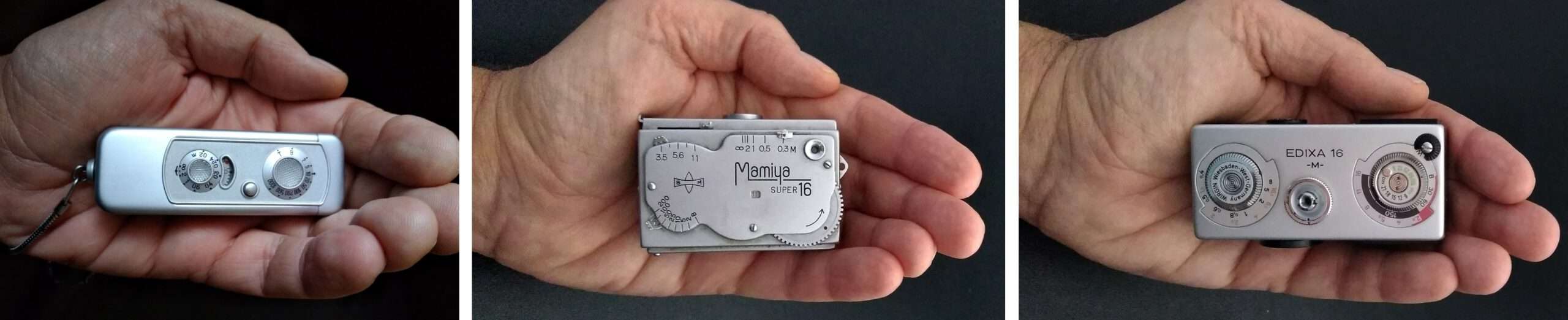
It wouldn't leave me alone. My comparison of the Minox A, Mamiya Super 16, and Edixa 16 also focused on the lenses. Unfortunately, I had to use estimated resolution values because no published values were available (except my own for the Minox A).

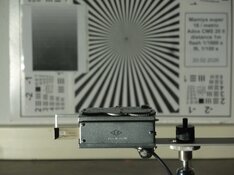
Now I've taken the restoration of a Mamiya as an opportunity to measure its lens resolution and, of course, that of the Edixa as well. Since I used the same test procedure for all three cameras, the results can be easily compared.

Resolution test Mamiya super 16 k.jpg

The surprise: Minox does not fare best in practice. Here is my report:
 
That's very interesting! They all did better than I expected.

I noticed in your test you used Ektar and noted its fine grain - my understanding is its fine grain does not imply higher resolution and in some cases Kodak reformulated their films to be finer grain at the expense of some resolution.

If I owned any of these cameras I think I'd shoot Scala 50/HR-50 or Acros for B&W and Fuji slide film for color. Maybe Kodak Aerocolor for color negative.
 
Several years ago, I compared the resolution of my Minox IIIs lens to my best 16mm, 35mm and 4x5 lens. I photographed a resolution chart to make a 2x2mm size image of the chart on the same film -- Agfapan 25. I enlarged each 2x2mm section to the same maginifaction -- 50X -- using the same enlarging lens. That's a 16x22 INCH print for the Minox; 12x15 FOOT for the 4x5". The results were comparable when the 2x2mm resolution chart was the enlarged to the same size, but I think the Minox was the winner. Still, the larger formats will be the winner under normal situations -- for example, where the 2x2mm section on 4x5" film would be 25x25mm. That's like comparing an 8x10" print to an 8 foot mural.

http://www.subclub.org/library/page2.html
 
That's very interesting! They all did better than I expected.

I noticed in your test you used Ektar and noted its fine grain - my understanding is its fine grain does not imply higher resolution and in some cases Kodak reformulated their films to be finer grain at the expense of some resolution.

If I owned any of these cameras I think I'd shoot Scala 50/HR-50 or Acros for B&W and Fuji slide film for color. Maybe Kodak Aerocolor for color negative.

Thanks for your comment about the films. Yes, you're right, in principle, the shape of the grains can be used to achieve different resolutions or edge sharpness for the same grain size.

However, when I look at the modulation transfer function of Ektar (https://business.kodakmoments.com/sites/default/files/files/products/e4046_ektar_100.pdf) and Aerocolor (https://www.kodak.com/content/pdfs/amc/KODAK-AEROCOLOR-IV-Negative-Film-2460-datasheet-en.pdf), I can't see major differences overall.
 
Certainly an interesting read. I messed around a lot with microfilm in 110 cameras during covid. Had to do something to stay occupied. I started using Minox cameras the year before after a couple decades of intent. At this point because of the qualities of the Minox images and how they look combined with the ease of use of the Minox, I find it a superior format. I'd like to try some 16mm cameras but none of them seem to be "right." I just don't see that much of an advantage with 16mm. The biggest problem I think is the cassettes. I have something like 40 or 50 Minox cassettes at this point. I rarely ever see any 16mm cassettes for sale.

I shoot Eastman XX in the Minox and find the images to be just about perfect though obviously not high resolution, but I am not after that. I can and do throw the Minox in my pocket when I leave the house. It is the ultimate film take with you camera.

I wouldn't mind trying out some actual 16mm cameras. Anyone know one that focuses and has a meter and a full range of shutter speeds that also has cassettes easily available? I suppose the meter isn't that big a deal, but the rest are.
 
I've taken the middle-ground of using half-frame and cropping when necessary. This is a 6x6 millimeter crop from the Olympus Pen on Aerocolor that I felt held good detail. Probably could pull more out of it if I used more extension tubing to digitize.

film08hcurves2crop6x12mm1024.jpg


I haven't yet figured out how to buy a Minox or similar at a reasonable price in good working order.
 
I wouldn't mind trying out some actual 16mm cameras. Anyone know one that focuses and has a meter and a full range of shutter speeds that also has cassettes easily available? I suppose the meter isn't that big a deal, but the rest are.

GO TO TOWN:

http://www.subclub.org/shop/16mm.htm

You're asking a lot to put into a 16mm camera which means bigger, heavier & costlier. I recently ran across a Feinwerk MEC 16 SB -- the first camera of ANY format to have a TTL meter. It also has Rodentsock f2.0 focusing lens.
 
I've taken the middle-ground of using half-frame and cropping when necessary. This is a 6x6 millimeter crop from the Olympus Pen on Aerocolor that I felt held good detail. Probably could pull more out of it if I used more extension tubing to digitize.

View attachment 419002

I haven't yet figured out how to buy a Minox or similar at a reasonable price in good working order.

One should also consider what can be achieved today with digital post-processing of small formats. I took the liberty of editing your photo. Keep in mind that it is a smaller negative than Minox (6x6mm):

2026-02-26_094510.jpg
 
One should also consider what can be achieved today with digital post-processing of small formats.

In all honesty, I would not consider that an improvement. Yes, the grain is gone. So is the acutance. The fine details are all smeared out. This is what used to be possible also in e.g. the Epson scanning software and other software offering noise reduction around 25 years ago, so it's not so much a demo of what is possible 'today'.
Of course today we have AI-assisted uprezzing tools that are supposed to help with scaling up images while retaining detail rendering. I have yet to see a single compelling example where this really works. At best, they keep upscaling artifacts limited, but there's never a gain in actual detail. Of course, a gain in actual detail is not to be expected, at lost not with fidelity to the original scene. However, I think it's something we can expect very soon, if not present already, with basically interpolated 'detail' that makes the 'made up' detail look crisp even if it's not actually real. But as said, the examples I see so far 'in the wild' don't look much better than just upscaling in e.g. GIMP. The example shown above of the bud also shows significant problems in how e.g. the edges of the folded petals render; personally I find this severely objectionable and therefore not an improvement (quite the contrary) to the original file.

Btw, I'd embrace these smaller format film/analog cameras and images for what they are instead of trying to make them into something they aren't. If you want reasonable digital image quality from a small package, just use a smartphone.
 
Yes, I appreciate the idea, but I do like seeing grain and dislike the "non-organic" for lack of a better term look of digital sharpening and upscaling. Most people sharpen their photos at least a tiny bit, I don't sharpen mine at all.
 
Sharpening after digitizing IMO is a different matter altogether because it generally compensates for various aspects of the digital imaging chain as well as the A/D conversion. To get a digital rendition that makes the same impression w.r.t. sharpness or acutance as a physical print it's usually strictly necessary to apply some degree of sharpening.
 
Minox was designed to be the absolutely take-anywhere camera. At the time -- almost 100 years ago -- most "portable" cameras were about the size of a loaf of bread. Leica (35mm) helped change that, but not what anyone would call "take-anywhere". The Minox did, and with today's film and processing methods, the results can be amazing.
 
As I've stated here before, I do NOT come from a scientific photography background. Our work at my parents studio was based on the rigidly pragmatic training they'd received at the School of Modern Photography in the late forties. We didn't know from contrast indexes or how to measure resolution or sharpness, everything was done by eye, mostly on b/w 4x5 film. Our customers didn't care what equipment/materials we used, as long as the images were usable for their needs.

So excuse me if the only thing I can bring to this discussion is this... Here's the sharpest, finest-grain image that ever came out of my Minox cameras in decades of shooting:

WOODPIL1.JPG


This was back in 2008, a home-load of either Kodak Supra 100 or Fuji Reala 100 (probably the Reala, given the blue cast in places) in a Minox B, processed/printed by Minox Processing Labs as a roughly 3-1/2 x 5 bordered print. This is only a 300dpi scan... but it's enough to show that this is crazy sharp and detailed for a Minox pic!
 
And there are lots of Minox galleries on line that are equally impressive.

Another point is that the results from any camera depend greatly on how the camera is used. Even a large format camera will produce lousy results if not held steady, for example. And as the format gets smaller, the need for stability increases. That's perhaps the biggest reason people disliked 110 camera results -- and especially disc cameras. They were so small and light it was difficult to hold them steady when you pushed the button to take a picture. And Minox users know this very well -- you squeeze the shutter release between your thumb and index finger.

Eliminating Blurs​

The main reason for poor results with subminiature cameras is camera movement during the exposure. If the camera is held steady during the exposure, even an inexpensive lens can produce good results. But even the best lens will produce unacceptable results if the camera is not held steady. If your pictures lack the quality that you want to see, start by increasing the stability of the camera.

The basic problem lies with the size and weight of the submini. Because it is so small and light, when the shutter release is pressed, the camera is very easily moved. This problem is compounded by the magnification required to make a print. Because the submini negative is so small, even the slightest blurring in the negative will be magnified tremendously in the final print.

The easiest approach is to select the highest shutter speed possible. This will of course mean opting for faster film and/or a wider aperture, with more grain and less depth of field in the final picture, respectively.. But those decisions are what photography is all about. Of course selecting the fastestshutter speed will not guarantee sharp results. Try to avoid speeds of less than 1/30 of a second. With practice though, it is possible to get good results with 1/15 of a second and even slower, hand-held!

A simple test will determine if you have a problem holding a camera steady, what is the lowest safe speed for you to shoot at, and give you practice in holding the camera steady. In lowish light (to allow for using the slowest shutter speeds), tape a page from any magazine on a wall. Choosea page with big letters and little letters. Place your camera on a tripod about 10 feet away and make an exposure at 1/125 or faster. Next, take thecamera off of the tripod and make a series of exposures hand-holding the camera from the same distance. For each exposure choose the next slowest shutter speed while stopping down the lens an equivalent amount. To evaluate the results, you don't even need to make prints. Place the negatives in the enlarger, raise the enlarger head to your standard size and focus the image with any grain focuser. First, examine the negative of the tripod shot. This will show you how sharp the camera can get. Then examine the handheld shots. They should show greater and greater blurring as the shutter speed gets slower. Making prints willl dramatically illustrate at what shutter speed and at what print size you will need a tripod or other firm support.Under all conditions it is essential to brace yourself to minimize vibrations. If your camera has a wrist strap, wrap it tightly around your wrist.Hold your arms firm against your body. Hold your hands and/or the camera firmly against your face. Avoid too tight a grip as this can induce tremors which will cause blurs. Stand firmly with your legs apart, and hold your breath just before pushing the shutter release. Don't simply press the shutter release, as this tends to move the camera. Place your index finger on the shutter release and your thumb on the opposite side of the camera. At the time of exposure, squeeze both fingers together and the opposing force will minimize movement.

If you can, sit down, and/or lean against any solid object such as a chair, wall or tree. If necessary lay down.

An alternative is to hold the camera against a solid object, such as a table, wall or tree. While you may not be able to see through the viewfinder, the results are bound to be more stable.

Many subminis have tripod sockets and there are a variety of miniature tripods available -- sometimes called table top tripods. One currently available model, prefect for submini work, is made of rugged, lightweight plastic and available at many camera and outdoor shops. It has three, non-adjustable 3 inch legs and will fit in the smallest pocket.. It can be attached to many subminis in such a way as to fold under the camera when not in use. It even comes with an attached velcro strap to tie the tripod to trees, fences or any other narrow, vertical support. The built-inmini-ballhead makes composing the picture a breeze. When using a tripod, or other support, a cable release will minimize blurring, if your camera allows its use.

Lugging along a tripod and cable release is not what most people have in mind when they think of using a submini camera. But if you shoot in a lotof low-light conditions, these can be accomodated without too much trouble. For most of us, practicing the tips listed above will solve most blurringproblems except where extra large prints will be made. In these instances, a tripod or other firm support is essential.

 
Photrio.com contains affiliate links to products. We may receive a commission for purchases made through these links.
To read our full affiliate disclosure statement please click Here.

PHOTRIO PARTNERS EQUALLY FUNDING OUR COMMUNITY:


Ilford ADOX Freestyle Photographic Stearman Press Weldon Color Lab Blue Moon Camera & Machine
Top Bottom