
• Welcome to Photrio!
    Registration is fast and free. Join today to unlock search, see fewer ads, and access all forum features.
    Click here to sign up

How can I match this professional print??

Iriana

H
Iriana

  • 3
  • 0
  • 58
Puddle

Puddle

  • 4
  • 2
  • 97

Forum statistics

Threads
202,734
Messages
2,844,779
Members
101,489
Latest member
Sunnydoran
Recent bookmarks
0
Purely amateur here.

When learning from books, and magazines back in the day, the consensus seemed to be anything bellow the lens would degrade the image, filters to be used in the filter draw above the negative. That seems to have gone by the board with a lot of people these days.

All those separate exposures add up to 24 seconds if I am right. Plus the time between exposures looking for filters, and positioning dodgers.
To my thinking it is a long time available to have a chance of enlarger movement.

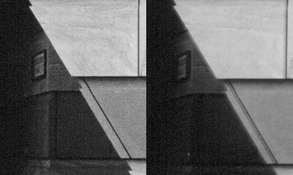
The left side of the diagonal is fuzzy along the entire length. The same with other straight lines.
If the lens is good, I put my money on the enlarger wobbling during or between exposures.
 
Image properties say they've both been scanned on an Epson ET-2650 flatbed scanner, which has a maximum paper size of A4, so the original prints could be 8x10" at most (unless multiple scans were stitched together). The pixel dimensions of the resulting files would be determined by the scanner resolution chosen. The OP could enlighten us, of course.

The OP is self-evidently keen to refine his technique. IMHO marginal improvements on every front are very much worthwhile, whatever size print he aims to make. And 8x10" is far from the limit for 35mm.

When learning from books, and magazines back in the day, the consensus seemed to be anything bellow the lens would degrade the image, filters to be used in the filter draw above the negative. That seems to have gone by the board with a lot of people these days.
We had a thread about this a while back (here). As far as I recall, no-one offered any evidence of degradation from under-lens filters. In the absence of any solid evidence, I think this could be a false trail for the OP. My own comparison showed no difference that I could see, but of course he could verify that for himself.
 
Dragging and dropping the image into PS, it says that the canvas size is 40.778 ins by 27.819 ins or 103.58 cm by 70.66 cm. This sounds very large for a print and I can only presume that the OP enlarged it to this scale on their screen, as no mention of sizes are given.

Terry S

Thanks for this direct answer, Terry. Your figures suggest that this is a pretty large print for 35mm and HP5+ IMO and it seems his only real concern is to get the detail in the frieze on his print as good as the professional printer has managed on his. It all looks pretty marginal to me, as I said and one ( well this one at least ) wonders if at say 16 x20 inches a viewer of the print would pick this out as a a problem

I'd have thought that a print at 16x 20 inches which is about half the size of your figures above on 35mm and using HP5 might be getting close to the maximum possible before "problems" start to become discernible

pentaxuser
 
It really is a thing. Used to drive me mad giving lectures illustrated with transparencies.

Oh, I know it's a thing. Definitely more likely with a slide (it's trapped in the holder with a very hot light source) than in an enlarger. Expansion of a 35mm negative in an enlarger holder (normally made of metal, so conducting heat away) would be more uniform. But it's pretty much impossible to do it with an LED bulb.
 
Thanks for this direct answer, Terry. Your figures suggest that this is a pretty large print for 35mm and HP5+ IMO and it seems his only real concern is to get the detail in the frieze on his print as good as the professional printer has managed on his. It all looks pretty marginal to me, as I said and one ( well this one at least ) wonders if at say 16 x20 inches a viewer of the print would pick this out as a a problem

I'd have thought that a print at 16x 20 inches which is about half the size of your figures above on 35mm and using HP5 might be getting close to the maximum possible before "problems" start to become discernible

pentaxuser
The image area itself measures 1636 x 2712 pixels. If printed at 300ppi, the resulting print would be approximately 9 x 5 1/2 inches.
 
Koraks, I don't see any double lines, even in the cropped section you posted. If there are double lines, that, indeed, points to movement. A popping negative or bumping the enlarger or jiggling it during exposure will certainly cause those.

I assumed, maybe incorrectly, that the OP had made more than one print and had simply posted a representative sample.

OP, if you just made one print, make some more, being careful with focusing and not to bump or move the enlarger during exposure. Also, heat up the negative using the focus setting for a while right before the exposure to get the negative "popped" (if that is the problem), so it doesn't during exposure and then report back.

Doremus
 
Dragging and dropping the image into PS, it says that the canvas size is 40.778 ins by 27.819 ins or 103.58 cm by 70.66 cm. This sounds very large for a print and I can only presume that the OP enlarged it to this scale on their screen, as no mention of sizes are given.

Terry S
Those dimensions are dependent on the resolution. If it was scanned at 300 dpi or higher, it is much smaller. Plus I don't think a beginner with a modest enlarger is making that size print.
 
The image area itself measures 1636 x 2712 pixels. If printed at 300ppi, the resulting print would be approximately 9 x 5 1/2 inches.

That's quite a difference from 40 x 27 inches . It still leaves my question of what size the magnification used by Pieter12 makes this apparently 9 x 51/2 on the pixels formula.

pentaxuser
 
It was not magnified, 100% from the image posted.

Maybe I am misunderstanding what it is you did? The OP shows what is a small but whole print from the negative and you show in #11 a small part of his print whose part size in #11 is larger than the OP's whole print

How are the two pictures reconcilable? I am at a loss to understand how yours is 100% of the image Surely both can't be 100 %

Should I be asking: does 100% from the image posted mean something different from 100% of the image?

Thanks

pentaxuser
 
Maybe I am misunderstanding what it is you did? The OP shows what is a small but whole print from the negative and you show in #11 a small part of his print whose part size in #11 is larger than the OP's whole print

How are the two pictures reconcilable? I am at a loss to understand how yours is 100% of the image Surely both can't be 100 %

Should I be asking: does 100% from the image posted mean something different from 100% of the image?

Thanks

pentaxuser
All I did was click on the thumbnail, then click the magnifier and grab a screenshot. I did not change the resolution of anything.
 
Koraks, I don't see any double lines, even in the cropped section you posted. If there are double lines, that, indeed, points to movement.

Looks like movement to me based on the following.

This is same(ish) section (enlarged 300%) from both images. Diagonal and vertical lines seem to indicate a predominantly horizontal shift.
 

Attachments

  • moved.jpg
    moved.jpg
    256.4 KB · Views: 74
All I did was click on the thumbnail, then click the magnifier and grab a screenshot. I did not change the resolution of anything.

OK, Thanks. However in terms of what I was trying to say about the projected image size I believe that in the sense of the word "magnification" in terms of the resulting print your image results in a much bigger overall image of the whole negative

pentaxuser
 
Years of knowledge and hands on darkroom experience.
More time in the darkroom, less on the web.

And yes, anything below the negative (or above) can affect print quality.
 
Last edited:
Looks like movement to me based on the following.

This is same(ish) section (enlarged 300%) from both images. Diagonal and vertical lines seem to indicate a predominantly horizontal shift.
I don't see any evidence of movement in the one image you posted at all. Maybe you meant to post two and this is the good one.

In this one, the only thing that could be interpreted as a double line is the two surfaces of the groove between the blocks. Other vertical and horizontal lines don't exhibit a doubling to my eye.

Doremus
 
Years of knowledge and hands on darkroom experience.
More time in the darkroom, less on the web.

And yes, anything below the negative (or above) can affect print quality.
My experience is that things such as dusty or scratched filters in the filter slot above the negative have no impact on the image quality.
 
I don't see any evidence of movement in the one image you posted at all. Maybe you meant to post two and this is the good one.

In this one, the only thing that could be interpreted as a double line is the two surfaces of the groove between the blocks. Other vertical and horizontal lines don't exhibit a doubling to my eye.

Doremus

Hi Doremus, That actually IS two separate images that Nige has posted; merely combined into one image to keep them right up against each other for a good side by side comparison.
The diagonal line shows very clearly that something has been bumped between exposures. I don't think focus is an issue because, beneath the two slightly offset exposures, one can still see either film grain or building texture.
I'm with Nige, definite movement there.

Other than that, just the opening up of that bottom left shadowed area and less of the 1.5 grade exposure around the freize to give those details better contrast and clarity and you're pretty much there, Brian. Well done! ☺
By the way, if I'm making a direct replica of another print for someone, I put the original print in my easel and focus the negative on that. That way the crop and any sort of tilt/straightening can be exactly matched very easily.

Nick's Print:
Nick.jpg


Brian's Print:
Brian.jpg
 
Image properties say they've both been scanned on an Epson ET-2650 flatbed scanner, which has a maximum paper size of A4, so the original prints could be 8x10" at most (unless multiple scans were stitched together). The pixel dimensions of the resulting files would be determined by the scanner resolution chosen. The OP could enlighten us, of course.

The OP is self-evidently keen to refine his technique. IMHO marginal improvements on every front are very much worthwhile, whatever size print he aims to make. And 8x10" is far from the limit for 35mm.


We had a thread about this a while back (here). As far as I recall, no-one offered any evidence of degradation from under-lens filters. In the absence of any solid evidence, I think this could be a false trail for the OP. My own comparison showed no difference that I could see, but of course he could verify that for himself.

I was initially skeptical about the optical performance of Ilford's below-the-lens filters, but I wouldn't hesitate to use them now. As long as they're kept clean, they are absolutely fine!
 
My experience is that things such as dusty or scratched filters in the filter slot above the negative have no impact on the image quality.
Within reason I would agree, badly scratched or very dirty filters could create problems depending on light source. I was not necessarily referring to sharpness but overall print quality. Issues with condenser, proper bulbs, light leaks etc.
 
That actually IS two separate images that Nige has posted; merely combined into one image to keep them right up against each other for a good side by side comparison.

Correct 🙂

The diagonal line in the lower-right quadrant is the most obvious bit.

I also think that once that is eliminated, the contrast will improve as the mushy grain caused by the movement will 'fix itself'
 
I'm convinced.

The OP is markedly silent, by the way. Last seen two days ago, but left again without commenting. Maybe he's in the darkroom.

He was last seen at 6:58 pm tonight Perhaps he's waiting for a consensus on what he need to do to match the professíonal print or waiting on the thread's replies exhausting before he tells us what he will do?

pentaxuser
 
Photrio.com contains affiliate links to products. We may receive a commission for purchases made through these links.
To read our full affiliate disclosure statement please click Here.

PHOTRIO PARTNERS EQUALLY FUNDING OUR COMMUNITY:


Ilford ADOX Freestyle Photographic Stearman Press Weldon Color Lab Blue Moon Camera & Machine
Top Bottom