

• Welcome to Photrio!
    Registration is fast and free. Join today to unlock search, see fewer ads, and access all forum features.
    Click here to sign up

How can I match this professional print??

Iriana

H
Iriana

  • 2
  • 0
  • 50
Puddle

Puddle

  • 4
  • 2
  • 94

Forum statistics

Threads
202,733
Messages
2,844,765
Members
101,487
Latest member
Bmattei
Recent bookmarks
0

Brian Stater

Member
Allowing Ads
Joined
Jun 15, 2020
Messages
23
Location
London
Format
35mm
Hello Photrio

You have helped me a lot in the past and I hope you won’t mind me picking your brains again….

I have attached two prints of the same image. The first is the work of a darkroom professional, the second is my attempt to match his quality and detail. And I need help to improve it!

Here’s the story: I used HP5 Plus film in an Olympus OM2N SLR camera.
I took the neg along to a top-class darkroom in London and Nick, their printer, did a wonderful job, especially in bringing out the detail of the frieze in the upper section of the picture.
I have a small darkroom at home and have tried to replicate his print.
I am happy with the tone and texture of the stonework, but I cannot get the figures in the frieze, or the pedestrian and his bag, quite as sharp as I’d like.
I am printing on Ilford MGFB Classic paper, with a glossy finish, the same as Nick.
Nick told me that he used split grade printing, with filters 1.5 and 5, so I have done the same. I tried various combinations but the most successful (shown here) was 9 secs at f11 for the 1.5, plus 6 secs at f11 with the 5 filter.
I have burnt in the lower section (pavement and pedestrian below the waist) at 4 secs, f11, grade 2.5, then an additional 5 secs, f8, grade 2.5 for the triangular void on the left.
My print was developed for 60 secs, though I have used shorter and longer times too.
My enlarger is fairly basic — a Kaiser VP350 System V — with below the lens filters.
I am focussing with an old EPL Focus Scope.

Does anyone have any suggestions, please? I feel I’m about 90 per cent there in matching Nick’s effort, but need your help over the final hurdle…

Many thanks

Brian
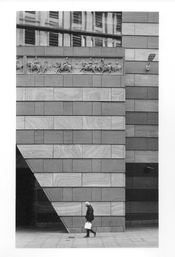
 

Attachments

  • Brian1.jpeg
    Brian1.jpeg
    1.5 MB · Views: 723
  • Brian1A.jpeg
    Brian1A.jpeg
    1 MB · Views: 700
Sure, I'll take a stab at it.

Contrast looks good. He dodged the lower left shadow and burned the lower right one a bit to balance the dark areas. He burned the upper half, probably using a card starting from the top several times, resulting in proportionally more burn up top.

That and a wee bit of edge burning (and top corner burns?) would get you pretty much there, me-thinks.

As for sharpness...filters below the lens isn't helping.
 
Looking as closely as I can to the two pictures, I believe yours is slightly out of focus across the whole print. F11 may have introduced a bit of diffraction across the print. Do you have a loupe you can use to critically look at various areas of the print to see if you can confirm this? It is also possible your enlarger/base/easel/lens/paper system is up against its limits sharpness-wise.
 
It looks like your negative popped between the two filter exposures, making it less sharp. I would suggest a heat-absorbing glass in the filter drawer or a glass negative carrier to prevent that.
 
He has done a very nice job. Would you share who it was? (DM me if you prefer)

It looks as though he got that principle vertical line more upright than you have - I checked using a square on my screen, and it's slight but not an illusion, I think. He has certainly lost a tiny bit on the left and right sides, and gained a tiny bit at the top, relative to your print. So I wonder if he raised one end of the enlarger baseboard slightly to correct the perspective? Or maybe it's just a very slightly different crop.

Apart from that, his highlights on the wall are cleaner, and the crevices darker. So I would try a shade less time on the grade 1.5 and a bit more on the grade 5, bearing in mind that the G5 is slower. It's possible he's used a condenser enlarger, but your setup (opal bulb and condenser, I believe?) should be capable of matching that appearance.

I agree that your print looks slightly unsharp, especially in the corners. Popping may be the cause - try not to let the negative heat up too much by leaving the enlarger lamp on for more than about 30 sec. Focus quickly and turn it off. I use a glassless negative carrier (35mm), so I am careful about this (although my enlarger does have the benefit of a heat filter above the lens).

I respectfully disagree with @MurrayMinchin about the below-lens filter causing unsharpness! I have made prints both ways and I can't see any difference. I think you will cause more unsharpness changing filters in the drawer above the lens (if you have one) than you will gain. You don't say what enlarger lens you are using, but the consensus seems to be that most enlarger lenses are sharpest at around f/5.6 or f/8.
 
Two things... to me it looks like your negative is not sitting flat in the holder. The top is not in focus. If it's in a glass holder, then it would be, so if that is the case, are the three stages... negative, lens, and easel all parallel with one another?
The other thing is the bottom shadow should be dodged a wee bit.
 
Also, question, did Nick use Selenium toner. It's very subtle on neutral tone papers but it increases Dmax.
 
yours is slightly out of focus across the whole print

your negative popped between the two filter exposures, making it less sharp

I also see the focus/sharpness problem, but I'd propose a third possible cause: movement due to switching contrast filters or by accidentally bumping into the easel between parts of the exposure.

The print on the right appears to have a hot spot in the center where the image is darker. I'd verify that illumination is even esp. at grade 5.

Otherwise I think the print on the right is a reasonably OK match to the other one. The shadow area bottom left could be opened up a bit more by cutting back the low grade exposure there. You probably only need grade 5 for that part of the image.

I personally would have printed with more contrast overall, but that's a matter of personal taste and not objectively better.
 
Hello Photrio

You have helped me a lot in the past and I hope you won’t mind me picking your brains again….

I have attached two prints of the same image. The first is the work of a darkroom professional, the second is my attempt to match his quality and detail. And I need help to improve it!

Here’s the story: I used HP5 Plus film in an Olympus OM2N SLR camera.
I took the neg along to a top-class darkroom in London and Nick, their printer, did a wonderful job, especially in bringing out the detail of the frieze in the upper section of the picture.
I have a small darkroom at home and have tried to replicate his print.
I am happy with the tone and texture of the stonework, but I cannot get the figures in the frieze, or the pedestrian and his bag, quite as sharp as I’d like.
I am printing on Ilford MGFB Classic paper, with a glossy finish, the same as Nick.
Nick told me that he used split grade printing, with filters 1.5 and 5, so I have done the same. I tried various combinations but the most successful (shown here) was 9 secs at f11 for the 1.5, plus 6 secs at f11 with the 5 filter.
I have burnt in the lower section (pavement and pedestrian below the waist) at 4 secs, f11, grade 2.5, then an additional 5 secs, f8, grade 2.5 for the triangular void on the left.
My print was developed for 60 secs, though I have used shorter and longer times too.
My enlarger is fairly basic — a Kaiser VP350 System V — with below the lens filters.
I am focussing with an old EPL Focus Scope.

Does anyone have any suggestions, please? I feel I’m about 90 per cent there in matching Nick’s effort, but need your help over the final hurdle…

Many thanks

Brian
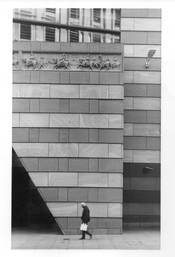
Actually, I think you've done a very decent job, and going any further may not be very efficient.
 
I kept on flashing between the two prints and eventually found the answer which is that both became virtually indistinguishable from each other 🙂

Still if you and all the others can see an appreciable difference then there must be one and I hope you find it

pentaxuser
 
I kept on flashing between the two prints and eventually found the answer which is that both became virtually indistinguishable from each other 🙂

Still if you and all the others can see an appreciable difference then there must be one and I hope you find it

pentaxuser
One is definitely softer than the other.

Screenshot 2025-11-20 at 1.28.19 PM.jpg
 
Definitely a focus problem. Check alignment, movement, focus and all that stuff, of course, but don't rule out that your friend simply has a sharper enlarging lens than you do. You don't mention your lens. If that's the culprit, you may want to up your game with a higher-quality lens. Enlarging lenses are fairly reasonable these days.

Doremus
 
Definitely a focus problem. Check alignment, movement, focus and all that stuff, of course, but don't rule out that your friend simply has a sharper enlarging lens than you do. You don't mention your lens. If that's the culprit, you may want to up your game with a higher-quality lens. Enlarging lenses are fairly reasonable these days.

Doremus
That is what leads me to the conclusion that it is the negative popping between exposures. The OP states he uses a grain focuser, so I assume the grain is in focus for the first exposure. The harder filter will tend to define grain more, but if the negative has popped that exposure will be soft and out of alignment with the first one.
 
I really think it's a problem of having bumped into something. You can tell by the double lines and the angles they make.
Top of the print; note how the double lines above the frieze joins at the left and diverge towards the right:
1763757430682.png

IMO that's consistent with accidentally bumping the negative carrier, the easel or even just the head or column as such so that the projected image rotates out of alignment ever so slightly. The use of below-the-lens filters is a plausible cause.

With a negative popping issue I would expect to see the problem to be the worst in the center of the frame where the 'pop' has the furthest travel and thus creates a bigger focus problem. In the actual print, the center is the least affected.
 
I had simply looked at the OP's two prints but have no idea how big they are. At what size of a print will what you show above be i.e. how big would the print be at this magnification

Thanks


pentaxuser
Whatever size the OP printed...I can't make it any more detailed than what he posted.
 
With a negative popping issue I would expect to see the problem to be the worst in the center of the frame where the 'pop' has the furthest travel and thus creates a bigger focus problem. In the actual print, the center is the least affected.

It’s possible that he focussed (usually in the image centre) with the negative in a ‘popped’ state.

Either way, a few precautions will eliminate bumping and popping as causes of unsharpness. The tonal subtleties are harder to get spot-on.
 
I've never had a 35mm negative pop.

The best idea is take all the possible errors under advisement and try to eliminate all of them. Check the alignment of the enlarger. Watch out for vibrations. Swapping a filter may make your enlarger shake a bit, especially if whatever table you have the enlarger on is a bit shaky. See how clear your under-the-lens filters are, since it's possible they could diffuse the light. Switch your bulb to an LED, if you can - since that doesn't produce enough heat to pop a negative. Use a grain focuser (I don't know what that is you're using).

I'd also advise giving the 1.5 filter a skip and just try enlarging at grade 3 or so. See if you like it.

Chances are your enlarging lens is not the problem. However, try to make your enlargement with the lens stopped down twice from fully open.
 
he burned in the right part of the frieze and dodged out the left to make the whole thing more even
 
Then the unsharpness would still be in the center. Think about it.

I did 🙂. You assume the negative popped again between focussing and the end of exposure. In my experience, once it is warmed up it stays popped for a short while. Who knows about the OP case.

I've never had a 35mm negative pop.
It really is a thing. Used to drive me mad giving lectures illustrated with transparencies. Maybe grown-up enlargers don’t make it happen, but mine certainly does. Before anyone suggests it, glass negative carriers are the worse of the two evils in my opinion.
 
Last edited:
Why just match the original print? You could try to improve upon it. The building looks a touch flat to me. Kick up the local contrast on the stone and hold back on the two shadowed areas. The print will be more dynamic.
 
I've just looked at the two images side by side in PS (magnified to 'print size') and agree with various points given so far.

On the print by the OP, the right edge isn't truly horizontal; the print is slightly soft, so focussing needs checking sometime(s) throughout; and the contrast is a bit lower. I have tried two filter printing in the past and have seen others work done with this, but I'm not overly impressed by it and think that you would be better printing at one grade (grade 3?) and then burning in highlight details slightly with a lower grade where necessary.

It is though a good starter print by the OP and he should be able to produce as good a print as the pro, taking into consideration the points made so far.

Good luck - you're nearly there, although I wouldn't set ones expectations too high, as you're competing against someone who does printing day in and day out as a job. And as Stephen says in post #22, why just 'try to match the print'? I understand that you probably hope to learn to print better, but also we all have our own idea of how the image should look - check out any negative swap and see all the variations done. So, why not try to give it your own interpretation on another print as well? :smile:

Terry S
UK
 
Whatever size the OP printed...I can't make it any more detailed than what he posted.

OK It was just that you appear to have magnified the OP's original prints to quite a large size to demonstrate the point you make All I was wondering was whether in so doing you know what size of a print that your magnificatíon represents

Yes I agree that at your magnification you can see a difference but if for sake of argument this represents a print of his whole negative at say 40 x 60 inches then at considerably lower but still large print size by most standards, the difference may become quite marginal

pentaxuser
 
All I was wondering was whether in so doing you know what size of a print that your magnificatíon represents

pentaxuser
Dragging and dropping the image into PS, it says that the canvas size is 40.778 ins by 27.819 ins or 103.58 cm by 70.66 cm. This sounds very large for a print and I can only presume that the OP enlarged it to this scale on their screen, as no mention of sizes are given.

Terry S
 
Photrio.com contains affiliate links to products. We may receive a commission for purchases made through these links.
To read our full affiliate disclosure statement please click Here.

PHOTRIO PARTNERS EQUALLY FUNDING OUR COMMUNITY:


Ilford ADOX Freestyle Photographic Stearman Press Weldon Color Lab Blue Moon Camera & Machine
Top Bottom
