• Welcome to Photrio!
    Registration is fast and free. Join today to unlock search, see fewer ads, and access all forum features.
    Click here to sign up

Gossen Luna Pro Spot attachment and a Gossen Luna Lux SBC question

Forum statistics

Threads
203,316
Messages
2,852,910
Members
101,782
Latest member
JaredDavis22
Recent bookmarks
0

Sirius Glass

Subscriber
Joined
Jan 18, 2007
Messages
50,933
Location
Southern California
Format
Multi Format
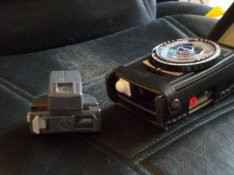
I just received a Gossen Luna Pro Spot Attachment. I also have a Luna Lux SBC which has a sliding incident light dome. The dome is in the way and I have to see if it can be removed and put back in without damage. Any ideas are welcome.
 

Attachments

  • 101_0142.jpg
    101_0142.jpg
    628.3 KB · Views: 383
I wouldn't try removing the dome. Scary! I use that attachment on a Luna Pro (the old one, not SBC) and the dome needs to be positioned "just so" for the attachment to be attached. If slid all of the way to the end it seems not to fit but if slid just a bit back toward center it should fit -- at least mine does. I never use the attachment with the meter in the case, BTW.
 
Thanks Brian! I moved the dome away from the edge a little and then it attached! It even works correctly!
 
I use the same attachment for both sbc and regular luna pros.

It's been a long time since i used em but i think you have to compensate by one stop... Look up the instructios on the Gossen site.
 
I don't know about the SBC but on the Luna Pro there are color coded marks (yellow and green triangles I think) to use for the different angle of view on the spot attachment, which is also color coded. It might be one stop for the 15 degree setting, 2 stops for the 7.5 degree setting.

Edit; After googling images for the SBC, I didn't see any color coded marks on it.
 
I have the SBC with the led lights. One group on the internet says to compensate +1 1/3 EV for 15° and +3 EV for 7.5°. The other group says that the meter automatically compensates for the attachment.
 
On the attachment should be a sticker with those correction figures. On the Gossen site you'll find the manuals anyway.
 
I have the SBC with the led lights. One group on the internet says to compensate +1 1/3 EV for 15° and +3 EV for 7.5°. The other group says that the meter automatically compensates for the attachment.

Mark Twain said that there are two types of people. The first type divides people into two groups. The second type does not.
 
The Luna Lux SBC (the red LED one) is a different meter than the Luna Pro SBC (aka Profisix in most of the world), which is of course different from the old Luna Pro.

So one needs to be cautious about things one sees on the internet :smile:.
 
Luna Lux adjust + 1 1/3 EV for 15° and + 3 Ev for 7.5°
Luna Lux SBC with the red lights What do I do with this one?
Luna Pro SBC aka Profisix automatically adapts

Now that the model variations have been defined. What do I do with Luna Lux SBC with the red lights?
 
Last edited by a moderator:
It's all in the manual.

The problem I got is that you are using the US designations which are unknown over here. (and which you have mistyped anyway).
Without having my comparative listing next to me it is a hassle looking up those designations
 
Last edited by a moderator:
Moi missppell?!?

[If the ability to spell correctly by ones self was important, the G-d would not have put <control-L> on computer keyboards.]

View attachment 77652

Then the above post should read:
Luna Lux adjust + 1 1/3 EV for 15° and + 3 Ev for 7.5°
Luna Lux SBC with the red lights automatically adapts
Luna Pro SBC aka Profisix automatically adapts


Thanks!
 
Steve... isn't the meter that you are using the same meter as in the manual link (post #7)? Luna Lux SBC with nulling LEDs? If so, it appears that you need to offset the exposure correction dial by 1 1/3EV when using 15deg or 3 EV when using 7.5 deg readings. The normal offset is 1 (or no offset). Described on pages 28 and 11 of the manual. Then you meter "normally" to null. It seems VERY important to remember to re-set the exposure compensation before and after using the spot attachment or subsequent reading will be all wrong.

The "automatically adapts" is misleading. The meter only adapts after you specify the proper offset of the meter for the amount of light it is being provided: 30 deg reading acceptance angle = offset of 1; 15 deg acceptance angle = offset 1 1/3; and 7.5 deg acceptance angle = offset 3.

If you haven't done so already, look closely at the attachment and you will see that it creates the smaller acceptance angles by restricting the amount of light reaching the meter. Smaller hole for 15 deg and even smaller hole for 7.5 deg. It is ingenious, but by it's very design must involve some compensation at the meter for the smaller amount of light hitting the sensor. :smile:
 
Last edited by a moderator:
Luna Pro SBC aka Profisix automatically adapts

No it does not. It even can not. As there is no linkage between the meter and that small spot attachment, aside of the attachment's feet that are just a fixture.

With those attachments that connect via electrical plugs there is a linkage, enabling automated compensation.
 
... or to expand AgX's reply: the correction for the two settings on the spot attachment must be done on the dial calculator: set the light reading value to the yellow index mark for no spot attachment, green index mark for 15 deg spot reading, and red index mark for 7.5 deg spot reading. Nothing automatic there... purely manual. :smile:
 
BrianShaw and AgX I got it. Set the offset before taking the reading. Thanks.

It only took 18 posts to nail it down completely.
 
It's not an easy concept to get. It took me quite a bit of puzzlement when I first got mine. After that, though... I really get a lot of value from using it.
 
The problem should have never been one. The adapter documentation about the exposure compensation is vague in its relationship to specific models of light meters which use the compensation. Furthermore the Luna Lux SBC light meter documentation mentions the adapter without discussing the exposure compensation.
 
I have to admit, you are right that in no meter manual that compensating for that Tele-attachment is hinted at. But you find it in the manual of that attachment.
Keep in mind that the compensation varies for continuous- and flash-lighting.

The later, black, model, has got a sticker at its underside clearly indicating that compensation adjustment. I don't know about the earlier grey model, but I assume it got it too.
 
The manuals seem to have be written for folks who already know what they are doing. Some help that is, eh? My grey spot attachment does not indicate the compensation because it was originally intended for use with the Luna Pro, which has color-coded index marks so knowing the compensation values is less important. So all one needs to remember is red circle in the viewfinder, red spot attachment setting, and red index mark on the meter... or green, green, green.
 
Last edited by a moderator:
Seemingly Gossen did not want to set even more signs on the dial when they introduced the Profisix. And they introduced a new version Tele-attachment with an informative sticker.
Those who already owned that older attachment, that did not need such sticker, and took it to use with their new meter were already aware of that necessity for compensation.
So that issue of missing information only applied for the used market, and one hardly can blame Gossen for not caring for that.
 
The gray version does not have any sticker and the Luna Lux does not have the green mark and the red indicates the unadjusted position.
 
The Luna Lux (Lunalite) is a later model (kind of simplified Profisix) and then there already had been those black attachments with that sticker.
 
Photrio.com contains affiliate links to products. We may receive a commission for purchases made through these links.
To read our full affiliate disclosure statement please click Here.

PHOTRIO PARTNERS EQUALLY FUNDING OUR COMMUNITY:



Ilford ADOX Freestyle Photographic Stearman Press Weldon Color Lab Blue Moon Camera & Machine
Top Bottom