• Welcome to Photrio!
    Registration is fast and free. Join today to unlock search, see fewer ads, and access all forum features.
    Click here to sign up

First foray into LF (help needed) (pics)

Sacred

A
Sacred

  • 1
  • 0
  • 50
San Miguel Arcangel

H
San Miguel Arcangel

  • 0
  • 0
  • 43

Recent Classifieds

Forum statistics

Threads
201,964
Messages
2,832,778
Members
101,032
Latest member
Hazel2025
Recent bookmarks
0

tron_

Member
Allowing Ads
Joined
Dec 25, 2011
Messages
412
Location
Michigan
Format
Multi Format
Hello,

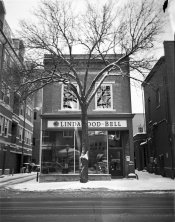
I very recently got into LF photography when I picked up a beautiful Toyo 45CX and 135mm 5.6 Fujinon lens from a fellow APUG member. It took a couple *ahem* experiments :whistling: to get some decent photos out of the camera but I have a couple questions:

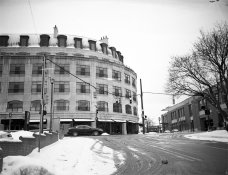
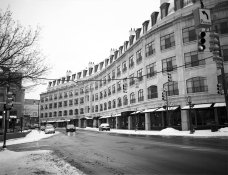
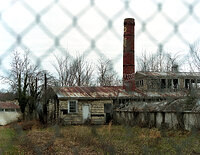
1. In all three photographs, why are the tree tops so out of focus? Is it just the super slim DoF considering the larger film plane (these were all shot at f/5.6). Also IIRC these were all shot at 1/30 second and there wasn't very much wind.

2. Also in the first and second photo, you can see the little black artifact in the top right of the frame. Any idea what this can be?
 

Attachments

  • photo 1.JPG
    photo 1.JPG
    575.2 KB · Views: 146
  • photo 2.JPG
    photo 2.JPG
    498 KB · Views: 134
  • photo 3.JPG
    photo 3.JPG
    530.6 KB · Views: 128

BrianShaw

Member
Allowing Ads
Joined
Nov 30, 2005
Messages
17,004
Location
La-la-land
Format
Multi Format
Were you using movements? If so they look a bit extreme; if not, perhaps some perspective correction should have been considered.

Artifact in 2nd picture looks like vignetting. Artifact on first image looks like emulsion loss somewhere in the process. What film was that?

Congrats on your initial experiements. It has been many years but I still remember my happiness with initial LF images (even though they were fairly mundane).
 

nsurit

Subscriber
Allowing Ads
Joined
Jan 27, 2005
Messages
1,809
Location
Texas Hill Country
Format
Multi Format
My guess is that you had someone process the film rather than doing it yourself and both artifacts (1&2) were cause by the clips used to hang the negatives to dry. Bill Barber
 

Bruce Osgood

Membership Council
Member
Allowing Ads
Joined
Sep 9, 2002
Messages
2,642
Location
Brooklyn, N.Y.
Format
Multi Format
It looks to me that the trees are in front (closer to the camera) than the plane of focus (ie: out of focus). At 5.6 there is not a lot of room for DOF especially in front of the plane of focus. It looks like you focused on the store front and the trunk of the tree retains some focus but the branches leaning towards you become out of focus.

I don't know what the artifact is but it appears to me it occurs to different degrees in photos 2 & 3.
 
OP
OP

tron_

Member
Allowing Ads
Joined
Dec 25, 2011
Messages
412
Location
Michigan
Format
Multi Format
Brian, no movements were used in these photos. I should have probably corrected the perspective distortion that makes the buildings look like they're falling backwards but didn't think of it at the time unfortunately. Also, these were shot on Ilford Delta 100 Pro film.

Bill, the film was processed in a 1+25 dilution of Rodinal for 9:00 in my 135/120 development tank using the "taco" method. IIRC the film was not clipped in those locations.

Bruce, I had a feeling that's what it might have been. I was just curious because the other two photos seem to have a deeper DoF despite having the same architecture. But I do understand that they are compositionally different and the distances may have had an effect on the DoF.

Thank you guys for the replies!
 

ntenny

Subscriber
Allowing Ads
Joined
Mar 5, 2008
Messages
2,521
Location
Portland, OR, USA
Format
Multi Format
I assume the artifact is there on the negatives, not something that happened during printing or scanning? It looks in both cases like a nasty scratch/scrape, more than you would normally get during development without some really extreme event. Any chance you accidentally beat those corners up pretty badly during loading/unloading, or during the taco-making process?

-NT
 

L Gebhardt

Member
Joined
Jun 27, 2003
Messages
2,364
Location
NH
Format
Large Format
I think the blurry trees are due to you having some lens tilt and shallow depth of field based on the aperture you chose (f/5.6). For the first shot I probably would have shot at f/16 minimum (probably owuld have used f/22) if I wanted the trees in focus along with the store front. But I think you had lens tilt because road in the foreground is more in focus than the tree tops and the top of the front building facades. In addition your background buildings are sharper at the top than the bottom (at least it looks that way form the small scan).

My guess is the black artifacts are scratches in the emulsion from your processing. In the first shot it also looks like there's a processing artifact in the upper right. Maybe uneven developer flow or wetting.
 

gone

Member
Allowing Ads
Joined
Jun 14, 2009
Messages
5,504
Location
gone
Format
Medium Format
Yep, f5.6 is not going to work for LF. As LG said, you need at least f16 for this sort of thing.
 

Dr Croubie

Member
Allowing Ads
Joined
Mar 21, 2013
Messages
1,986
Location
rAdelaide
Format
Multi Format
Just to put it in perspective: Shooting 135mm f/5.6 on 4x5 you'll get the same DOF and FOV as shooting 38mm f/1.5 on 135, ie, very shallow DOF. The trees are just out of focus. (and #2 and #3 are focussed further away, so you get comparatively more DOF than the closer #1)
For my LF (especially lanscapes), I'm generally always at f/22-32 (135 equiv f/6-9).

Also, you said you didn't use movements, but if you had then the edges can also get soft and smeared (like a lensbaby looks) near the limits of shift, how bad depends on the lens. (not a problem in these ones, but it's something to keep in mind if you're new to LF).

Agree with the others, the black splotches look like scratches and scraped on the negative. You say you used the 'taco' method, but in what tank? Inversions? The film taco could have hit the lid of the tank, or the funnel in the top, when inverting. (or clips when drying, or holder in scanner, the list goes on). Also, is that a crinkle or something in the road of #1?
 

pbromaghin

Subscriber
Allowing Ads
Joined
Sep 30, 2010
Messages
3,865
Location
Castle Rock, CO
Format
Multi Format
To me, the artifacts look like a couple of very large chunks of dust on the film.
 

Michael W

Member
Allowing Ads
Joined
Feb 11, 2005
Messages
1,594
Location
Sydney
Format
Multi Format
I'd suggest the black marks are emulsion damage from the taco style developing. I gave up on that way of doing things after similar problems. If you curl the processed sheet the same way it was in the tank and look at it, it's pretty clear how likely it is for one sharp corner to be scratching the emulsion as the film moves around during agitation.
 

jp498

Member
Allowing Ads
Joined
Oct 5, 2009
Messages
1,525
Location
Owls Head ME
Format
Multi Format
The first photo, the building is falling back slightly which goes along with your no movements idea. The front standard and rear standard should be level to keep a upright plane of focus. It doesn't take much to alter that. Raise the front standard if you want to correct for the building falling back. Basically keep things vertical if you want the plane of focus to be vertical. More aperture for more depth of field is good too. It appears there are some scratches on the film in the first photo, as you've mentioned in the corner, dust would show up light (as it blocks light and is value inverted by scanning/printing)
 

ntenny

Subscriber
Allowing Ads
Joined
Mar 5, 2008
Messages
2,521
Location
Portland, OR, USA
Format
Multi Format
To me, the artifacts look like a couple of very large chunks of dust on the film.

Wouldn't dust be white in the positive image?

-NT
 

nsurit

Subscriber
Allowing Ads
Joined
Jan 27, 2005
Messages
1,809
Location
Texas Hill Country
Format
Multi Format
If you are getting indigestion from your tacos, you might look at a Mod54 insert for a Paterson tank. That is what I use and am happy with the results. If you agitiate the crud out of you film while processing you can screw things up. Watch his youtube video and you should have no problems. http://www.youtube.com/watch?v=LKcyevwJITg Bill Barber
 

bdial

Subscriber
Joined
Jan 2, 2005
Messages
7,516
Location
North East U.S.
Format
Multi Format
Wouldn't dust be white in the positive image?

-NT
If dust is on the film at the time of the exposure, then it leaves a clear spot on the film, which ends up black in the print.
The spot in the first image is pretty bad, looks more like emulsion damage than dust to me. Could be from lots of things, one of the more likely is a film clip allowed onto the image area, or pulling the film from a clip rather than releasing the clip.
 

Trail Images

Member
Allowing Ads
Joined
Apr 7, 2010
Messages
3,268
Location
Corona CA.
Format
Multi Format
The first photo, the building is falling back slightly which goes along with your no movements idea. The front standard and rear standard should be level to keep a upright plane of focus. It doesn't take much to alter that. Raise the front standard if you want to correct for the building falling back. Basically keep things vertical if you want the plane of focus to be vertical. More aperture for more depth of field is good too.

These were items I noticed too, as well as I agree with the corrections required. Years back when I first started using 4x5 I never used the movements. Moving from MF to LF it was nothing more then a larger image to me. But, to prevent the "keystone" effect as I've known it where tops of buildings and trees tip backwards movements are required. In a lot of cases it's not how you do it, it's recognizing the need to adjust to the cause and affect one way or another.

Also, I find I use a lot of aperture. Almost always at least f22 and mostly f32. I always wondered why LF lenses had numbers as high as f-64 or more, I do not wonder anymore.

Welcome to the LF world and your posted images are a darn good start IMO....:smile:
 
Last edited by a moderator:

snapguy

Member
Allowing Ads
Joined
Jan 1, 2014
Messages
1,287
Location
California d
Format
35mm
You have a good eye and are going to take a lot of wonderful photos with your LF. But I agree with the others, you need to think f11, 16 or 22. In the third photo the center of the pic (about where the car on the right is) is about the only thing in focus. You need to stop it down -- unless what you got was what you want.
 

paul_c5x4

Member
Allowing Ads
Joined
Apr 22, 2009
Messages
1,942
Location
Ye Olde England
Format
Large Format
I picked up a beautiful Toyo 45CX and 135mm 5.6 Fujinon lens from a fellow APUG member.

1. In all three photographs, why are the tree tops so out of focus? Is it just the super slim DoF considering the larger film plane (these were all shot at f/5.6).

Would that be an early Fujinon in a Seiko shutter or one of the later CMW/NWS versions ?
Not that it really matters as they are cracking little lenses with plenty of room for movements.

As others have already suggested, f/5.6 gives you a pretty shallow DoF:


Fujinon-135mm_DoF.jpg
 
Joined
Sep 10, 2002
Messages
3,676
Location
Eugene, Oregon
Format
4x5 Format
I'd suggest the black marks are emulsion damage from the taco style developing. I gave up on that way of doing things after similar problems. If you curl the processed sheet the same way it was in the tank and look at it, it's pretty clear how likely it is for one sharp corner to be scratching the emulsion as the film moves around during agitation.

+1 It looks like emulsion damage to me to.

Your out-of-focus problem is simply too shallow a depth-of-field. f/5.6 on view camera lenses is for viewing and focusing or for really, really shallow depth of field. If you want everything sharp, you have to learn how to use movements and stop down. I'd say that 90% of the photographs I make are taken at f/22 - f/32

Check out the large-format home page here: http://www.largeformatphotography.info/ and read the sections on focusing the view camera and selecting the f-stop. It is a bit of a study session and a learning curve, but once you have mastered these articles, it doesn't get any harder. The articles on movements are good too.

Best,

Doremus

www.DoremusScudder.com
 
Photrio.com contains affiliate links to products. We may receive a commission for purchases made through these links.
To read our full affiliate disclosure statement please click Here.

PHOTRIO PARTNERS EQUALLY FUNDING OUR COMMUNITY:


Ilford ADOX Freestyle Photographic Stearman Press Weldon Color Lab Blue Moon Camera & Machine
Top Bottom