


• Welcome to Photrio!
    Registration is fast and free. Join today to unlock search, see fewer ads, and access all forum features.
    Click here to sign up

F Stop Timer

Cigar again

H
Cigar again

  • 1
  • 0
  • 17
Rainy Day Trees

A
Rainy Day Trees

  • 8
  • 1
  • 113

Recent Classifieds

Forum statistics

Threads
203,165
Messages
2,850,752
Members
101,705
Latest member
kyuut
Recent bookmarks
1

Curt

Member
Allowing Ads
Joined
Sep 22, 2005
Messages
4,618
Location
Pacific Nort
Format
Multi Format
Hello, I was listening to Photo Talk Radio and F Stop Timers were mention. I know almost nothing about them but it seems logical to think in terms of F Stops. Is it easy to learn, or relearn an old horse, and who or how many companies make these timers and are they worth it. Which if any would you recommend?

I have my Beseler color head "remodeled" by removing the transformer, circuit boards, wiring, and all else but the lamp holder, fan, and filter unit. I have one new halogen bulb in the correct color temperature that now runs on 120 volt ac and no longer have the 82 volt unrepairable setup. Going to run it from a Sola CVA unit. A useless color head that is useful again.

Now I can use my timers or change to the F Stop timing system which looks very practical. Next is to make a 5x7 head, then an 8x10 head with Dichroic filters for VC papers.
 
Curt: I find f/stop timing so logical and easy to learn that I cannot understand why it is not the method taught to new printers. First, determining exposure by test strips made in 1/2 or 1/3 stops is far more logical and revealing than strips made in, say, 2 second intervals, where the second strip is 1 stop darker than the first, but the fifth strip is only 1/8 stop darker than the fourth. After you've tested and arrived at a work print, it is so much more logical to decide that you need 1/3 or 1/2 stop more exposure overall, or need to burn the bottom 1/3 stop, than it is to try to figure out how many more seconds to give.

Although it makes life easier, you don't need an f/stop timer. I always work in stops and don't yet have one. You can use a calculator and the 1/2 or 1/3 stop factors, or you can use a chart published in books by Ralph Lambrecht, Tim Rudman, and I am sure, others.

Give it a try before you invest in a timer, but I bet you'll never go back.
 
Check out www.darkroomagic.com, under Book and Library sections, you'll find some interesting reading there.
 
Personally I use an Excel sheet to compute the values, I round them up to the second, and then I do my test strip by gradually hiding the photo with a piece of cardboard while counting the seconds in my head to the sound of a ticking clock. It's really that simple and it works well. I use the f-stop scale (in 1/4) as well for dodging and burning.

In my case, I use the cardboard method (an MAS tip) because my cold light is old and sometimes does not light up immediately after switching it. Using a timer isn't ideal for me.
 
There are (at least) two APUG sponsors that make f-stop timers - Darkroom Automation and RH Designs.

I have the RH Designs Stopclock Pro and find it excellent. The Darkroom Automation timer is less expensive and also has its advocates.

As mentioned above, it's also possible to use f-stop printing methods without a special timer. I hope you find the solution that's right for you.

All the best,

Frank
 
RH Designs F stop timer (Vario) is the best invention (after the enlarger) that you can possibly buy for your darkroom.
I love mine.

jan
 
Making test strips and exposure adjustments by fractions of a stop is one of those forehead slapping "doh" moments when you see it for the first time after printing for 35 years. :rolleyes: Yeah, I don't know why it isn't the default method.

Anyway, I saw it demonstrated at a workshop with Les McLean. He was using the RHDesigns timer, but we were also using tables with other timers on other enlargers at the workshop. When I got home, I adapted my own tables and was moving happily along with my Omega CT-40 timer. It was a bit tedius to set all the different times, but could be done with the keypad on the Omega easy enough. However, fate stepped in and the CT-40 died. :sad: So, needing a timer anyway, I just bought a stop-clock. It's a bit like going from a slide rule to a calculater. What a revelation in ease of use. (Plus the stop clock does other things, but that's another thread)

Bottom line: F stops is the way to go. One can do it with any timer - or no timer - but an f stop timer will simply make it that much easier.

As always YMMV. :wink:
 
Curt: I find f/stop timing so logical and easy to learn that I cannot understand why it is not the method taught to new printers.
At my house it is the method taught. :smile: Just over a year ago I pulled two 12 year olds from an art class with an unqualified teacher and gave them two months of photography lessons. Teaching f-stop printing (and split filter printing) with the RH-Designs timer was simply an extension and reinforcement of teaching f-stops and shutter speeds for film exposure. The kids didn't see it as complicated or odd, and it fit with what they'd already learned, so it seemed entirely logical to them.
Lee
 
A question-- Can I assume that I can still choose and use say F8 as my preferred F stop for sharpness issues--I don't actually want to print at either wide open or , say, f 16 ?
Enlighten me !
 
A question-- Can I assume that I can still choose and use say F8 as my preferred F stop for sharpness issues--I don't actually want to print at either wide open or , say, f 16 ?
Enlighten me !

Exposure is still basically a function of the diameter of the aperture and the length of time that light is allowed to pass through it. Gene Nocon's silly admonition against using time as a measurement of exposure notwithstanding, in theory, the "right" exposure for your print (aperture and time) will be the same whether you mark time in a linear or algorhythmic fashion.

The benefits of f-stop printing are that you are dividing your exposure (for test strip purposes, basically) into a smooth progression of changes in print density...and that you can then make adjustments to printing times in terms of this progression.

You have a far better chance of intuiting that you need 1/2 stop more or a 1/4 stop less density than to attempt to arrive at the same result by increasing or decreasing by some amount of linear time. Yes, a half stop more is going to be some amount of time but "half stop" has a consistant meaning whereas "x seconds" does not. 10 seconds is 100% of 10 seconds and 17% of 60 seconds.

All that said, there is nothing about f-stop printing that would inherently alter your choice of enlarging lens aperture.
 
Last edited by a moderator:
Jos, There is no difference in regards to F stop timers and other timers when it comes to choosing your prefered lens setting (F stop)
It is only the timing and the easiness of making those small adjustments so nice on the F stop timer. Repeatability when split printing, easy dry down compensation is just a few of the other great features.

jan
 
http://www.worldtalkradio.com/archive.asp?aid=7901&ssid=646527200

Your kidding, doesn't everybody know about World talk radio? Watch the Photo Talk Radio on this link, there's a nice interview with John Sexton. And one called is film dead or something like that by Freestyle Photo.

I actually just found out about it last night, it's pretty cool actually.
 
One thing that is often missed when recommending f-stop timing is the ease of transferring even a complicated burning and dodging routine from one print size to another. Assuming that the same type of paper is used only the base exposure time varies, the routine stays exactly the same in f-stop terms.
 
Thanks Dave it all looks like the direction I want to go. I wish I had been onto it before now. I don't go in for fads but this one is not a fad but a simplification of the procedures and it will make life easier in the darkroom.

Curt
 
Curt, I'm still saving pennies for an f-stop timer and managing it with charts and a linear timer and it STILL makes life easier.
 
Curt, I'm still saving pennies for an f-stop timer and managing it with charts and a linear timer and it STILL makes life easier.

I know what you mean about price, I checked and the RH model is over $300.00 USD. I don't know much about them yet but the other one is $160.00 +-. I will start using it as I figure it out. I read the Ralph Lambrecht article with a chart, is there any other charts to print out?
 
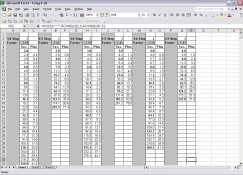
I have an Excel spread sheet that shows 2, 3 and 4 second base exposures extended in 1/4 and 1/2 stop steps to the last step short of 5 minutes, rounded to the nearest 1/10th second with an adjacent column that shows the increase in time between each step for use in making test strips. It's hard to describe and self-explanatory if you look at it.

Here's a screen shot. I'd be happy to send the .xls file to anyone that wants it.
 

Attachments

  • fstop.jpg
    fstop.jpg
    168.8 KB · Views: 352
When doing test strips, I find the following progression useful.

Just start with your timer set to 64 seconds, and then cover over another section of the paper after each indicated interval.

In other words, expose the entire strip for 6 seconds, then all but the first segment for another 2 seconds, then all but the the first two segments for another 3 seconds, etc.

You end up with segments that are each exposed for the indicated "f stop" number of seconds - with each segment receiving 1/2 stop more exposure then the previous.

This works better than exposing each segment separately (no problem with inconsistent effects from bulb warm up time, or having to reset the timer over and over.

Matt
 

Attachments

  • f stop.pdf
    8.5 KB · Views: 276
The RH Designs timer has an automatic f-stop test strip timing generator; what a mouthfull! What that means is that you push a button and the machine sets up a test strip sequence for you.

With regard to published tables, they can be found in Tim Rudman's book "The Photograper's Master Printing Course" among others.

Like the others that have responded, I cannot imagine printing using any other timing method.
 
One of the nice things about the test strip functions of the RH timer is you have the choice of a sequence of full exposures or of incremental additions. So for instance, I have a test strip easel that I made for my soft test strip and because each strip is a different, completre exposure for the same area of the print, it will do (for example) a sequence of 2, 2.8, 4, 5.6, 8, 11, 16, 22, 32...waiting for me to step on the foot switch after each move of the paper in the easel. Then, for a hard test strip it can do incremental additions for a stationary sheet of paper with a moving card, for a sequence such as; 2, .8, 1.2, 1.6, 2.4, 3, 5, 6, 10...

I am really looking forward to having these features!

Of course, the theory is that with a Zonemaster II enlarging meter I can skip the test strips altogether....
 
/

When I got rid of my condensor enlarger and bought a dichroic enlarger to replace it two years ago, I also bought RH Designs' Professional Stop-Clock timer. I immediately commenced using the dry-down feature with my fiber papers and, boy, did it save me tons of money! If my father, who died three years ago, could have seen what it can do in that regard as well as with f-stops, he would have fainted! In my condensor days, I hated printing portraits because of the lack of fine-tuning the exposure. However, using the Stop-Clock's easy f-stop feature to print portraits has made me more productive and it has enabled me to produce gorgeous prints that I couldn't possibly have in the past.
 
Photrio.com contains affiliate links to products. We may receive a commission for purchases made through these links.
To read our full affiliate disclosure statement please click Here.

PHOTRIO PARTNERS EQUALLY FUNDING OUR COMMUNITY:


Ilford ADOX Freestyle Photographic Stearman Press Weldon Color Lab Blue Moon Camera & Machine
Top Bottom
