• Welcome to Photrio!
    Registration is fast and free. Join today to unlock search, see fewer ads, and access all forum features.
    Click here to sign up

Exposing using a red filter.

Sprung

H
Sprung

  • 2
  • 2
  • 33
Hensol woods

A
Hensol woods

  • 4
  • 0
  • 45

Recent Classifieds

Forum statistics

Threads
202,962
Messages
2,848,164
Members
101,557
Latest member
finishthat
Recent bookmarks
0
A coloured filter used with black and white film doesn't increase contrast per se. What it does is differentiate different parts of a scene from other parts of the scene, based on the underlying colours in the scene.

So if you have a light blue car in front of a dark blue sky, a red filter won't really cause the result to change. If it is a red car in front of a blue sky, the result will be a lighter car in front of a darker sky - which may be just what you are looking for.

A polarizer works in a somewhat similar way, but instead of working its magic on the colour in the scene, it works on the polarized component of the light in the scene. Polarized light often shows up as haze or glare, and a polarizer can modify that.

Before you look at underexposure and "pushing" development, I'd suggest looking first at just increasing development when the subject is of low contrast to start.

Under exposure gives you shadows without detail or texture, and near shadows that are similar - that is detail and texture you will never be able to retrieve. In "contrast", most films can withstand a fair bit of over-development without much damage.
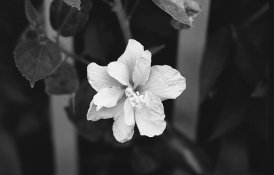
 
Your camera's meter may handle the exposure for you. Hold the filter up to the lens and see what it reads, then take it away and ck it again. If it's about 2 stops, just let the camera handle it. My red filter takes 2 to 2 1/2 stops of exposure difference, but some red filters are a little different. It will definitely add contrast, or at least the appearance of more contrast.

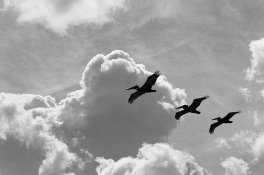
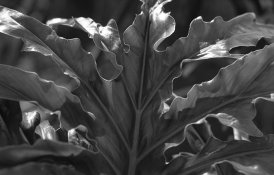
I really like red filters for leaves and skies. My favorite filter probably. Orange didn't work for me. You can get some odd skin tones w/ that one. Yellow is your do-all filter. Love that one too. These were w/ a red filter.


small nr25.jpg

small nr15.jpg

small ok td8.jpg
 
Last edited by a moderator:
If using an in-camera TTL meter and the filter is attached, just meter and shoot. If using a hand-held meter, meter normally (without the filter in front of the meter) and open 3 stops to account for the filter.

No,it's better to meter without the filter and then adjust theexposure for the filter.otherwise,the filter will throwoff the spectral sensitivity of the internal camerameter.You are better of to trust the filter manufacturwr's filter factor:whistling:
 
bookmarked.
 
If the spectral sensitivity of your meter closely matches that of your film then go ahead and meter through the filter. That's extremely unlikely though. The only way to be accurate is to first find a spectral sensitivity graph of your film then estimate exposure compensation using that chart. It'll take some experimentation before you have a really good feel for how a particular filter interacts with a particular film in differing lighting conditions on various subject matter. It's absolutely not a one-size-fits-all equation.

TAKE NOTES!!
 
Capture.PNG

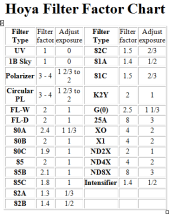
I can't remember where I got this chart from (probably here! If it was someone who reads this thread, thank you very much!!!!), but I have a copy of this in my camera bag.

It gives the Filter factor (which I nearly never use) but it also gives the adjustment by stops.

Considering, though, that the OP is probably using a pretty modern camera with reasonable TTL metering, you could get away with just doing that. But it is a good idea to still get an incident meter reading and adjust your settings manually based on that. I tend to find my images are what I want them to be more regularly using this method then I would using any of the priority modes with TTL.

Cheers
 
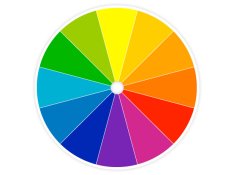
Color wheel. It will tell you everything you need to know.

A red filter will primarily darken its complimentary color - green. At the same time it will lighten colors that are red. It will not do much with pure blue and dark yellow, which are at 90 degree angle on the wheel from both red and green. Those will stay largely the same as without a filter.

So, red filter does increase contrast, but mostly only between the colors red and green. Example: If you photograph a red rose the flower petals will look almost white, while the green stem and leaves will look very dark.

If you want to darken skies I would recommend an orange filter, or even yellow, which will do a better job of darkening blue than red will.

In the case of rally cars, you would have to choose a filter where you have two complimentary colors in the scene and the filter was the same as one of them. Then you'd be able to increase contrast.
In the case of portraits, red filters can cover skin blemishes up nicely, but will also completely change the appearance of the person's complexion, so you may wish to go about it more conservatively and think about things such as lighting, film exposure, and film development.

It's very important to understand how these filters work if you want to get the most out of them, and they do not increase general overall contrast - they only increase contrast between certain colors.

Your disadvantage is that you lose about 3 stops of speed with red filters. So ISO 400 film becomes like ISO 50.
 

Attachments

  • HGTV_Color-Wheel-Full_s4x3_lg.jpg
    HGTV_Color-Wheel-Full_s4x3_lg.jpg
    68.8 KB · Views: 128
View attachment 92886

I can't remember where I got this chart from (probably here! If it was someone who reads this thread, thank you very much!!!!), but I have a copy of this in my camera bag.

It gives the Filter factor (which I nearly never use) but it also gives the adjustment by stops.

Considering, though, that the OP is probably using a pretty modern camera with reasonable TTL metering, you could get away with just doing that. But it is a good idea to still get an incident meter reading and adjust your settings manually based on that. I tend to find my images are what I want them to be more regularly using this method then I would using any of the priority modes with TTL.

Cheers

I'm using a Pentax k1000. This chart works for you?
 
Color is a completely different animal. Manufacturer's suggested compensation factor is usually pretty darned close.
 
I'm using a Pentax k1000. This chart works for you?

You are using a Manual Focus SLR?!! Well done! While people took action pictures for many many decades before the implementation of auto focus, its a rarity to see someone do it today!

OK, now, back to filters. The question is how do you currently meter a scene? I am assuming that the K1000 is TTL (or Through The Lens) centre weighted metering (please correct me if I am wrong!). If this is the case, do an experiment.

Go outside and meter off of something that is a mid grey. I have been known to meter off of well worn tarmac/asphalt when shooting cars. If you have a grey card, better still! Anyhow, get a meter reading. For simplicity, I'll do the sunny 16. Lets say you meter at 1/125th, F16, ISO100. Now, put your red 25A filter on and meter off of the same spot. Ideally, your reading should be 1/125th F5.6. If this is the case, I'd probably just stick with using the TTL metering of your camera - its going to be close enough.

But, as others have suggested, putting a filter in the path of a TTL meter may give false readings. I tend to use a hand held incident meter to meter the actual light of the scene (not the light that is reflecting back to you, as you get with TTL) and adjust my reading by the number of stops mentioned in that table.

Now, I have probably confused you more......
 
Hey LifeIn35mm,

Looks like you got every good answer and this will be a good thread...

The reason Red filters make good contrast filters for your car shows is that... with the skies, it darkens the blue. You have to be careful though, because it super-darkens the shadows too. And that's because shadows are lit by reflections of the blue sky... (I didn't know that until I started reading up on it but it's so obvious it should hit you too). Shadows are mostly blue. Your through-the-lens meter probably shows 2 stops difference. Suppose 3 f/stops is the filter factor, the difference between meter cell 'spectral sensitivity' and film sensitivity causes the meter to say 2 when the best results would be 3. Best to meter without a filter and knock off 3 f/stops... If you want some fun, look up the "Hutchings factor" a variation on how to meter through the filter. Interestingly, Hutchings did his work with Tri-X so if you use film with different spectral sensitivity (say, TMY-2) you might want to create a new set of factors you might call the "LifeIn35mm factor".
 
Thanks to everyone for the great advice!

Now if you all wouldn't mind I have a critique thread up that I would love to get some comments on.

(there was a url link here which no longer exists)
 
For that red filter, start at opening 3 stops. Then bracket +1 and -1 stops. Do that for three different subjects and lighting conditions on one roll. Make a contact sheet. Compare the results of the 9 pictures and go with the exposure factor adjustment that works with your test roll. Good luck.
 
Don't get to swamped with the details. You can "geek out" all you want, but with a K1000 you can just put the filter on and spend your energy on composing good pics. The metering will take care of itself and the small differences will get taken care of by the film latitude. Your only worry should be that you are using the red filter for a scene where the red filter will give the desired results.

If I recall correctly the K1000 is an averaging meter (not center weighted) so worry more about that affecting exposure than the filter factor. It has been 30 or 40 years since I used K1000 so my memory of that may be vague. Forgive me if my memory is incorrect.
 
If the tech stuff is uninteresting to you then Brian and others are right. Just meter through the filter. BUT... bracket one stop under and one and two stops over until you have a better feel of how this works for you and your particular equipment.
 
Pentax K-1000s use CDS meter cells which will give false readings when used with a red filter. Meter before adding filter to camera, then open up the necessary stops. 3 stops for the 25A filter. Otherwise you will underexpose your film.
 
Pentax K-1000s use CDS meter cells which will give false readings when used with a red filter. Meter before adding filter to camera, then open up the necessary stops. 3 stops for the 25A filter. Otherwise you will underexpose your film.

Yes they will underexpose unless the film is a far infrared film.
The other option is to adjust the ISO by 5 stops rather than three.

But although the filters are termed contrast filters and do alter contrast they are only practical for sloooow photos where you have time to select the correct filter eg for the auto colour.

A pola will be ok for sky (some of time) and won't alter the autos unrecognisibly but even losing a stop is undesirable for action shots. You can use it to cut through the glass for drivers hands on wheel with limits.

If you are shooting autos racing Id not worry about clouds.

For auto racing use a uV and deep hood to protect the lens from debris and get in close on inside of bend with a wide.

I can keep both eyes open with a K1000, could be desirable for autos racing.

Don't underexpose and overdevelop to kill shadow detail burn them at print stage if you want. Id give auto racing an extra stop and use a compensating developer to try and keep highlights, Trix or HP5+.
 
CDS meters see mainly blue light. This was well know when they were popular. CDS meters will give false readings for red, orange and yellow filters.
 
Different kinds of pan films have slightly different sensitivities, but don't seem to differ from one another as much as meters can. So I never
meter thru a deep filter. With a 25 Red a 3 EV compensation seems to consistently work with the various film I personally use. How to control
shadow values in such circumstances is a more involved question, and is largely related to how blue the shadows are. Anyone who shoots in
high mtns under deep blue skies learns about this pretty fast. I normally work with a handheld Pentax spotmeter for everything, even 35mm,
so it's easy to apply a three stop compensation right to the dial.
 
I would say that the only guaranteed way to get more contrast regardless of subject matter is to push the right film a stop or two. Delta 100/400, PanF and Acros 100 are inherently contrasty films. Push them a stop or two and contrast will go off the scale, particularly with Acros or PanF. You can also use a red filter to darken a blue sky like you wanted to but when it comes to the cars and ground/grass/surrounds it depends on their relative colours and the filter used as others have said.

I shot a roll of HP5 the other day pushed 3 stops and it was really high contrast yet very clean too. Though that was on 120, not sure how it would work on 35mm.
 
Pan F is pretty finicky, with a very short straight line to its curve. Fool much with the exposure and you'll just blow out the shadows, highlights,
or both - don't confuse that with usable contrast! Probably not the best beginner film. Since this is about 35mm, it's pretty inexpensive
just to go out there and test various filters with various subjects to see what happens, provided one recognizes what a usable negative looks like afterwards.
 
I have been doing some tests with my 'Gift' CONTAX RTS II Quartz using a RED Filter and first tests relying on the Contax metering were severely UNDER-exposed with the filter -- I had a reply on another Forum from Author Roger Hicks that the Contax meter is over-sensitive to RED so under-exposes -- subsequent exposures I used my old Weston Master V with the x8 allowance for the Wratten 25 red and got better results.
 
If using an in-camera TTL meter and the filter is attached, just meter and shoot. If using a hand-held meter, meter normally (without the filter in front of the meter) and open 3 stops to account for the filter.

+1:wink:
 
Photrio.com contains affiliate links to products. We may receive a commission for purchases made through these links.
To read our full affiliate disclosure statement please click Here.

PHOTRIO PARTNERS EQUALLY FUNDING OUR COMMUNITY:


Ilford ADOX Freestyle Photographic Stearman Press Weldon Color Lab Blue Moon Camera & Machine
Top Bottom