• Welcome to Photrio!
    Registration is fast and free. Join today to unlock search, see fewer ads, and access all forum features.
    Click here to sign up

Excessive grain in Delta 3200

Recent Classifieds

Forum statistics

Threads
201,946
Messages
2,832,482
Members
101,029
Latest member
5000Kelvin
Recent bookmarks
0

Cybertrash

Member
Joined
Nov 1, 2012
Messages
238
Location
Stockholm, Sweden
Format
Multi Format
I wanted to take some pictures of my family this last Christmas, and as the Swedish winters are fairly dark I decided to use Delta 3200 in 120 format. I rated it at 3200 (exposure was around 1/30 @ f/5.6 for most shots) and developed the film in Microphen (stock solution) for 9 minutes at 20c as per Ilfords recommendation, continuous agitation for the first minute and then 10 seconds every minute.

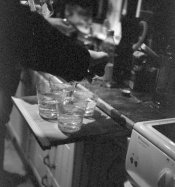
However, when I scanned the negatives I noticed that the photos are *very* grainy, and more especially the grain is *ugly* it's huge and clumpy. Now I know that Delta 3200 is grainy, but I've seen so many examples that look so much better.

For example, this guys pictures look a lot better, much smoother grain and better tonality. This person also achieved better grain.

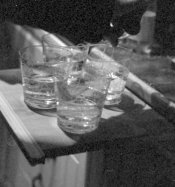
I've attached a scan of one of the pictures, as well as a crop of the same picture.

What could've caused this ugly grain? Agitation? Developer choice?

EDIT: I also noticed that there is this strange "bloom" around the edge markings (see attached picture), and it's not only the scanner doing it, if you look at the film you can see a "cloud" of density around the little numbers and symbols.
 

Attachments
  • scan018.jpg
    scan018.jpg
    600.8 KB · Views: 290
  • scan018-2.jpg
    scan018-2.jpg
    441.4 KB · Views: 260
  • scan019.jpg
    scan019.jpg
    68.3 KB · Views: 234
Last edited by a moderator:

pentaxuser

Member
Joined
May 9, 2005
Messages
20,352
Location
Daventry, No
Format
35mm
Based on your explanation and on the "this guys" description of his I cannot see why your pictures are grainier than his appear to be. However this is based on a comparision of scans. The real test is a silver gelatin print.

I'd strongly suggest that you get a print done and then decide if D3200's grain is acceptable to you.

Any fast film, even in 120, may show grain beyond a certain enlargement but you should get to at least 8x10 inch prints with reasonable grain. At least that has been my experience

You appear to have ruled out any problem with your scanning and you may be right but when you introduce scanning into the situation you introduce other possible problems.

What I am now going to say may not and probably will not make much difference but is worth a try. Next time reduce the speed to 1600, if at all possible and try either Xtol or DDX

pentaxuser
 

Heinz

Member
Allowing Ads
Joined
May 9, 2009
Messages
110
Location
Herdecke, Germany
Format
Multi Format
I used DELTA 3200 in 135 as well as in 120 format - as you are a subscriber you can look at some examples in the gallery.

I develop it in XTOL stock (not 1:1 as I do it for TRI X 400 and APX 100). I have not yet tried different development procedures because the standard data I found e.g. in APUG for 1600 ASA (XTOL stock concentration, 7 min at 20 °C) worked well. Agitation is 5 seconds agitation each 30 sec, after 30 sec continuous agitation at start.

I do not find the grain excessive or clumpy. Concerning the edge markings I just checked - indeed they have a bloom around them in 120 format on my films too (in particular the arrows with numbers, as you show it too), but they are sharp and crispy in 135 format - so I think this is connected to a different method for exposing them on the films and not an error of development.
 

chriscrawfordphoto

Member
Allowing Ads
Joined
Mar 12, 2007
Messages
1,893
Location
Fort Wayne, Indiana, USA
Format
Medium Format
To me, it looks like the film was underexposed. Notice the dark tones that have no detail in them, even though they're not dark black...the scanner lightened the image to compensate, but since there's no detail, all you get is empty dark tones full of grain.
 

cliveh

Subscriber
Allowing Ads
Joined
Oct 9, 2010
Messages
7,805
Format
35mm RF
If you use a film that is 3200 ISO how can you complain about grain?
 

Roger Cole

Member
Allowing Ads
Joined
Jan 20, 2011
Messages
6,069
Location
Atlanta GA
Format
Multi Format
To me, it looks like the film was underexposed. Notice the dark tones that have no detail in them, even though they're not dark black...the scanner lightened the image to compensate, but since there's no detail, all you get is empty dark tones full of grain.

I'm not so sure it's not underdeveloped. Normally more development would equal more grain but in the case of D3200 I'm not as sure. I do know I get great results if I use Ilford's times for one stop less. When I shoot it at 3200 I develop per instructions for 3200. It's a flat enough film that contrast doesn't build excessively and the midtones and highlights get much better development. Mine look great (for a film shot at 3200.)

Here are a few of mine, 6x6 in my Yashicamat 124, EI 3200, developed in T-Max developer per instructions for 6400:

Alicia_1a.jpg


Anachrocon1b.jpg
 
Last edited by a moderator:

timhenrion

Member
Allowing Ads
Joined
Apr 25, 2008
Messages
20
Location
Boston, MA U
Format
Multi Format
+1 on the bad scan. All of the crap is in the shadows. Look at the mid tones on the cutting board. They're pretty much grain free.
 

markbarendt

Member
Allowing Ads
Joined
May 18, 2008
Messages
9,422
Location
Beaverton, OR
Format
Multi Format
I'm going to suggest that the problem is simply not enough exposure.

You can check this on the negative with a loupe or magnifying glass in the sleeve area and under the cutting board; if detail is hard to see directly when magnified (film nearly clear) that would verify that underexposure is the problem.

Printing these negatives darker and at a higher contrast rate might improve the result with these.
 

ntenny

Subscriber
Allowing Ads
Joined
Mar 5, 2008
Messages
2,520
Location
Portland, OR, USA
Format
Multi Format
I think it's a combination of "not enough exposure" and the scanner. Scanners are good at finding information in shadow areas, and that means that an area that would look close to solid black in a wet print can have this kind of grainy look in a neg scan. Compare a wet print, and in the digital domain try squashing the blacks to match the print.

-NT
 

snapguy

Member
Allowing Ads
Joined
Jan 1, 2014
Messages
1,287
Location
California d
Format
35mm
Humbug opinion

If I were to offer my Humbug Opinion, I would not rely of very fast film for family photos. I don't think 3200 is the new 400. Nobody cares about your big ISO, they just want nice photos.
 

cliveh

Subscriber
Allowing Ads
Joined
Oct 9, 2010
Messages
7,805
Format
35mm RF
  • Deleted member 2924
  • Deleted

Roger Cole

Member
Allowing Ads
Joined
Jan 20, 2011
Messages
6,069
Location
Atlanta GA
Format
Multi Format
I did but it is still 3200 ISO.

Delta 3200 is capable of much better and lower grain results than you see in the OP. See my post above for samples (scanned from contact prints, not from the negatives.)

And I certainly WOULD rely on it for family photos in a situation where the speed was needed. Particularly from medium format it's capable of some really excellent prints. Oh it's grainy, but the grain can look good. Shot at 1250-1600 it is indeed somewhat reminiscent of very old versions of Tri-X. (TMZ more so, but that's discontinued, some remaining stock around though.)
 

Fixcinater

Member
Allowing Ads
Joined
Dec 11, 2008
Messages
2,500
Location
San Diego, CA
Format
Medium Format
I bet if you made prints you would see less grain. Scanning always (in my experience) accentuates grain, especially when you are trying to raise the shadows up like you are in the examples.

Quick fix: drop the shadows down to where they should be (true blacks) and see how underexposed the shots are.
 

StoneNYC

Member
Allowing Ads
Joined
Aug 5, 2012
Messages
8,345
Location
Antarctica
Format
8x10 Format
There is a very strange mottled look, certainly partly a bad scan, and maybe actually an out of focus scan...

I've certainly had much better. I've head Microphen is good for pushing I think so I'm surprised, but it also looks like there's something else going on, the edge marking light bleeding is normal, but is the film possibly very dense? Almost looks over developed... Or perhaps the film was fogged somehow? Hmm. Hope you can figure it out
 

Nuff

Member
Allowing Ads
Joined
Feb 16, 2013
Messages
581
Location
Tokyo, Japan
Format
Multi Format
I agree with others. Bring down the shadows to what they should be, you have grain in all the dark parts with no detail. They should be solid black. Also it could be over sharpening by the scanner software.
 

hooograa

Member
Allowing Ads
Joined
Mar 25, 2010
Messages
4
Format
35mm
Or could it be reticulation caused by cold rinse water? That looks like messy grain too.
 

StoneNYC

Member
Allowing Ads
Joined
Aug 5, 2012
Messages
8,345
Location
Antarctica
Format
8x10 Format
Do you have the "DICE" feature on? To remove dust? That won't work on B&W and perhaps that's part of the weird mottled issue?
 

markbarendt

Member
Allowing Ads
Joined
May 18, 2008
Messages
9,422
Location
Beaverton, OR
Format
Multi Format
Delta 3200 is capable of much better and lower grain results than you see in the OP. See my post above for samples (scanned from contact prints, not from the negatives.)

And I certainly WOULD rely on it for family photos in a situation where the speed was needed. Particularly from medium format it's capable of some really excellent prints. Oh it's grainy, but the grain can look good. Shot at 1250-1600 it is indeed somewhat reminiscent of very old versions of Tri-X. (TMZ more so, but that's discontinued, some remaining stock around though.)

I agree Roger,

I happily shoot D3200 for low light family shots especially in medium format, like any film when it well exposed it is capable of making beautiful prints.

Until we hear back from Cybertrash as to how much detail is visible in the shadow areas on the negative, we are just speculating.

Normally though (with non-C-41 films) reducing exposure means less visible graininess.

More exposure (coming from bright subject matter in the scene) means more silver gets developed in the finished negative, which means more grain.
Less exposure (coming from dark subject matter in the scene) means less silver gets developed in the finished negative, which means less grain.
Too little exposure (coming from very dark subject matter in the scene) means no silver gets developed in the finished negative, leaves a pure clear film base, which means no grain.
 
OP
OP

Cybertrash

Member
Joined
Nov 1, 2012
Messages
238
Location
Stockholm, Sweden
Format
Multi Format
Thanks for the answers everyone.

I examined the negatives with a loupe on a light table (or well, a piece of ANR glass on top of my iPad) and I suspect that what many of you said is right, the negatives show little or no detail in the shadows (the shadows do show visible grain however, even in the clear areas of the film, interestingly enough). I suspect that rescanning with a higher black point might get rid of some of the clumpiness.

Stone mentioned an out-of-focus scan, the negatives were very curled (currently flattening them), could that have made the problem worse?

Nonetheless, I'll try to find the time to make some silver prints from the negatives and report back.
 

markbarendt

Member
Allowing Ads
Joined
May 18, 2008
Messages
9,422
Location
Beaverton, OR
Format
Multi Format
Thanks for the answers everyone.

I examined the negatives with a loupe on a light table (or well, a piece of ANR glass on top of my iPad) and I suspect that what many of you said is right, the negatives show little or no detail in the shadows (the shadows do show visible grain however, even in the clear areas of the film, interestingly enough). I suspect that rescanning with a higher black point might get rid of some of the clumpiness.

Stone mentioned an out-of-focus scan, the negatives were very curled (currently flattening them), could that have made the problem worse?

Nonetheless, I'll try to find the time to make some silver prints from the negatives and report back.

Where things get real thin on the negative you are typically down on the toe of the film curve and the contrast rate, the difference between neighboring tones, gets really small. This poses problems for both scans and printing because there simply isn't enough detail or contrast to work with.

The problem becomes apparent when you try to display it or print it to look normal.

This is one issue that should stick out like a sore thumb if you use a contact printing regime, at the normal contact print settings frames like this will print very dark.

Scanners typically default toward trying to "fix it" and show the scan at normal brightness, and you end up with "digital noise" in the shadows, not grain. Essentially the software doesn't have enough info to work with and just guesses. What I'm saying is that it's not a "bad scan".

The fix going forward is pretty obvious though given this info, use more exposure.
 
OP
OP

Cybertrash

Member
Joined
Nov 1, 2012
Messages
238
Location
Stockholm, Sweden
Format
Multi Format
Where things get real thin on the negative you are typically down on the toe of the film curve and the contrast rate, the difference between neighboring tones, gets really small. This poses problems for both scans and printing because there simply isn't enough detail or contrast to work with.

The problem becomes apparent when you try to display it or print it to look normal.

This is one issue that should stick out like a sore thumb if you use a contact printing regime, at the normal contact print settings frames like this will print very dark.

Scanners typically default toward trying to "fix it" and show the scan at normal brightness, and you end up with "digital noise" in the shadows, not grain. Essentially the software doesn't have enough info to work with and just guesses. What I'm saying is that it's not a "bad scan".

The fix going forward is pretty obvious though given this info, use more exposure.

Yes obviously I need to test how I use Delta 3200. I've managed to get decent results with it before, but that was in a camera with a built-in meter. I suspect that it may have somrthing to do with how I metered (I was using a hand held reflective meter with a viewfinder). Hopefully I'll be able to rescue these pictures somehow.
 
Photrio.com contains affiliate links to products. We may receive a commission for purchases made through these links.
To read our full affiliate disclosure statement please click Here.

PHOTRIO PARTNERS EQUALLY FUNDING OUR COMMUNITY:


Ilford ADOX Freestyle Photographic Stearman Press Weldon Color Lab Blue Moon Camera & Machine
Top Bottom