

Hello all, I am new to this forum, I saw a former thread on the GT-x980. I recently purchased the scanner new from Japan, Unboxed and followed the directions from the on-line V850 manual, I thought I set it all up but the scanner light flashes red and will not connect with the computer. I called epson twice, and after an hour of customer service they said I had a hard drive issue and could not help me. They suggested I contact the seller. Perhaps I am missing something in the set-up or download. I downloaded the V850 driver already. Before I return the item, I would like to know if any one on the forum who has the GT-X980 scanner can assist me. Thank you in advance. Mel
-
Welcome to Photrio!Registration is fast and free. Join today to unlock search, see fewer ads, and access all forum features.Click here to sign up
You are using an out of date browser. It may not display this or other websites correctly.
You should upgrade or use an alternative browser.
You should upgrade or use an alternative browser.
Epson GT-X980
-
H
- Thread starter oldschool56
- Start date

Recent Classifieds
-
Want to Buy 4 x 5 Back for Agfa Ansco Universal View Camera
- Started by sharpnikkor
-
For Sale Set of 3 glass beakers
- Started by Jon Shiu
-
For Sale 4x5 and 5x7 Black and white sheet film
- Started by Peter Schrager
-
For Sale Set of 4 stainless beakers Leedal, Vollrath
- Started by Jon Shiu
-
For Sale Hasselblad Distagon FE 50mm
- Started by Jammoh
Forum statistics
- Threads
- 203,104
- Messages
- 2,849,877
- Members
- 101,669
- Latest member
- JeremiahPeterson
- Recent bookmarks
- 1
Did you check to see if your computer can see or find the scanner? Check your computers "device manager" to see. I have the same Japanese model from Japan and had no problems at all. I'm running it on Vuescan and have never used the Epson software yet.Hello all, I am new to this forum, I saw a former thread on the GT-x980. I recently purchased the scanner new from Japan, Unboxed and followed the directions from the on-line V850 manual, I thought I set it all up but the scanner light flashes red and will not connect with the computer. I called epson twice, and after an hour of customer service they said I had a hard drive issue and could not help me. They suggested I contact the seller. Perhaps I am missing something in the set-up or download. I downloaded the V850 driver already. Before I return the item, I would like to know if any one on the forum who has the GT-X980 scanner can assist me. Thank you in advance. Mel

Hi John,
Thank you for your reply; I just checked the device manager. The computer sees the scanner.
Thank you for your reply; I just checked the device manager. The computer sees the scanner.
I have one. I know this was probably discussed with tech support but I just want to double check. Is the top cable connection to the bottom loose at all and not fully connected?
Tight fit,but connected.

Taylor K Nankervis
Member
Check the scanner mechanism is not locked (for transport).
? Good question!Check the scanner mechanism is not locked (for transport).
I am using windows 11,the locks are open.

At what point does it start to flash red?the scanner light flashes red
If you turn off the scanner, disconnect the scanner from the computer and turn the scanner back on, does the red light also blink?
If you turn off the scanner, disconnect the lid's connector, then turn the scanner back on, does the red light also blink?
With the scanner connected to the computer and the scanner turned on, if you start Epson Scan (and, if you get that far, attempt to make a preview), what error message do you get?
Is there a small yellow icon/exclamation mark displayed along with the scanner entry? What icon does the scanner have in the Device Manager and in which category does it appear?I just checked the device manager. The computer sees the scanner.
At what point does it start to flash red?
If you turn off the scanner, disconnect the scanner from the computer and turn the scanner back on, does the red light also blink?
If you turn off the scanner, disconnect the lid's connector, then turn the scanner back on, does the red light also blink?
With the scanner connected to the computer and the scanner turned on, if you start Epson Scan (and, if you get that far, attempt to make a preview), what error message do you get?
Is there a small yellow icon/exclamation mark displayed along with the scanner entry? What icon does the scanner have in the Device Manager and in which category does it appear?
1) pushing the power button will cause a flashing green light while the scanner is "activating?", then it turns to a flashing red.
2) Turning the scanner off and disconnecting, then reconnecting will give same sequence of failure.
3) Turning off the scanner, disconnecting the lid connector the green light is on, not flashing.
4) Starting epson scan without connecting the lid connector allowed me to scan a photo , I am very confused.
5) Reconnecting the connector allowed me to scan a photo through epson scan but not using the scanning button..
6) Turning off the scanner and turning it on again went from green to flashing red again.
Yikes!
Okay, so the problem is definitely with the TPU (transparency unit)/lid and/or its connection to the scanner. The LED flashes red if initialization of the TPU fails. Connecting the TPU to the scanner once it's already on takes the scanner into an undefined state, which explains the kind of erratic behavior you're seeing at that point. The cause is most likely still specifically with the TPU and its lack of communication with the scanner itself.
Could you please disconnect the lid from the scanner and upload a photo of what the connector looks like, when looked head-on at the contact surface?Tight fit,but connected.
Okay, so the problem is definitely with the TPU (transparency unit)/lid and/or its connection to the scanner. The LED flashes red if initialization of the TPU fails. Connecting the TPU to the scanner once it's already on takes the scanner into an undefined state, which explains the kind of erratic behavior you're seeing at that point. The cause is most likely still specifically with the TPU and its lack of communication with the scanner itself.
Could you please disconnect the lid from the scanner and upload a photo of what the connector looks like, when looked head-on at the contact surface?
Attachments
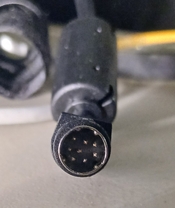
Thanks, that looks good to me as far as I can tell without holding it in my hand. Can you verify none of the pins is squashed or severely vent out of alignment?
Could you re-try connecting this to the scanner, carefully observing correct alignment of the connector?
Also, if you connect the lid to the scanner and turn on the scanner, what kind of sounds do you hear? Is any sharp clicking or rattling involved?
Could you re-try connecting this to the scanner, carefully observing correct alignment of the connector?
Also, if you connect the lid to the scanner and turn on the scanner, what kind of sounds do you hear? Is any sharp clicking or rattling involved?
Thanks, that looks good to me as far as I can tell without holding it in my hand. Can you verify none of the pins is squashed or severely vent out of alignment?
Could you re-try connecting this to the scanner, carefully observing correct alignment of the connector?
Also, if you connect the lid to the scanner and turn on the scanner, what kind of sounds do you hear? Is any sharp clicking or rattling involved?
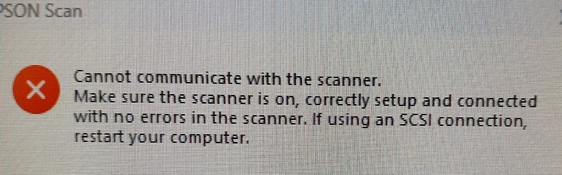
pins appeared to be in alignment, "scanner type" sounds, no clicking or rattling. Flashing red light and this message
Attachments
Okay, no rattling & clicking suggests that the transport lock shouldn't be the issue. I know on older types this can engage/disengage with some friction and I could imagine that it doesn't unlock perfectly due to this. But I suspect that's not the problem here as you've re-tried this already.
With the lid installed & connected, and the lid opened so you can see what happens behind the glass, do you see the lamp come on and the carriage move a bit during scanner startup? This is a 'vital signs' check; also movement of the carriage likely suggests some form of communication between the scanner and the TPU/lid.
I assume the error message you posted does not occur ever if you operate the scanner with the lid disconnected, correct? In that case, the error message is likely the result of the scanner itself reporting an error back to the scanner driver, which translates it into a generic error message towards the user. Sadly, this message isn't very specific.
PS: you probably figured this out already, but the conclusion of customer support that it's a "hard drive issue" is really bogus; there's no indication of a problem with your PC in any way. I interpret that as them saying "we have no clue what's going on and we're going to assume that it's beyond our scope to help with this."
With the lid installed & connected, and the lid opened so you can see what happens behind the glass, do you see the lamp come on and the carriage move a bit during scanner startup? This is a 'vital signs' check; also movement of the carriage likely suggests some form of communication between the scanner and the TPU/lid.
I assume the error message you posted does not occur ever if you operate the scanner with the lid disconnected, correct? In that case, the error message is likely the result of the scanner itself reporting an error back to the scanner driver, which translates it into a generic error message towards the user. Sadly, this message isn't very specific.
PS: you probably figured this out already, but the conclusion of customer support that it's a "hard drive issue" is really bogus; there's no indication of a problem with your PC in any way. I interpret that as them saying "we have no clue what's going on and we're going to assume that it's beyond our scope to help with this."
One fairly random thing to check; this is on a V700 but conceptually these TPU lids are all similar:
You could easily check whether the carriage in the lid has come loose. I don't expect so, but it's worth to check.
You could easily check whether the carriage in the lid has come loose. I don't expect so, but it's worth to check.
I am not sure what occurred, but the scanner appears to be working properly now. I am a true newby to digital scanning of film, and have many negatives (all formats to scan). One last question, do I need a separate software to convert the negatives to positives? Thank you all and especially Koracs for your help.
Hurray! Happy to hear. My guess is that due to the tight fit of the TPU connector, the connection wasn't perfect first time round. Let's hope it's stable now. In any case, I'm really glad to hear you got it working.
Here's (more or less) how I do it: https://tinker.koraks.nl/photography/flipped-doing-color-negative-inversions-manually/ Again - keep in mind there are many, many ways to skin that cat.
One more thing - in case you are also going to scan regular B&W film, keep in mind that ICE (the automatic anti-dust/scratch technology that comes with the scanner) only works on color slides and color negatives.
There are as many workflows and options for this as there are people scanning film...The short answer is: no, you don't need anything more than Epson Scan, which comes with the scanner. Just select the 'color negative' option on the scanner and the preview will already be inverted. Warning: there are many more ways to mess up a color negative scan than there are ways to get it right. There's a massive learning curve involved. If you're not happy with your initial scans - don't curse the scanner. It's OK. It's just a tricky process.do I need a separate software to convert the negatives to positives?
Here's (more or less) how I do it: https://tinker.koraks.nl/photography/flipped-doing-color-negative-inversions-manually/ Again - keep in mind there are many, many ways to skin that cat.
One more thing - in case you are also going to scan regular B&W film, keep in mind that ICE (the automatic anti-dust/scratch technology that comes with the scanner) only works on color slides and color negatives.
Koraks, thanks. I will be using the scanner to preview my film, the vast majority in B&W, for old school analog enlarging. I will view your link, I am sure I will have more questions.

One more thing - in case you are also going to scan regular B&W film, keep in mind that ICE (the automatic anti-dust/scratch technology that comes with the scanner) only works on color slides and color negatives.
Plus one more alternative - the C41 processed Ilford XP2 black and white film, if it is indeed processed in the C41 chemistry which is normally used for colour negative.
Ran into a problem, tried to scan a 4x5 B&W negative, using the carrier. The epson scan software downloaded does not have a 4x5 configuration under home or pro. I probably am overlooking something. When I did the scan in auto mode, it took 3 different passes thinking it was medium format.
You could use Pro mode and then select the "film area guide" setting, provided that's available. This should scan the entire platen and you should then be able to select just the section you need (i.e. the image you want to scan).
| Photrio.com contains affiliate links to products. We may receive a commission for purchases made through these links. To read our full affiliate disclosure statement please click Here. |
PHOTRIO PARTNERS EQUALLY FUNDING OUR COMMUNITY:  |