

• Welcome to Photrio!
    Registration is fast and free. Join today to unlock search, see fewer ads, and access all forum features.
    Click here to sign up

Easier to read numbers on 120 backing paper

The Hot Waters

A
The Hot Waters

  • 0
  • 0
  • 1
The Hot Waters

A
The Hot Waters

  • 0
  • 0
  • 1

Recent Classifieds

Forum statistics

Threads
204,283
Messages
2,866,608
Members
102,207
Latest member
gustavocf
Recent bookmarks
0

Chrispi

Member
Joined
Aug 1, 2022
Messages
4
Location
Switzerland
Format
35mm Pan
Hello, I am a newly registered member on this site. In the past, I have often read various threads that have interested me but never got round to registering! I have now registered, as Sue Evans at Ilford recommended you as the most likely to have an answer for my question to Ilford.
First, I must say that Sue has been particularly helpful but was unable to provide a practicable solution for my problem which is that the numbers printed on the backing paper of 120 film are all but invisible through the ruby glass of vintage cameras. It appears that the old dense ink used for the printing is incompatible with the newer emulsions resulting in the numbers showing up on the negatives. This problem is also apparent with films from Kodak, Foma and, I presume, other manufacturers.
My question is: do you know of films with old style printing or can you suggest a practical solution for using the newer films in vintage cameras requiring manual advance with the aid of the ruby window?
Since retirement I have acquired a number of film cameras, many of which would have been too expensive for me in the heyday of film. I enjoy trying out these different cameras with different films and testing different homemade developers. This summer I decided to try out my Rolleicord with FP4 but found it impossible to know where I was on the film! I then tried just the backing paper in my Ikonoflex and several folders that I have and found that the numbers are next to invisible in all of them. The only film that I have at the moment that I can use in these cameras is Acros I (I don't have any II) and I only have one roll of this left.
Any suggestions are welcome
Thank you
Chris
 
Last edited by a moderator:
Welcome to Photrio.
I've moved your thread to the Medium Format sub-forum and tweaked the thread title to draw more response.
My solution is to carry a small LED flashlight - even the hardest to read numbers are usually visible with its help.
 
Welcome to Photrio. I was going to say what Matt did, although rather than a LED flashlight I use the flashlight feature on my cell phone, with no problem.

oh and the Fuji Acros films actually have more visible markings than ilford. Foma is better too but not up to Acros.
 
Welcome to Photrio. I was going to say what Matt did, although rather than a LED flashlight I use the flashlight feature on my cell phone, with no problem.

Also a good solution, although it wouldn't have worked until recently for me, because I was using a flip phone.
I put one of these sorts of flash lights in each of my camera bags - they are also generally useful when working in dim light.
Be sure to check the batteries regularly to avoid problems with leakage.
1659373988915.png
 
Thanks for the prompt response.
How safe a method is this? I ask as most of these cameras have a shutter on the window which one only opens when actually advancing the film.
Are some of the more artisan films e.g. Spur or Washi better?
 
None of my cameras with the red window has a shutter that opens just when advancing the film - they are open all the time.

In terms of safety, it is totally fine in my experience. Between the red window and the black on the backing paper, I have had no problem. Plus the red window is always open during the time the film is in the camera.

I have no experience with the Washi or Spur films, so cannot help.
 
I've found that fairly strong magnifying eye glasses help me see the numbers with my old eyes.
 
.


Welcome to APUG Photrio!!
 
The flashlight solution works very well, though I'd also suggest that the only "ruby window" camera I have a lot of trouble reading frame numbers in is my Mamiya 6 folder, in which the moving film plane focus and related pressure plate put the backing deep enough into the back that light has to shine almost directly into the window (despite it being amber instead of deep red).

FWIW, if you live in the USA, you can watch advertising fliers (or sign up to receive them if necessary) and get flashlights like those for free, including a set of (cheap) batteries, several times year from Harbor Freight. I'm easy on equipment, generally, but I typically get several years of "daily in my pocket" service out of one of these free flashlights -- and still have my smart phone as backup.
 
On the safety issue, my sense is that the earliest red window cameras were made when the paper itself wasn't as effective at blocking light as modern paper is. And of course, the windows were red, because the film was not red sensitive.
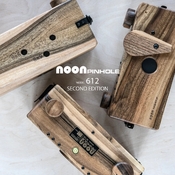
I have a pinhole camera that has clear glass/plastic windows - three of them - and they are all uncovered. I've used T-Max 400 in it without fogging problems.
Here is a pic from a listing on the internet showing a slightly more recent version of my pinhole camera:

Noon pinhole.jpg

If you find yourself struggling with having too few hands, attaching one of these to the brim of your baseball cap can solve that problem. It and your camera won't make you look geeky at all :whistling:.

1659378110979.png
 
None of my cameras with the red window has a shutter that opens just when advancing the film - they are open all the time.

... Plus the red window is always open during the time the film is in the camera.

Some cameras got sliders to cover the red window when not used.
 
Thank you to everyone
I will give it a go. It would be a pity not to be able to use these old cameras.
 
One may just count turns. If one uses just one fixed number of turns, one cannot employ the film fully due to growing frame division. But at least one can use the camera.
 
Only one folder camera I have has the slider over the red window... that camera only accepts ortho films. And yes, it is difficult to see the numbers.
 
Hmm.. just yesterday, in broad daylight, I missed frame number one on an HP5 roll. Repeat offender, too.
I am going to tape an Ilford backing paper in the bathroom, so the pattern sinks in!
Also, I should focus more on the "warning" dots for frame one, then later, it gets to a more predictable interval pattern.
 
Do you need the red window? Is the backing paper not enough? It is meant to protect the film against the light. Has anyone ever tried that?
 
I have quite some cameras with sliders for the red window. It was not uncommon. And yes, I do have problems with the numbers myself. That's why I concentrated on cameras with automatic film advance.

Those which need the window only to detect no. 1 are easy. I do loading at home with a spotlight easily available. I have had minor leaks already at 400 ISO. So I tape the windows when not needed. And yes again, there was backing paper letting the numbers shine through...
 
One may just count turns. If one uses just one fixed number of turns, one cannot employ the film fully due to growing frame division. But at least one can use the camera.
There is a better solution:

certo_dolly_IMG_7708.jpg

Copy the patern and transfer it to your camera. After each photo you make one full term plus the way to the next number (except 11 and 12, where it's less than a full term, the roll being thicker). Works like a charm.

See https://www.120folder.com/certo_ssd.htm
 
Last edited:
Thanks for posting. I have the same problem. I had more or less given up on my Holgas and pinhole cameras for this reason. I'll try the flashlight solution AND the magnifier. I've always thought that the window on the back of my Holgas would cause a light leak if pointed at the sun. Always used to cover it with black tape between winding.
 
  • AgX
  • Deleted
  • Reason: Clueless doe
Dear 250swb
I should be so lucky. Mine is a Rolleicord II - only manual advance.

All Rolleicords have mechanical counters. On the Rolleicord II you only use the red window for the first frame, when you reset the counter to 1, and after that you don't use the red window.
 
The red window on the Rolleicord uses the number 1 from the 6x9 numbers on the backing paper, so if you don't use the camera's mechanical counter you will only get eight frames per roll.

To use the counter, wind the film until you see the number 1 in the red window, and then you press the button on the winding knob while moving the small aluminium button downwards, and the counter resets to 1. After each picture taken, press the button on the winding knob and wind the film, and it should automatically stop at the next frame.
 
Photrio.com contains affiliate links to products. We may receive a commission for purchases made through these links.
To read our full affiliate disclosure statement please click Here.

PHOTRIO PARTNERS EQUALLY FUNDING OUR COMMUNITY:


Ilford ADOX Freestyle Photographic Stearman Press Weldon Color Lab Blue Moon Camera & Machine
Top Bottom