• Welcome to Photrio!
    Registration is fast and free. Join today to unlock search, see fewer ads, and access all forum features.
    Click here to sign up

dodging a complicated horizon

Recent Classifieds

Forum statistics

Threads
203,138
Messages
2,850,420
Members
101,692
Latest member
eviosl
Recent bookmarks
3

BetterSense

Member
Allowing Ads
Joined
Aug 16, 2008
Messages
3,151
Location
North Caroli
Format
35mm
I have a scene with lots of sky and clouds. There is enough density in the negative to print the foreground with good tonality but then the sky is white. I can print the sky to a satisfactory tonality but then the foreground is too dark.

The horizon is hilly and has trees, so I haven't been able to dodge it so that it looks right. I would cut a mask with scissors, but the trees ruin it. I might have to let the trees go black.

I fiddled around trying to make litho masks for the negative but didn't get anywhere. Ideas?
 
May be it is better to do a gradation, dodging less in the horizon line and more in the sky above.
I have seen many Salgado's prints where due to the sky dodging many figures are half black.
 
Masks would be the thing to use, really. I can't think of anything else that would work with the precision required.
lots of work, bleaching out the parts you wouldn't want to be masked (if necessary). And getting the mask and negative in registration in the negative stage can be tricky.

Masks don't have to be on litho.
 
Making the assumption that you use a variable-contrast paper, and depending on the relative contrasts of the skyline items (likely silhouetted) and the clouds (likely low contrast) I'd suggest printing tests of half a sheet with as high contrast as possible in the sky showing the clouds clearly, then try it again with the lowest possible contrast for comparison. See what results you get, make notes and file away the tests. In other words, the burning can probably be best done at a different contrast than the foreground. To get a suitable light-grey tone through the relatively dark negative area in the blue sky you will likely want to try a higher contrast for the burn of course. The clouds themselves might benefit from a lower contrast, to show their form.

That approach can be made more general by using split grade printing, so that you expect to separate both the high- and low-contrast emulsion base-exposures and the burning-in exposures as a matter of routine, on 'tricky' negatives.

Alternatively, print in a sky from a different negative so the clouds are photogenically just away from your horizon. In 35mm you'd want to be careful about film type and magnification factor, just to match up the two areas of the print. Or, especially if you were originally working with a tripod for consistency, you could make one shot filtered for the foreground (maybe a yellow-green or green filter, if you have a lot of dark trees or similar, or maybe no filter) and another filtered for the blue-sky-and-fluffy-clouds (with perhaps an orange filter). That way you would be able to match grain and tonality between the two negs more easily.
 
For me it would depend if there is an important element, such as a foreground object, that was the focus, in which case the horizon may become less important. If it is a general scene then the sky becomes more important and requires, probably, a graduated burning in as though a neutral density graduated filter was used at time of taking ( with bland pale skies it is probably the most useful landscape filter, and with red/orange filters for blue skies - but no use after the event !). If the skyline trees are important/large enough to be significant in detail then this is a problem that could be reduced by tighter cropping and eliminating as much featureless sky as possible and then the edges burning in. For me the overall look of a picture isn't necessarily spoilt by featureless sky if there is interesting composition or other elements. In the past -maybe still - complex or precise masking could be done by applying rubber cement to the base exposed area under the safety filter, burning in and then peeling off before developing, I guess doing a tree would send you barking.
 
I'd keep fooling around with masks...but I wouldn't use litho film unless you wanted to completely block out a certain area or areas during a second exposure, as opposed to doing the whole print with one exposure. I'd use a standard in-camera film. This will give you easy and consistent continuous tone and a higher quality base and emulsion. It also allows you to have a lot of control over your mask with development, which is what you need to finely "craft" good masks. It is much more expensive, but is worth it. I use Ilford Ortho, preferably, as it can be processed under red light. Litho film, not being designed for continuous tone, is very finicky to work with, and consistency can be hard to achieve. It is also easier to damage, the emulsion can be prone to tiny defects, and the base is generally much lower in quality.

Masking takes lots of time, and plenty of trial and error. You should not expect to get it right on your first try. Also, while I have made a few masks by visual registration only, it certainly was not fun or efficient. Even a basic homemade registration system is usually better than this. Pins are ideal, but at the very least, cut out four edge notches on the original frame, using an X-Acto knife – one near each corner. This will aid you greatly in achieving visual registration if this is the way you decide to register the sandwich.

Also, IMO, you should experiment with different levels of diffusion during exposure. The diffusion goes between the in-camera film and the mask when making the exposure. The more diffusion that is used, the less precise registration has to be, but the softer the edges in the mask will be, thus the "dirtier" the line you will get between the masked area and the rest of the print. The various levels of diffusion can be used to creative effect, or out of necessity. With some images, the film base of the mask alone provides the perfect amount of diffusion. With other images, this provides a mask that is too sharp, and you can get a weird wiry effect no matter how much futzing around you do with registration. You should look for a diffusion material that is thin, not easily damaged, completely patternless, and available in various different levels of transparency.

A densitometer helps, but comparing your mask with a step wedge, or anything transparent with a known density, will do the trick.

Here is a good Webpage to read through, and it has some good links at the bottom as well: http://www.largeformatphotography.info/unsharp/.

 
preflashing the print seems like the simplest way to achieve a grey tone in the sky. Split grade printing might/will yield a better result but ive never had a problem with pre-flashing the print to get a suitable sky and it works out fine.
 
i have and have used Alan Rosses method of sacanning the full negative in PS then masking the areas you want then printing it out on OHP film ( doesn't matter what manufacturer)
 
I guess it's too late for that. :wink:

It would create the same problem as using a straight edged dodge mask: not just the sky, but anything that extends up above the horizon will be darker.
 
I guess it's too late for that. :wink:

It would create the same problem as using a straight edged dodge mask: not just the sky, but anything that extends up above the horizon will be darker.

Indeed, it's too late, but using something like a yellow/orange filter can dramatically simplify this task, especially when using a film with increased blue sensitivity, compared to longer wavelengths. Of course, the sky has to be blue to begin with; it's effectiveness is very limited with very bright sky.
 
Better Sense

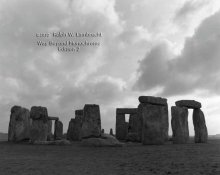
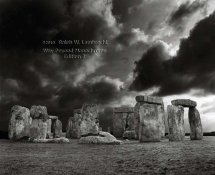
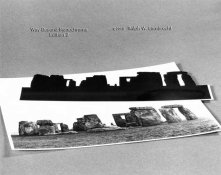
Flashing helps but doesn't solve most cases. A mask will do the trick, but you need patience and a bit of time. The reward is worth it. Look at the attached example:

1. straight print (awful)
2. final print (yes, that's what I wanted)
3. mask (lots of work but worth it)

First, print for the foreground, then use the mask to burn in the sky. The mask was made from a test print for the sky for which the foreground was way too dark. Good luck!
 

Attachments

  • StoneHenge1.jpg
    StoneHenge1.jpg
    23.3 KB · Views: 257
  • StoneHenge2.jpg
    StoneHenge2.jpg
    41.5 KB · Views: 261
  • StoneHenge3.jpg
    StoneHenge3.jpg
    34.3 KB · Views: 244
Next I will probably try the test-print-as-mask trick. The trees will just have to go black. Unfortunately there are horses at the bottom not far from the horizon so it's fairly important.
 
One thing to try
pick a average grade that builds into the print most of the image , as your first exposure.
Second exposure BURN at the horizon line and into the trees , in fact vignette into the bottom of the image a burn at 00 to put tone right at the horizon line.
Third and fourth Burn in the top section to bring in detail you want , and then also use the 5 filter to BURN in the sky, this may not make any sense but the areas of the sky that have density will see the 5 and darken. This is always good practice to get highlight separation.
this will create a illusion of detail, the 00 in the split will produce needed tone, and the 00 over the bottom main image will not hurt.

I like the advantage of using masks but IMO they are obvious and do have their place and do look intense, but if you are just trying to make a subtle transition between sky and forground a combination of filters and burning with softer and harder filters will help fool the eye into seeing detail.


Next I will probably try the test-print-as-mask trick. The trees will just have to go black. Unfortunately there are horses at the bottom not far from the horizon so it's fairly important.
 
Whenever I'm faced with a difficult dodge or burn on a print the first thing I ask myself..... is this image important or good enough to warrant all the time and expense of material usage to get it right ? Obviously the only way to improve darkroom skills is practice these things so if this is the aim then by all means go for it. Sometimes it's better to write the neg off and repeat the shot from scratch by revisiting the location in different or more favourable lighting conditions and perhaps modifying exposure development etc.

I've seen some very impressive dodging and burning techniques on a print but the end result can look unreal or 'digital like' !!
 
Last edited by a moderator:
Whenever I'm faced with a difficult dodge or burn on a print the first thing I ask myself..... is this image important or good enough to warrant all the time and expense of material usage to get it right ? Obviously the only way to improve darkroom skills is practice these things so if this is the aim then by all means go for it. Sometimes it's better to write the neg off and repeat the shot from scratch by revisiting the location in different or more favourable lighting conditions and perhaps modifying exposure development etc.

I've seen some very impressive dodging and burning techniques on a print but the then the end result can look unreal or 'digital like' !!

I agree, the image must be worth the effort, unless you're trying to hone your skills. That said, I'm not necessarily after realistic images, but that's a different discussion.
 
What size negative? If it's 35mm, or perhaps even roll film, then the options are limited.

But if your negative is lf, you could try dye-dodging the foreground. Fix out and wash an sheet of unexposed film, and after it is dry, tape it to the non-emulsion side of your negative. Put the emulsion side of the clear film against the back (non-emulsion) side of your negative.

Now, with the negative on a lightbox and using magnifiers, gently paint over the foreground area of the negative, applying the paint to the back to the clear film overlay. Use a magenta dye since that will also end to increase the contrast in the foreground relative to the sky. Dr. Martin's is a good brand of liquid watercolor for this purpose. Use a small brush to work the details in the horizon.

After the dye dries, try making a print. You may need to interate through several stages to get the result you want.
 
There are two ways to mask.

One is to make a negative mask as discussed above.

The other is to take a print and cut a way the sky. Then use the print to dodge and burn in the sky by moving it slightly back and forth and slightly raising and lowing it.

Steve
 
I have sometimes had this problem. When you have an odd shaped area to dodge, you can make a custom dodging mask for it. This is not always the answer, but it often works. Focus the negative on the easel. Take a piece of thin cardboard, and hold it under the lens some distance above the easel - a comfortable dodging distance. Mark the dodging pattern on the cardboard with a felt tipped marker, and cut it our. The use the shaped cardboard as a dodging tool.
 
That's what I would normally do. However there is a row of leafless trees on the horizon and it would be impossible to cut the cardboard out for all the branches.
 
For the heck of it you could also attempt a high contrast over-exposure combined with a SLIMT bath. Less work than a complicated mask and doesn't take a lot of attempts to figure out if it'll work.
 
Better Sense

Flashing helps but doesn't solve most cases. A mask will do the trick, but you need patience and a bit of time. The reward is worth it. Look at the attached example:
[...]

Ralph, do you have some tips for cutting the mask?
I always admire the precision of your masking :smile:

Best,
 
Photrio.com contains affiliate links to products. We may receive a commission for purchases made through these links.
To read our full affiliate disclosure statement please click Here.

PHOTRIO PARTNERS EQUALLY FUNDING OUR COMMUNITY:


Ilford ADOX Freestyle Photographic Stearman Press Weldon Color Lab Blue Moon Camera & Machine
Top Bottom