
• Welcome to Photrio!
    Registration is fast and free. Join today to unlock search, see fewer ads, and access all forum features.
    Click here to sign up

Diy ECN-2 chemistry resulted in dark negatives?

Forum statistics

Threads
203,317
Messages
2,852,927
Members
101,782
Latest member
JaredDavis22
Recent bookmarks
0

filip0502

Member
Joined
Feb 14, 2026
Messages
16
Location
Croatia
Format
35mm
I made my own ECN-2 (recipe is below).

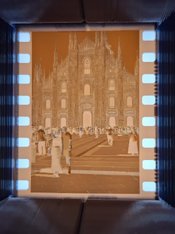
The negatives turned out very dark. I did a roll of Kodak Gold (from which I didn't expect perfect results since it is cross-processing) and a roll of Vision 250D, which is not currently with me because it wasn't dry but it also looked dark. I don't know if this is fine or if I should try making another batch. Below are photos of some blank film from this roll and one developed in C-41, as well as negative and positive scans.

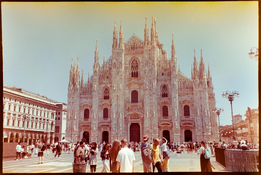
1: Blank piece of Kodak Gold 200, the top one was developed in C-41, the bottom in ECN-2 / 2: A photo from the roll developed in C-41 / 3: Developed in my diy ECN-2 (taken minutes apart on different cameras)
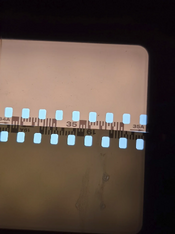
1771066131804.png1771066245726.png1771066275509.png
1: Scanned on a Nikon scanner and converted with NLP / 2: Quick DSLR scan with a bad film holder and light, hence the weird edges

tried-diy-ecn-2-did-i-mess-up-v0-w6zp5vzlkcjg1.png1771066590910.png
This is the recipe I used:
1771066966845.png
 
Welcome to Photrio!

Did you use a red or amber safelight when loading the film into the development tank?

Also, with the ferricyanide bleach, you need to do a thorough rinse between developer and bleach, or (preferably) a sulfite clearing bath. If you went straight from develop to bleach, then this can very well explain the problems you're seeing.
 
Welcome to Photrio!

Did you use a red or amber safelight when loading the film into the development tank?

Also, with the ferricyanide bleach, you need to do a thorough rinse between developer and bleach, or (preferably) a sulfite clearing bath. If you went straight from develop to bleach, then this can very well explain the problems you're seeing.

I didn't use a safelight. Complete darkness as usual

After the developer I used vinegar and water as a stop bath and then I rinsed the film once or twice. Do you think I should rinse more? What's this sulfite clearing bath, this is my first time hearing about it.
 
Also, with the ferricyanide bleach, you need to do a thorough rinse between developer and bleach, or (preferably) a sulfite clearing bath. If you went straight from develop to bleach, then this can very well explain the problems you're seeing.

Oh I'd forgotten about the difference with ferricyanide bleach.

Basically, any residual developing agent that makes it into the bleach will cause dye formation. Theoretically the stop and adequate rinsing will mitigate it, but that's often not true in the home environment.

https://www.photrio.com/forum/threads/sodium-sulfite-clearing-bath-in-ecn2-process.216559/ there was another recent thread about this and it completely slipped my mind
 
Oh I'd forgotten about the difference with ferricyanide bleach.

Basically, any residual developing agent that makes it into the bleach will cause dye formation. Theoretically the stop and adequate rinsing will mitigate it, but that's often not true in the home environment.

https://www.photrio.com/forum/threads/sodium-sulfite-clearing-bath-in-ecn2-process.216559/ there was another recent thread about this and it completely slipped my mind

So I should try mixing new bleach before trying this bath?
 
The bleach will still work okay. Try the sulfite clearing bath, but given your process description I'm surprised you got this much fog given your use of a stop bath followed by a water rinse.

Did this film pass through CT airport scanners?
 
The bleach will still work okay. Try the sulfite clearing bath, but given your process description I'm surprised you got this much fog given your use of a stop bath followed by a water rinse.

Did this film pass through CT airport scanners?

It went through regular x-ray scanners but so did the other roll. They are both from the same trip, just from different cameras.
 
Regular x-ray or CT? Either way, it's odd one roll shows the problem and the other doesn't.

If that's not it we may have to have a look at the chemistry you used, but the fogging pattern doesn't indicate a problem with purity etc. That would have resulted in a perfectly even pattern; you now have this odd gradient/band along one edge of the film.

Absolutely no sources of light on the darkroom when you handled the film? You wouldn't be the first to overlook a status indicator LED somewhere. All it takes is a single blink to ruin a roll of film. Computers, phones, smoke detectors etc.
 
The "fogging" isn't uneven. It might look like it because of my light, but it's completely uniform across the roll. The whole film is simply darker. There weren't any light sources in the room. If it were fogged by light, I doubt it would be fogged evenly across the whole roll. Here another photo I took of them, side by side (the streaks on the left are reflections, they aren't on the film).
1771086060871.png
 
Can you show some strips of negatives of the same film processed in c41 vs your diy ecn2 side by side? Like the first example image you posted, but then the bits of film with images on them.

What development time& temperature did you use for the ECN2 processing?
Did you try running the affected film though bleach and fix again to see if it clears a little more?
Have you tried processing some film in your ecn2 developer but a regular c41 bleach and fix?
 
I did 3 minutes at 41 degrees. I know that you can refix film, I didn't know that I can bleach it and fix it again. I might try that. As for the regular c41 bleach and fix, I don't currently have access to those so I can try that.
1771090935315.png
 
Well, it doesn't look like retained silver, and the level of fog is dramatic indeed. Do you normally process color film as well, or is this the first time? If you've done this before, what differences were there in the process compared to previous runs?
 
I've used a Cinestill ECN-2 kit, a Cinestill C-41 kit and an Adox C-41 kit. This definitely isn't my first time doing color negative. It is however my first time mixing raw chemistry (apart from a remjet remover). I have a Cinestill temp controll unit ao I doubt the temperature is the problem.
 
I made my own ECN-2 (recipe is below).

The negatives turned out very dark. I did a roll of Kodak Gold (from which I didn't expect perfect results since it is cross-processing) and a roll of Vision 250D, which is not currently with me because it wasn't dry but it also looked dark. I don't know if this is fine or if I should try making another batch. Below are photos of some blank film from this roll and one developed in C-41, as well as negative and positive scans.

1: Blank piece of Kodak Gold 200, the top one was developed in C-41, the bottom in ECN-2 / 2: A photo from the roll developed in C-41 / 3: Developed in my diy ECN-2 (taken minutes apart on different cameras)
View attachment 417990View attachment 417991View attachment 417992
1: Scanned on a Nikon scanner and converted with NLP / 2: Quick DSLR scan with a bad film holder and light, hence the weird edges

View attachment 417993View attachment 417994
This is the recipe I used:
View attachment 417995

Isn't there too much Sodium Carbonate? Kodak recipe states 25.6 grams.
 
I've used a Cinestill ECN-2 kit, a Cinestill C-41 kit and an Adox C-41 kit. This definitely isn't my first time doing color negative. It is however my first time mixing raw chemistry (apart from a remjet remover). I have a Cinestill temp controll unit ao I doubt the temperature is the problem.
It's not a temperature issue. The question still stands what went differently this time. Something is responsible for the high fog, and so far there's no factor in sight that explains it. You'd need to do a process of exclusion to narrow down the options. A first step would be to isolate the developer since that's the one the most likely to play a role in this problem. Hence the earlier question about c41 bleach & fix.
 
It's not a temperature issue. The question still stands what went differently this time. Something is responsible for the high fog, and so far there's no factor in sight that explains it. You'd need to do a process of exclusion to narrow down the options. A first step would be to isolate the developer since that's the one the most likely to play a role in this problem. Hence the earlier question about c41 bleach & fix.
I'll shoot another roll and develop half of it, if it's not good I'll remix the developer and try again.
 
You could do that although that will not give much insight if there's a systematic problem with your process or ingredients. I personally would hold off on it and set up an experiment that gives more insight.
 
Two things. First, check what form your carbonate is - if it's anhydrous, you've added too much. Second, the first remjet removal bath should be at room temperature and only 5-10 seconds long. I've had a similar problem, which I traced back to that bath.
 
Second, the first remjet removal bath should be at room temperature and only 5-10 seconds long.
He's not doing any as he's so far just processed remjet-less film.

The carbonate - you're right about the molar weight difference, but even if he had it wrong, I expect he would have ended up with dramatic gamma, but not this much fog. Then again, it's one thing that does need to be excluded.
 
He's not doing any as he's so far just processed remjet-less film.

The carbonate - you're right about the molar weight difference, but even if he had it wrong, I expect he would have ended up with dramatic gamma, but not this much fog. Then again, it's one thing that does need to be excluded.
I used washing soda, which is usually monohydrate, but I found the datasheet for it, and it has the CAS number 497-19-8, which should mean it's anhydrous. Looking again at my recipe and the posts where I got it from, even if it was monohydrate, I put in too much (69 grams). Kodak's recipe calls for 25.6 grams of anhydrous.
I don't know how that affects the developer but that could be the problem.
 
Photrio.com contains affiliate links to products. We may receive a commission for purchases made through these links.
To read our full affiliate disclosure statement please click Here.

PHOTRIO PARTNERS EQUALLY FUNDING OUR COMMUNITY:


Ilford ADOX Freestyle Photographic Stearman Press Weldon Color Lab Blue Moon Camera & Machine
Top Bottom