• Welcome to Photrio!
    Registration is fast and free. Join today to unlock search, see fewer ads, and access all forum features.
    Click here to sign up

Digital negatives on Canon Pro 100

Recent Classifieds

Forum statistics

Threads
201,078
Messages
2,818,690
Members
100,518
Latest member
printwelluk
Recent bookmarks
0

pwitkop

Member
Allowing Ads
Joined
Aug 8, 2004
Messages
132
Location
Southern Maine
Format
Multi Format
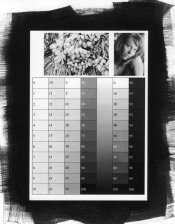
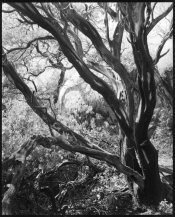
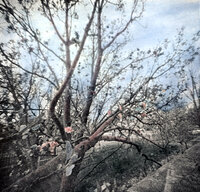
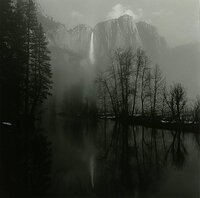
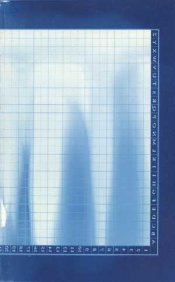
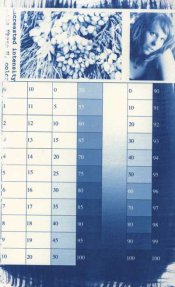
I haven't seen much about this printer and digital negatives, so I thought I'd share what I've learned. I'm just learning hand coated processes, so I've just used cyanotype so far. The Platinum kit is on the way, so we'll see how things work with that soon. At first I was having trouble getting enough UV density with the black and white mode but printing as a color image, with intensity pushed all the way up and with Matte paper selected, I'm getting pretty good density. My cyanotype curve, I've had to cut the density back a little actually so if I need more with platinum. As far as color density goes, a dark green and full black give about the same UV density. The color chart and one of my test pattern's are below, if anyone's interested.

Peter
2016-01-26-0001.jpg
2016-01-26-0003.jpg
 
OP
OP

pwitkop

Member
Allowing Ads
Joined
Aug 8, 2004
Messages
132
Location
Southern Maine
Format
Multi Format
Palladium update

I've managed to get some good results in palladium using the B&S digital negative kit, which is Palladium with PT NA2. I've gotten more than enough UV density to use the high contrast formula, I could probably print with straight palladium.

If anyone's thinking of using this printer for digital negatives, it certainly is capable, at least for PT and Cyanotype. I'd be glad to share any details if anyone has any questions or is having trouble.
 

Attachments

  • pt-calibration-target.jpg
    pt-calibration-target.jpg
    131.2 KB · Views: 470
  • tree-print.jpg
    tree-print.jpg
    199.2 KB · Views: 442

BDK

Member
Allowing Ads
Joined
Feb 13, 2010
Messages
20
Location
Metro New York
Format
Medium Format
I haven't seen much about this printer and digital negatives, so I thought I'd share what I've learned. I'm just learning hand coated processes, so I've just used cyanotype so far. The Platinum kit is on the way, so we'll see how things work with that soon. At first I was having trouble getting enough UV density with the black and white mode but printing as a color image, with intensity pushed all the way up and with Matte paper selected, I'm getting pretty good density. My cyanotype curve, I've had to cut the density back a little actually so if I need more with platinum. As far as color density goes, a dark green and full black give about the same UV density. The color chart and one of my test pattern's are below, if anyone's interested.

Peter
View attachment 184813
View attachment 184814
I have just got interested in cyanotype and I have a Pixma Pro-100 also. My scanner is the Epson Perfection V-750. I can use the Epson Scan software, or Apple's upgraded Photos. I just figured out that to make a "negative" I can invert the curve settings, The standard curve is a straight line between lower left and upper right. If I drag these to the opposite corners I have a negative, or so it seems. That's where I am now. Do i just print this? Would appreciate any lessons you can give me on this. Thanks.
 

MEB

Member
Allowing Ads
Joined
Aug 1, 2016
Messages
74
Location
USA
Format
Multi Format
Any issue with your digital negatives made with the Pro 100 with diagonal line patterns? I print my 4x5" digital negatives from digital files on Pictorico Ultra Premium Transparency Film and tried different print settings for printing on this transparency foil. No matter which option I select and independent on the resolution, there are tiny diagonal lines on the negative which show up in large prints when looking very closely. I believe it has to do with the printer head but didn't find a fix.
 

Kevin Harding

Member
Allowing Ads
Joined
Nov 28, 2013
Messages
169
Format
Multi Format
Hi there - just bouncing into this thread from a search. I know it's been 2 years since the OP, but what inkset and transparency are being used to generated "acceptable" digital negatives?
 
Photrio.com contains affiliate links to products. We may receive a commission for purchases made through these links.
To read our full affiliate disclosure statement please click Here.

PHOTRIO PARTNERS EQUALLY FUNDING OUR COMMUNITY:


Ilford ADOX Freestyle Photographic Stearman Press Weldon Color Lab Blue Moon Camera & Machine
Top Bottom