

• Welcome to Photrio!
    Registration is fast and free. Join today to unlock search, see fewer ads, and access all forum features.
    Click here to sign up

DARK HALO Around Blacks on 35mm neg

Flooded woodland

Flooded woodland

  • 14
  • 0
  • 84
Babylon

D
Babylon

  • 3
  • 1
  • 77

Recent Classifieds

Forum statistics

Threads
202,840
Messages
2,846,302
Members
101,559
Latest member
gnafin61
Recent bookmarks
1

Phil Joanou

Member
Allowing Ads
Joined
May 16, 2017
Messages
12
Location
Pasadena CA
Format
35mm
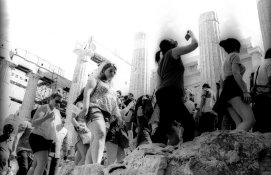
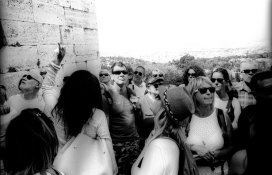
I need help... I developed Tri-X normal with HC110, Stop Bath and Rapid fixer... Temps were all at 68, but stop bath was at room temperature. My negatives were fine... But there is an "halo effect" around all the deep blacks. Including on the edges of the frame (bleeding from black into the shot). Anyone know what could have caused this...? First time it's happened to me. Thank you for your help!
 

Attachments

  • acropolis1 014.jpg
    acropolis1 014.jpg
    486.8 KB · Views: 497
  • acropolis2 015.jpg
    acropolis2 015.jpg
    458.7 KB · Views: 341
Hi, and welcome tp APUG.
Can you post shots of the negatives themselves, rather than scans?
 
Hello,

Does this effect manifest itself on the negatives themselves?

It looks like you have posted scans, which may have had the tone curves or at least contrast adjusted....or alternatively they need adjusting. Those photos look like they need work for optimum contrast. The halo effect you describe can often be present when you scan good negatives but need to do post-scanning work on them (eg, photoshop).

As MattKing suggested, can you post photos of the actual negatives?
 
As a quick example I can reduce the halo effect by spending a couple of minutes with ACDSee software, which is very basic and doesn't have a quarter the functions of Photoshop. Also I am working of the picture you uploaded and not the scan...nor do I have the negative here to work with.

It could be that your negative is fine but you need to take more care scanning, or a better scanner...or consider having it printed the old fashioned way onto proper photographic paper.

acropolis1 014.jpg
 
There's edge problems as well I'd suspect possibly quite under exposed negatives as there's no details in the blacks, grain is excessive. We'd need to see the negatives themselves.

Ian
 
There's edge problems as well I'd suspect possibly quite under exposed negatives as there's no details in the blacks, grain is excessive. We'd need to see the negatives themselves.

Ian

I'd say there's every change you are on the money with that idea. Under exposed or under developed negatives along with a scanner which is trying to produce a picture with "average" contrast could end up with this effect. I've seen it before on similar shots.
 
Welcome to APUG

What speed did you shoot the film? Please post the negatives.
 
I need help... I developed Tri-X normal with HC110, Stop Bath and Rapid fixer... Temps were all at 68, but stop bath was at room temperature. My negatives were fine... But there is an "halo effect" around all the deep blacks. Including on the edges of the frame (bleeding from black into the shot). Anyone know what could have caused this...? First time it's happened to me. Thank you for your help!

Why are you scanning? B&W film should be printed optically in a darkroom.
 
+1, but that is not always possible for everyone.
 
Why are you scanning? B&W film should be printed optically in a darkroom.

Darkroom printing is great, of course, but needs time and facilities. But, to my own knowledge, the availability of scanning of negs and slides, in a home environment, has brought two or three friends and acquaintances into analogue photography, even if a bit "by the back door".
 
Nothing wrong with "by the back door". We're liberal at APUG...
 
+1 on there being nothing wrong with shooting film and then scanning, if the other option is shooting no film at all. Not all of us have time/space to make prints, or money to have them made for us.

I think we need to see the negatives if possible...OP if you could post a photo of the negatives that would be great. Also tell us what camera you used, how the exposure was metered...and what scanner and software you have? Did you use auto or default settings?
 
+1 on there being nothing wrong with shooting film and then scanning, if the other option is shooting no film at all. Not all of us have time/space to make prints, or money to have them made for us.

I think we need to see the negatives if possible...OP if you could post a photo of the negatives that would be great. Also tell us what camera you used, how the exposure was metered...and what scanner and software you have? Did you use auto or default settings?


The problems with scanning conventional B&W film are legion. Forget it.
 
Last edited:
Look at the dark lines along the right and left edges. That suggests a process problem. Not sure until I can see the negs.

PE
 
The problems with scanning are legion. Forget it.
Your sniping is both misplaced and of no help to the OP.
If you have nothing useful to offer, save yourself some energy eh?
 
Your sniping is both misplaced and of no help to the OP.
If you have nothing useful to offer, save yourself some energy eh?


What? He won't be able to figure it out otherwise. I do have something useful to offer, and that is stop scanning!
 
What? He won't be able to figure it out otherwise. I do have something useful to offer, and that is stop scanning!
My suggestion would be to find more persuasive ways to make your point, because issuing snarky ad hominem one-liners has a marked tendency to antagonise and alienate people.
They've certainly had that effect on me. SO ... bye
 
Any chance you didn't dilute the HC110 and used pure concentrate?
 
It is probably NOT a scanning problem.

PE

Actually Ron this is almost definitely a scanning problem. The darker areas are flare, probably from a dirty/cheap scanner. I've seen it many times before.

First time I have known something that Ron didn't know. Not sure what to do now. I feel like I have gone through some sort of Twilight Zone door. Do I quit photography? Get a beer? Find out if I am in some exclusive private club now? The world seems strange!
 
Hey everyone... thank you for your help on this. What is the best way to post the negs? Shoot them on a light Box? I want to do it the right way. I'm using a Nikon super cool scan 4000 to scan the negs and haven't had any trouble in the past. Thanks again!
 
Photrio.com contains affiliate links to products. We may receive a commission for purchases made through these links.
To read our full affiliate disclosure statement please click Here.

PHOTRIO PARTNERS EQUALLY FUNDING OUR COMMUNITY:


Ilford ADOX Freestyle Photographic Stearman Press Weldon Color Lab Blue Moon Camera & Machine
Top Bottom
