OP
OP


I know…




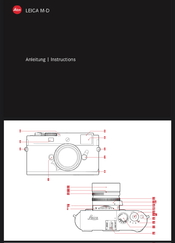
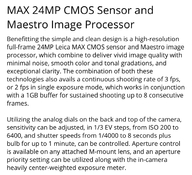
I had a hard time believing the MD-262 did not have JPG storage capability...any camera that shoots RAW files has to have an internal RAW-to-JPG conversion capability in order to even present a view of a photo that has been captured, after all. So I went in search of the MD type 262 user manual and found one.
It can store JPG files, in your choice of sRGB or aRGB color space, at one of two compression levels.
I had a hard time believing the MD-262 did not have JPG storage capability...any camera that shoots RAW files has to have an internal RAW-to-JPG conversion capability in order to even present a view of a photo that has been captured, after all. So I went in search of the MD type 262 user manual and found one.
It can store JPG files, in your choice of sRGB or aRGB color space, at one of two compression levels.

How…
How can you do setting functions without an LCD screen?The copy of the user manual page which I posted shows Setting the Function, in Paragraph 1 and 2, how to set file type and data compression.
Other settings select sRGB or aRGB


As pointed out, there are apparently 2 M 262 Leica models. One has a screen and produces jpegs, the other does not.
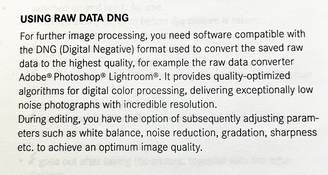
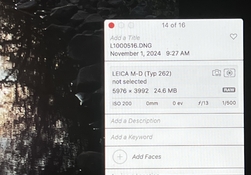
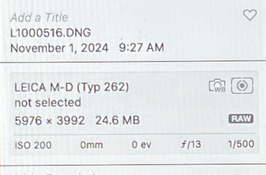
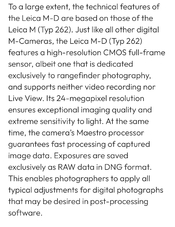
The Leica MD 262 shoots only in RAW…
The Leica MD 262 shoots only in RAW…

Yet the information that you linked in your own post #87 in this thread says "JPG", in the highlighted text?!
The manual that I referenced was via a link to the MD type 262 in this post under the first column mentioning '10 947'
Leitz and Leica Camera Compendium with User Manual and Firmware Downloads - Thorsten Overgaard's Leica Photography Pages
Complete overview of Leica Camera models with links to user manuals, articles and firmware updateswww.overgaard.dk
I now notice there are two references, one for the model without a rear screen. Yet the manual presented still mentions a menu for setting language, time, date, format, etc....how do basic functions get set without a display?!
Yet the information that you linked in your own post #87 in this thread says "JPG", in the highlighted text?!
The manual that I referenced was via a link to the MD type 262 in this post under the first column mentioning '10 947'
Leitz and Leica Camera Compendium with User Manual and Firmware Downloads - Thorsten Overgaard's Leica Photography Pages
Complete overview of Leica Camera models with links to user manuals, articles and firmware updateswww.overgaard.dk
I now notice there are two references, one for the model without a rear screen. Yet the manual presented still mentions a menu for setting language, time, date, format, etc....how do basic functions get set without a display?!
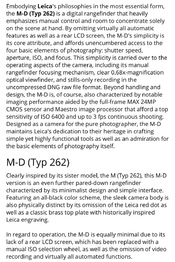
Looks like we’re on the same page, pun intended…I poked around some more, and I found an official Leica blurb about the M-D typ 262 that has no display. Their write-up does confirm what you said about having only DNG file.
 …
…The manual that I referenced was via a link to the MD type 262 in this post under the first column mentioning '10 947'

@runswithsizzers
Thanks for that tutorial. I left the Apple computer world in the 1990’s for Windows due to corporate incentivization. My wife never made that transition so when she has computer problems I can only respond with a single word: GeekSquad.
The problem is that the website you linked to 'efficiently' contains just ONE user manual for the M262 and the MD262. They posted only the manual of the former. This creates confusion that does not exist if you rely on Leica's documentation as I did in post #85. At around that time, the issue was already cleared up - but apparently it's fun to do the same routine again, so let's see when the next guy comes along to say "ooooh but why don't you just shoot jpeg..." and then you can join the chorus pointing out it's not possible. We will snowball our way towards a rare case of consensus on this forum, although I expect it'll take probably a year or more.
 …
…
Maybe it’s based on the design of the M262 but restricted only to shoot in RAW for simplicity?
I'm confused. The photo you posted shows it supports JPEG.

| Photrio.com contains affiliate links to products. We may receive a commission for purchases made through these links. To read our full affiliate disclosure statement please click Here. |
PHOTRIO PARTNERS EQUALLY FUNDING OUR COMMUNITY:  |