• Welcome to Photrio!
    Registration is fast and free. Join today to unlock search, see fewer ads, and access all forum features.
    Click here to sign up

Best film scanner resolution for making 4" x 6" prints from 35mm negatives

Viaduct.jpg

A
Viaduct.jpg

  • 3
  • 1
  • 42
Durham walk.jpg

A
Durham walk.jpg

  • 0
  • 0
  • 30

Recent Classifieds

Forum statistics

Threads
202,538
Messages
2,842,054
Members
101,369
Latest member
hluvmiku
Recent bookmarks
0

Nikon 2

Subscriber
Allowing Ads
Joined
Feb 19, 2023
Messages
1,658
Location
Moyers, Oklahoma
Format
Multi Format
What is considered the best resolution of scanners to get the most detail out of a 35mm 4x6 film print…?
 
Unless you plan to look at it with a magnifying glass, a 4x6 print doesn't need to be printed at a higher resolution than 600 dpi - and I think many are 300-400 dpi. Assume 800 dpi. So scan at 3200 dpi.
 
Unless you plan to look at it with a magnifying glass, a 4x6 print doesn't need to be printed at a higher resolution than 600 dpi - and I think many are 300-400 dpi. Assume 800 dpi. So scan at 3200 dpi.

The lab I use scans at 2400x3600, what do you think…?
 
For clarity, are you asking about the scanner resolution to use when scanning a slide or negative, when your intention is to make 4"x6" prints from the scan?
Because people do scan 4"x6" prints!
300 dpi is close to the maximum beneficial printing resolution for prints viewed at normal distances. Some labs don't even provide more printing resolution than that. 300 ppi converts well to 300 dpi. But there is an advantage to having files with more resolution - you can crop easily, and you can print larger. In addition, many post-processing actions work better if you have extra resolution to work with.
2400 x 3600 is a very usable resolution. It can give very nice 8" x 12" prints.
 
For clarity, are you asking about the scanner resolution to use when scanning a slide or negative, when your intention is to make 4"x6" prints from the scan?
Because people do scan 4"x6" prints!
300 dpi is close to the maximum beneficial printing resolution for prints viewed at normal distances. Some labs don't even provide more printing resolution than that. 300 ppi converts well to 300 dpi. But there is an advantage to having files with more resolution - you can crop easily, and you can print larger. In addition, many post-processing actions work better if you have extra resolution to work with.
2400 x 3600 is a very usable resolution. It can give very nice 8" x 12" prints.

My question was about the scanner scanning the 35mm negative and the best resolution for the scanner to achieve optimum quality for the 4x6 prints...!
 
My question was about the scanner scanning the 35mm negative and the best resolution for the scanner to achieve optimum quality for the 4x6 prints...!

With this in mind, I've changed the thread title. How does it look now to you?
 
Pacific Image XAS raw scan through SilverFast
Easily beats noritsu and frontier.
Especially when I put the time to
 
300 dpi is close to the maximum beneficial printing resolution for prints viewed at normal distances.

Indeed; it's damn hard to tell apart 300dpi from higher resolutions. That means 1200x1800px files suffice for 4x6" prints. Higher resolutions don't hurt, but won't give more visible detail.
 
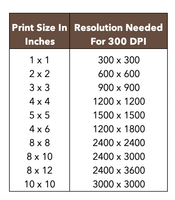
This chart might help.

V7dpi-chart.png

I would suggest that you might scan for resolution 2400x3600 px and that will give you the option to make a 8x12 inch print or any size smaller because it is easier to go down but harder to go up.

In commercial printing, like a Fuji Frontier, the dpi is 300 as standard. As has been said in previous posts, you will not be able to visually tell the difference between a higher resolution.
 
A scan of 35mm film resulting in an image of 3600 X 2400 is about a 2540dpi scan and there is usually a bit of cropping done. Is this from a minilab that uses a Noritsu, Frontier or Agfa scanner or a desktop scanner?

The type of paper used will greatly affect this. For instance, super glossy paper is probably the highest resolving paper you can print on and using a quality printer can make very good prints at 300dpi. On the other end of the spectrum are the more textured types of paper that will not be able to take advantage of all that detail. Having more detail then the printer/paper is better. This gives room for more cropping if needed/wanted.
 
In answer to your question , the way it was asked: The best resolution is the highest resolution that your scanner can deliver.

If you change the wording in the question from "best" to something like "good enough" then the answer may end up being some lower resolution.
 
Just scan them maximum possible resolution you can get from your scanner.
Hard drive space is very cheap
 
Commercial/lab prints are typically 240-600 pixels per inch. If you’re just getting proof prints, they’re likely 240 or 300 pixels per inch Printed on standard lustre photo paper. You’ll be very hard pressed to see a difference between 240 ppi and higher resolution.

if you do 1500x2250 or higher, you’ll be totally fine for 4x6.
 
I do 300 default. If I want to digitally print I do 600 but I doubt it is a big difference.
 
When I scan 35mm, I almost always scan at the scanner's highest optical resolution.
The files might be large, but I don't need to re-scan later if I want a larger print than
4x6.

I can then edit the scan in Photoshop and save my work in the native Photoshop file
format, and export resized images to 300 dpi jpeg files as needed.

I have Photoshop and Lightroom installed on my computer, but I mostly use Photoshop
since I learned that first. Sometimes I work on scans in Photoshop AND Lightroom,
but for some weird reason, Photoshop is easier for me.
 
Photrio.com contains affiliate links to products. We may receive a commission for purchases made through these links.
To read our full affiliate disclosure statement please click Here.

PHOTRIO PARTNERS EQUALLY FUNDING OUR COMMUNITY:



Ilford ADOX Freestyle Photographic Stearman Press Weldon Color Lab Blue Moon Camera & Machine
Top Bottom