• Welcome to Photrio!
    Registration is fast and free. Join today to unlock search, see fewer ads, and access all forum features.
    Click here to sign up

Beginner having trouble printing

Manners street Lads

A
Manners street Lads

  • 1
  • 0
  • 21
Arkansas Ent

A
Arkansas Ent

  • 4
  • 2
  • 52

Recent Classifieds

Forum statistics

Threads
203,048
Messages
2,849,128
Members
101,623
Latest member
Ohio in Photography
Recent bookmarks
1

IOS

Member
Allowing Ads
Joined
Dec 18, 2007
Messages
142
Location
Iowa
Format
35mm
Im a beginner and i tried to print a 35mm. When i took it out of the fixer the print was beautiful and sharp with alot of detail. After it dried it was garbage ! it was so flat and dull with all the sharpness totaly gone. Does anyone know why this happened after it dried ? Thank you for your response.

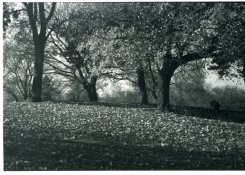
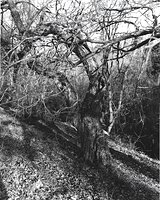
First image is the original negative scan
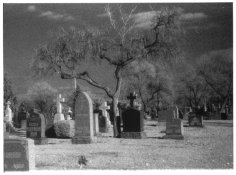
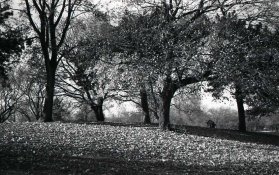
Second image is the print that went bad after it dried
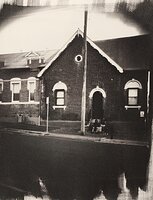
Third image is another print that went bad when it dried
 

Attachments

  • 119.jpg
    119.jpg
    114.7 KB · Views: 230
  • hc-1101.jpg
    hc-1101.jpg
    278.8 KB · Views: 241
  • c.jpg
    c.jpg
    59.8 KB · Views: 218
How long did you fix the print? How long was your wash cycle? Resin coated or fibre? Matte or glossy. I'm guess you used matte resin coated, multigraded VC paper. If there was insufficient washing time, you can get dull, lifeless prints.
 
Sorry i forgot to post the info

trees and hill

Paper Ilford satin multigrade rc
Developer kodak hc-110 Dul 2-15.5 for 1 minute
Stopbath kodak for 10 sec
Fixer kodafix for 2 minutes
Rinse for 5 minutes
Exposure F11 for 30 sec

Cemetery
Paper Ilford satin multigrade rc
Developer kodak hc-110 Dul 2-15.5 for 1 minute
Stopbath kodak for 10 sec
Fixer kodafix for 2 minutes
Rinse for 5 minutes
Exposure f8 for 20 sec
 
Hi, HC-110 is a film developer, I don't think it is particularly good for paper. Try Dektol instead. Hal
 
Hi, HC-110 is a film developer, I don't think it is particularly good for paper. Try Dektol instead. Hal


I also tried r09 and got the same results.
 
I also tried r09 and got the same results.

R09 is also a film developer. I have not tried to develop paper in film developer – but like Hal I believe that this is the root of your problem.
 
Paper Ilford satin multigrade rc
Developer kodak hc-110 Dul 2-15.5 for 1 minute
Stopbath kodak for 10 sec
Fixer kodafix for 2 minutes
Rinse for 5 minutes

As said earlier, you need a paper deveoper. RO9 isn't one either.

In my experience, the Ilford RC satin paper looks very flat when dry compared to when wet. This effect, coupled with your very short processing times, could be the problem. I would be using longer times in all three chems.

Another variable you are not mentioning is the filtration you are using for contrast, if any.

I would suggest getting some Kodak Dektol or Ilford paper developer, and some glossy paper. Read the directions and follow them for all of the chemicals and the chosen paper, and see if your results don't get better.

Good luck. We'll be here. :smile:
 
isn't that film developer as well? Also, when using paper developer the prints need to develop for 90 secs.


what was the filter grade?

Prints look better wet than dry, and you need to figure out the dry down times and apply. RC paper has less dry down than fiber, but it can look quite different when dry.


What is happening is just the learning curve , and we always end up with more prints going into the learning bin before they are ready for the wall.
(learning bin=trash can)
 
Isn't R09 a film developer also? Where did you obtain the information to use HC-110 and then RO9 for print development? Satin RC is much duller than either Pearl or Glossy and as such looks much different while still wet compared to dry. The difference is much greater than the change in Pearl or Glossy paper from wet to dry. Difficult to judge from a scan but Satin is a very flat finish which is how it looks on my monitor.

Use a proper print developer then judge. I have a feeling that you will not like a Satin finish anyway based on what I think your expectations of how the finished print look should be.

What made you choose Satin? Did you check any Satin samples before buying?

pentaxuser
 
Film developers don't work so well on paper and it looks like your prints have that muddy "pulled" from the developer too soon look to them. Using paper developer like Dektol, or Ilford Multigrade or anything else that is specifically for paper developing will help greatly. Paper developer works quick. I've not really seen a huge difference between satin and pearl surfaces but it could just be me. I don't like glossy because it shows up fingerprints quickly.
 
Go with a readily available paper developer such as Kodak Dektol, LPD, etc.. Also, use a glossy paper (fiber preferably) and take drydown in consideration. Wet prints look different then dry prints because when prints dry they get darker and loose some contrast. Get the wet print to where you want it and then print it again but with 10% less exposure and when the print drys it should be close to where you want it. Another option is to use a dim inspection light (mine is 40w) and drydown will become less of an issue. Hope this helps.

Regards,
John
 
May I suggest two things, get a 25 sheet envelope of Ilford Multigrade IV RC Pearl to try out and buy an envelope of Dektol Developer. I really like the results with pearl finish RC paper as I really like the results of glossy fibre paper. For your situation stick with RC paper for now.

Dektol is a print developer, mixing up powder turns some people off but I really love how it keeps its properties in the tray all session long. Liquid developers seem to crap out on me.
 
Isn't R09 a film developer also? Where did you obtain the information to use HC-110 and then RO9 for print development? Satin RC is much duller than either Pearl or Glossy and as such looks much different while still wet compared to dry. The difference is much greater than the change in Pearl or Glossy paper from wet to dry. Difficult to judge from a scan but Satin is a very flat finish which is how it looks on my monitor.

Use a proper print developer then judge. I have a feeling that you will not like a Satin finish anyway based on what I think your expectations of how the finished print look should be.


I bought a bunch of paper from a photography student on Craigslist, i bought apx $200 worth of paper for $50 ! i thought i got a good deal ? I already dont like the satin paper and that is 50% of the paper i bought. I have only been printing for the past 36 hours. in the past 36 hours i bought an enlarger and paper from craigslist so you can see that im a beginner but i think i will figure it out soon. I will get some Ilford paper developer tomorrow if the photo supply store is open. Thank you for your responce.

Jim
 
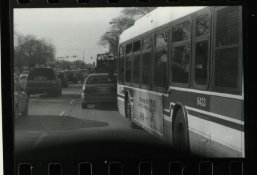
I think the paper is bad ! I just made another print with the pearl paper and when it dried it looked very good compared to the other ones that are on the satin paper. I know the scan of the new one with the pearl paper looks bad but that is just my cheap scanner i used. here is the pearl paper, its was done quick so i can try the pearl. It just a CTA bus in chicago, not to interesting.

Jim
 

Attachments

  • img0066666.jpg
    img0066666.jpg
    136.1 KB · Views: 164
As said earlier, you need a paper deveoper. RO9 isn't one either.

In my experience, the Ilford RC satin paper looks very flat when dry compared to when wet. This effect, coupled with your very short processing times, could be the problem. I would be using longer times in all three chems.

Another variable you are not mentioning is the filtration you are using for contrast, if any.

I would suggest getting some Kodak Dektol or Ilford paper developer, and some glossy paper. Read the directions and follow them for all of the chemicals and the chosen paper, and see if your results don't get better.

Good luck. We'll be here. :smile:

Dave, I didnt use a filter and the times for the chem's i got from kodak. Developing time was from a kodak manual, also the stopbath time was from kodak. The fixer is kodafix and i used the time on the bottle for paper, 2 minutes. I will try longer times on my next print and see how it comes out.

Thanks
Jim
 
One thing I've always done to avoid problems with the change in a print after it dries is to use my wife's blow dryer to completely dry my test strips. Then you can see right away what time will give the desired look when the print is dry. Works well for both RC and FB paper. If someone else mentioned this already, sorry for the redundancy.
 
Hi, to add a few more factors: 1) paper that is too old or stored in hot conditions can become "fogged" - meaning it will be overall gray in tone. Check by developing a sheet straight out the box, without exposing it. If after processing it is a mottled gray, it means it is too old.
2) A safelight that is too bright can also fog your photo, most notably making your bright tones gray.

Jon
 
Many papers, even when developed in paper developer rather than film developer, exhibit a "dry down" effect, losing brilliance/ A print that may took too contrasty often dries down to the proper tone. Stick to one paper for a while until you learn to judge the look of the final print from its appearance in the darkroom, when wet.

John, Mount Vernon, Va USA
 
Go for the Dektol if you find it. It's less expensive and just as good, if not better than, the Ilford stuff. I've used Ilford's Bromophen, which is similar to Dektol, and didn't like it too much. I'd never even consider using a premixed liquid concentrate for this application. They offer nothing more than the convenience of not needing to mix up the dry powder with water that is free from your tap. All that stuff is terribly overpriced, IMO, and has a very short shelf life compared to dry chemicals. Remember that liquid concentrates are still mostly water. Water is heavy. The product must be shipped, and shipping costs money.
 
I think the paper is bad ! I just made another print with the pearl paper and when it dried it looked very good compared to the other ones that are on the satin paper.

Since you bought the paper secondhand, that is indeed a possibility; however, don't ditch it just yet. Different papers often require slightly different development times, so it's entirely possible that you underdeveloped the satin paper and properly developed the pearl paper.

I know that both HC-110 and Rodinal (R09) can be used as paper developers; however, as this thread indicates, most people prefer to use developers that were created with paper in mind. There's nothing wrong with experimenting with HC-110 or Rodinal/R09 on paper, but for learning I certainly concur with the others who say you should try a common paper developer. Note that development times vary both between papers and between developers, so development times for Developer A may be off if you use Developer B.
 
Thank you to everyboby for all your very helpful advice. I will get the proper developer and decide if i want to use the glossy or the pearl, i will dump the satin or i can use it for test strips. Again thank you very much !!!!

Jim
 
Thank you to everyboby for all your very helpful advice. I will get the proper developer and decide if i want to use the glossy or the pearl, i will dump the satin or i can use it for test strips. Again thank you very much !!!!

Jim

Don't discard the satin - it definitely has its place for the right subject. I would just suggest that you put it to the side for a while, while you learn on glossy or pearl.

I'd recommend looking for an older Kodak Black & White Darkroom Dataguide, or some similar publication. They have samples of different textured papers (using Kodak letter codes) and they'll give you a sense of the differences, and appropriate uses for more textured papers.

IMHO you may be making the learning process just a little bit more difficult than it need be. Using old paper, and non-standard developers, may result in erratic and unpredictable results. I would put them aside for a while.

What you need is consistent paper and consistent chemistry, so that any change in your results will flow from changes in your technique (which you control).

Once you gain experience with standard, new paper and the correct chemistry you may find it fun and useful to try the old paper, and see how it compares. It may be fine, in which case you did get a bargain. Unfortunately, until you have some experience, you probably won't be able to tell :smile:.

Don't get discouraged - keep having fun!

Matt
 
The satin paper will last for several years so just put it aside somewhere dry, and preferably cool, until you want to use it later. I prefer the satin to the pearl MGIV but that's just me...

When wet the pearl or satin will essentially be glossy from the water on it so when they dry you will see the loss in sparkle that you describe. It just needs adjusting when you print - generally by printing at a higher contrast. A hair-drier can be used to speed up drying small RC test prints - I tend to just squeegee them as that alone gets them 90% dry.

Have fun, Bob.
 
Just thought I would mention that few, if any of us got good prints from our early printing sessions. I think that following the advice given here you will start to get acceptable results soon.
Let us know how you get on.
 
Photrio.com contains affiliate links to products. We may receive a commission for purchases made through these links.
To read our full affiliate disclosure statement please click Here.

PHOTRIO PARTNERS EQUALLY FUNDING OUR COMMUNITY:


Ilford ADOX Freestyle Photographic Stearman Press Weldon Color Lab Blue Moon Camera & Machine
Top Bottom