• Welcome to Photrio!
    Registration is fast and free. Join today to unlock search, see fewer ads, and access all forum features.
    Click here to sign up

another "how did I mess this up" question

Recent Classifieds

Forum statistics

Threads
202,969
Messages
2,848,251
Members
101,564
Latest member
noelchenier
Recent bookmarks
1

winger

Subscriber
Allowing Ads
Joined
Jan 13, 2005
Messages
3,979
Location
southwest PA
Format
Multi Format
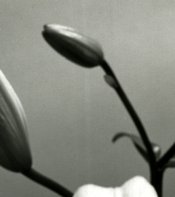
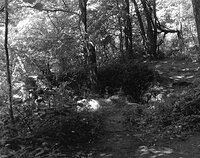
Here are scans of 2 prints. They're not the same frame, but from the same roll. Through several frames on the roll, there are those stripes. They aren't exactly the same on each frame, though, but all run top - bottom (the one is crooked because the print was crooked in the scanner). The film is Tmax 400, developed in tmax developer on a plastic reel. Did I not let it warm enough before loading?

 

Attachments

  • img187-1.jpg
    img187-1.jpg
    187 KB · Views: 186
  • img188-1.jpg
    img188-1.jpg
    199.5 KB · Views: 177
could it be film made with 50 year old equipment in a 3rd world country?
 
Bethe:

Hold the film - emulsion (glossy) side up, at an angle - can you see surface deposit marks? If so try washing the film again - use distilled water for the final rinse or for making up your photo flow bath. I have seen this effect many times at school.

Rare that Kodak products have emulsion problems - but you never know.

Mike
 
...... but all run top - bottom.....?
Do you mean parallel to the sprocket holes? If so, did you touch the film with something, like a sponge to remove water, when it was wet?
 
The marks are parallel to the sides (no sprocket holes - 120). They really don't appear to be on the surface, but re-washing can't hurt. Originally, they were lightly wiped with wet fingers to get the excess water off, then hung to dry. I've done the exact same thing 100s of times, but never with this happening. The marks really look like they're in the film.
 
At first, I thought they looked like squeegy marks, but you mention wiping them with your fingers. Maybe, just this once, you did it a little too hard or had a bit of crud on your fingers. Personally, after a wash in wetting agent, I hang the film to dry without touching the emulsion in any way. Still, must be a bit of a bummer 'coz they're nice shots.
 
Temprature wouldn't cause a problem like this. You would see under development or over development, but I've never seen the wrong temperature on it's own cause streaking like this. The thing about these being drying marks doesn't sit well with me either. The marks are too regular, the lines too straight; and there isn't any evidence that we can see from the examples of water spots which would likely also be a problem. I'm equally indisposed to believe that is an artifact of poor quality control. We are talking about Kodak TMY. Say what you will about Kodak; their quality control is very good. In all the years that I've used their products, I cannot recall a single case when poor results have been because of shoddy materials and not my own ham-fisted and bone-headed mistakes.

So I'm really at a loss here. The most likely cause is, I believe, water marks left behind after drying. You didn't mention if you used a wetting agent. If you didn't, I'd suggest you give PhotoFlo or an equivalent product a try. I use it with my own tap water and my negatives are always clean.
 
I do have sorta bony knuckles, I guess, so maybe they got that one spot? I'll try re-wetting and see what happens. I did use photo-flo. Who knows - I'm just jinxed with lillies of any type, I think.
 
Lines parallel to the sides can be pressure marks left by something on the film track in the camera. Check the edges of the frame for any kind of roughness. If that is the cause, whatever did it may no longer be there, which is very frustrating, since you won't know for sure without running another roll through the camera and in fact the whole process, but if the streak is across more than one frame, you can be fairly sure it was something somewhere in the film transport path.

The old Kodak Autographic cameras had a window in the back and a stylus by which you could write, through the paper backing, a message on any exposure. It would show as black on the negative.
 
P.S.

That was probably the reason for the great length to width ratio of 116 and 616 film. It allowed for a message at the bottom of the frame.
 
Who knows - I'm just jinxed with lillies of any type, I think.

Not so! I've seen your work and the lillies I saw were flawless and beautiful.

Unfortunately, all I can add is this shout of support, Bethe. I'll let the knowledgeable folks give you the important stuff.
 
Not so! I've seen your work and the lillies I saw were flawless and beautiful.
Thanks, Whitey! those were the 3rd try after the film got messed up in #1 and #2 were horribly overexposed. :smile: part of the reason for the title "Calla Cluster"

I think I'll check the pressure plate idea. I have 2 backs for the hassy and this might have been the newer one that I haven't used as much. I also don't think the lines are on the whole roll, which makes it more frustrating (they're just on the ones I want to print).
 
Photrio.com contains affiliate links to products. We may receive a commission for purchases made through these links.
To read our full affiliate disclosure statement please click Here.

PHOTRIO PARTNERS EQUALLY FUNDING OUR COMMUNITY:


Ilford ADOX Freestyle Photographic Stearman Press Weldon Color Lab Blue Moon Camera & Machine
Top Bottom