OP
OP

That company made hundreds of versions across dozens of products over the years.
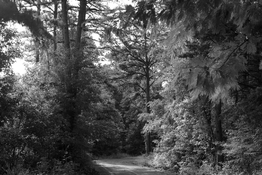
This is all I got…

Attachments
Last edited:

That company made hundreds of versions across dozens of products over the years.

Now that I understand the effect you are talking about, I'll tell you how I achieve that in Photoshop. It has nothing to do with saturation and everything to do with selective color filtration when converting from color to black and white.
First, a raw color shot saved as jpg:
View attachment 414129
Next, here's a fairly "straight" conversion to monochrome:
View attachment 414130
And here is a conversion to monochrome using the "Infrared" color filtration schema in the Black and White Adjustment layer, which emphasizes yellows and greens, subsequently making them very light in tone and looking like snow is on the foliage:
View attachment 414131
Notice how all of the foliage "glows"...

My images are Raw when I adjust them…!
So was mine. What you adjusted in your conversion was not saturation but rather a selective color filtration in conversion to black and white.
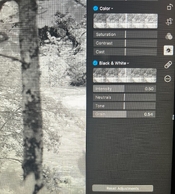
These are my only adjustments…!
For the color images to be converted to B&W I need only to select neutrals and no more color…!
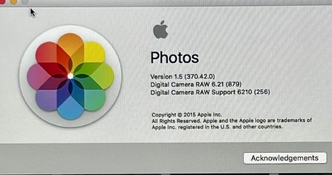
Ok, I think I understand what's happening. If you're working on RAW files (which are color natively in your case), the order in which the adjustments are made matters in this case. It's likely that the saturation adjustment is performed before the conversion to monochrome.

The saturation slider is one that can be taken up or down; down means you bring the image towards monochrome, up means you boost the saturation. So by default it will indeed be in the middle.Step 3. Saturation seems to be already engaged in the middle…
It's those adjustments under the Black & White panel that is doing most of the work in the conversion, while the saturation adjustment under the Color panel is lost in the conversion to Black and White.
It’s the saturation adjustment under the color panel that creates the snowy texture…!
Now that I understand the effect you are talking about, I'll tell you how I achieve that in Photoshop. It has nothing to do with saturation and everything to do with selective color filtration when converting from color to black and white.
First, a raw color shot saved as jpg:
View attachment 414129
Next, here's a fairly "straight" conversion to monochrome:
View attachment 414130
And here is a conversion to monochrome using the "Infrared" color filtration schema in the Black and White Adjustment layer, which emphasizes yellows and greens, subsequently making them very light in tone and looking like snow is on the foliage:
View attachment 414131
Notice how all of the foliage "glows"...

| Photrio.com contains affiliate links to products. We may receive a commission for purchases made through these links. To read our full affiliate disclosure statement please click Here. |
PHOTRIO PARTNERS EQUALLY FUNDING OUR COMMUNITY:  |