• Welcome to Photrio!
    Registration is fast and free. Join today to unlock search, see fewer ads, and access all forum features.
    Click here to sign up

Adding saturation to converted digital B&W images

sentinels of the door

A
sentinels of the door

  • 3
  • 0
  • 30
Sycamore Fruits

H
Sycamore Fruits

  • 0
  • 0
  • 21

Forum statistics

Threads
201,696
Messages
2,828,696
Members
100,894
Latest member
picpete
Recent bookmarks
1
OP
OP
Nikon 2

Nikon 2

Subscriber
Allowing Ads
Joined
Feb 19, 2023
Messages
1,645
Location
Moyers, Oklahoma
Format
Multi Format

Attachments

  • IMG_0131.jpeg
    IMG_0131.jpeg
    643 KB · Views: 22
Last edited:

djdister

Subscriber
Joined
Oct 6, 2012
Messages
268
Location
Maryland USA
Format
Multi Format
Now that I understand the effect you are talking about, I'll tell you how I achieve that in Photoshop. It has nothing to do with saturation and everything to do with selective color filtration when converting from color to black and white.

First, a raw color shot saved as jpg:
20250926_2104a.jpg


Next, here's a fairly "straight" conversion to monochrome:
20250926_2104b.jpg


And here is a conversion to monochrome using the "Infrared" color filtration schema in the Black and White Adjustment layer, which emphasizes yellows and greens, subsequently making them very light in tone and looking like snow is on the foliage:
20250926_2104c.jpg


Notice how all of the foliage "glows"...
 
OP
OP
Nikon 2

Nikon 2

Subscriber
Allowing Ads
Joined
Feb 19, 2023
Messages
1,645
Location
Moyers, Oklahoma
Format
Multi Format
Now that I understand the effect you are talking about, I'll tell you how I achieve that in Photoshop. It has nothing to do with saturation and everything to do with selective color filtration when converting from color to black and white.

First, a raw color shot saved as jpg:
View attachment 414129

Next, here's a fairly "straight" conversion to monochrome:
View attachment 414130

And here is a conversion to monochrome using the "Infrared" color filtration schema in the Black and White Adjustment layer, which emphasizes yellows and greens, subsequently making them very light in tone and looking like snow is on the foliage:
View attachment 414131

Notice how all of the foliage "glows"...

I don’t have Photoshop on my computer…😟
 
OP
OP
Nikon 2

Nikon 2

Subscriber
Allowing Ads
Joined
Feb 19, 2023
Messages
1,645
Location
Moyers, Oklahoma
Format
Multi Format
My images are Raw when I adjust them…!
 
OP
OP
Nikon 2

Nikon 2

Subscriber
Allowing Ads
Joined
Feb 19, 2023
Messages
1,645
Location
Moyers, Oklahoma
Format
Multi Format
So was mine. What you adjusted in your conversion was not saturation but rather a selective color filtration in conversion to black and white.

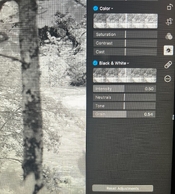
These are my only adjustments.
For the color images to be converted to B&W I need only to select neutrals and no more color…!
 

Attachments

  • IMG_0132.jpeg
    IMG_0132.jpeg
    709.5 KB · Views: 41
Last edited:

djdister

Subscriber
Joined
Oct 6, 2012
Messages
268
Location
Maryland USA
Format
Multi Format
These are my only adjustments…!

It's those adjustments under the Black & White panel that is doing most of the work in the conversion, while the saturation adjustment under the Color panel is lost in the conversion to Black and White.
 

koraks

Moderator
Moderator
Joined
Nov 29, 2018
Messages
26,716
Location
Europe
Format
Multi Format
For the color images to be converted to B&W I need only to select neutrals and no more color…!

Ok, I think I understand what's happening. If you're working on RAW files (which are color natively in your case), the order in which the adjustments are made matters in this case. It's likely that the saturation adjustment is performed before the conversion to monochrome.
 
OP
OP
Nikon 2

Nikon 2

Subscriber
Allowing Ads
Joined
Feb 19, 2023
Messages
1,645
Location
Moyers, Oklahoma
Format
Multi Format
Ok, I think I understand what's happening. If you're working on RAW files (which are color natively in your case), the order in which the adjustments are made matters in this case. It's likely that the saturation adjustment is performed before the conversion to monochrome.

Well:

Step 1. The color images are shown.
Step 2. I click on Neutrals
Step 3. It’s now converted to B&W
Step 4. Saturation seems to be already engaged in the middle of the scale…💻
 
Last edited:
OP
OP
Nikon 2

Nikon 2

Subscriber
Allowing Ads
Joined
Feb 19, 2023
Messages
1,645
Location
Moyers, Oklahoma
Format
Multi Format
It's those adjustments under the Black & White panel that is doing most of the work in the conversion, while the saturation adjustment under the Color panel is lost in the conversion to Black and White.

It’s the saturation adjustment under the color panel that creates the snowy texture…!
 
OP
OP
Nikon 2

Nikon 2

Subscriber
Allowing Ads
Joined
Feb 19, 2023
Messages
1,645
Location
Moyers, Oklahoma
Format
Multi Format
It’s the saturation adjustment under the color panel that creates the snowy texture…!

Clicking on any of the tabs under the Black & White panel turns the color image to monochrome…💻

They are:

Intensity
Neutrals
Tone
Grain
 

Attachments

  • IMG_0133.jpeg
    IMG_0133.jpeg
    692.6 KB · Views: 18
OP
OP
Nikon 2

Nikon 2

Subscriber
Allowing Ads
Joined
Feb 19, 2023
Messages
1,645
Location
Moyers, Oklahoma
Format
Multi Format
Now that I understand the effect you are talking about, I'll tell you how I achieve that in Photoshop. It has nothing to do with saturation and everything to do with selective color filtration when converting from color to black and white.

First, a raw color shot saved as jpg:
View attachment 414129

Next, here's a fairly "straight" conversion to monochrome:
View attachment 414130

And here is a conversion to monochrome using the "Infrared" color filtration schema in the Black and White Adjustment layer, which emphasizes yellows and greens, subsequently making them very light in tone and looking like snow is on the foliage:
View attachment 414131

Notice how all of the foliage "glows"...

Thank you for your help and time, really appreciate that, even though I have no idea what’s going on still…😂
 
Last edited:
OP
OP
Nikon 2

Nikon 2

Subscriber
Allowing Ads
Joined
Feb 19, 2023
Messages
1,645
Location
Moyers, Oklahoma
Format
Multi Format
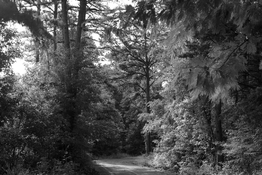
I converted this image not only to B&W but another world…🤓
 

Attachments

  • 1766585191429.png
    1766585191429.png
    148.4 KB · Views: 32
  • L1009254.jpeg
    L1009254.jpeg
    504.7 KB · Views: 32
Photrio.com contains affiliate links to products. We may receive a commission for purchases made through these links.
To read our full affiliate disclosure statement please click Here.

PHOTRIO PARTNERS EQUALLY FUNDING OUR COMMUNITY:



Ilford ADOX Freestyle Photographic Stearman Press Weldon Color Lab Blue Moon Camera & Machine
Top Bottom