• Welcome to Photrio!
    Registration is fast and free. Join today to unlock search, see fewer ads, and access all forum features.
    Click here to sign up

Adding saturation to converted digital B&W images

Recent Classifieds

Forum statistics

Threads
202,670
Messages
2,843,838
Members
101,452
Latest member
LookThroughTheLens
Recent bookmarks
0

Nikon 2

Subscriber
Allowing Ads
Joined
Feb 19, 2023
Messages
1,658
Location
Moyers, Oklahoma
Format
Multi Format
I’ve been interested in B&W photography lately.
Before getting my B&W film from the developer I converted the color digital photos to B&W on my screen.
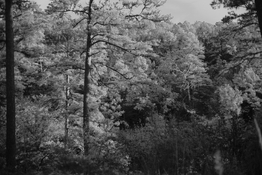
When I added saturation the images looked like a snow scene! What’s going on here…🧐
 
Last edited:
Saturation is a color attribute. Obviously, after converting to B&W you did not also convert to greyscale.

Yep, my computer is way too obsolete for those applications…!
 
My camera doesn’t have a screen and my computer lacks brains…!
 
Quite confused, here. What did you convert to black and white if the film has not been processed yet?

I converted my existing digital color images to black and white on the computer.
I then added saturation resulting in a snow covering effect…❄️
 
Last edited:
Could you post an example?
Yes please.

@Nikon 2 adding saturation to a monochrome image is in itself a meaningless action. I'm not too surprised that you run into an unintended effect.
I suspect that what you might be trying to do is adding color toning to your monochrome images. So something like sepia toning, or even a split-toned effect. Here's an example of what I mean:

Original monochrome image:
1766308564555.png


Sepia toned:
1766308592956.png


Split-toned (cool shadows, warm highlights):
1766308621182.png


I've exaggerated the toning for sake of the example. It's arguably too much, but this is just to get the point across.

I did this by starting with a monochrome image (in JPEG format), which I then converted into RGB color space. I then used the Curves tool for the toning effects, by adjusting the red and blue curves separately.

Manipulations like these can be done even on old hard- and software since the necessary features and computing power have been around for decades. So your old computer does not have to be a problem (btw, I made the examples above on a Windows computer that's ca. 12 years old).

 
I can't replicate what you describe. Could you post an example?

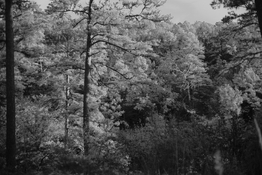
First image with no saturation added…!
Yes please.

@Nikon 2 adding saturation to a monochrome image is in itself a meaningless action. I'm not too surprised that you run into an unintended effect.
I suspect that what you might be trying to do is adding color toning to your monochrome images. So something like sepia toning, or even a split-toned effect. Here's an example of what I mean:

Original monochrome image:
View attachment 414100

Sepia toned:
View attachment 414101

Split-toned (cool shadows, warm highlights):
View attachment 414102

I've exaggerated the toning for sake of the example. It's arguably too much, but this is just to get the point across.

I did this by starting with a monochrome image (in JPEG format), which I then converted into RGB color space. I then used the Curves tool for the toning effects, by adjusting the red and blue curves separately.

Manipulations like these can be done even on old hard- and software since the necessary features and computing power have been around for decades. So your old computer does not have to be a problem (btw, I made the examples above on a Windows computer that's ca. 12 years old).

 

Attachments

  • L1002535.jpeg
    L1002535.jpeg
    291.4 KB · Views: 48
  • L1002535.jpeg
    L1002535.jpeg
    403.5 KB · Views: 52
Yes please.

@Nikon 2 adding saturation to a monochrome image is in itself a meaningless action. I'm not too surprised that you run into an unintended effect.
I suspect that what you might be trying to do is adding color toning to your monochrome images. So something like sepia toning, or even a split-toned effect. Here's an example of what I mean:

Original monochrome image:
View attachment 414100

Sepia toned:
View attachment 414101

Split-toned (cool shadows, warm highlights):
View attachment 414102

I've exaggerated the toning for sake of the example. It's arguably too much, but this is just to get the point across.

I did this by starting with a monochrome image (in JPEG format), which I then converted into RGB color space. I then used the Curves tool for the toning effects, by adjusting the red and blue curves separately.

Manipulations like these can be done even on old hard- and software since the necessary features and computing power have been around for decades. So your old computer does not have to be a problem (btw, I made the examples above on a Windows computer that's ca. 12 years old).
 

Attachments

  • L1002535.jpeg
    L1002535.jpeg
    291.4 KB · Views: 41
  • L1002535.jpeg
    L1002535.jpeg
    403.5 KB · Views: 48
OK, you've posted two images. What are they? Should I assume that the image on the left is the original monochrome image and the one on the right the image where you applied a hypothetical saturation adjustment? As I said earlier, saturation is meaningless in a monochrome greyscale image. As I also said earlier: what are you trying to accomplish?
 
OK, you've posted two images. What are they? Should I assume that the image on the left is the original monochrome image and the one on the right the image where you applied a hypothetical saturation adjustment? As I said earlier, saturation is meaningless in a monochrome greyscale image. As I also said earlier: what are you trying to accomplish?

Yes, the image on the left was not applied saturation as the image on the right was applied saturation…!
 
I wasn’t trying to accomplish anything. I was amazed that adding saturation did to the original image…!
 
I’ve gotten the idea that I can use the Nikon F2 for B&W photography and the Leica M-D for color photography.
The film is being processed still at Blue Moon camera for TIFF files only on a supplied flash drive.
My reasoning was to compare both the TIFF files to the converted B&W digital images…📷
 
I’ve gotten the idea that I can use the Nikon F2 for B&W photography and the Leica M-D for color photography.
Sure. Or the other way around. Or use both for both. The possibilities are endless.

I was amazed that adding saturation did to the original image…!

I am, too, but it remains a puzzle since nobody actually know what you did with what kind of software, except you of course. So for the rest of us this is an even bigger riddle. It beats sudokus though, IMO.
 
All my images are in RAW files and this could be why there’s so much manipulation to accomplish…🧐
 
Sure. Or the other way around. Or use both for both. The possibilities are endless.


I am, too, but it remains a puzzle since nobody actually know what you did with what kind of software, except you of course. So for the rest of us this is an even bigger riddle. It beats sudokus though, IMO.

Am I the only one here that can have a snow scene in the summer…🥸
 
The software is included in my computer.
OS X El Capitan, Version 10.11.6 ( late 2015)…💻
 

Attachments

  • IMG_0126.jpeg
    IMG_0126.jpeg
    365.5 KB · Views: 52
  • IMG_0126.jpeg
    IMG_0126.jpeg
    567.9 KB · Views: 49
The software is included in my computer.
OS X El Capitan, Version 10.11.6 ( late 2015)…
I don't know what photo/image editing app might have come with that, sorry.
Regardless, it's apparently an app that does something weird with a monochrome image if you adjust saturation. I'd consider that a bug.
 
I don't know what photo/image editing app might have come with that, sorry.
Regardless, it's apparently an app that does something weird with a monochrome image if you adjust saturation. I'd consider that a bug.

I quite like it! As long the final image is B&W…!
 

Attachments

  • IMG_0127.jpeg
    IMG_0127.jpeg
    309.2 KB · Views: 42
  • IMG_0129.jpeg
    IMG_0129.jpeg
    177.3 KB · Views: 37
I don't know what photo/image editing app might have come with that, sorry.
Regardless, it's apparently an app that does something weird with a monochrome image if you adjust saturation. I'd consider that a bug.

Maybe it needs calibration, but still like how it affects the image…🤓
 
I don't know what photo/image editing app might have come with that, sorry.
Regardless, it's apparently an app that does something weird with a monochrome image if you adjust saturation. I'd consider that a bug.

It’s adobe…!
 
Photrio.com contains affiliate links to products. We may receive a commission for purchases made through these links.
To read our full affiliate disclosure statement please click Here.

PHOTRIO PARTNERS EQUALLY FUNDING OUR COMMUNITY:


Ilford ADOX Freestyle Photographic Stearman Press Weldon Color Lab Blue Moon Camera & Machine
Top Bottom