• Welcome to Photrio!
    Registration is fast and free. Join today to unlock search, see fewer ads, and access all forum features.
    Click here to sign up
Resource icon

Online Tool for curve plotting and analyzation

Forum statistics

Threads
202,212
Messages
2,837,281
Members
101,196
Latest member
Hans85
Recent bookmarks
2

Bill Burk

Subscriber
Allowing Ads
Joined
Feb 9, 2010
Messages
9,494
Format
4x5 Format
Or do you mean I should add a feature that allows users to derive luxs from a "perfect" ISO curve and then use this value as a reference for other plots? This to me sounds a bit dodgy. I would probably suggest measuring the actual exposure given by the sensitometer. As the other method introduces many points of uncertainty.

In a consistent sensitometer the exposure will be the same every time. So finding it once is good enough.
 
OP
OP
reneboehmer

reneboehmer

Subscriber
Joined
Oct 6, 2024
Messages
212
Location
Austria
Format
Analog
Small update.

-Ci is now illustrated with the arcs drawn.
-The XY grid steps are now user definable to make for more accurate manual reading of the curves
-The ISO triangle illustration appears as a tickable box once the mode ISO is used.
-A mode that will plot each curve separately in the exported file (It will always show Ci and Delta X illustrations in the single curve plots, like on my picture below.)


Bildschirmfoto 2025-09-04 um 18.35.19.png

Bildschirmfoto 2025-09-04 um 18.48.41.png
 
Last edited:
OP
OP
reneboehmer

reneboehmer

Subscriber
Joined
Oct 6, 2024
Messages
212
Location
Austria
Format
Analog
@Bill Burk
I added the sensitometer calibration for you. There is a small button under the ISO options. (more...) if pressed you can add a “golden curve” this will be used to calibrate the X axis to your sensitometer, with the method described by you earlier.

It does it like this:
  • It looks at your reference density data and finds its speed point (the exposure needed to get a density of 0.1 above base+fog).
  • It calculates the real exposure in lux-seconds that a film with that box speed should have required according to the official ISO formula.
  • It finds the difference between the real value and your sensitometer's value. This difference is your personal "log H offset." A confirmation message will appear showing you this calculated offset value.
From now on (until you clear it or refresh the page), the tool is calibrated.

  • The chart's x-axis label will change from "Relative log H" to "Calibrated log H (lux-s)".
  • The ISO values calculated for all your other curves will now be absolute ISO speeds based on this calibration.
 
Last edited:
OP
OP
reneboehmer

reneboehmer

Subscriber
Joined
Oct 6, 2024
Messages
212
Location
Austria
Format
Analog
Oh, and the tool will show some info here now instead of on the graph directly. That gets too convoluted.In this case, the user selected to see the ISO triangle. The tool will tell the user info about it.
Bildschirmfoto 2025-09-04 um 19.49.27.png
 
OP
OP
reneboehmer

reneboehmer

Subscriber
Joined
Oct 6, 2024
Messages
212
Location
Austria
Format
Analog
Small Update:
-The export will now use JPG instead of PNG files, Pngs were getting to large in file size. The user can chose the JPG compression of the files with a slider.
-An area in the export document with citation of used literature
 
OP
OP
reneboehmer

reneboehmer

Subscriber
Joined
Oct 6, 2024
Messages
212
Location
Austria
Format
Analog
Update:
-The software will now not only interpolate from datasets but also extrapolate from the datasets. If you have too little data, the software will now output "recommended" times and speeds based on second degree polynomial equations. The data that will be "found" this way will be in displayed as Italic in the datasheet PDF. (This is information is not within your own data reach, and is therefore to be taken with a grain of salt. For small overreach it should be ok, but larger gaps should be filled by actual data.)
-A Delta X / Fixed density bug has been fixed. It now again works as intended.
-ISO parts have been renamed to EFS effective film speed
 
Last edited:
OP
OP
reneboehmer

reneboehmer

Subscriber
Joined
Oct 6, 2024
Messages
212
Location
Austria
Format
Analog
Update:
-You can now display curves in dotted and dashed line configurations of your choice. This will help to print on BNW printers and still being able to differentiate between curves.
-You can now choose to show, or not to show, the data points (dots) on the curves.
-You can now choose if you want to see the grid behind the curves.
123.jpg
 
OP
OP
reneboehmer

reneboehmer

Subscriber
Joined
Oct 6, 2024
Messages
212
Location
Austria
Format
Analog
Update to the page,

- you will now be able to perform C41 commercial process control with the tool.
- you will now be able to perform BNW commercial process control with the tool.

You can enter targets for different key values in the process controls and perform daily tests. The tool will plot the tolerance vs days in order to give you an overview of your process stability and quality.

- overall visual style has been streamlined


2.jpg


1.jpg
 
OP
OP
reneboehmer

reneboehmer

Subscriber
Joined
Oct 6, 2024
Messages
212
Location
Austria
Format
Analog
Small update,

The BnW process stability tracker is now a bit more refined and even gives feedback on the last couple of days of process stability, that will let you know if your actions have helped to bring the process back into tolerance. This is mostly for professional use in large scale replenishment systems.

I added full user customizable Action and control limits that will automatically scale into sight. Red is the action limit and yellow the control limit. Green is in tolerance.

You can now also generate a set of test data to import on the site, to see better what the tool actually does.
 
OP
OP
reneboehmer

reneboehmer

Subscriber
Joined
Oct 6, 2024
Messages
212
Location
Austria
Format
Analog
Update to the plotter.

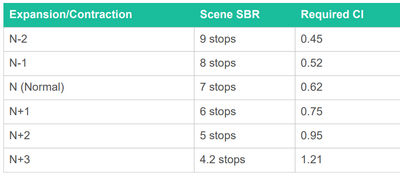
- The Zone system table had a bug that defined normal wrong. Now normal is defined after subject luminance ranges. 7 stops is normal.
- I also added an option to directly enter log D unit of step wedges as an addition to the X axis data input
 
OP
OP
reneboehmer

reneboehmer

Subscriber
Joined
Oct 6, 2024
Messages
212
Location
Austria
Format
Analog
- I am currently having some issues with my website provider, I am working on getting the website back online soon.
 
OP
OP
reneboehmer

reneboehmer

Subscriber
Joined
Oct 6, 2024
Messages
212
Location
Austria
Format
Analog
I will post the HTML file to downoad soon :smile: It will be up again soon too. I am in contact with the provider. It was a missunderstanding
 

FotoD

Member
Joined
Dec 15, 2020
Messages
438
Location
EU
Format
Analog
I haven't used your tool yet. But I still want to say thanks for sharing it. It looks very useful.
 
OP
OP
reneboehmer

reneboehmer

Subscriber
Joined
Oct 6, 2024
Messages
212
Location
Austria
Format
Analog
This is just the plain HTML file you can use until the website is back online. Download it and open it with a browser. Im still working on some fixes. The exported output is not to be fully trusted yet.
 

RalphLambrecht

Subscriber
Allowing Ads
Joined
Sep 19, 2003
Messages
14,980
Location
K,Germany
Format
Medium Format
The tool will now also plot these curves to sum up your data. The more data plots, the more precise this approximation curves become. The curves will help in working with the output data.


View attachment 405658

small criticism: the plots should name film and developer to be more useful in an archive.
 

Dan Rainer

Member
Joined
Mar 28, 2024
Messages
52
Location
Georgia, USA
Format
Multi Format
This is just the plain HTML file you can use until the website is back online. Download it and open it with a browser. Im still working on some fixes. The exported output is not to be fully trusted yet.

Thanks so much! Your tool has become really invaluable to my workflow.

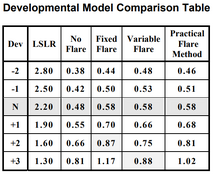
The one feature request I have is the ability to customize "Normal" CI values.
I like working with the Practical Flare Model from "What is Normal?" which is slightly different from the program's default (comparison below).
 

Attachments

  • Screenshot 2026-02-07 190327.png
    Screenshot 2026-02-07 190327.png
    44.6 KB · Views: 15
  • Screenshot 2026-02-07 190422.png
    Screenshot 2026-02-07 190422.png
    60.4 KB · Views: 15
OP
OP
reneboehmer

reneboehmer

Subscriber
Joined
Oct 6, 2024
Messages
212
Location
Austria
Format
Analog
Thanks so much! Your tool has become really invaluable to my workflow.

The one feature request I have is the ability to customize "Normal" CI values.
I like working with the Practical Flare Model from "What is Normal?" which is slightly different from the program's default (comparison below).

Hey Dan. I changed this so that the program would always find the development already calculating in dynamic flare in the background. I'm not all too happy with it atm since it's very confusing. Ill make some more options for you and send you the updated version to test.
 
OP
OP
reneboehmer

reneboehmer

Subscriber
Joined
Oct 6, 2024
Messages
212
Location
Austria
Format
Analog
small criticism: the plots should name film and developer to be more useful in an archive.
Hey Ralph! Yes that's a good point, the reason it isn't in the pictures is, that those curves are part of a document my program outputs. The curves will only ever be found in a document of a particular film. But for quick sharing it might be good to have the info on each page! I'll introduce the feature.
 
Photrio.com contains affiliate links to products. We may receive a commission for purchases made through these links.
To read our full affiliate disclosure statement please click Here.

PHOTRIO PARTNERS EQUALLY FUNDING OUR COMMUNITY:


Ilford ADOX Freestyle Photographic Stearman Press Weldon Color Lab Blue Moon Camera & Machine
Top Bottom