• Welcome to Photrio!
    Registration is fast and free. Join today to unlock search, see fewer ads, and access all forum features.
    Click here to sign up

My Dollar Densitometer

St Ives - UK

A
St Ives - UK

  • 2
  • 0
  • 54
Across the Liffey

H
Across the Liffey

  • Tel
  • Feb 25, 2026
  • 1
  • 2
  • 49

Recent Classifieds

Forum statistics

Threads
202,439
Messages
2,840,887
Members
101,333
Latest member
HalH509
Recent bookmarks
14
In fact, you do. Part of the trick (insofar it works) is in the fact that @Alan Townsend's "$1" meter relies on a >$150 DMM
My meter is not a great one. I would say kind of middle quality. It is autorange only with only three ranges on impedance. I had a much better one 20 years ago that got stolen.
since anything more modestly priced will generally not perform sufficiently well in high-impedance applications. Hence, part of the non-linearity you're running into is likely caused by meter itself.
Yes, mostly the current from the meter circuit causing heating in the CdS cell, which slews the reading
As I alluded to in my earlier post, there are also challenges in managing the actual light path. With low-density samples, these effects drop away sufficiently in some cases, but as you try to measure higher densities, things get tricky. This is in addition to more fundamental issues mentioned earlier.

Like I said before, the principle (sort of) works, but the question is how well it works, and what conditions need to be met to make it work sufficiently well. Once those are figured out, you've re-invented the densitometer...
No, just copying this old design with more modern instrumentation. http://www.jollinger.com/photo/meters/meters/sci-mech_a3.html

I had one of these when I was a kid and was amazed at the simplicity.
 
I see your point, but it might be more manageable in practice than it seems.
My comments are based on many practical projects along these lines and the theoretical issues encountered in the process. Give it a try, see how it goes. You may recognize some of the things I mentioned.

With the ADS1112's 16-bit base plus 4-bit PGA, we get a theoretical 20-bit range
I think it's 3-bit PGA, not 4. Also, you're simplifying things a bit. Refer to the datasheet and see how the input range works. You'll notice you lose another bit if you're working with a positive signal instead of a differential input. Now, of course, you could shift the analog signal into a differential pair on the ADC...we could complicate things in any number of ways. Then we'd have to see how many bits of precision we lose in this manageable practice to S/N issues.
Given a 16-bit DAC, the average electronics enthusiast (like myself) will struggle to get 16 'clean' bits of resolution. 18...wow. 20...amazing.

Off-the-shelf chips like the AD8310 log amp offer 95dB (approx.D 9.5) of range via internal six-stage gain. That’s likely far more than here requires. The issue you mentioned was resolved by ADI engineers.
Sure. Btw, in consumer quantities around here that's a €15 part. This excludes everything else needed. Like I said, the problem isn't that there's no solution. It's just that you end up reinventing the wheel and realize that it was a pretty decent wheel to begin with. Now, that can be lots of fun and might even make sense sometimes.

Anyway, we're veering off course. To each their own; presently I'm not working on a densitometer project, although in the long list of plans (most of which will never materialize) there indeed is also something (things, actually) along these lines.
 
I’ve got some good news about the cds cell measurements.

I put some more thought into this today, to figure out what’s happening. The response curves that bernard_L showed for a specific cds cell, shows linear response on a Log - Log scale. The straight lines don’t go through the zero point, so you have a non-zero Y intercept.

Any straight line function can be described in the form Y = mX + b where m is the slope and b is the Y intercept value (or value of Y when X=0). If we just look at Logs of the two resistance values or two conductance values for Y, we can look at the difference. Log(Y2) - Log(Y1) = Log(Y2/Y1) = Log((mX1+b/(mX2+b))

If b was 0 then this reduces to Log(mX1/mX2) and the m cancels out to be Log(X1/X2) This would mean the Log difference in light intensity (or difference in density) would equal the Log difference in Resistance or Conductance.

Unfortunately, b is not 0, so it’s not an easy calculation.

The good news is that if the Log Log response is linear over a wide range, we can still use a relatively simple linear formula to calculate densities. We just need two known reference densities to calibrate the system.

If you have a step wedge with already marked density values, you can use that.

I have a home-made step wedge I made decades ago with marked density values. I took two medium density steps, one at 2.16, and the other at 0.87. I then measured the resistance values of the cell under each step. I made sure the light source was strong enough to get resistance readings around the middle of it’s range. I then calculate the Log of each of these resistances.

Since density values are already Log units, these become my X values. The Log Resistance values become my Y units. If a straight line is plotted through these two points, you can easily calculate m and b. m = (Log(R2)-Log(R1))/(Density2-Density1)

b can be calculated using either one of the points b = Y - mX b = Log(R1) - m(Density1)

Now use the formula Y = mX + b to calculate the density for any other resistance value. To do that, you rearrange the formula to calculate Density from Resistance, to the form X = (Y - b)/m

or Density = (Log(Resistance3) - b)/m

I made up a simple Excel sheet to do the calculations. I have the two reference densities already entered. I just need to find the resistance values for the two points, and enter those. The last entry is the resistance at any other random point, and just calculate the density using the formulas. Excel does all the heavy lifting with the calculations. The results were excellent for a seat-o-the pants experiment. Caculated density values were very close to the actual density. I’ve attached some pictures of a couple of sample measurements. It definitely would be good enough for doing quick evaluations of the density of your negatives, without needing a densitometer.

If you’re using your reference steps in an enlarger, you need to calibrate the system at a specific height and aperture, and all the measurements need to be made at the same conditions.

In the sample pictures of the Excel file, X Density 1 and X Density 2 are my reference negative densities. Y Resistance 1 and Y Resistance 2 are going to vary depending on the brightness of the light source, so they are specific to each setup.
Slope m and b are calculated values, and will be unique for each setup. New Resistance is the measured Resistance value of the cell under an unknown density. Calculated Density is the calculated density of the unknown density, based on the linear formula. Actual is the actual measured
density via a densitometer.

CDS 1 pic.jpeg


CDS 2 pic.jpeg
 
Last edited:
My comments are based on many practical projects along these lines and the theoretical issues encountered in the process. Give it a try, see how it goes. You may recognize some of the things I mentioned.

I think it's 3-bit PGA, not 4. Also, you're simplifying things a bit. Refer to the datasheet and see how the input range works. You'll notice you lose another bit if you're working with a positive signal instead of a differential input. Now, of course, you could shift the analog signal into a differential pair on the ADC...we could complicate things in any number of ways. Then we'd have to see how many bits of precision we lose in this manageable practice to S/N issues.
Given a 16-bit DAC, the average electronics enthusiast (like myself) will struggle to get 16 'clean' bits of resolution. 18...wow. 20...amazing.

Sure. Btw, in consumer quantities around here that's a €15 part. This excludes everything else needed. Like I said, the problem isn't that there's no solution. It's just that you end up reinventing the wheel and realize that it was a pretty decent wheel to begin with. Now, that can be lots of fun and might even make sense sometimes.

Anyway, we're veering off course. To each their own; presently I'm not working on a densitometer project, although in the long list of plans (most of which will never materialize) there indeed is also something (things, actually) along these lines.

A decade ago, I worked on sensors featuring a dynamic range of 100+dB. Talking about AD8310 here doe'sn't mean a light meter really need 96dB; I just wanted to point out that hitting logD 4.0 isn't a “large dynamic range” or major hurdle in market level. To digress a bit, we prefer approaches that don't push the limits, such as buying a 32-bit ADC with a dynamic range exceeding 120dB for 16~20 bit measurement, as the core issue is the sensor, not how to measure it.

Most of your considerations exsist, but only really matter if you’re aiming for a fully automated, commercial-grade device for under $10. In this situation, all the parameters are runing at their edges. For a fun-project, it’s not that deep. As for OP's example, the 1972 A-3 model mentioned: components of that era even frequently utilized resistive dividers or bridge networks for range shifting rather than transistors. We're talking about some resistors, a range switch, and a 50uA meter here. Even a direct clone would hardly break the bank.

Also I agree with you about we have pretty decent wheel—buying a commercial product is always the most reliable way to access current industry standards.
 
Last edited:
Of course, I agree with you about pretty decent wheel—buying a commercial product is always the most reliable way to access current industry standards.

Well, yeah, although that's not the feeling I have with all this. the sentiment is that " a dmm plus a $1 CdS makes a perfectly good 1% accuracy densitometer." I have my doubts about that. Can you make something that works OK? Sure, you can. But then the question is whether it's worth it. What does an old, beat-up but still functioning film densitometer cost? It may take some time to find one, but generally it's possible and it'll cost a fraction of the DIY solution unless someone values their time at $0.

Anyway...I feel I've said enough on the subject. I find the question of a decent DIY topology for a densitometer interesting; it's a nice project that's not necessarily too complicated. I personally hold very little stock in the CdS + DMM solution for a variety of reasons, and usability is also one. But this thread isn't about the best solution; it's about whether the shoestring approach works for someone. I'm not that someone, so there's not much more I could say about the topic.
 
Well, yeah, although that's not the feeling I have with all this. the sentiment is that " a dmm plus a $1 CdS makes a perfectly good 1% accuracy densitometer." I have my doubts about that. Can you make something that works OK? Sure, you can. But then the question is whether it's worth it. What does an old, beat-up but still functioning film densitometer cost? It may take some time to find one, but generally it's possible and it'll cost a fraction of the DIY solution unless someone values their time at $0.

Anyway...I feel I've said enough on the subject. I find the question of a decent DIY topology for a densitometer interesting; it's a nice project that's not necessarily too complicated. I personally hold very little stock in the CdS + DMM solution for a variety of reasons, and usability is also one. But this thread isn't about the best solution; it's about whether the shoestring approach works for someone. I'm not that someone, so there's not much more I could say about the topic.

Quick question does the OP DMM has better than 1% accuracy in resistance measurement?
 
I’ve got some good news about the cds cell measurements.

I put some more thought into this today, to figure out what’s happening. The response curves that bernard_L showed for a specific cds cell, shows linear response on a Log - Log scale. The straight lines don’t go through the zero point, so you have a non-zero Y intercept.

Any straight line function can be described in the form Y = mX + b where m is the slope and b is the Y intercept value (or value of Y when X=0). If we just look at Logs of the two resistance values or two conductance values for Y, we can look at the difference. Log(Y2) - Log(Y1) = Log(Y2/Y1) = Log((mX1+b/(mX2+b))

If b was 0 then this reduces to Log(mX1/mX2) and the m cancels out to be Log(X1/X2) This would mean the Log difference in light intensity (or difference in density) would equal the Log difference in Resistance or Conductance.

Unfortunately, b is not 0, so it’s not an easy calculation.

The good news is that if the Log Log response is linear over a wide range, we can still use a relatively simple linear formula to calculate densities. We just need two known reference densities to calibrate the system.

If you have a step wedge with already marked density values, you can use that.

I have a home-made step wedge I made decades ago with marked density values. I took two medium density steps, one at 2.16, and the other at 0.87. I then measured the resistance values of the cell under each step. I made sure the light source was strong enough to get resistance readings around the middle of it’s range. I then calculate the Log of each of these resistances.

Since density values are already Log units, these become my X values. The Log Resistance values become my Y units. If a straight line is plotted through these two points, you can easily calculate m and b. m = (Log(R2)-Log(R1))/(Density2-Density1)

b can be calculated using either one of the points b = Y - mX b = Log(R1) - m(Density1)

Now use the formula Y = mX + b to calculate the density for any other resistance value. To do that, you rearrange the formula to calculate Density from Resistance, to the form X = (Y - b)/m

or Density = (Log(Resistance3) - b)/m

I made up a simple Excel sheet to do the calculations. I have the two reference densities already entered. I just need to find the resistance values for the two points, and enter those. The last entry is the resistance at any other random point, and just calculate the density using the formulas. Excel does all the heavy lifting with the calculations. The results were excellent for a seat-o-the pants experiment. Caculated density values were very close to the actual density. I’ve attached some pictures of a couple of sample measurements. It definitely would be good enough for doing quick evaluations of the density of your negatives, without needing a densitometer.

If you’re using your reference steps in an enlarger, you need to calibrate the system at a specific height and aperture, and all the measurements need to be made at the same conditions.

In the sample pictures of the Excel file, X Density 1 and X Density 2 are my reference negative densities. Y Resistance 1 and Y Resistance 2 are going to vary depending on the brightness of the light source, so they are specific to each setup.
Slope m and b are calculated values, and will be unique for each setup. New Resistance is the measured Resistance value of the cell under an unknown density. Calculated Density is the calculated density of the unknown density, based on the linear formula. Actual is the actual measured
density via a densitometer.

View attachment 416993


View attachment 416994

Thanks for the information. Not sure how you're making the measurements. Are you using your enlarger, or a desk lamp or other? You should be in a dark room with no other lights on to measure these other than a single lamp perpendicular to sensor. Are you eliminating side light from coming in?. Other objects in the room, the wall, or ceiling can reflect a fair amount of light. How do you read the meter? Built in light or other light or using the lock function? You could mount the sensor so all side light is blocked, use a diffuser over the CdS cell, or make other improvement to the physical mountings.

I suggest using your smart phone with a lux meter app and a desklamp to measure those two densities. When I do that, I get the same value for a negative density I measured at 2.2 density on my enlarger.
Also, if you measure each density seperately with CdS, what do you get?

I believe the power function you're trying to model has an exponent close to the squar root of 2, but unsure of the units for that. Remember that the response curve for a CdS cell is an arbitrary curve, not a math function. This curve has a tremendous dynamic range, much greater than most sensors, of over a million to one. For a 4.00 density range, we are looking at only 1/100 of that curve, a small enough section that it's nearly linear. We forget how distorted a log curve can be, kind of like thinking Greenland is a huge island due the distorted projection method used to make the globe on a flat piece of paper.

I appreciate you simplifying my metering method, but I think the math approach to this is a complication. Figuring out why you get such different results that I do is another matter.
 
Quick question does the OP DMM has better than 1% accuracy in resistance measurement?
I really have no idea, but it's a moderate quality one I paid $32 for about 25 years ago at Radio Shack. I mostly got it for the nifty rs232 feature it has. When making these measurements, the digits drift constantly at a low rate. They drift down on MOhms, but stabilize in about 15 second to about 2% lower. That happens when the auto ranges switches. On KOhms, the meter doesn't drift much but sometimes drifts upward very slowly for a short while. I assumed these could be temperature drifts from current heating but doubt this now. Possibly a meter problem. I looked it up today and found the temperature coefficient is a function of the light level, being low at high illumination, and higher at low illumination. A quick question with my typical encyclopedic answer. 🙂
 
Thanks for the information. Not sure how you're making the measurements. Are you using your enlarger, or a desk lamp or other? You should be in a dark room with no other lights on to measure these other than a single lamp perpendicular to sensor. Are you eliminating side light from coming in?. Other objects in the room, the wall, or ceiling can reflect a fair amount of light. How do you read the meter? Built in light or other light or using the lock function? You could mount the sensor so all side light is blocked, use a diffuser over the CdS cell, or make other improvement to the physical mountings.

I suggest using your smart phone with a lux meter app and a desklamp to measure those two densities. When I do that, I get the same value for a negative density I measured at 2.2 density on my enlarger.
Also, if you measure each density seperately with CdS, what do you get?

I believe the power function you're trying to model has an exponent close to the squar root of 2, but unsure of the units for that. Remember that the response curve for a CdS cell is an arbitrary curve, not a math function. This curve has a tremendous dynamic range, much greater than most sensors, of over a million to one. For a 4.00 density range, we are looking at only 1/100 of that curve, a small enough section that it's nearly linear. We forget how distorted a log curve can be, kind of like thinking Greenland is a huge island due the distorted projection method used to make the globe on a flat piece of paper.

I appreciate you simplifying my metering method, but I think the math approach to this is a complication. Figuring out why you get such different results that I do is another matter.

I think you're misunderstanding what I'm doing. I'm taking 2 measurements with the cds cell, using the multimeter to read resistance in ohms. The readings are done the same way that you describe them. You can put the film over the sensor, or put the film in the enlarger. The only difference is that you need to know the actual density value of the film for the two readings. Once you have those two readings, you can calculate the density for any other piece of film with an unknown density by just taking the resistance reading with that film over the sensor, or in the enlarger. The accuracy is incredibly good, as can be seen in the two samples shown.

I started with two pieces of film, one with a density of 2.16, and the other with a density of 0.87. You can use any two known density values you have available, since you just need two points to define any straight line. Those two points are used to create the formula for the straight line, and then you can calculate the density value of any other piece of film, if you measure the resistance under the same lighting conditions.

You're just calculating the m and b parameters for the straight line function Y=mX + b. Once you have those, you can calculate the density of any other piece of film by just measuring the resistance.

In the first example, I used my two reference pieces of film to determine the m and b parametes. Once I have those, I just measure the resistance of another piece of film. In the first unknown sample I measured a resistance of 22,700 ohms. Using the formula, I calculated that this would be a density of 1.75. The actual measurement on a densitometer was 1.72.

In the second example, I'm still using the same m and b parameters that I used in the first, since the setup was the same. In the second unknown sample I measured a resistance of 1954 ohms. Using the formula, I calculated that this would be a density of 0.179. The actual measurement on a densitometer was 0.18.

This works, since there is a direct correlation between the Log of light intensity, and density, since density is also on a logarithmic scale. You're essentially plotting the Log of Resistance vs Density. That's a linear relation, and can be described by the simple straight line function. You need two points to fully define the line, and once you've done that you can calculate any other density based on the resistance value. The math is extremely simple.
 
  • Yezishu
  • Yezishu
  • Deleted
  • Reason: repeat post
The old meters using these cells, including the Science and Mechanics meter I showed, used a mercury cell, which gives 1.3 volts, and gives less heating than the DMM will, which likely uses a 5 volt reference.
There might be a slight difference here. While DMMs use a 9V battery and a 5V reference voltage, their resistance measurements typically have very low open-circuit voltages (0.3~0.6V), sometimes not even enough to conduct a diode. Perhaps you could test this with another DMM.
Quick question does the OP DMM has better than 1% accuracy in resistance measurement?
DMM claims are generally around 0.5% to 1%, plus a few "numbers". These instruments usually yield more accurate results if carefully calibrated before testing (not after months of storage), but at the cost of usability. Regarding the usage by OP et al., if I understand correctly, calibrated with another densitometer before using, measure twice in a short time and comparing the relative values, the reults might be better as many long-term drifts don't have time to occur.
 
There might be a slight difference here. While DMMs use a 9V battery and a 5V reference voltage, their resistance measurements typically have very low open-circuit voltages (0.3~0.6V), sometimes not even enough to conduct a diode. Perhaps you could test this with another DMM.

DMM's supply a constant current when in resistance mode rather than supplying a voltage.
 
My meter is not a great one. I would say kind of middle quality. It is autorange only with only three ranges on impedance. I had a much better one 20 years ago that got stolen.

Yes, mostly the current from the meter circuit causing heating in the CdS cell, which slews the reading

No, just copying this old design with more modern instrumentation. http://www.jollinger.com/photo/meters/meters/sci-mech_a3.html

I had one of these when I was a kid and was amazed at the simplicity.

But those meters are just a reference meter to give the print the same exposure as the reference. It's not a densitometer.
 
Density=log(r1/r2) where r1>r2. For phone lux meter Density=log(Lux1/Lux1) where Lux1 is reading the lamp without the density, Lux2 is reading through the density with same lamp.

Depending on your CdS cell you would need to divide the result by a constant.
 
I think you're misunderstanding what I'm doing.
I understand what you're doing, modeling CdS celll as a power function and using two densities to calculate the equation, then using that equation with a measured value.

Attached is a document that may be helpful.
 

Attachments

  • APP_PhotocellIntroduction.pdf
    406.9 KB · Views: 25
There might be a slight difference here. While DMMs use a 9V battery and a 5V reference voltage, their resistance measurements typically have very low open-circuit voltages (0.3~0.6V), sometimes not even enough to conduct a diode. Perhaps you could test this with another DMM.
That would be much better than a higher voltage, as I assumed. That would be better than the 1.3 volt mercury batteries. My only other DMM is a very cheap on, but yes, I can try that for fun when I can find it. 🙂
DMM claims are generally around 0.5% to 1%, plus a few "numbers". These instruments usually yield more accurate results if carefully calibrated before testing (not after months of storage), but at the cost of usability. Regarding the usage by OP et al., if I understand correctly, calibrated with another densitometer before using, measure twice in a short time and comparing the relative values, the reults might be better as many long-term drifts don't have time to occur.
You may be combining my thoughts with Sharktooth there somewhat. Sharktooth has another densitometer, I use my phone lux app as a crude densitometer over a shart range of about 2.5 density units. That's a free densitometer everybody has in their pocket. I get the same results reading densities with my phone app as with my CdS cell method. Sharktooth does not get the same result directly, so used results from another densitometer to calibrate the CdS cell density readings.

Thanks for all your information.
 

Attachments

  • APP_PhotocellIntroduction.pdf
    406.9 KB · Views: 26
But those meters are just a reference meter to give the print the same exposure as the reference. It's not a densitometer.
No, that meter is a camera exposure meter, a darkroom enlarger exposure meter, and a densitometer. Read near the end of the article, it shows pitctures of a densitometer made from the plans they included for that. In my version, I used a dimmer with a 15W tungsten bulb so I could adjust the meter reading to the constant they required so that the meter scale did not need to be changed to make a density reading. They included a small circular plastic coated paper calculator to convert the current readings to other units, including density units. That converter was very crude and difficult to read. I don't recall for sure, but it likely converted the linear meter reading to log exposure readings. F stop and shutter speeds are logrythmic units, along with density units as well.
 
No, there's no power function involved. It's just the formula for a straight line.

I'll try do describe it a different way. I'm just creating a graph with Log Resistance values on the Y axis, and Density values on the X axis. I need two points on the graph in order to define the straight line function. The X values for those two points are the known density values of two pieces of film. The Y values for the two points are the Log(R) values for these two points, The R values are the ohms readings from the multimeter under the two known pieces of film.

I now make the assumption that there is a linear relationship between the Log(R) values and density values, such that they can be described by a straight line function Y = m*X + b where m is the slope and b is the Y intercept.

Now that I have the two points identified on the graph, I can calculate the slope parameter m by evaluating the rise/run, or m = (Log(R2) -Log(R1))/(Density2-Density1). The b parameter can then be solved by b = Log(R1) - m*Density1.
Now that I have both the m and p parameters, I can solve for any unknown density by measuring the Resistance measured under that density filter, taking the Log of that Density, then plugging that into the straight line formula.
Y = mX + b
Since we want to solve for the density value X, we rearrange the formula to be X = (Y - b)/m
The Y value will be the Log of the Resistance measured, and b and m have already been calculated.

This only works because there is a linear relationship between the Log(R) values and the Density values. This makes sense when considering that the graph of the cds cell response is also linear with Log(R) values on the Y axis, and Log(Lux) values on the X axis. Density values are already logarithmic, and the Density changes the Lux received by the sensor.

Really, the proof is in the pudding. If you have a step wedge with several density values, you can plot them out yourself, to see if the data forms a straight line. Just plot the density values on the X axis, and the Log(R) values on the Y axis.

There is no complicated math whatsoever, and I'm not doing any conversions calculations for light, or any other wild analysis. As long as your light remains the same, the linear formula remains the same.
 
Depending on your CdS cell you would need to divide the result by a constant.
Dividing the log of the delta resistance over the log of the delta illumination) gives the slope of the response curve, which is the slope of the line between the two points. So the denominator would also be a variable, the log of the delta of the illumination change, not a constant.

Another detail I failed to remember is also in this document attached, that the color temperature of the light also changes the curves a fair amount, and they normalize to 2850 deg. K. I use a 2800 deg. K white LED type lamp to be as close to this as possible without melting my negatives.

This document only covers two materials over about a four decade range. I had another with more material types and ranges but can't find that now. I used this one when I setup my current system. I'm also using mine at pretty close to 100 lux max, so would have 1 lux with a 2.00 density. This is the range is use about 99% of the time. CdS would be what they are calling a type 3 material in this document. These closely follow the response of the human eye and are recommended for densitometers and exposure meters, according to this document.
 

Attachments

  • APP_PhotocellIntroduction.pdf
    406.9 KB · Views: 27
To put my money where my mouth is, I've plotted the Log of the resistance readings from the multimeter vs the density values of pieces of film over the cds sensor. I've done this for two different light levels. Here's the data and the graph.

CDS Graph 2.jpeg


You can see the data is very linear, and well suited to a straight line function of the form Y = mX + b
I'm showing a least squares linear regression fit to both sets of data.

For any set stable light level, you only need two points to define the linear function. With that, you can calculate the density of another piece of film based on the resistance value from the multimeter.

In practical terms, you start with two pieces of film with known density. Place each piece of film over the cds sensor and measure the resistance value of the cds cell for each.
You need to make a calculation to determine the m and b parameters for your straight line function

m is the slope m = (Log(R2) - Log(R1))/(Density2-Density1)

b is the Y intercept b = Log(R1) - m*Density1

Now that you have m and b, you can calculate the density of another piece of film of unknown density. Just measure the resistance of the cds cell with that piece of film over the sensor.

The density of that piece of film will be = (Log(measured resistance) - b)/m

In other words, you need two resistance measurements to calibrate the system to get the m and b parameters. After that, you can find the density of any other unknown piece of film by just measuring the resistance and plugging it in the formula. It's easily set up in a simple Excel file, so you just need to enter the resistance values, and let Excel give you the result.
 

This article is about my Popular Mechanics A3 Light Meter that I bought when I was a kid and was the basis for my first building of a dollar densitometer about 25 years ago. I used mine mostly in the darkroom, but also built a densitometer for it as well. It was too clunky to use as a light meter, although I did use in on a Crown Graphic groundless a few times. If only that meter movement had a locking function... as it was, it was a two person job using it that way. 🙂

IMG_9836.jpeg


That was a fun meter. I used it to meter the eclipse. It needed a mercury battery, but I used a voltage regulator circuit to give it 1.35 volts. I didn’t find it to be accurate so I gave it to a friend, but it was a real fun tool for studying light.
 
I use a 2800 deg. K white LED type lamp to be as close to this as possible without melting my negatives.
These closely follow the response of the human eye and are recommended for densitometers and exposure meters, according to this document.

Yes, a similar issue arises when replacing selenium-cell in cameras; modern silicon photocells differ not just in their response curves, but in their overall spectral response. Correcting metering results based on color temperature and film type for different scenes can be a little complex.
Pentax not only specifying the CdS typeds but also bin their CdS sensors into three colors based on sensitivity and matched each sensitivity with a corresponding type variable resistor, technicians could swap them together without too much calibration.
But here since densitometers are used with a known fixed light source in darkroom—I guess careful calibration should be enough.
 
No, that meter is a camera exposure meter, a darkroom enlarger exposure meter, and a densitometer. Read near the end of the article, it shows pitctures of a densitometer made from the plans they included for that. In my version, I used a dimmer with a 15W tungsten bulb so I could adjust the meter reading to the constant they required so that the meter scale did not need to be changed to make a density reading. They included a small circular plastic coated paper calculator to convert the current readings to other units, including density units. That converter was very crude and difficult to read. I don't recall for sure, but it likely converted the linear meter reading to log exposure readings. F stop and shutter speeds are logrythmic units, along with density units as well.

Is there a plan to build that thing? or a schematic diagram?
 
Is there a plan to build that thing? or a schematic diagram?

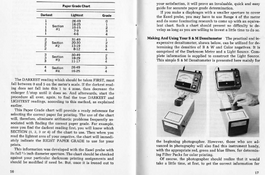
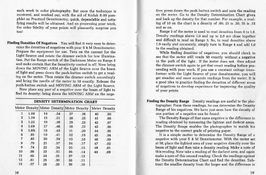
There's a manual in the OP‘s link that explains how to use this lightmeter as a densitometer.
The key features are a white light source and a small hole; I've included two screenshots.
16-17.png18-19.png
Of course, as the manual says, its performance is just for beginner photographers and it would take a little time to get the correct information, You may deduce that it's actually not comparable to commercial densitometers, but simple enough for DIY.
 
the average electronics enthusiast (like myself) will struggle to get 16 'clean' bits of resolution. 18...wow. 20...amazing.

I just saw some new wheels, today I noticed a old equipment utilized TSL2561 or TSL25715 for UV intensity monitoring which has a nominal 100M:1 dynamic range, and checked their updated light sensors. Their new TSL2572 Ambient Light Sensor features two built-in 16-bit ADCs, four programmable gain from 1x to 120x, with integration steps 0~256, results in 800M:1 dynamic range (roughly 29.5-bit), allows dark room to 60K lux sunlight operation——all above in a small DFN chip. With I2C digital interface, it requires almost no external components, yet it’s priced at only $1.91 on DigiKey. I think this would be a good choose for homemade projects.
 
View attachment 417072

That was a fun meter. I used it to meter the eclipse. It needed a mercury battery, but I used a voltage regulator circuit to give it 1.35 volts. I didn’t find it to be accurate so I gave it to a friend, but it was a real fun tool for studying light.

Do you have manual on how to use this meter?
 
Photrio.com contains affiliate links to products. We may receive a commission for purchases made through these links.
To read our full affiliate disclosure statement please click Here.

PHOTRIO PARTNERS EQUALLY FUNDING OUR COMMUNITY:


Ilford ADOX Freestyle Photographic Stearman Press Weldon Color Lab Blue Moon Camera & Machine
Top Bottom