
• Welcome to Photrio!
    Registration is fast and free. Join today to unlock search, see fewer ads, and access all forum features.
    Click here to sign up

Film edge density and color issue

Recent Classifieds

Forum statistics

Threads
204,294
Messages
2,866,713
Members
102,212
Latest member
Lasco
Recent bookmarks
0

Kuby

Member
Joined
Aug 25, 2017
Messages
66
Location
Toronto, Ontario
Format
Medium Format
I'm curious to know if the following is an issue that can be fixed by tweaking my development workflow.

I'm experiencing extremely clean results in the middle of my frames, but at the edge of my frames the colour bleeds into a cyan/blue. It is often subtle enough not to cause issues and is much worse in some frames than others. It's more of a minor inconvenience that anything but I'm curious to know if others experience this, if it's normal, and if it's correctable. Please see attached photo for an example (and note that I pulled the density way down to exaggerate the issue).

My development workflow is as follows and was derived from PE and others in this forum (everything at 37.8 C):

Using Jobo CPP2 with lift
4-8 rolls at a time
Either 400 ml or 850ml of chem

2x 30 sec water baths

3:15 dev

1 min stop bath with white vinegar at 1:4

1 min wash

6.5 min Bleach

3.5 min wash with several fill and dumps

6.5 min fix

3.5 min wash with several fill and dumps

1.5 min final rinse

Any thoughts as to how to get clean development all the way to the edge of the frame?

 

Attachments

  • Raven-007.jpg
    Raven-007.jpg
    478.1 KB · Views: 246
I would look whether this is a camera issue. Can you try test shots with standard run-off-the-mill B&W film? It definitely does not look like a processing defect to me, but maybe others could chime in here.
 
I would look whether this is a camera issue. Can you try test shots with standard run-off-the-mill B&W film? It definitely does not look like a processing defect to me, but maybe others could chime in here.
+1

Hi,

do your photos look ok, if you don't develope by yourself? If yes, it's about developement.
do your photos look ok, if you use a different camera? If yes, some kind of light leak is in your camera/back.

Best
Jens
 
Ah. Good point. This is shot with an RZ67proii. I also have a Hasselblad 500cm and I just realized that this is never an issue with the frames from that camera. So it is an issue with my camera/back. I have two backs for my RZ so it is hard to know which one/what will be causing the issue. Because this camera has a rotating back, I wonder if it is a common problem?

I would look whether this is a camera issue. Can you try test shots with standard run-off-the-mill B&W film? It definitely does not look like a processing defect to me, but maybe others could chime in here.

+1

Hi,

do your photos look ok, if you don't develope by yourself? If yes, it's about developement.
do your photos look ok, if you use a different camera? If yes, some kind of light leak is in your camera/back.

Best
Jens
 
Can a processing fault really be excluded?

Otherwise:
Looking at the mounting flange of such back I do not see how light could leak in there. But have a look at other parts of your magazine.
I assume the camera body can be excluded as the culprit.
 
Last edited:
Seems like a film back light seal issue, especially if the defect is not present on images from another camera.

Could also be a processing defect. 8 rolls at one time is a fair quantity of film. Pouring time and marks related to pouring should be considered.
 
If you adjust the colour of that shot to render the edges white, you may have a more accurate indication of the problem.
The intervening scan makes it difficult to help. May we see the negatives - film rebates included?
 
So it is an issue with my camera/back. I have two backs for my RZ so it is hard to know which one/what will be causing the issue. Because this camera has a rotating back, I wonder if it is a common problem?

Never had a light leak problem in my RZ67 of any kind. This camera is workhorse built to never fail.

If you are using also a "ProII" back, it is highly unlikely to have ligh leaks there. They have a very robust design and don't need foams to guarantee sealing from light. Plain "Pro" backs have a more standard design a could be a suspect.
 
All film backs need seals replaced at some point.
 
All film backs need seals replaced at some point.
The RZ Pro II backs don't have light seals - they have a light labyrinth that makes seals unnecessary.
Remember, however, that the rotating adapters can also leak light if they have seals and those seals degrade.
By the way, I think the colour of the light leak is false. I think if you correct your scan to neutralize the colour, the edges end up white.
 
Sorry for the delayed reply. After working on this some more I realized that I am at times experiencing the same/similar problems with my hasselblad frames. So I do think that this is a development issue. Below I have included some photographs that might shed some light.

This is just an "auto" rendering using an Flexcolor with an Flextight. No settings are applied and all it is doing is finding the white and black point within the image.

The second photo I have taken the eye dropper for blacks and chosen the rebate for my black point, but otherwise it is the same.

The last photo I have taken the second image and added a slight curves adjustment to render a more pleasing image. But I find it frustrating that I cannot achieve a pleasing image without adding contrast and crushing the information.

Note that the background is grey with a very slight hint of red, whereas the finished image has large amounts of blue/cyan.
 

Attachments

  • Leanne Janke 002-Web Res.jpg
    Leanne Janke 002-Web Res.jpg
    436.4 KB · Views: 168
  • Leanne Janke 002 Blacks - Rebate-Web Res.jpg
    Leanne Janke 002 Blacks - Rebate-Web Res.jpg
    370.8 KB · Views: 152
  • Leanne Janke 002 - Edited-Web Res.jpg
    Leanne Janke 002 - Edited-Web Res.jpg
    343.6 KB · Views: 135
Alternatively, I can't help but wonder if maybe this particular frame has something to do with the lighting and not development issues. I'm just puzzled. I sifted through some other frames from my hasselblad and they're perfect...
 
It is the lighting,
 
We're in agreement there.

Referring back to the original image then, do you think my film back is at fault? I'm still a bit stymied by that one.
I think it is the lighting there as well.
I think the colour comes from the scan. If you neutralize the edges to white by reducing magenta and blue, the skin tones are the sort of tones that come from some light sources, but the effects at the edge just look like uneven lighting - the sort of effect that a background with some curl might give you.
 
I think it is the lighting there as well.
I think the colour comes from the scan. If you neutralize the edges to white by reducing magenta and blue, the skin tones are the sort of tones that come from some light sources, but the effects at the edge just look like uneven lighting - the sort of effect that a background with some curl might give you.

I can pretty much guarantee in that case that it's not the lighting. It's a pink backdrop with a hard flash coupled with big softbox behind for fill. The lighting style here just wouldn't have created that kind of unevenness.
 
The pink backdrop looks to me to be curling toward the camera at the edges - which with fairly direct flash (note the shadows) can often lead to specular reflection.
And of course a pink backdrop can make scanning "interesting".
 
Ah well. I guess we can agree to disagree on that point. It's a 9 ft. backdrop that she was in the middle of and there are other frames that don't have this problem.
 
Can you show us the negatives - including the rebates and between the frames.
Scans just don't work when you are trying to diagnose problems that may, or may not, be related to development.
 
Can you show us the negatives - including the rebates and between the frames.
Scans just don't work when you are trying to diagnose problems that may, or may not, be related to development.

Ah okay. Yeah give me a sec.
 
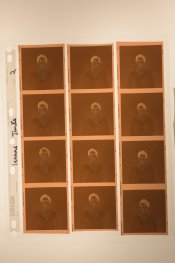
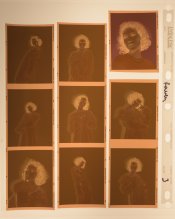
Here are the two negatives in question, both opened in PS as .fff files and then saved as jpegs. Also attached are the contact sheets which hopefully show okay. I have to photograph them on a crappy home built light table and the invert in PS to create previews, because I don't have a flatbed.
 

Attachments

  • Leanne-Janke-002-Web Res.jpg
    Leanne-Janke-002-Web Res.jpg
    312.3 KB · Views: 119
  • Raven-007-Web Res.jpg
    Raven-007-Web Res.jpg
    427.8 KB · Views: 136
  • Raven-202-Web Res.jpg
    Raven-202-Web Res.jpg
    321.7 KB · Views: 117
  • Raven-206-Web Res.jpg
    Raven-206-Web Res.jpg
    332.5 KB · Views: 152
Last edited:
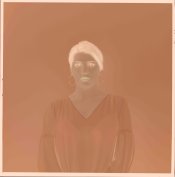
Here's the individual files with a significant exposure increase to help show the discrepancy in development around the edges.
 

Attachments

  • Leanne-Janke-002-Web Res-2.jpg
    Leanne-Janke-002-Web Res-2.jpg
    411 KB · Views: 124
  • Raven-007-Web Res-2.jpg
    Raven-007-Web Res-2.jpg
    398.9 KB · Views: 123
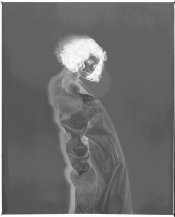
Okay and here I've taken some fun liberties with the negatives to try see what's going on. I think it's helping me understand what's going on but I'd be interested to hear others thoughts.

My take is that the frame of Leanne is just poorly lit (oops). My fill light basically cast a secondary shadow that causes the overall frame to have odd and uneven light.

The frame of Raven to me looks like something else going on though. I see unevenness all throughout the negative which I presume suggests error in development.

Edit: Now that I think about it... the area between frames looks pretty clean on the contact sheets. So maybe uneven development is not the issue and what I'm seeing in the middle of the frame is unevenness on the paper. I'm still confused about the edges, though.
 

Attachments

  • Leanne-Janke-002-Web Res-3.jpg
    Leanne-Janke-002-Web Res-3.jpg
    420.1 KB · Views: 123
  • Raven-007-Web Res-3.jpg
    Raven-007-Web Res-3.jpg
    356.9 KB · Views: 156
Last edited:
I've looked as carefully as I can at the photos of your negatives, and I cannot find any indication of un-even development.
However, I also don't see any evidence of the light being un-even.
I think your problem is coming in at the scanning stage.
 
I've looked as carefully as I can at the photos of your negatives, and I cannot find any indication of un-even development.
However, I also don't see any evidence of the light being un-even.
I think your problem is coming in at the scanning stage.

Gotcha. Thanks for your help Matt.
 
Photrio.com contains affiliate links to products. We may receive a commission for purchases made through these links.
To read our full affiliate disclosure statement please click Here.

PHOTRIO PARTNERS EQUALLY FUNDING OUR COMMUNITY:


Ilford ADOX Freestyle Photographic Stearman Press Weldon Color Lab Blue Moon Camera & Machine
Top Bottom