
-
Welcome to Photrio!Registration is fast and free. Join today to unlock search, see fewer ads, and access all forum features.Click here to sign up
- Home
- Forums
- Analog Workflow Forums (100% Analog/Traditional)
- Analog Equipment
- 35mm Cameras and Accessories
You are using an out of date browser. It may not display this or other websites correctly.
You should upgrade or use an alternative browser.
You should upgrade or use an alternative browser.
Why do my photos look like this?
-
A
- Thread starter Bolal
- Start date


Recent Classifieds
-
For Sale Ilex Oscillo-Paragon no. 3X universal shutter (CLA'd)
- Started by OAPOli
-
For Sale Stainless Developing Tank with 2 35mm Reels, Japan
- Started by Jon Shiu
-
For Sale Kodak Medalist II camera case
- Started by campy51
-
Want to Buy Lomo UPB-1 - 16mm cine film processing tank
- Started by blee1996
-
For Sale Really Right Stuff RRS BH-55 Ball Head
- Started by samuelphoto
Forum statistics

Thanks for your efforts.
It actually assists us if we can see the negatives a strip at a time, because there can be clues in the area between the frames.
And if can separate them a bit from the backlighting source, the banding and texture problems should improve. Try holding them 5cm away from the screen.
It actually assists us if we can see the negatives a strip at a time, because there can be clues in the area between the frames.
And if can separate them a bit from the backlighting source, the banding and texture problems should improve. Try holding them 5cm away from the screen.
It is also worth mentioning that the film passed through a single 'film safe' airport scanner, though I have read this shouldn't impact any film above iso 800.
Film safe, eh?
So they say.
Third photo: what do you see?


I saved the negatives to my hd, opened them in PS and selected Invert. The color is inaccurate but the vignette and stripes become apparent as tonal differences.
Time for that camera to see a service technician.
Time for that camera to see a service technician.
I'm not too sure what people mean by 'banding' or 'tonal differences' - could you elaborate? Thank you!I saved the negatives to my hd, opened them in PS and selected Invert. The color is inaccurate but the vignette and stripes become apparent as tonal differences.
Thanks for your efforts.
It actually assists us if we can see the negatives a strip at a time, because there can be clues in the area between the frames.
And if can separate them a bit from the backlighting source, the banding and texture problems should improve. Try holding them 5cm away from the screen.
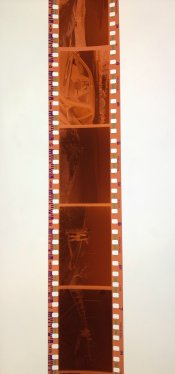
Here is a full strip from the roll in question. I can't help but notice that some of the photos turned out brilliantly, like this one:

Let me know!
Seeing the last set of negs and the print, they both seem fine. As said most likely to be a scanning issue by the lab.
Terry S
Terry S
- Joined
- Jun 21, 2003
- Messages
- 29,810
- Format
- Hybrid
hi OP
hate to ask this but do you have a darkroom handy where you are ?
you can see what is going on with your camera or if it is the lab
by taking a scrap of photo paper ( RC is fine ) and putting it over the film gate ..
rate it at about iso 24 ( ilford rc Mg ) take 1 photograph out side in open shade
so you will have mid tones .. stop your lens down to about f5.6/8 and use a tripod and take a photograph
go back in, and process it in print developer for 1 min stop then fix
and look at your negative ( the operation will take about IDK 6 mins total ) ...
scan it if you want you will see if something in-camera obstructed your color film negatives
you will see if it was a camera issue ( or "other" ) or you will see if it was the lab that did not scan your film well.
if you have used the lab, camera, lens, film all before/gone to the same concert .. then its probably a random problem..
you could always expose another roll, stop down to f5.6 / 8 and bring / send it to thee e-lab again, or take it to a lab nearby
so you can talk to the lab operator to get his / her opinion of trouble if it happens again.
good lucK !
john
hate to ask this but do you have a darkroom handy where you are ?
you can see what is going on with your camera or if it is the lab
by taking a scrap of photo paper ( RC is fine ) and putting it over the film gate ..
rate it at about iso 24 ( ilford rc Mg ) take 1 photograph out side in open shade
so you will have mid tones .. stop your lens down to about f5.6/8 and use a tripod and take a photograph
go back in, and process it in print developer for 1 min stop then fix
and look at your negative ( the operation will take about IDK 6 mins total ) ...
scan it if you want you will see if something in-camera obstructed your color film negatives
you will see if it was a camera issue ( or "other" ) or you will see if it was the lab that did not scan your film well.
if you have used the lab, camera, lens, film all before/gone to the same concert .. then its probably a random problem..
you could always expose another roll, stop down to f5.6 / 8 and bring / send it to thee e-lab again, or take it to a lab nearby
so you can talk to the lab operator to get his / her opinion of trouble if it happens again.
good lucK !
john
After a bit of digital magic, using the image of the strip of negatives, I think this gives a good view of three of them:

These negatives look fine to me.
These negatives look fine to me.
- Joined
- Jun 21, 2003
- Messages
- 29,810
- Format
- Hybrid
matt, dude, you aren't allowed to do that in the 100% analog forum. the mixed use police task force is going to
complain and have this thread shut down ! that is why i went about my suggestion of doing things the long way around
rather than this decadent short-cut !
next thing you know you will click hybrid and digital on the photrio banner !
complain and have this thread shut down ! that is why i went about my suggestion of doing things the long way around
rather than this decadent short-cut !
next thing you know you will click hybrid and digital on the photrio banner !
Too late John.
Every few days I click those other two areas, look through to find one or two threads of interest, read them, and mark as read the rest.
And FWIW, I've never opposed dealing here with the portions of a mixed media issue which are necessarily digital in digital ways. What I've always opposed is using an analogue focused forum to conduct non-analogue centred discussions, contrary to the rules of the forum, and the wishes of many of those using the forum.
Every few days I click those other two areas, look through to find one or two threads of interest, read them, and mark as read the rest.
And FWIW, I've never opposed dealing here with the portions of a mixed media issue which are necessarily digital in digital ways. What I've always opposed is using an analogue focused forum to conduct non-analogue centred discussions, contrary to the rules of the forum, and the wishes of many of those using the forum.
The opening question is about a roll of Ektar 100
How does that happen, darkroom magic or digital manipulation?
then in post 32 the film in question turns into Fuji PRO 400H.Hello! I just got some film back from the lab, and I am less than happy with the results. The photos are not sharp, the colours are off and there is severe vignetting around the edges. They look like they were taken with a much cheaper, older camera than the Canon AE-1 with an f1.4 lens that I am using. The photos were all shot on Ektar @100. Here are some examples:
Here is a full strip from the roll in question. I can't help but notice that some of the photos turned out brilliantly, like this one:
How does that happen, darkroom magic or digital manipulation?
- Joined
- Jun 21, 2003
- Messages
- 29,810
- Format
- Hybrid
Too late John.
Every few days I click those other two areas, look through to find one or two threads of interest, read them, and mark as read the rest.
And FWIW, I've never opposed dealing here with the portions of a mixed media issue which are necessarily digital in digital ways. What I've always opposed is using an analogue focused forum to conduct non-analogue centred discussions, contrary to the rules of the forum, and the wishes of many of those using the forum.

Good question.The opening question is about a roll of Ektar 100
then in post 32 the film in question turns into Fuji PRO 400H.
How does that happen, darkroom magic or digital manipulation?
The OP photographed the wrong strip - I think probably one from the "comparison" negs that he/she referred to later.

Sirius Glass
Subscriber
Looks like a lab scanning issue.

I see horizontal and vertical bands and it extends into the edge area thus eliminating the shutter! The shutter does not extend exposure into those areas.
I'm puzzled at the effect as it is so prominent in the negatives but not in the print.
PE
I'm puzzled at the effect as it is so prominent in the negatives but not in the print.
PE
Sirius Glass
Subscriber
Me too. 
And, as noted, the pictures seem clean in the second post above. Something very wrong here.
PE
PE
3/4 of the rolls I shot were Ektar, one of them was Fuji Pro. Just picked the Fuji for the picture, figured it wouldn't make that much of a difference since they were all developed and scanned the same!How does that happen, darkroom magic or digital manipulation?
Oh oh. What are the prominent theories? Thanks again everyone.And, as noted, the pictures seem clean in the second post above. Something very wrong here.

- Joined
- Dec 29, 2009
- Messages
- 1,235
- Format
- Multi Format
I see some severely underexposed and some quite overexposed. The vignetting is probably an exaggerated effect from the auto correction of the scanner on overexposed frames in combination with a wide open lens. I would guess that you have 2 issues - 1) your shutter is inconsistent and 2) your aperture was left wide open or was not closing properly. The aperture being left wide open or not closing properly could explain poor focus, particularly on the shot with snow and trees. The foreground there is very soft and your exposure would have been such that the lens would be stopped down some.
PE - I do not see the same thing you do, I see the banding end at the frame edge.
PE - I do not see the same thing you do, I see the banding end at the frame edge.
2) your aperture was left wide open or was not closing properly.
I do remember shooting at high shutter speed and therefore quite an open aperture. Perhaps this is the issue after all.
Your VW is running ruff so do you take your Ford in for the tune up? They both use the same gas.3/4 of the rolls I shot were Ektar, one of them was Fuji Pro. Just picked the Fuji for the picture, figured it wouldn't make that much of a difference since they were all developed and scanned the same!
Ektar 100 is ISO 100, Fuji PRO 400H is ISO 400, two stops faster. Faster film shows light leaks quicker than slower films but slower films shows shutter erratic behavior quicker as shutters fail at slow speeds before they do at fast speeds the majority of the time.
The body needs a CLA and take the lens in with it as it may need a CLA also, let the service tech be the judge of that. Show the tech a strip of the Ektar with the flaws in it.
The Fuji shows the processing is not the fault as color films develop at the same time/temperature regardless of speed.
No matter what anyone says, that screen effect seen in the scans cannot be explained by any means.
PE
PE
| Photrio.com contains affiliate links to products. We may receive a commission for purchases made through these links. To read our full affiliate disclosure statement please click Here. |
PHOTRIO PARTNERS EQUALLY FUNDING OUR COMMUNITY:  |