
• Welcome to Photrio!
    Registration is fast and free. Join today to unlock search, see fewer ads, and access all forum features.
    Click here to sign up

White areas on Negs

Filling In

H
Filling In

  • 1
  • 2
  • 49
Painted Hills # 3.jpg

H
Painted Hills # 3.jpg

  • 4
  • 0
  • 92

Recent Classifieds

Forum statistics

Threads
203,211
Messages
2,851,499
Members
101,728
Latest member
BrickSandwich
Recent bookmarks
0

alan951

Member
Allowing Ads
Joined
Aug 27, 2009
Messages
60
Location
Southern Cal
Format
Multi Format
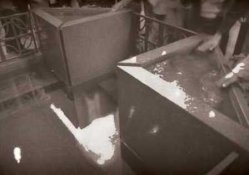
I'm stuck, There are these white areas on the negs, why? I shot Fuji Acros 100, Developed in Rodinal 1:50 13 1/2 minutes at 20C. Fresh Developer, not so fresh stop bath but still color indicating that is still good. Fix fairly fresh, Two minutes in stop bath 3 minutes in fix all same temp. No flash was used to expose the image.
Help.
 

Attachments

  • img012.jpg
    img012.jpg
    10.5 KB · Views: 200
Considering the way the white shapes seem to follow the form of parts of the subject matter; could they be reflections from sky? It looks as if the subjects were wet to some extent. Did the spots show up on any other frames?
 
Considering the way the white shapes seem to follow the form of parts of the subject matter; could they be reflections from sky? It looks as if the subjects were wet to some extent. Did the spots show up on any other frames?

Yes. And this image was taken indoors, but the outdoor images are the same. I know I did something wrong just can't figure out what.
 
Perhaps it needs a longer fixing time?

Try fixing it for another 3 minutes and then rewash the film. See if it clears the areas.
 
The image posted is a positive with abnormal white areas. The texts indicates white areas on the negative.

????
 
The image posted is a positive with abnormal white areas. The texts indicates white areas on the negative.

????

That's what I'm seeing too.

alan951 is this a print or a negative scan?

The actual negative is just really dark in those areas, right?
 
Another thought, it looks like the bulk of the scene was pretty dark given the motion blur of the people in the background, the flat contrast, and limited detail in these areas. This leads me to think that that area of the negative might be underexposed.

???
 
My times for Acros in Rodinal 1:50 would be no more than 10 minutes. You might be overdeveloping it: if the areas on the negative that correspond to light subjects are very dark and dense with little density variation, and if you can not get enough separation in lighter values.

Other suggestion is 3 minutes for fixing is probably not enough. If the negative has "milky" areas or color tint / stains to it then you need more fixing. There should be no harm in fixing it once more. Try 10 - 15 minutes
 
One more thing that could cause this kind of problem is vigorous "cocktail shaker" style agitation
 
Thank you all for your responses. And Yes this is a neg scan sorry I didn't mention that. I'll try a longer fix time. The developing time is from a developing chart form Freestyle. I develop Efke at 10 min per the chart and get great results. I have never done the cocktail shaker like agitation always slow and smooth.What I have done so far for the next roll is I washed all my containers out several times, much more then I normally do and start from there.
 
No I cannot see detail in the shadow areas.

So in that area of the negative, I'm guessing, there may have been too much exposure or too much development.
 
What about other shots from the roll? Different contrast, more/less exposure, are there shots that came out better? That could give some clues
 
What about other shots from the roll? Different contrast, more/less exposure, are there shots that came out better? That could give some clues

The shots that were taken outside would have been very nice exposures but a third of the image is basically wiped out the same way. I am going to try to fix for about 5 min more and rewash to see if that improves at all but open to other suggestions.
 
Do the problem areas look like undeveloped film on the negatives themselves? If so, I would guess that the filw wasn't loaded properly in the reel, and parts of it were prevented from being in contact with the chemistry. If that is the case, then when you fix the film again, those parts will come out clear.
 
Perhaps it needs a longer fixing time?

Try fixing it for another 3 minutes and then rewash the film. See if it clears the areas.

Problem solved I fixed again for 3 minutes and rewashed. The neg sparkles, thank you Mr. Keyes much appreciated.
 
And Mr. King loading of the film was not the problem, I was taught a great technique a long time ago for loading 35 mm. But yes I thought that to, when I take the film from the rinse I hold it up to see if I loaded incorrectly, and everything was fine.
 
WHOOOO-HOOOO!!!!

I' love when it's an easy fix!
 
Photrio.com contains affiliate links to products. We may receive a commission for purchases made through these links.
To read our full affiliate disclosure statement please click Here.

PHOTRIO PARTNERS EQUALLY FUNDING OUR COMMUNITY:


Ilford ADOX Freestyle Photographic Stearman Press Weldon Color Lab Blue Moon Camera & Machine
Top Bottom