• Welcome to Photrio!
    Registration is fast and free. Join today to unlock search, see fewer ads, and access all forum features.
    Click here to sign up

Where's the shoulder in the film data sheets?

Chose vue

A
Chose vue

  • 0
  • 0
  • 15
Chose vue

A
Chose vue

  • 0
  • 0
  • 19

Recent Classifieds

Forum statistics

Threads
202,106
Messages
2,835,186
Members
101,116
Latest member
Jai DuVal
Recent bookmarks
0

Rudeofus

Member
Joined
Aug 13, 2009
Messages
5,119
Location
EU
Format
Medium Format
If I look at the data sheets of current b&w film stock as published by Kodak, Fuji and Ilford, they all contain characteristic curves which show the whole toe but never the shoulder. For some reason all these published characteristic curves stop somewhere in the straight section.

Given how much fuzz most reputable b&w photography books make about the shoulder of film, is there a special reason the shoulder is not shown in data sheets?
 

David Lyga

Member
Allowing Ads
Joined
Nov 25, 2007
Messages
3,445
Location
Philadelphia
Format
35mm
That is a good question and maybe both of us are wholly naive. But...perhaps there is far more importance in establishing the threshold of exposure (toe) and that the 'flattening out' with excess exposure comes about ONLY with too much exposure. With films like microfilm (ie, Kodak's ImageLink) there is not enough latitude for both shadow detail and highlight detail. You must choose one or the other. But with films like Tri-X, HP-5+, etc, there can be an abundance of overexposure before the shoulder flattening becomes too apparent.

If I make no sense perhaps someone will come to our collective rescue. - David Lyga

MODERATOR: I cannot remove the double 'there' in my second sentence. In the 'edit' mode only one appears and if I remove that one, none remains. - David Lyga
 

Monito

Member
Allowing Ads
Joined
May 16, 2011
Messages
335
Location
Nova Scotia,
Format
Multi Format
Usually it is Shift F5. But in any case, explore the menus of your browser, something you should have done a while ago. Look for "Refresh" or "Reload". Do it when you have this page open (not editing).

In the recent FireFoxes, it is not in the menu, but Shift F5 works. In any case it is in the toolbar as a circular arrow.
 

ic-racer

Member
Joined
Feb 25, 2007
Messages
16,752
Location
USA
Format
Multi Format
If I look at the data sheets of current b&w film stock as published by Kodak, Fuji and Ilford, they all contain characteristic curves which show the whole toe but never the shoulder. For some reason all these published characteristic curves stop somewhere in the straight section.

Given how much fuzz most reputable b&w photography books make about the shoulder of film, is there a special reason the shoulder is not shown in data sheets?

The usual 21 step wedge does not give enough datapoints to show both the toe and shoulder on modern films. I have used a wide 21 step wedge that was half-sandwiched with a strong ND filter to try and make "complete" curves.

Sure, people post about "The Shoulder" but sometimes it is crazyass stuff. For example the guy exposing T-max 400 at ISO 3200 shooting with a hazy f1.2 lens from e-bay wide open with a dirty "Skylight filter" (maximum flare condition & severe underexposure) and worrying about his highlights on the shoulder. Under those conditions the highlights are likely to fall TEN or more stops from the shoulder.
 
Last edited by a moderator:
OP
OP
Rudeofus

Rudeofus

Member
Joined
Aug 13, 2009
Messages
5,119
Location
EU
Format
Medium Format
The usual 21 step wedge does not give enough datapoints to show both the toe and shoulder on modern films. I have used a wide 21 step wedge that was half-sandwiched with a strong ND filter to try and make "complete" curves.
And I'm quite sure that Kodak, Fuji and Ilford have better tools available than limited range step wedges and ND filters. And even in the absence of such tools you can create the full curve with two or three separate measurements. It may be less neat that way but it's just for a data sheet after all. The curves in the data sheets end at densities below 3, even a 200€ flat bed scanner could measure this.
Sure, people post about "The Shoulder" but sometimes it is crazyass stuff. For example the guy exposing T-max 400 at ISO 3200 shooting with a hazy f1.2 lens from e-bay wide open with a dirty "Skylight filter" (maximum flare condition & severe underexposure) and worrying about his highlights on the shoulder.
Even Ralph Lambrecht and Ctein write about the shoulder and the importance of its shape, so this topic is not exactly reserved for a bunch of clueless freaks ...

There are some situations where I would really like to know in advance how certain films are going to respond to severe local overexposure, e.g. any scene including the sun during broad daylight or any scene including the moon at night.
 

Photo Engineer

Subscriber
Allowing Ads
Joined
Apr 19, 2005
Messages
29,018
Location
Rochester, NY
Format
Multi Format
If you look at a standard H&D curve, for negative films the shoulder is on the right where the straight line ends and density levels off. On reversal films, the shoulder is on the left where density levels off. Usually, this is about D=3.0 but in negative films and MP print films it can be higher or it may not even be present due to extreme latitude.

PE
 

Michel Hardy-Vallée

Membership Council
Subscriber
Allowing Ads
Joined
Apr 2, 2005
Messages
4,794
Location
Montréal, QC
Format
Multi Format
It sort of depends on the film and on the way the manufacturer plots their graphs.

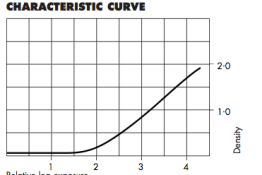
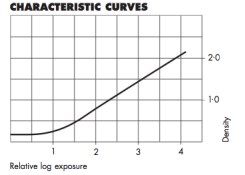
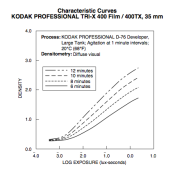
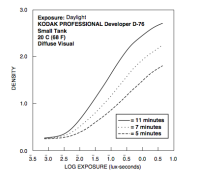
If you look at the curves in attachment here, Plus-X has a clear shoulder, followed by Tri-X. Then PanF+ has a very gentle shoulder (use a straight line to compare) and HP5+ has almost no visible shoulder.
 

Attachments

  • PanFplus.png
    PanFplus.png
    18.5 KB · Views: 150
  • HP5plus.png
    HP5plus.png
    20.4 KB · Views: 166
  • Tri-X.png
    Tri-X.png
    45.6 KB · Views: 149
  • Plus-X.png
    Plus-X.png
    34.3 KB · Views: 159

ic-racer

Member
Joined
Feb 25, 2007
Messages
16,752
Location
USA
Format
Multi Format
write about the shoulder and the importance of its shape,

The shape of the shoulder is of no importance if there is no image forming data there. What are you taking pictures of that places density way out there? Light sources?
 
OP
OP
Rudeofus

Rudeofus

Member
Joined
Aug 13, 2009
Messages
5,119
Location
EU
Format
Medium Format
The shape of the shoulder is of no importance if there is no image forming data there. What are you taking pictures of that places density way out there? Light sources?

Here:

There are some situations where I would really like to know in advance how certain films are going to respond to severe local overexposure, e.g. any scene including the sun during broad daylight or any scene including the moon at night.
 
OP
OP
Rudeofus

Rudeofus

Member
Joined
Aug 13, 2009
Messages
5,119
Location
EU
Format
Medium Format
If you look at a standard H&D curve, for negative films the shoulder is on the right where the straight line ends and density levels off.
Yes, and unfortunately only very few characteristic curves posted in data sheets show that shoulder. If you look at the curves (there was a url link here which no longer exists) posted (and the like of which can be found in most data sheets), the curves suddenly end in the straight section with no shoulder in sight.

Usually, this is about D=3.0 but in negative films and MP print films it can be higher or it may not even be present due to extreme latitude.
You mean the film goes up in flames if you expose it more? At some point all the silver must be activated and reduced by the developer, so there must be some form of well defined shoulder in every negative film.
 

Photo Engineer

Subscriber
Allowing Ads
Joined
Apr 19, 2005
Messages
29,018
Location
Rochester, NY
Format
Multi Format
You mean the film goes up in flames if you expose it more? At some point all the silver must be activated and reduced by the developer, so there must be some form of well defined shoulder in every negative film.

This is not actually correct. Films can be designed to have a straight line up to densities of 6.0 or greater, but they are never needed in practice. A density of 3.0 - 4.0 is generally enough and the curves posted generally encompass enough latitude for overexposure by as much as 2 stops. As you push into the shoulder, you lose detail, of course. The same is true of the toe. Neither can be totally eliminated.

Sometimes more detail is lost by the printing process than by overexposure of the negative, and this can only be corrected by creative printing (split grade printing and / or dodging and burning)

PE
 

ic-racer

Member
Joined
Feb 25, 2007
Messages
16,752
Location
USA
Format
Multi Format
I'll explain what I have done in more detail. I have a 21 step wedge that is over twice as wide as my densitometer aperture. I cover 1/2 of the step wedge with a strong ND filter so that I am left with 42 boxes, each slightly larger than my densitometer aperture. I use that to make the exposure.

However, there are technical hurdles. For example you need very tight contact or else it bleeds too much from the strong light needed to make the exposure. The soft foam of an EG&G is not enough pressure.

Also, the exposure duration needs to be much longer than one would use for a H&D curve made with a 21 step wedge, so you may need multiple pops of the sensitometer flash, thus straying from the realm of any presumed ISO testing condition.

Another way to put it is that with a sensitometer calibrated for ISO testing, the light may not be strong enough to get the film to the shoulder even without any added density. You understand that the last step of the wedge is clear, so you can't just make it "more clear" if you know what I mean.
 
OP
OP
Rudeofus

Rudeofus

Member
Joined
Aug 13, 2009
Messages
5,119
Location
EU
Format
Medium Format
So what you say is the characteristic curve published in the data sheet is meant for the zone system disciples who need 10 stops and no more, so the curves show a little more than that to cover exposure errors. It also appears that film goes way beyond the density range shown in these curves but much higher densities would require multi mega watt enlarger lamps (log10 is one flat curve).

Thanks all for the clarification!
 

Photo Engineer

Subscriber
Allowing Ads
Joined
Apr 19, 2005
Messages
29,018
Location
Rochester, NY
Format
Multi Format
No, I did not say that! I did not mention the zone system and we never used it at EK AFAIK.

The curve as you see it is normally truncated at about D= 3.0 because that is what is normally used. Also, it might be that the normal curve that goes higher than that is larger than a sheet of 8.5 x 11" paper that we use for plotting. In fact, I have drawn larger curves horizontally by taping 2 sheets together.

But, what is on the shoulder does not matter as D=3.0 for example and is unchanged. On the shoulder itself, you can modify it during printing as I noted above.

But, as you say, it is mainly due to the fact that at extremely high densities you have, as you say, long printing times or bright bulbs!

Again, the zone system is not really involved here.

PE
 
Photrio.com contains affiliate links to products. We may receive a commission for purchases made through these links.
To read our full affiliate disclosure statement please click Here.

PHOTRIO PARTNERS EQUALLY FUNDING OUR COMMUNITY:


Ilford ADOX Freestyle Photographic Stearman Press Weldon Color Lab Blue Moon Camera & Machine
Top Bottom