
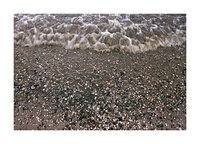
I've been using Forte Polywarmtone for some time together with Neutol WA. Earlier observations indicated that very fresh developer was crucial in order to achieve the desired contrast. When I did 13x18 cm prints, I couldn't see the artefacts as shown below. But now, when I'm doing 18x24 prints the uneven development is there on many prints. I'm using freshly made Neutol 1+7, and develop for 2,5 minutes at 20 C. When I tried Ilford PQ universal developer these streaks were note present. I've also tried Neutol with Ilford Gallery, Fomatone, and Emaks Fineprint and I've never experienced these artefacts. So clearly, Neutol WA and Forte pwt is a bad combo in my hands. The question I have is: What's causing these streaks/uneven development? Eager to hear your thoughts, please.
-
Welcome to Photrio!Registration is fast and free. Join today to unlock search, see fewer ads, and access all forum features.Click here to sign up
You are using an out of date browser. It may not display this or other websites correctly.
You should upgrade or use an alternative browser.
You should upgrade or use an alternative browser.
What's going on in my tray?
-
A
- Thread starter abeku
- Start date

Recent Classifieds
-
Want to Buy LVT printer/developer machine in EU, Durst rhino or similar.
- Started by ScandiPhoto
-
For Sale Ilford hp5 7x17 plus contact printing frame
- Started by Ales'
-
Free Cinestill TCS-1000 for UK only (maybe Ireland?)
- Started by Alex Varas
-
For Sale FS: Vintage leather ever-ready case for Nikon Rangefinder camera.
- Started by AnselMortensen
-
For Sale FS: Stereo Realist Leather Ever-Ready Case
- Started by AnselMortensen
Forum statistics
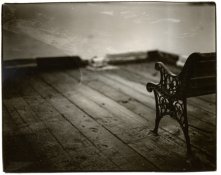

Looks like the chemistry is settling-out and not staying mixed or you have some sort of oil contamination in the tray that is selectively blocking development.
Do you lay your prints face down in the tray or slip them under the surface of the developer when you process the paper?
Any chance of oil contamination?
How did you mix the cocktail of developers? In the tray? In a graduate and then pour into a tray? Did you use concetrate?
Do you lay your prints face down in the tray or slip them under the surface of the developer when you process the paper?
Any chance of oil contamination?
How did you mix the cocktail of developers? In the tray? In a graduate and then pour into a tray? Did you use concetrate?
OP
OP

Hi Kino,
I cleaned the tray thoroughly in order to get rid of any contaminants but the streaks remained.
I used to put the print with the face down but changed this habit and had it face up, I even changed from steel tongs to plastic tongs, still no improvement.
I use a concentrate of Neutol and make it up in a cylinder and pour into the tray so it's fairly mixed.
I agree, it looks like an oil contamination but from where? The cylinder is just used for film and paper developers. Thanks for pointing this out, I'll have a closer look at my equipment to see if there's an oil film present.
I cleaned the tray thoroughly in order to get rid of any contaminants but the streaks remained.
I used to put the print with the face down but changed this habit and had it face up, I even changed from steel tongs to plastic tongs, still no improvement.
I use a concentrate of Neutol and make it up in a cylinder and pour into the tray so it's fairly mixed.
I agree, it looks like an oil contamination but from where? The cylinder is just used for film and paper developers. Thanks for pointing this out, I'll have a closer look at my equipment to see if there's an oil film present.
abeku said:Hi Kino,
I cleaned the tray thoroughly in order to get rid of any contaminants but the streaks remained.
I used to put the print with the face down but changed this habit and had it face up, I even changed from steel tongs to plastic tongs, still no improvement.
I use a concentrate of Neutol and make it up in a cylinder and pour into the tray so it's fairly mixed.
I agree, it looks like an oil contamination but from where? The cylinder is just used for film and paper developers. Thanks for pointing this out, I'll have a closer look at my equipment to see if there's an oil film present.
Abeku,
(grasping at straws here, so be patient)
Now, don't laugh at me, but by any chance did you eat food that was high in oil content just prior to using the darkroom or touch a recoil spring on the back of your enlarger just prior to printing?
You might have touched something in the printing chain PRIOR to washing your hands that is constantly re-introducing contamination back into the system no matter how much you wash the trays.
Do you use a paper safe? If so, check around the paremeter of the lid for oil residue.
Did you check your print easel for possible contamination?
I would re-trace my steps with the light on and use a flashlight to look hard at surfaces to see if you can find a sheen of oil anywhere.
Sillicone oil can be particularly hard to remove completely...

Okay, I have ZERO idea what's causing the problem, but let me say that I love the image!

I will continue with the grasping at straws theme... have you printed THIS (lovely, btw) image on those other papers without streaking. Just want to make sure it's not an issue with the negative.
Like I said, grasping! If it is the developer, then I would give everything it touched a thorough washing.
Good luck, hope you figure it out!
Like I said, grasping! If it is the developer, then I would give everything it touched a thorough washing.
Good luck, hope you figure it out!
OP
OP
Thanks for your input! Kino, I've been taking your advice seriously. I moved the bowl with crisps from the darkroom (just kiddin')... I've just been out in the darkroom and washing everything that's in touch with the developer; tongs, trays, cylinders and... the bottle which I keep the working solution in (very seldom cleaned so this could be the culprit!). Next time, I'll prepare fresh solutions using this very clean gear and hope for the best.
I don't use a paper safe, it's straight from box. Next time, I'll grab a paper that's in the middle of the box (just to be sure that the plastic bag they are stored doesn't get in touch with the paper). Greasy hands? I'll pay attention to this as well, when I'm having my next darkroom session.
I've printed this image before on an Oriental paper with an expected result, so the negative should be fine. These streaks are appearing randomly on the prints so there's something in the tray that happens.
Here's another straw: Could it be something with the coating of the paper causing these irregularities?
I don't use a paper safe, it's straight from box. Next time, I'll grab a paper that's in the middle of the box (just to be sure that the plastic bag they are stored doesn't get in touch with the paper). Greasy hands? I'll pay attention to this as well, when I'm having my next darkroom session.
I've printed this image before on an Oriental paper with an expected result, so the negative should be fine. These streaks are appearing randomly on the prints so there's something in the tray that happens.
Here's another straw: Could it be something with the coating of the paper causing these irregularities?
Well, it COULD be contaminated paper from the start... it's possible.

If, in spite of everything you do, this problem remains, try this.
Soak the paper in water for about 2 minutes and then let the excess moisture drip off. Place in the developer and process as normal. If this is an incorporated developer paper, you will have to increase the development time, and you may see a drop in contrast, but this is a test for uniformity.
If the uniformity problem vanishes, this is probably a manufacturing problem related to even distribution of chemicals during coating or drying. If contrast goes down substantially, then the problem was most likely with the incorporated developer, but that is a guess.
To check for incorporated developer, fog a sheet of paper and then soak it in a strong solution of alkali. If it turns black or dark grey, then it is a developer incorporated paper, and the even distribution of the developer may be your problem.
With low activity developers, uneven developer in the paper will show up as streaks and blemishes, but with high acitivty developers, you can't see the problem, as the activity of the developer overwhelms the non-uniformity problem.
This is a guess, based on similar problems in the past, and may be entirely out in the weeds. Just another oar in the water.
PE
Soak the paper in water for about 2 minutes and then let the excess moisture drip off. Place in the developer and process as normal. If this is an incorporated developer paper, you will have to increase the development time, and you may see a drop in contrast, but this is a test for uniformity.
If the uniformity problem vanishes, this is probably a manufacturing problem related to even distribution of chemicals during coating or drying. If contrast goes down substantially, then the problem was most likely with the incorporated developer, but that is a guess.
To check for incorporated developer, fog a sheet of paper and then soak it in a strong solution of alkali. If it turns black or dark grey, then it is a developer incorporated paper, and the even distribution of the developer may be your problem.
With low activity developers, uneven developer in the paper will show up as streaks and blemishes, but with high acitivty developers, you can't see the problem, as the activity of the developer overwhelms the non-uniformity problem.
This is a guess, based on similar problems in the past, and may be entirely out in the weeds. Just another oar in the water.
PE

Well, from the big loop of uneven density I would say you need to go back to face down immersion, and learn to immerse quickly. If the developer gets on part of the print and develops a while before the rest of it is immersed you get that effect. The later immersed areas never catch up to the first in.
Working large sheets of film or paper is not like doing the small sheets. You need to use techniques that will get the film under the developer quickly and evenly. I hold the paper up and start it in at the far end of the tray and kinda roll the rest of it in behind, drawing the sheet towards me. An alternate motion if I'm immersing faceup is to rock the tray a bit and send a wave to one end, dropping the sheet into the shallow end and drawing it towards the other while the wave rebounds and rolls back over the sheet, providing a very even and fast immersion. It all takes practice, I got mine developing 18x25 inch lithographic film by hand at the local newspaper where I grew up.
Working large sheets of film or paper is not like doing the small sheets. You need to use techniques that will get the film under the developer quickly and evenly. I hold the paper up and start it in at the far end of the tray and kinda roll the rest of it in behind, drawing the sheet towards me. An alternate motion if I'm immersing faceup is to rock the tray a bit and send a wave to one end, dropping the sheet into the shallow end and drawing it towards the other while the wave rebounds and rolls back over the sheet, providing a very even and fast immersion. It all takes practice, I got mine developing 18x25 inch lithographic film by hand at the local newspaper where I grew up.
What is your development time? Perhaps not long enough. Some of the marks look like marring from tongs.
OP
OP
Thanks for the additional input! PE, I'll do those tests next time in the darkroom. It will be interresting to see the outcome of those experiments.
I've considered my techniques thoroughly and came up with an immersing techique close to what you are describing, Gary. A part of this immersion technique is also to NOT touch the exposed areas of the print with the tong. The development time is 2.5 minutes at room temperature (20C).
Well, at least I'm improving my development techniques!
glbeas said:An alternate motion if I'm immersing faceup is to rock the tray a bit and send a wave to one end, dropping the sheet into the shallow end and drawing it towards the other while the wave rebounds and rolls back over the sheet, providing a very even and fast immersion.
I've considered my techniques thoroughly and came up with an immersing techique close to what you are describing, Gary. A part of this immersion technique is also to NOT touch the exposed areas of the print with the tong. The development time is 2.5 minutes at room temperature (20C).
Well, at least I'm improving my development techniques!
Last edited by a moderator:
I have been using Forte both Polygrade and Polywarmtone with neutol and Calbe developer. I have never seen that in my prints (24X30cm).
The Forte papers are free of incorporated devs and thus "Lithable" and they do quite good in lithdevs. The only problem I have encountered with papers is standing waves, Yes standing wave. I agitated throughout the development and when examinating the print it was obvious Offcource I never did that again
Must be some kind of contamination of your developer. Some residues that falls to rest on the paper during development.
Cheers, Søren
The Forte papers are free of incorporated devs and thus "Lithable" and they do quite good in lithdevs. The only problem I have encountered with papers is standing waves, Yes standing wave. I agitated throughout the development and when examinating the print it was obvious
Offcource I never did that again Must be some kind of contamination of your developer. Some residues that falls to rest on the paper during development.
Cheers, Søren
Another straw for grasping: Do you have a print drum (for processing color prints)? If so, try using that. If there's contamination or uneven development from bad agitation in the tray, using the drum should fix the problem, or at least result in a distinctly different pattern of problems, which would itself be useful data. For that matter, you could try another tray, if you've got a spare; that'd help you rule out tray contamination.
| Photrio.com contains affiliate links to products. We may receive a commission for purchases made through these links. To read our full affiliate disclosure statement please click Here. |
PHOTRIO PARTNERS EQUALLY FUNDING OUR COMMUNITY:  |