
• Welcome to Photrio!
    Registration is fast and free. Join today to unlock search, see fewer ads, and access all forum features.
    Click here to sign up

What lens do I need to enlarge 6x6 to 16x20 on a Beseler 45M

Rainy Day Trees

A
Rainy Day Trees

  • 5
  • 1
  • 79
One Way

A
One Way

  • 3
  • 1
  • 76

Recent Classifieds

Forum statistics

Threads
203,154
Messages
2,850,683
Members
101,703
Latest member
arrowactive
Recent bookmarks
0

lloyd darkrooms

Member
Allowing Ads
Joined
Apr 20, 2015
Messages
28
Format
Instant Films
Hello APUG, In my black and white darkroom I am working with a Beseler 45M. I currently have three lenses on hand: 50mm, 75mm, 135mm. When I attempt to enlarge my 6x6 negatives to 16x20 with the 75mm lens, there is a strong vignette surrounding the image. No matter how I adjust the bellows, I cannot successfully print without a vignette across all four corners. If I use the 50mm, the vignette is worse. With the 135mm, I cannot enlarge a 6x6 to 16x20. What focal length lens do I need? Thank you - Lloyd
 
Maybe I'm just plain dumb, but how do you make a rectangular print from a square negative? You're asking how do you get a 20x20 print from a 6x6 neg, then crop? If that's the case, then you need something that will cover at least 20x20. I'm not sure that enlarger will make a print that large w/ any lens w/o moving the baseboard down somehow, or flipping the enlarger to project onto a wall or something. In any case, here's the manual for that enlarger. Great piece of equipment by the way. Wish I had one.

http://www.jollinger.com/photo/cam-coll/manuals/enlargers/beseler/Beseler_45M.pdf
 
Last edited by a moderator:
The chosen lens most likely doesn't cover 6x6 then. You will need an 80mm or 90mm lens to cover the format. A 75mm enlarging lens generally will cover 6x4.5. You may also need a column that is taller.
Momus, to make a rectangular print using a square negative is as simple as using rectangular paper and cropping.
 
I think its the placement of the condenser lenses, your 75mm will cover. for 16x16 or 20x 20 from a 2 1/4.
 
Hello APUG, In my black and white darkroom I am working with a Beseler 45M. I currently have three lenses on hand: 50mm, 75mm, 135mm. When I attempt to enlarge my 6x6 negatives to 16x20 with the 75mm lens, there is a strong vignette surrounding the image. No matter how I adjust the bellows, I cannot successfully print without a vignette across all four corners. If I use the 50mm, the vignette is worse. With the 135mm, I cannot enlarge a 6x6 to 16x20. What focal length lens do I need? Thank you - Lloyd

Lloyd, as others have mentioned, the condenser is probably the culprit here, and they can be a nightmare to deal with.

Try setting the condenser to the correct height, and using the 75mm lens and the 6x6 carrier, expose a sheet of paper to about a medium gray. You will most likely see unevenness in the print, often as much as 1/2 stop off in the corners.

If that's the case, I will try to post my super simple LED conversion technique.
 
I can get 14" with a 100mm lens, and 24" with a 50.
 
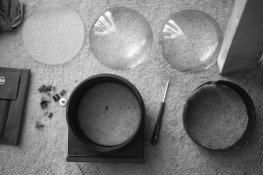
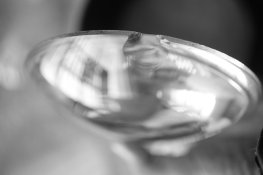
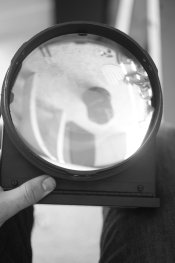
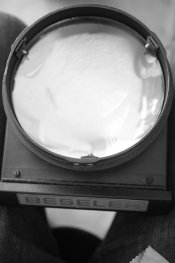
after looking at the manual, I believe item #5 the heat absorbing glass is improperly positioned. Currently it is placed directly ontop of #10 condenser top 7 1/8.
 
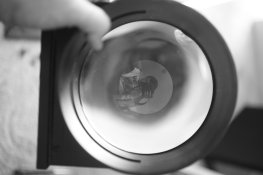
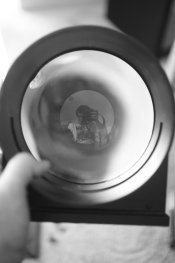
after removing the heat absorbing glass I am still getting two concentric circles and uneven distribution of light even without a lens.
 
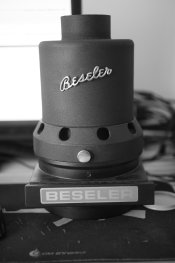
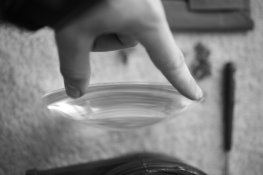
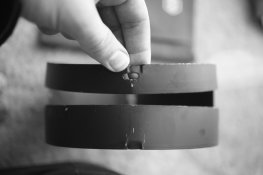
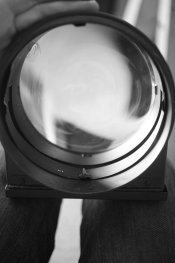
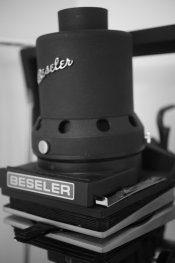
I will share an image of my condenser and how it is currently assembled.
 
If I needed a larger print from 6X6 I would probably use a 60/4 Bogen Wide Angle enlarging lens and close down to f/8.
 
A 80mm to 90mm lens is needed; a 75mm lens may not be able to do the enlargement.
 
A 75 mm lens generally covers a 6X6 negative; a 50 mm will cut off the corners and a 135 will require you to raise the enlarging head too far (about 58 inches).
 
If I needed a larger print from 6X6 I would probably use a 60/4 Bogen Wide Angle enlarging lens and close down to f/8.

I think I may have one of those somewhere around here.
 
attachment.php
attachment.php
attachment.php
attachment.php
attachment.php
 

Attachments

  • _MG_0179.jpg
    _MG_0179.jpg
    386.1 KB · Views: 176
  • _MG_0188.jpg
    _MG_0188.jpg
    434.2 KB · Views: 195
  • _MG_0184.jpg
    _MG_0184.jpg
    243 KB · Views: 171
  • _MG_0185.jpg
    _MG_0185.jpg
    234.7 KB · Views: 173
  • _MG_0187.jpg
    _MG_0187.jpg
    227.4 KB · Views: 187
I use the Nikkor 75mm to 16x20 from 6x6 negs all the time.
Two thoughts.
Is the condenser put together correctly? Going by memory, the curved surfaces face each other with the spacer between them. The slot in the spacer aligns with the filter drawer.
Or the condenser is too high, the top knob controls the height. There is a guide to set the condenser that is often missing.

See this http://www.beselerphoto.com/parts-pdf/condenserheadview.pdf
 
attachment.php
attachment.php
attachment.php
attachment.php
 

Attachments

  • _MG_0189.jpg
    _MG_0189.jpg
    235.1 KB · Views: 118
  • _MG_0189.jpg
    _MG_0189.jpg
    235.5 KB · Views: 176
  • _MG_0190.jpg
    _MG_0190.jpg
    324.4 KB · Views: 191
  • _MG_0191.jpg
    _MG_0191.jpg
    280.2 KB · Views: 163
  • _MG_0192.jpg
    _MG_0192.jpg
    297.4 KB · Views: 179
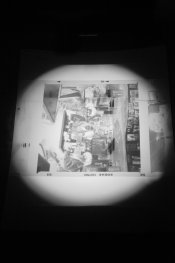
i think i fixed it. i am having trouble uploading the photos. it is the motorized model....hold on and i will try to upload a full image. when I extend the top condenser bellows I believe my issue is resolved...
 
attachment.php
when the bellows are too high i get the vignette...when i adjust them the results are the image i shared above
 

Attachments

  • _MG_0199.jpg
    _MG_0199.jpg
    417.6 KB · Views: 158
the cone of light covers the entire negative! as you can see my 6x6 negative is in a 4x5 carrier. thank you for your help I believe my problem has been resolved. If I attempt to enlarge the 6x6 and crop it to fill out the entire 16x20 paper I do not have a vignette. the problem was with the condenser bellows being at the incorrect height. as you can see my unit is missing the gauge that tells you the correct heights...must have broken off.
 
Photrio.com contains affiliate links to products. We may receive a commission for purchases made through these links.
To read our full affiliate disclosure statement please click Here.

PHOTRIO PARTNERS EQUALLY FUNDING OUR COMMUNITY:


Ilford ADOX Freestyle Photographic Stearman Press Weldon Color Lab Blue Moon Camera & Machine
Top Bottom