
• Welcome to Photrio!
    Registration is fast and free. Join today to unlock search, see fewer ads, and access all forum features.
    Click here to sign up

What kind of shutter issue is this?

Valencia

A
Valencia

  • 2
  • 1
  • 64
Tied to the dock

D
Tied to the dock

  • 4
  • 0
  • 98

Recent Classifieds

Forum statistics

Threads
203,096
Messages
2,849,764
Members
101,664
Latest member
logan.perrin
Recent bookmarks
0

IloveTLRs

Member
Allowing Ads
Joined
May 22, 2007
Messages
1,132
Location
Boston
Format
Sub 35mm
Hello everyone,

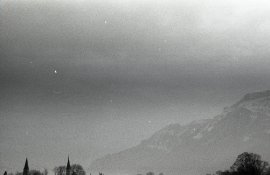
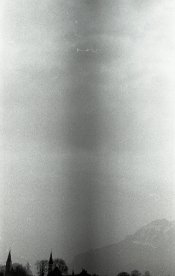
I just developed two rolls of Tri-X yesterday in R90 1:50. This shot is from a Leica II which was performing fine a few months ago.

Notice how the image is dark in the middle. It is a bit more pronounced in some photos, and absent in others. I did two rolls at once, and the roll from a different camera didn't have this at all.

I'm no shutter expert (besides wrecking them) but can anyone tell me how a horizontal focal plane shutter would cause something like this?
 

Attachments

  • img289.jpg
    img289.jpg
    53.3 KB · Views: 239
A very distinctive symptom. A sticking shutter curtain which allows more light to strike the film at a certain point in its travel. When you press the shutter release the first curtain begins to open. Shortly after that the second curtain is released and begins to follow the first. Other than a short time parallax between the two motions the travel of the two curtains must be at the same speed. When the second curtain does not move smoothly (sticks) you get the distinctive exposure pattern seen in the sample. If the problem should be reversed and the first curtain sticks then you would see a band of reduced exposure.

Check to see that the grooves that the curtains run in are clean and there is no foreign material there. Another possibility is dirt in the gear train that controls the shutter.
 
Last edited by a moderator:
Gerald gave you an excellent explanation. I'd suggest it's time to take or send that body in for a Cleaning Lube and Adjustment. Leica's factory service HQ is in Germany. There's a bunch of good info on how to access that service, paperwork requirements, etc., here
http://us.leica-camera.com/service/service_and_repair/headquarters_germany/
although come to think of it, you may have a certified Leica repair specialist right in your own neighborhood. Silly me eh? :D
Mark
 
i'm unclear -- is this picture cropped out of a horizontal frame, or is it a full frame on its edge--turned vertical?

If what you are showing us is the cropped middle of a full horizontal negative then, yeah, your second curtain may be hanging up in the middle of its run. CLA advised.

If this is a full frame, just vertical, then I'd have to ask if the dark band extends through the blank spaces between negatives, because there is no way a camera with a horizontal-running shutter is going to fog a negative like this, if this is a full frame, not just cropped.

scan three negs, with outside border areas, and post that-- makes analysis much easier.

Also, Leica will not service a II. You will have to send it to an independent shop. Essex in New Jersey does a good job.
 
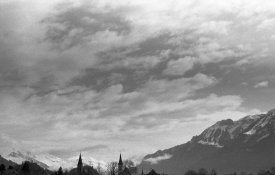
Thank you for all the replies. The original photo I posted was shot portrait. I've attached two more photos - shot landscape - with the same problem.
It's fine if Leica doesn't service IIs anymore, I know of a few places I can send it.

I wish I could do it myself, but I'm positive I would destroy it
 

Attachments

  • img278.jpg
    img278.jpg
    53.2 KB · Views: 217
  • img293.jpg
    img293.jpg
    103.9 KB · Views: 186
Your Leica has a horizontal shutter, it wouldn't cause a line like this if it was hanging or slow. Most likely a light leak somewhere.
 
Surely a light leak would cause a white band? Is it possible that there is some frayed material or a lump of fluff stuck to the leaning or trailing edge of one of the blinds?
 
Surely a light leak would cause a white band? Is it possible that there is some frayed material or a lump of fluff stuck to the leaning or trailing edge of one of the blinds?

I had exactly this problem with my M4-P. Although the effect on the negative was a little different which may be because I've darkened the attached image to make the problem more pronounced. It only showed up with faster shutter speeds where the gap between the curtains was narrow and being almost spanned by the fluff.

Holding the camera at an angle with the back removed and the shutter held open on B, I could just about see some tiny strands of loose felt attached to the metal strip (cap?) on the edge of the curtain towards the bottom of the camera. A combination of tweezers and a bit of huffing and puffing removed them.

Hope this helps.

marks_bw.jpg
 
Yeap sorry you are right I was a bit sleepy and didn't take a closer look at the set of images. I hope you get to fix this, its a nice little camera.
 
Well this is embarrassing ..

I thought it may actually be my Leica IIIc causing that trouble (I shot that roll about two months ago.) So I ran a roll through both cameras.

.. and the problem did not resurface :pouty:

I also tried Rick Olson's CRT shutter speed check (http://rick_oleson.tripod.com/index-135.html) on both cameras and neither showed trouble (as did two other unrelated cameras.)

Sorry everyone ..
 
Well this is embarrassing ..

I thought it may actually be my Leica IIIc causing that trouble (I shot that roll about two months ago.) So I ran a roll through both cameras.

.. and the problem did not resurface :pouty:

I also tried Rick Olson's CRT shutter speed check (http://rick_oleson.tripod.com/index-135.html) on both cameras and neither showed trouble (as did two other unrelated cameras.)

Sorry everyone ..

There you go, as a leica that is only about 80 years old shouldn't cause any problems.
 
There's no way your camera caused fogging like that down the middle of a lengthwise piece of film. Has to be fogging from some other cause.

Scientific testing demands repeatability. Run a factory-loaded roll you know is good, and soup that, see what happens. Review all your film handling procedures while you do.

oh, wait, i see you did.

Problem solved. Check your film stocks...
 
There's no way your camera caused fogging like that down the middle of a lengthwise piece of film. Has to be fogging from some other cause.

Correct me if I am wrong, but the examples posted by the OP are positives, so if there is any fogging, it is at the edge of the negatives, not the centre.

It looks to me like something is in the light path near the centre of the image field.
 
I have whole array of things that might have gotten bad, some of which can come and go, just as you wrote:
ripped curtains could make this pattern go on and off, check for loose thread sticking out of a curtain edge
badly serviced curtains (unevenly attached) - not very probable to manifest itself on a single roll only
Faulty development or fixing - it's a bizarre pattern, but you newer know... If you've done stand development, I would blame the processing part, not the shutter.
A hair or a thread somewhere inside the lens (somewhere near rear element?) - most probable cause IMO too, may vanish by itself
A light leak, as suggested, may manifest itself this way, or a faulty cassette
Finally, a batch of film might have been produced with a flaw like this

It's not really good to hear things like this to come and go, there's a chance of it coming back and ruining more shots. Prevention needs the cause to be known.
 
The problem with a sticking shutter sometimes goes away with exercise. However it usually comes back.
 
In my experience when shutter troubles have come up, they rarely go away without a proper repair.

That being said, I believe it's a light leak and possibly the way I opened the film canister. I've always found Kodak canisters to be tricky, so I try to leave the leader out.
 
I don't understand why dark areas on (positive) photos are so often diagnosed as light leaks. Surely something's blocking the light not letting it in. If it were the extra light from a leak causing the issue, the photo would show white or overexposed areas. It would be the original negative that showed dark areas. Or am I missing something?
 
No you are missing nothing, I just wonder how there can be so many posts accumulated between them by so many people who still can't see the difference between negative and positive........on a film forum!

Steve

Are, discerning the difference between negative and positive, that old chestnut. It is almost like asking people to think in reverse. I think it is because of this constant neg/pos conundrum that I sometimes try and pull doors that say push.
 
Are, discerning the difference between negative and positive, that old chestnut. It is almost like asking people to think in reverse. I think it is because of this constant neg/pos conundrum that I sometimes try and pull doors that say push.

I suppose throwing slides into the equation complicates matters occasionally!
 
If it was a light leak it would be white on the photo. On the neg it would be dark. If it were slide film it would be the same as a photo (positive), white. Possibly a development issue? In any case, it's gone. For now.
 
Hello,
not enough volume of developer in the tank?

I thought of that, but no, I measured it out. This roll was on the bottom, so it should have been no problem.
 
Photrio.com contains affiliate links to products. We may receive a commission for purchases made through these links.
To read our full affiliate disclosure statement please click Here.

PHOTRIO PARTNERS EQUALLY FUNDING OUR COMMUNITY:


Ilford ADOX Freestyle Photographic Stearman Press Weldon Color Lab Blue Moon Camera & Machine
Top Bottom