• Welcome to Photrio!
    Registration is fast and free. Join today to unlock search, see fewer ads, and access all forum features.
    Click here to sign up

What did I do wrong on these B&W negatives?

Our Local Pub

A
Our Local Pub

  • 0
  • 1
  • 21
_Z721531-positive.JPG

H
_Z721531-positive.JPG

  • 1
  • 0
  • 29

Recent Classifieds

Forum statistics

Threads
202,023
Messages
2,833,956
Members
101,077
Latest member
Niklas W
Recent bookmarks
0

johnielvis

Member
Allowing Ads
Joined
May 21, 2010
Messages
966
Format
Medium Format
well--are you rolling the film on the reel so the emulsion is facing toward the center of the reel (with the wind of the roll) or so the eumulsion faces away from the center (against the wind on the film spool)?

if outside, then maybe the "spring action"is causing the film to press against the reel more tightly--if so, try winding emulsing side in.

well...actually this is sounding more and more like it's the film...I just noticed that it is not kodak film....I've had wierd problems with non-kodak films in the past...
you may have a bad batch of film.

well...it's not that bad--just shoot with a slight bigger border and one day the source of the problem will become apparent and you'll let us all know. This little bit of artsy extra border isn't worth snifflng about and may become fashionable---I say EXPLOIT it...print with the weird border and take full credit for discovering a new way of hipsterizing a pic...even though you don't know what causes it, you know how to get it...use your camera with your film and your normal dev process...nobody else can duplicate it!!!!
 
Last edited by a moderator:
OP
OP
adelorenzo

adelorenzo

Member
Allowing Ads
Joined
Mar 10, 2012
Messages
1,421
Location
Whitehorse, Yukon
Format
4x5 Format
This is on Pan F+ but the last roll was Delta 400 so I'm reasonably confident it's not a film issue. I've had good rolls out of both of these batches of film.

I did have some unexpected vignetting on a few shots. I'll open the camera and lens and see if anything looks weird.
 
OP
OP
adelorenzo

adelorenzo

Member
Allowing Ads
Joined
Mar 10, 2012
Messages
1,421
Location
Whitehorse, Yukon
Format
4x5 Format
I shot a film test with Tri-X tonight. All the frames came out just fine, using my normal agitation and development style. I really don't think this could be a development problem, especially since the frames with these problems have clear edges.

So that means it is looking like a camera or a lens issue and possibly cold related. I opened the back and cycled the shutter and don't see any problems. Ditto with the lens, everything appears normal. I'll inspect the film back a little closer and compare it to the other ones that I own.

I just can't think of how light could be getting blocked from the sides of the frames, which is the top and bottom of the film in the camera. Is my film buckling in the cold?
 

Bob-D659

Member
Allowing Ads
Joined
Feb 10, 2008
Messages
1,273
Location
Winnipeg, Ca
Format
Multi Format
Well I just had a look in my 645, the original one, the light absorbing liner behind the mirror and in front of the shutter appears to be a flock covered plastic liner. It could come loose, I guess and buckle and bow out on the sides, in front of the frame rails. If you can lock your shutter open on a B or T setting it's easier to look at. You do have to push in on one of the pins on the grip side of the camera to fool it into working without a film insert.

Those "marks" are on the sides of the frame and the camera, not the top and bottom. :smile:
 

Rafal Lukawiecki

Member
Allowing Ads
Joined
Feb 23, 2006
Messages
789
Location
Wicklow, Ireland
Format
Multi Format
Would it be possible that you stored the film next to a chemical for quite some time that would desensitise the emulsion at the edges of the the first few frames? A bit like a fat roll light leak but vapour, not light. I realise this is a long shot, but long term storage next to Ferricyanide etc? Or, frozen storage with humidity, ice forming, backing paper sticking... Brain storming.

It is puzzling how regular the top and bottom is. I suppose mechanical issue is more likely, in the camera.

Ps. I did not realise it is between frames, was thinking top and bottom. Ignore my suggestion, please.
 

johnielvis

Member
Allowing Ads
Joined
May 21, 2010
Messages
966
Format
Medium Format
kodak filim no problems....that indicates the other film is the problem, as suspected.
 

ic-racer

Member
Joined
Feb 25, 2007
Messages
16,747
Location
USA
Format
Multi Format
The negatives are showing up as positives on my screen. I presume they are supposed to be negatives and not a positive process right? They are not prints, right?

You have only included the frame markings in the first post, but if they are still developed adequately on subsequent images, then that rules out film-coating and processing issues.

Do you have any anti-reflective material coming loose in the mirror box?
 
OP
OP
adelorenzo

adelorenzo

Member
Allowing Ads
Joined
Mar 10, 2012
Messages
1,421
Location
Whitehorse, Yukon
Format
4x5 Format
Sorry yes the scans are positive scans. So there is a white fog on the frame edges negatives that seems to indicate either not getting light or not getting development. As the film edges are developed that leaves me looking at in-camera problems.

I opened the shutter and looked inside the camera and I really can't see any problems. It looks great in there, nothing appears to be blocking the frame.

The two times it has happened have been with a very cold camera. So I'm racking my brain to think what could be happening, maybe sticking shutter or loose film or...?
 

kreeger

Member
Allowing Ads
Joined
Jun 21, 2009
Messages
207
Location
Missouri
Format
Multi Format
I don't know if that camera has a bellows, but if it does, check it. It looks to me like it's out of focus like its in front of the film plane some how.
 
OP
OP
adelorenzo

adelorenzo

Member
Allowing Ads
Joined
Mar 10, 2012
Messages
1,421
Location
Whitehorse, Yukon
Format
4x5 Format
I don't know if that camera has a bellows, but if it does, check it. It looks to me like it's out of focus like its in front of the film plane some how.

I noticed that too that there seem to be focus issues and I'm not normally that bad with focusing. It's not a bellows camera but this does support the theory that, in the extreme cold, the film is not winding properly (it has a motor drive) and buckling out so that the centre is out of focus and the sides are not getting any light.

Have put two rolls through the camera now, indoors using identical development and no issues.
 

Stoo Batchelor

Member
Allowing Ads
Joined
Dec 15, 2005
Messages
1,237
Location
Hertfordshir
Format
Medium Format
Dear Adelorenzo

I think I have the answer for you (or am pretty sure), as I have had the same problem. I also use the 645n2, and I see from the first negative that you used the 45mm lens. This has the petal shaped lens hood, and I am sure that you have put it on slightly wonky. If you don't match up the white dot on the lens, and the white dot on the hood and rotate clockwise so as the word "Pentax" is on top, your hood will not be on straight. If you take a look at your lens hood you will see my thinking behind this, as the dark areas on your image mimic the dips either side of the petals on your lens hood. Could it be stray light entering the lens?, or the hood obscuring the image area? All I know is that by making sure that my hood is on straight I have not had the problem return.

I could be wrong in your case, but ask yourself when you retested the camera if you used the same lens, or correctly fitted your lens hood, if fitted at all. It is easily done.

I hope this helps.

All the best

Stoo
 
Last edited by a moderator:

OP
OP
adelorenzo

adelorenzo

Member
Allowing Ads
Joined
Mar 10, 2012
Messages
1,421
Location
Whitehorse, Yukon
Format
4x5 Format
Hi Stoo,

Well now... That would certainly be a simple explanation wouldn't it? I did have the hood on the camera and I have never really paid attention to lining up the white dot. I'm going to test this theory out but this could be it....

Regards,
Anthony
 

Stoo Batchelor

Member
Allowing Ads
Joined
Dec 15, 2005
Messages
1,237
Location
Hertfordshir
Format
Medium Format
I hope it's the answer for you, as I know how frustrating these problems can be, and how tedious further testing will be for you. If I get time tomorrow I will dig out a negative with the same problem and scan it to post here.

Cheers and good luck

Stoo

Hi Stoo,

Well now... That would certainly be a simple explanation wouldn't it? I did have the hood on the camera and I have never really paid attention to lining up the white dot. I'm going to test this theory out but this could be it....

Regards,
Anthony
 

Stoo Batchelor

Member
Allowing Ads
Joined
Dec 15, 2005
Messages
1,237
Location
Hertfordshir
Format
Medium Format
Hi Stoo,
I'm going to test this theory out but this could be it....

Regards,
Anthony

Dear Anthony

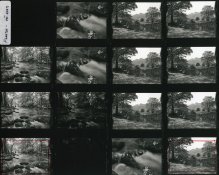
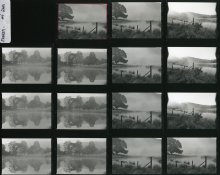
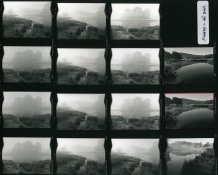
Please find attached a few contact sheets along with a few images from the contact sheets that sort of tell the story of why I came to the conclusion that both yourself and I have suffered from the same issues with the Pentax 645n2 fitted with the 45mm lens with Petal Lens Hood. It is worth noting that these negatives were made in 2003, and I was very new to photography and the darkroom, and also the Pentax was a new toy to me. These negatives were only the 15th roll on-wards of film that had gone through the camera. I was very confused :eek: when I developed my film as to what could have been the problem, so will explain how I came to the conclusion that the issue was the Petal Lens Hood and nothing to do with my development routine.

If you look at the first two contact sheets you will notice that not all of the images suffer from the issue, that is because the images that don't were made with the 150mm lens, and all of the images with the issue were made with the 45mm lens complete with Petal Hood, which points to an issue with that particular lens.

On the third contact sheet shown, all of the images were made with the 45mm lens with Petal Hood, but while exposing this roll of film I noticed that the lens hood was fitted incorrectly, so put this right, which as I have mentioned before, is done by lining the white dot on the lens with the white dot on the hood and turning clockwise so that the word "Pentax" sits on top of the hood. You will see that by doing so the next two images made, which are the two on the top of the right hand column of the contact sheet, are without issue.

From studying these contact sheets I sort of came to the conclusion that by not having the Petal lens hood fitted correctly, along with a harsh side light, these issues would arise, though if you look at the river image that I have attached, scanned from one of the contact sheets, that is not strictly true, as there was no side light on this particular occasion.

Since making these images, when using the 45mm lens with Petal Hood I always double check that the hood is fitted correctly, and if there is a harsh side light I use my hand to cast a shadow over the glass, and I have never had the issue since, some nine years later, so must be doing something right!

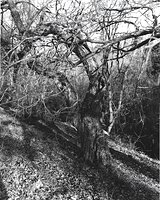
I have also attached some images made from those contact sheets to prove that a silk purse can be made from a sows ear :smile: (IMO)


Pentax_645_hood_issue001.jpg Pentax_645_hood_issue003.jpg Pentax_645_hood_issue004.jpg Pentax_645_hood_issue002.jpg Winters-Morning_Elterwater.jpg Elterwater_Still.jpg


I hope this helps.

Stoo
 
Photrio.com contains affiliate links to products. We may receive a commission for purchases made through these links.
To read our full affiliate disclosure statement please click Here.

PHOTRIO PARTNERS EQUALLY FUNDING OUR COMMUNITY:


Ilford ADOX Freestyle Photographic Stearman Press Weldon Color Lab Blue Moon Camera & Machine
Top Bottom