• Welcome to Photrio!
    Registration is fast and free. Join today to unlock search, see fewer ads, and access all forum features.
    Click here to sign up

weird density on step wedge

half stop lighter er.jpg

A
half stop lighter er.jpg

  • jhw
  • Jan 12, 2026
  • 8
  • 7
  • 110
sentinels of the door

A
sentinels of the door

  • 4
  • 0
  • 91

Recent Classifieds

Forum statistics

Threads
201,719
Messages
2,829,044
Members
100,909
Latest member
SuninPisces
Recent bookmarks
1

Chuck_P

Member
Allowing Ads
Joined
Feb 2, 2004
Messages
2,369
Location
Kentucky
Format
4x5 Format
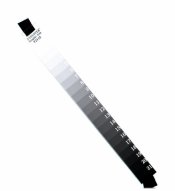
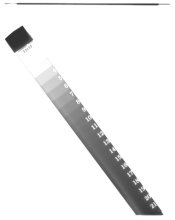
I was doing a film test yesterday with TMX using HC-110 (H). On the negative there is a density line on the step wedge opposite the step numbers. It's not a light leak, the film edges are clear and this has happened when I did my test with D-76 last year. It's clear as a bell on the negative but I had to brighten the scan quite a bit to get it to show. I don't know how to prevent it because I don't know what is causing it. Any thoughts?

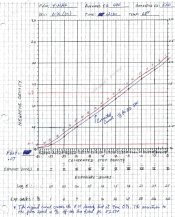
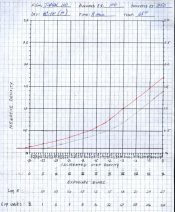
I read the wedge with the densitometer, keeping the aperture away from the dense line on the wedge and came up with this curve. Seems weird, the original curve (the red line) does not even cross the 0.1 density line until past the zero mark. So it had to be shifted 1 1/3 stop to the right to get the curve to cross the 0.1 density line at Zone I. The shifts the effective film speed from 100 to 250.

The main reason for the post is the density I'm getting on the steps of the wedge itself, I just thought the curve was interesting. I had a similar shift to the right with my test on TMY/d-76 last year, but only 1/3 stop for a speed of 500 and no shift at all with TMZ/d-76 for a working speed of 100.
 

Attachments

  • hc110 test002.jpg
    hc110 test002.jpg
    21.3 KB · Views: 198
  • curve001.jpg
    curve001.jpg
    116.8 KB · Views: 175

Martin Aislabie

Subscriber
Allowing Ads
Joined
Nov 17, 2007
Messages
1,413
Location
Stratford-up
Format
4x5 Format
I don't know what your film process is normally, what it was in this case or what it should ideally be

However, all my problems I have ever had with uneven density have been

(1) 95% = inadequate agitation

(2) 4.9% = inadequate chemical volume/sliding reels

(3) 0.1% = chemical contamination

Can you repeatedly get the problem of uneven development and film speed change?

Martin
 

T Hoskinson

Member
Allowing Ads
Joined
Oct 13, 2008
Messages
65
Location
Thousand Oak
Format
8x10 Format
I was doing a film test yesterday with TMX using HC-110 (H). On the negative there is a density line on the step wedge opposite the step numbers. It's not a light leak, the film edges are clear and this has happened when I did my test with D-76 last year. It's clear as a bell on the negative but I had to brighten the scan quite a bit to get it to show. I don't know how to prevent it because I don't know what is causing it. Any thoughts?

I read the wedge with the densitometer, keeping the aperture away from the dense line on the wedge and came up with this curve. Seems weird, the original curve (the red line) does not even cross the 0.1 density line until past the zero mark. So it had to be shifted 1 1/3 stop to the right to get the curve to cross the 0.1 density line at Zone I. The shifts the effective film speed from 100 to 250.

The main reason for the post is the density I'm getting on the steps of the wedge itself, I just thought the curve was interesting. I had a similar shift to the right with my test on TMY/d-76 last year, but only 1/3 stop for a speed of 500 and no shift at all with TMZ/d-76 for a working speed of 100.

Looks to me like a defective step wedge.
Is this a Stouffer step wedge? If it is, I'd ask Stouffer - maybe they'll replace it??
 

Photo Engineer

Subscriber
Allowing Ads
Joined
Apr 19, 2005
Messages
29,018
Location
Rochester, NY
Format
Multi Format
Looks like a processing streak.

From the curves, and the strip, it looks like the step wedge was underexposed or underdeveloped. All of the image is on the toe region of the curve. The dmax should go up to 3.0.

PE
 

smieglitz

Member
Allowing Ads
Joined
Oct 18, 2002
Messages
1,950
Location
Climax, Michigan
Format
Large Format
...shifts the effective film speed from 100 to 250.

The main reason for the post is the density I'm getting on the steps of the wedge itself, I just thought the curve was interesting. I had a similar shift to the right with my test on TMY/d-76 last year, but only 1/3 stop for a speed of 500 and no shift at all with TMZ/d-76 for a working speed of 100.

Are you saying your tests show TMX (ISO 100) to work best at EI 250, TMY (ISO 400) at 500 and TMZ (nominal ISO 1000) at EI 100? If so, something very strange is going on. Or is the TMZ value a typo? I usually find TMX @EI 50, TMY @EI 320, and TMZ @EI 1000-1250.

Are you exposing for zone X in this test?

Joe
 

Nicholas Lindan

Advertiser
Advertiser
Joined
Sep 2, 2006
Messages
4,313
Location
Cleveland, Ohio
Format
Multi Format
I take it you are contacting a step wedge to a sheet of 4x5, laying the wedge diagonally across the sheet.

If this is the case the problem isn't agitation. Since you had the same problem last year it points to a defect in the wedge, unlikely as that seems. The only other explanation I can think of is some sort of internal reflection in the glass of the contacting frame, but the line seems to be too consistent for that explanation.

As to the shift in the curve, the X-Axis is labeled in step wedge steps and not in units of light intensity. It simply looks like the exposure you gave to the film was different in the two tests, with the most recent test receiving about 1 1/3 stops more exposure.

I have to confess to not believing your curves. Your test seems to indicate either the toe extending to 0.7 OD density on the film or shadow contrast that is 1/3 the highlight contrast: neither is plausible.

The plotting dots on the curve also give me some concern. The dots line up horizontaly, implying you are plotting film density as the independent variable - i.e. finding a specific density on the film and then plotting the corresponding step wedge number. You should be measuring your film's density at each patch and plotting that density above the wedge's calibration density for that patch.

If you are using a calibrated wedge then your horizontal axis tick spacing isn't going to be even. You will get better results using a spread-sheet program for making the plot as it can deal with a varying independent variable interval better than you can with graph paper.
 

ic-racer

Member
Joined
Feb 25, 2007
Messages
16,719
Location
USA
Format
Multi Format
I have seen this when the step wedge is not tight against the film during the exposure. Did you sandwich it with glass and foam?
 

Nicholas Lindan

Advertiser
Advertiser
Joined
Sep 2, 2006
Messages
4,313
Location
Cleveland, Ohio
Format
Multi Format
I have seen this when the step wedge is not tight against the film during the exposure. Did you sandwich it with glass and foam?

Good point. If the wedge was simply laying on the surface of the film this is the sort of artifact one would expect.
 
OP
OP
Chuck_P

Chuck_P

Member
Allowing Ads
Joined
Feb 2, 2004
Messages
2,369
Location
Kentucky
Format
4x5 Format
Looks to me like a defective step wedge.
Is this a Stouffer step wedge? If it is, I'd ask Stouffer - maybe they'll replace it??

I should have stated in my OP that the step wedge is not the problem, this line varies in thickness and location on my past tests. The wedge is does not show the line at all.
 
OP
OP
Chuck_P

Chuck_P

Member
Allowing Ads
Joined
Feb 2, 2004
Messages
2,369
Location
Kentucky
Format
4x5 Format
Looks like a processing streak.

From the curves, and the strip, it looks like the step wedge was underexposed or underdeveloped. All of the image is on the toe region of the curve. The dmax should go up to 3.0.

PE

I thought of processing, but the streak is only within the wedge and not anywhere else on the negative, and my other negatives as well.
 
OP
OP
Chuck_P

Chuck_P

Member
Allowing Ads
Joined
Feb 2, 2004
Messages
2,369
Location
Kentucky
Format
4x5 Format
Are you saying your tests show TMX (ISO 100) to work best at EI 250, TMY (ISO 400) at 500 and TMZ (nominal ISO 1000) at EI 100? If so, something very strange is going on. Or is the TMZ value a typo? I usually find TMX @EI 50, TMY @EI 320, and TMZ @EI 1000-1250.

Are you exposing for zone X in this test?

Joe

Sorry, I meant to write TMX. I've always confused those two.

Yes, the wedge was exposed on Zone X.
 

Photo Engineer

Subscriber
Allowing Ads
Joined
Apr 19, 2005
Messages
29,018
Location
Rochester, NY
Format
Multi Format
Yeah, I reconsidered after realizing it was on the diagonal. I was going to correct myself. I make step wedges that way myself, so it must be some other problem. I still think it is underexposed and / or underdeveloped due to the low dmax.

PE
 
OP
OP
Chuck_P

Chuck_P

Member
Allowing Ads
Joined
Feb 2, 2004
Messages
2,369
Location
Kentucky
Format
4x5 Format
I take it you are contacting a step wedge to a sheet of 4x5, laying the wedge diagonally across the sheet.

Yes, but I have to disagree with all that you wrote. My test is performed exactly to the letter as described in John P. Schaefer's book.
 
OP
OP
Chuck_P

Chuck_P

Member
Allowing Ads
Joined
Feb 2, 2004
Messages
2,369
Location
Kentucky
Format
4x5 Format
I have seen this when the step wedge is not tight against the film during the exposure. Did you sandwich it with glass and foam?

This makes some sense but it was exposed in the film holder while taped to the film, not under the enlarger---perhaps the wedge is not flat against the film during exposure causing some kind of reflection when it is blasted with a Zone X exposure?

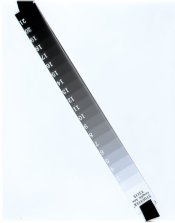
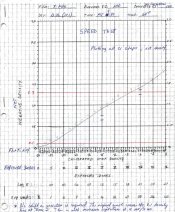
Same wedge: this is last years TMX/TMY and test with d-76 1:1 and their curves. Notice the streak within the wedge area of the negative, it varies. Looks like the TMY wedge was perhaps resting flat on the film, IDK.
 

Attachments

  • TMY wedge001.jpg
    TMY wedge001.jpg
    25.9 KB · Views: 120
  • TMY curve001.jpg
    TMY curve001.jpg
    140.4 KB · Views: 101
  • TMX wedge001.jpg
    TMX wedge001.jpg
    26.1 KB · Views: 116
  • TMX curve001.jpg
    TMX curve001.jpg
    145.8 KB · Views: 103

Nicholas Lindan

Advertiser
Advertiser
Joined
Sep 2, 2006
Messages
4,313
Location
Cleveland, Ohio
Format
Multi Format
Yes, but I have to disagree with all that you wrote. My test is performed exactly to the letter as described in John P. Schaefer's book.

If it had been you wouldn't be having the problems you are having. Something(s) are being done wrong.

OTOH, maybe the book is wrong. There is the famous saying "I know it's true, I read it in a book." Second only to "I read it on the internet."
 
Last edited by a moderator:

Photo Engineer

Subscriber
Allowing Ads
Joined
Apr 19, 2005
Messages
29,018
Location
Rochester, NY
Format
Multi Format
Chuck;

The samples in your post #14 are perfectly exposed and processed. Note the difference in the scale between those and the OP. And, they show no problem. FWIW, there is some difference between them that not only causes low dmax/underexposure/whatever, and I believe Nicholas has said it well.

PE
 
OP
OP
Chuck_P

Chuck_P

Member
Allowing Ads
Joined
Feb 2, 2004
Messages
2,369
Location
Kentucky
Format
4x5 Format
Yeah, I reconsidered after realizing it was on the diagonal. I was going to correct myself. I make step wedges that way myself, so it must be some other problem. I still think it is underexposed and / or underdeveloped due to the low dmax.

PE

I see what you are saying about the low D-max, but it was exposed by:

-ISO 100 and placing EV 13 on Zone X, I used 1/2 sec at f/11, check me on that, but that's Zone X I believe.

-I diluted HC-110 (H) from concentrate to 1:63 in 1,200 ml of distilled water, being very carefull to extract the exact amount of devolper by syringe and ensuring it was completely rinsed from the syringe. Is my math wrong? I get: 18.75ml syrup to 1,181ml of water, I rounded up to 1,200ml.

-I developed for twice as long as Dilution B. B is 5.5 min I dev H for 11 min.

-It's an old bottle of HC-110 (6 or 7 yrs), could it be weak? I posted a thread and noone really thought that was old for HC-110, so i used it for the test.

I've gone over my application of the methodology, its sound I believe. I hope :wink:
 

Photo Engineer

Subscriber
Allowing Ads
Joined
Apr 19, 2005
Messages
29,018
Location
Rochester, NY
Format
Multi Format
Take a tiny piece of fresh film in daylight and develop it for 11 min and see if you get a density of 3.0 or higher after complete processing in the same chemistry. If you do not, then the developer is bad or the time is bad. If you get dmax, then something else is wrong, as you should get the same results as in the second set of pictures. There is a HUGE difference between those two results just for starters and aside from the streak!!!!!

PE
 
OP
OP
Chuck_P

Chuck_P

Member
Allowing Ads
Joined
Feb 2, 2004
Messages
2,369
Location
Kentucky
Format
4x5 Format
Chuck;

The samples in your post #14 are perfectly exposed and processed. Note the difference in the scale between those and the OP. And, they show no problem. FWIW, there is some difference between them that not only causes low dmax/underexposure/whatever, and I believe Nicholas has said it well.

PE

Ok, but let me run this by you. For arguments sake (and my own better understanding of it all), if I accept this corrected curve for an EI of 250, normal development time would be a time that has the curve crossing Zone VIII at the 1.3 density line.

Based on this curve it would be several more minutes beyond 11 min to raise the curve up by 0.21 units (1.3 - .09, where Zone VIII is now on the corrected curve), that would D-Max at about 1.8. Could it not be that dilution H at 11 min is simply not long enough in the developer? Don't I have to remember that this is not a normal develpment curve just yet, I can only gather the speed point at this time with this film/dev/dilution.

I know you know tons more of this stuff than me :smile:, but this is what keeps going through my mind. Just wandering.

 
OP
OP
Chuck_P

Chuck_P

Member
Allowing Ads
Joined
Feb 2, 2004
Messages
2,369
Location
Kentucky
Format
4x5 Format
Take a tiny piece of fresh film in daylight and develop it for 11 min and see if you get a density of 3.0 or higher after complete processing in the same chemistry. If you do not, then the developer is bad or the time is bad. If you get dmax, then something else is wrong, as you should get the same results as in the second set of pictures. There is a HUGE difference between those two results just for starters and aside from the streak!!!!!

PE

Great, I will do this, thanks for this tip. I'll post that result.

Last years test, post 14 above, are d-76 1:1 speed tests. I would not think I should expect the same results with hc-110 1:63. Based on other curves I've seen with TMX and hc-110, I was expecting an upswept curve, I was not expecting the speed point to be -1 1/3 stop from the box speed, I was expecting it to go the other way.

Thanks for all your input, this is really helping me.
 

Photo Engineer

Subscriber
Allowing Ads
Joined
Apr 19, 2005
Messages
29,018
Location
Rochester, NY
Format
Multi Format
Ok, if you want it explained that way, then consider this.....

A perfect picture is centered in the straight line portion of the curve (or the center of the zones), with 1/2 of the zones below the center and 1/2 above. Looking at the curves in post #14 above, I can do that easily in several different fashions by changing the ISO value and just moving left or right by a stop or even two and still fit. Contrast will remain constant in the print as long as I keep the image off the toe and shoulder, with only grain and sharpness being the variables.

Now, go to the OP and there is no leeway whatsoever to move around. All you have is mainly toe. Therefore, something is wrong with this example besides the streak. It is either poorly processed or badly exposed or both. IDK the cause, but I suggested a way to test the developer. Since that is easy, give it a try.

The key issue here is that the first example shows no evidence of having any straight line portion, and therefore would probably need about a grade 4 paper and a grade 0 paper (split grade printing) to get any sort of good image IMHO. That is mainly due to the fact that the entire image would be done on a curve which would tend to alter contrast.

Remember that the contrast of the print is the slope of the negative x slope of the paper. In this case, the slope of the negative varies from zone to zone. That is the problem.

I have posted a graphical representation of this in one of the threads in the Emulsion Making and Coating forum on system design.

PE
 

ic-racer

Member
Joined
Feb 25, 2007
Messages
16,719
Location
USA
Format
Multi Format
If you just taped the strip on the film, then the extra line is indeed from it not being held flat. Since your method does not allow compression, a wider step wedge may help, if the line is affecting results.

Here is the same phenomenon in a contact print onto paper. The effects is eliminated when a contact frame or glass overlay is used.

IMG_0001-1.jpg
 
OP
OP
Chuck_P

Chuck_P

Member
Allowing Ads
Joined
Feb 2, 2004
Messages
2,369
Location
Kentucky
Format
4x5 Format
If you just taped the strip on the film, then the extra line is indeed from it not being held flat. Since your method does not allow compression, a wider step wedge may help, if the line is affecting results.

Here is the same phenomenon in a contact print onto paper. The effects is eliminated when a contact frame or glass overlay is used.

IMG_0001-1.jpg

I believe this indeed the problem so I'm going to get the 4x5 sheet film version of the step wedge----then it should be pretty flat since it loads completely on top of the film being tested. Also, with the narrow wedge, it's clear that I never know when it's going to be flat, just a little raised, or largely so as seen with my last test.

Thanks
 
OP
OP
Chuck_P

Chuck_P

Member
Allowing Ads
Joined
Feb 2, 2004
Messages
2,369
Location
Kentucky
Format
4x5 Format
Take a tiny piece of fresh film in daylight and develop it for 11 min and see if you get a density of 3.0 or higher after complete processing in the same chemistry. If you do not, then the developer is bad or the time is bad. If you get dmax, then something else is wrong, as you should get the same results as in the second set of pictures. There is a HUGE difference between those two results just for starters and aside from the streak!!!!!

PE

The density I got from a piece of film exposed fully to daylight and then developed for 11 min with the same dilution of hc-110 is 2.44. So, there it is and I can only reassure that poor processing is not the case as time, temp, and agitation are all very consistent factors in my processing.

By this then, the developer is bad or the time is bad. I exposed an extra sheet with the wedge the other day when I did my test, so I'm going to give it more time to see what happens to D-Max.
 

Photo Engineer

Subscriber
Allowing Ads
Joined
Apr 19, 2005
Messages
29,018
Location
Rochester, NY
Format
Multi Format
Chuck;

A dmax of 2.44 is kinda low considering the results on your other step wedges! They go up more than 0.5 density units to about 3.0.

Film bowed upwards will allow light to leak under and make a dark line on the negative which results in a low density streak along the edge. This is a possible problem.

PE
 
Photrio.com contains affiliate links to products. We may receive a commission for purchases made through these links.
To read our full affiliate disclosure statement please click Here.

PHOTRIO PARTNERS EQUALLY FUNDING OUR COMMUNITY:


Ilford ADOX Freestyle Photographic Stearman Press Weldon Color Lab Blue Moon Camera & Machine
Top Bottom