
-
Welcome to Photrio!Registration is fast and free. Join today to unlock search, see fewer ads, and access all forum features.Click here to sign up
You are using an out of date browser. It may not display this or other websites correctly.
You should upgrade or use an alternative browser.
You should upgrade or use an alternative browser.
Wasting paper in the darkroom?
-
A
- Thread starter cerber0s
- Start date

Recent Classifieds
-
For Sale Canonet QL17 Rangefinder
- Started by davela
-
For Sale 85mm F2 Olympus Zuiko for OM 35mm System - Bargain!
- Started by davela
-
Want to Buy Clean Zeiss Ikon ZM
- Started by NortheastPhotographic
-
Want to Buy WTB FM3a Black
- Started by samuelphoto
-
For Sale FS: Lomo LC-Wide, 35mm point and shoot w/ 17mm f/4.5
- Started by dirkfletcher
Forum statistics
- Joined
- Dec 4, 2007
- Messages
- 259
- Format
- 4x5 Format
Using a well calibrated R&H Design Analyser pro, the first print is often pretty decent, the second print good enough in most cases and when i am in a perfectionist mood, a third print will be as perfect as my skills allow me.
Last edited:
Using a well calibrated Zone-master, the first print is often pretty decent, the second print good enough in most cases and when i am in a perfectionist mood, a third print will be as perfect as my skills allow me.
No test strips with grade filters and whatnot? Or do you know beforehand what you want?
Buzz-01
Member
It depends on the negative. Easy negatives require a single test strip and result in a good print right away, difficult ones may take several strips and full sheets. And sometimes I just can't get it right at all...
I scan all my negatives and try to work out the general idea of dodging and burning digitally on my phone. That usually gives me a decent plan for printing in the darkroom.
Difficult ones I work out on small paper (4x6 or 5x7) and only when I'm happy I'll make a larger print. My dr timer allows for working in F-stops and calculating enlargement factor based on current size and desired size and that works pretty accurate for me (as long as I use the same paper ofcourse).
I scan all my negatives and try to work out the general idea of dodging and burning digitally on my phone. That usually gives me a decent plan for printing in the darkroom.
Difficult ones I work out on small paper (4x6 or 5x7) and only when I'm happy I'll make a larger print. My dr timer allows for working in F-stops and calculating enlargement factor based on current size and desired size and that works pretty accurate for me (as long as I use the same paper ofcourse).


With the products from RH Designs or Darkroom Automation it is possible to get a good work print on the first try. From there you can take tweak the exposure and contrast and do a first pass at dodging & burning and make a very good second print. From there it is up to you.
It is also a good idea to work at first with a small 5x7 print and then scale up (I use 5x8 - wish there was a 5x8 speed easel available). Again, the RHD and DA products make this easy. If you don't have a good enlarging meter, DA provides a scale you can fit to a yard stick that does a very accurate job of finding the new exposure. http://www.darkroomautomation.com/support/stopsruler.pdf &
But beware the negative from Hell. It isn't that the negative is thick or thin or contrasty or flat. It is a negative that causes you to chase after an illusory image that isn't there.
It is also a good idea to work at first with a small 5x7 print and then scale up (I use 5x8 - wish there was a 5x8 speed easel available). Again, the RHD and DA products make this easy. If you don't have a good enlarging meter, DA provides a scale you can fit to a yard stick that does a very accurate job of finding the new exposure. http://www.darkroomautomation.com/support/stopsruler.pdf &
But beware the negative from Hell. It isn't that the negative is thick or thin or contrasty or flat. It is a negative that causes you to chase after an illusory image that isn't there.
Last edited:
- Joined
- Dec 4, 2007
- Messages
- 259
- Format
- 4x5 Format
No test strips with grade filters and whatnot? Or do you know beforehand what you want?
Indeed. The R&H Design Analyser gives me very good idea of contrast, exposure time and basic dodging and burning. It might be an expensive tool, but it safes me a lot of time and wasted paper, so earns itself back easily.

I think for me it must average about 2 1/2 sheets per print. I gave up small paper sizes some years ago because my aim is always prints for the wall. I do everything with the enlarger set to cover a 16x12 sheet, which makes for an easy life. I don’t have an analyser, so I make test strips from full sheets cut into 8 pieces across the width. I make one stepped test strip at whatever grade seems appropriate (based on experience and viewing the negative). I then make a second test strip entirely exposed at whatever seemed the best exposure time (allowing for dry down). Then I make a full print. Sometimes that’s the one I keep, more often I will tweak a few things and make a second. I don’t do a lot of dodging/burning, not because I can’t but because I don’t often see the need.
So I think each final print is costing me about £10 (GBP) in Ilford MG FB.
The thing I used to waste most paper on was the Negative from Hell that @Nicholas Lindan describes, but I’m getting much better at recognising and ignoring that delusion without making any prints.
So I think each final print is costing me about £10 (GBP) in Ilford MG FB.
The thing I used to waste most paper on was the Negative from Hell that @Nicholas Lindan describes, but I’m getting much better at recognising and ignoring that delusion without making any prints.
Last edited:

bdial
Subscriber
Calibrating some of your process helps too.
For example, determine the minimum exposure time you need for maximum black for the film and developer combinations you use the most. This will give you a standard starting point for all prints.
With that time, do a contact sheet with the enlarger head at a standard height. If you generally make 8x10's then that's a good standard. Use the sharpest aperture for your lens, usually 1 or 2 stops from it's max.
Now the contact sheet will tell you if your basic exposure is good, or if you need more time (or, possibly less). You can use that exposure time for your 8x10 enlargement.
Some folks like to use grade 1 or so filtration for the contact sheet which will give you a hint of how much filtration you'll need for your initial print.
When you're ready to enlarge one of the negs, you will have most of the information you need to get a good starting point. You can use partial sheets to help nail it or just use a full size sheet, it depends on your confidence in the initial steps of the process.
Aside from all that, experience will help a lot, so buy a box of paper you like and make a lot of prints. After a while you'll be able to glance and the negative and know where you need to start, and where it might need extra attention in burning or dodging.
Take lots of notes, and don't be afraid of making notes on the back of your test prints. I use a fine point "Sharpie" marker with my tests on RC papers, and pencil on fiber base papers.
Note that if your minimum time for maximum black results in an exposure that's consistently too dark or too light, you either need to work on your negative exposure or processing, or adjust your standard exposure time to account for how you like to expose and process your negatives.
For example, determine the minimum exposure time you need for maximum black for the film and developer combinations you use the most. This will give you a standard starting point for all prints.
With that time, do a contact sheet with the enlarger head at a standard height. If you generally make 8x10's then that's a good standard. Use the sharpest aperture for your lens, usually 1 or 2 stops from it's max.
Now the contact sheet will tell you if your basic exposure is good, or if you need more time (or, possibly less). You can use that exposure time for your 8x10 enlargement.
Some folks like to use grade 1 or so filtration for the contact sheet which will give you a hint of how much filtration you'll need for your initial print.
When you're ready to enlarge one of the negs, you will have most of the information you need to get a good starting point. You can use partial sheets to help nail it or just use a full size sheet, it depends on your confidence in the initial steps of the process.
Aside from all that, experience will help a lot, so buy a box of paper you like and make a lot of prints. After a while you'll be able to glance and the negative and know where you need to start, and where it might need extra attention in burning or dodging.
Take lots of notes, and don't be afraid of making notes on the back of your test prints. I use a fine point "Sharpie" marker with my tests on RC papers, and pencil on fiber base papers.
Note that if your minimum time for maximum black results in an exposure that's consistently too dark or too light, you either need to work on your negative exposure or processing, or adjust your standard exposure time to account for how you like to expose and process your negatives.
Personally, I wouldn't consider any sheet or piece of paper I use in the darkroom attempting to produce a fine print is a "waste." That said, I don't really know a quantity of paper used per negative. As others have said, some negatives are easier to print than others. My overall general technique is:
1. Make one or two test strips (less than a full sheet of paper) to determine initial exposure and contrast. If this requires 3 or 4 test strips, so be it.
2. Once I know the base exposure, I make a full size work print for evaluation.
3. If I determine that any dodging and/or burning is required, I use small snips of paper and expose for less than my base exposure (dodging) or more than (burning.)
4. Then, I hold each of these "test pieces" over the area of the work print requiring adjusting until I see what works.
5. Once I have the formula down, I make another full size work print for evaluation. Typically, very minor adjustments are made from here because you really can't make any final decisions until you see the entire image as a whole.
6. When I'm ready to make the final print, I usually make 2 - 3 identical images in case I make any errors in toning and/or decide to experiment.
I should mention that all steps are recorded in my printing journal. If I decide to make more prints of this same negative, only one sheet of paper is needed per print. Unless, of course, I decide to re-visit that image.
It sounds like a lot of steps, but it's a careful and methodical way of working IMO. I should mention, too, that very few of my negatives even see this process. I make a LOT of "also ran" negatives...very few "sing" to me. Therefore, overall paper wastage is not a concern for me.
1. Make one or two test strips (less than a full sheet of paper) to determine initial exposure and contrast. If this requires 3 or 4 test strips, so be it.
2. Once I know the base exposure, I make a full size work print for evaluation.
3. If I determine that any dodging and/or burning is required, I use small snips of paper and expose for less than my base exposure (dodging) or more than (burning.)
4. Then, I hold each of these "test pieces" over the area of the work print requiring adjusting until I see what works.
5. Once I have the formula down, I make another full size work print for evaluation. Typically, very minor adjustments are made from here because you really can't make any final decisions until you see the entire image as a whole.
6. When I'm ready to make the final print, I usually make 2 - 3 identical images in case I make any errors in toning and/or decide to experiment.
I should mention that all steps are recorded in my printing journal. If I decide to make more prints of this same negative, only one sheet of paper is needed per print. Unless, of course, I decide to re-visit that image.
It sounds like a lot of steps, but it's a careful and methodical way of working IMO. I should mention, too, that very few of my negatives even see this process. I make a LOT of "also ran" negatives...very few "sing" to me. Therefore, overall paper wastage is not a concern for me.

Sirius Glass
Subscriber
I use split grade printing so I normally use a test strip for magenta and one for the magenta exposure with a test strip of yellow. When I need to burn or dodge, I rarely need another test strip.
Using a well calibrated R&H Design Analyser pro, the first print is often pretty decent, the second print good enough in most cases and when i am in a perfectionist mood, a third print will be as perfect as my skills allow me.
This accurately reflects my experience also (using the RH). I do not use test strips. Actually, my goal is not to minimize paper usage, but to minimize time! There are always more prints to make...

Personally, I wouldn't consider any sheet or piece of paper I use in the darkroom attempting to produce a fine print is a "waste."
I was setting up to print a negative today and forgot to switch out the white light lever before doing my first test - that was a "wasted" 4"x5" sheet

But generally, I agree.
And if you do a fair amount of toning, even the properly made test strips are useful, because you can use them to gage the amount of toning you do.
The 8"x10" print I made today - sort of a refined work print incorporating what I intend to include in an 11"x14" print - took 3.5 8"x10" sheets of paper. That was one wasted 4"x5" grossly over-exposed test strip (the white light one), one useful 4"x5" test strip, one 8"x10" print that was too dark - reflecting a mis-read of the test strip, one 8"x10" print with good density and contrast but needing a small amount of burning and dodging and one final 8"x10" print incorporating that burning and dodging.
It was of a forest scene exposed with a 6x9 pinhole camera, so it isn't an "easy" negative to print.
I use split grade printing so I normally use a test strip for magenta and one for the magenta exposure with a test strip of yellow. When I need to burn or dodge, I rarely need another test strip.
Do you go straight for the graded test strips, or do you make a print without grading first?
Sirius Glass
Subscriber
I was setting up to print a negative today and forgot to switch out the white light lever before doing my first test - that was a "wasted" 4"x5" sheet
But generally, I agree.
And if you do a fair amount of toning, even the properly made test strips are useful, because you can use them to gage the amount of toning you do.
The 8"x10" print I made today - sort of a refined work print incorporating what I intend to include in an 11"x14" print - took 3.5 8"x10" sheets of paper. That was one wasted 4"x5" grossly over-exposed test strip (the white light one), one useful 4"x5" test strip, one 8"x10" print that was too dark - reflecting a mis-read of the test strip, one 8"x10" print with good density and contrast but needing a small amount of burning and dodging and one final 8"x10" print incorporating that burning and dodging.
It was of a forest scene exposed with a 6x9 pinhole camera, so it isn't an "easy" negative to print.
BTDT more times that I would like remember.

- Joined
- Feb 9, 2010
- Messages
- 9,571
- Format
- 4x5 Format
Do you go straight for the graded test strips, or do you make a print without grading first?
My first test strip (in third-stop increments) is on Grade 2 or Grade 3 depending on the obvious contrast of the negative. (Flat negative - G3, Contrasty - G2).
This is a 2 to 3 inch by 11 inch strip cut from a sheet of 11x14 paper.
I almost always have enough information from the first strip. Sometimes it’s garbage because I made a mistake like choosing the wrong f/stop. Then the next strip would work.
I pick a base time and plan at least one dodge or burn and make a work print on 11x14. Then if I see room for improvement I will make another with the improvements.
Typically that’s it for me. One or two test strips and two or three full sheets of paper. Then I move on to a different negative.
Whenever I try to make a full print without a test strip it’s almost always a failure, even if I am working on the same roll and same day. So always at least a test strip and a full sheet of 11x14.

As I mainly work on 6x6, I print on 24x24cm, I cut a 6cm strip off a 24x30cm sheet and use it as a test strip for the exposure, which I usually can guess rather close to what it should be.
Then I usually print 2 to 3 prints, sometimes 4, always with increasing interventions:corrections, like burning and dodging, based on what the previous print is telling me.
I work with a table showing exposure times in 1/8 aperture increments, which gives me the feeling of 'a grip'...
What I do too is switching from a condenser- to a diffusor enlarger when I think the negative's contrast needs it.
For the 6x9 negatives, it's somewhat the same but then I cut 30x40cm sheets into 24x30cm and use the rest for teststrips. When I get some test strips left from these, I can use them for the 6x6 printing when needed, I always print on the same paper: FOMABROM FB III.
I ask my supplier for the same production number if possible, but this last item isn't really so paramount...
Always the same developer: home brewed E-72, and for the same amount of prints.
For now, the film stock is for 90% Hp5+ processed in X-Tol 1+1 for 14min. at 20°C, the remaining 10% is Fp4+ in X-Tol 1+1 and 11min.
I have about 25% keepers per film, which, I know, should be better...
I always print the full negative (with the black film borders), and a white border of 2cm around on the outer side, leaving an image of 20x20cm.
Slowly and thoughtful working is important: festina lente, and you will reach a state of satisfaction...
And keep your darkroom tidy.
I hope by this to control as much as possible the waste of film, paper and chemicals...

Then I usually print 2 to 3 prints, sometimes 4, always with increasing interventions:corrections, like burning and dodging, based on what the previous print is telling me.
I work with a table showing exposure times in 1/8 aperture increments, which gives me the feeling of 'a grip'...
What I do too is switching from a condenser- to a diffusor enlarger when I think the negative's contrast needs it.
For the 6x9 negatives, it's somewhat the same but then I cut 30x40cm sheets into 24x30cm and use the rest for teststrips. When I get some test strips left from these, I can use them for the 6x6 printing when needed, I always print on the same paper: FOMABROM FB III.
I ask my supplier for the same production number if possible, but this last item isn't really so paramount...
Always the same developer: home brewed E-72, and for the same amount of prints.
For now, the film stock is for 90% Hp5+ processed in X-Tol 1+1 for 14min. at 20°C, the remaining 10% is Fp4+ in X-Tol 1+1 and 11min.
I have about 25% keepers per film, which, I know, should be better...
I always print the full negative (with the black film borders), and a white border of 2cm around on the outer side, leaving an image of 20x20cm.
Slowly and thoughtful working is important: festina lente, and you will reach a state of satisfaction...
And keep your darkroom tidy.
I hope by this to control as much as possible the waste of film, paper and chemicals...
Last edited:

I printed silver gelatin from the late 70s to the early 90s. For better or worse, I had my own way of approaching enlarging my 4x5 B&W negatives to 16x20. For one thing, photo paper has always been expensive. In terms of me being able to afford it, photo paper is actually much cheaper now. Back then it was beer or photo paper, and photo paper won -- which is why I had signs in the Art Dept saying "Will cut window-mats for beer."
If I was comfortable with the negative and the image, I would dedicate a 10-sheet package of 16x20 Portriga Rapid III (usually grade 3) to the image, and around a 12 hours printing session (overnight, from set-up to tear-down with washed prints on the screens).
One sheet cut in thirds for test strips (or left-over strips from previous printing sessions). Optimal aperture, exposure time, contrast nailed down easily for the first full sheet be a good work print (no burning or dodging yet) to study (wet) and determining minor exposure adjustments and initial burning needs. Or the work print told me to abandon all hope ye that enter here. Image-wise, the workprint would often be disappointing...and occasionally I would have to force myself to take the next step and bring what I saw, felt, and experienced into the image on the paper.
My work print was usually a little light (purposefully 'underexposed' on the base exposure) to control the blacks and I could dance over the print finishing and building on that first light exposure by burning (very little dodging). I found it gave me wonderful control.
This would take me about five prints to achomplish by fixing and taking each print into the light (community darkroom) to study for 15 minutes or so, and plan my next burning adjustments/moves. These were all kept in my head and never written down. So it goes.
This left me with three or four sheets to make final copies, which were washed and dried and eventually selenium toned when I got a big enough batch to do at once. I enjoyed the whole process and the visual and menial intensity it created over that 12-hr printing session. I would clip the corners of the 16x20 prints to keep track of the printing order. Years later I look at the prints trying to see the differences/changes that led to the final prints...it can be tough!
Out in the desert, images usually went on Gallerie (Grade 3). This cliff face is the back side of Manly Beacon in Death Valley from the usual profile seen.
If I was comfortable with the negative and the image, I would dedicate a 10-sheet package of 16x20 Portriga Rapid III (usually grade 3) to the image, and around a 12 hours printing session (overnight, from set-up to tear-down with washed prints on the screens).
One sheet cut in thirds for test strips (or left-over strips from previous printing sessions). Optimal aperture, exposure time, contrast nailed down easily for the first full sheet be a good work print (no burning or dodging yet) to study (wet) and determining minor exposure adjustments and initial burning needs. Or the work print told me to abandon all hope ye that enter here. Image-wise, the workprint would often be disappointing...and occasionally I would have to force myself to take the next step and bring what I saw, felt, and experienced into the image on the paper.
My work print was usually a little light (purposefully 'underexposed' on the base exposure) to control the blacks and I could dance over the print finishing and building on that first light exposure by burning (very little dodging). I found it gave me wonderful control.
This would take me about five prints to achomplish by fixing and taking each print into the light (community darkroom) to study for 15 minutes or so, and plan my next burning adjustments/moves. These were all kept in my head and never written down. So it goes.
This left me with three or four sheets to make final copies, which were washed and dried and eventually selenium toned when I got a big enough batch to do at once. I enjoyed the whole process and the visual and menial intensity it created over that 12-hr printing session. I would clip the corners of the 16x20 prints to keep track of the printing order. Years later I look at the prints trying to see the differences/changes that led to the final prints...it can be tough!
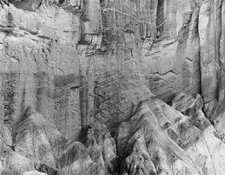
Out in the desert, images usually went on Gallerie (Grade 3). This cliff face is the back side of Manly Beacon in Death Valley from the usual profile seen.
Attachments
Last edited:

Using a well-calibrated R&H Design Analyser pro, the first print is often pretty decent, the second print good enough in most cases and when I am in a perfectionist mood, a third print will be as perfect as my skills allow me.
same here. Anyway, I don't consider any test strip to be a waste. It's just part of the journey!
- Joined
- Apr 19, 2011
- Messages
- 922
- Format
- 35mm
Like others here I welcome making test strips and I don't mind the time it takes. I use condenser enlargers with classic opal bulbs, I have simple digital timers without any programs. It is a simple and unhurried process which is, in this crazy life, why it always feels new and interesting to me. Similar to when I began more than 40 years ago. Don't get me wrong, there are times that I can't afford a box of 50 sheets 20x24 in. So, I try to concentrate as much as possible. That is my main parameter to make sure I am efficient.
Have fun! And remember that the wastebasket is one of the most important accessories in the darkroom!
Have fun! And remember that the wastebasket is one of the most important accessories in the darkroom!
The the analog version of ctrl+z.

In my learning years, I went through quite a bit of paper. I proofed on RC, with the good ones ending up on fibre-based paper. When I got good at it, I wasted less. Then I started proofing negatives on the scanner. That saved a whack of paper! If I ever started printing on gel silver papers again, I'll go back to that workflow, considering the price of paper now!
| Photrio.com contains affiliate links to products. We may receive a commission for purchases made through these links. To read our full affiliate disclosure statement please click Here. |
PHOTRIO PARTNERS EQUALLY FUNDING OUR COMMUNITY:  |