• Welcome to Photrio!
    Registration is fast and free. Join today to unlock search, see fewer ads, and access all forum features.
    Click here to sign up

VueScan dust reduction feature is a NoGo with Plustek OpticFilm 120

White Doves of Peace

A
White Doves of Peace

  • 0
  • 0
  • 0
Flowstones

H
Flowstones

  • 2
  • 0
  • 30

Forum statistics

Threads
202,529
Messages
2,841,923
Members
101,366
Latest member
calmomile
Recent bookmarks
0

jmoche

Member
Allowing Ads
Joined
Nov 28, 2009
Messages
62
Location
Woodland Hills, CA
Format
35mm
When using Vuescan with the latest iteration of the OpticFilm 120, the dust reduction feature does not work. The issue is that the IR layer that contains the dust info is offset from the RGB layers. This does not happen when using Silverfast. After several weeks of going back and forth with Ed Hamrick, he concluded that he cannot fix the issue. If you are thinking about pickup up a new Plustek 120 (which I highly recommend, by the way) you will need to stick to the full version of Silverfast 9 Ai Studio that comes bundled with the scanner.
 
When using Vuescan with the latest iteration of the OpticFilm 120, the dust reduction feature does not work. The issue is that the IR layer that contains the dust info is offset from the RGB layers. This does not happen when using Silverfast. After several weeks of going back and forth with Ed Hamrick, he concluded that he cannot fix the issue. If you are thinking about pickup up a new Plustek 120 (which I highly recommend, by the way) you will need to stick to the full version of Silverfast 9 Ai Studio that comes bundled with the scanner.
Or if you like VueScan you could just continue using it and remove dust manually. I like the idea of auto dust removal but found a slight softening of the resulting scan. It's handy though. I'd love to try out an OpticFilm 120 sometime.
 
Thread title tweaked.
 
Or if you like VueScan you could just continue using it and remove dust manually. I like the idea of auto dust removal but found a slight softening of the resulting scan. It's handy though. I'd love to try out an OpticFilm 120 sometime.

Dust reduction does result in a slight softening. Unfortunately, the vast majority of negs I'm scanning are decades and decades old and time has not been their friend. Lots of dust stuck in the emulsion, scratches, bits of loose/missing emulsion, etc. Included are the negs of my wedding back in 1973. No photos exist anywhere -- just the negatives -- so I can't take a chance on trying any rewashing methods. So far, the OpticFilm 120 seems pretty good. Medium format negs scan much sharper than they do on my Epson V850 and I can't detect any differences on 35mm between the Plustek and my Coolscan 5000. Now that the Plustek has proven itself, I'm going to try cleaning the mirror on my Coolscan.
 
Or if you like VueScan you could just continue using it and remove dust manually. I like the idea of auto dust removal but found a slight softening of the resulting scan. It's handy though. I'd love to try out an OpticFilm 120 sometime.

I'm hoping that one of these days (maybe years?) AI will be able to fix dust and scratches. Currently, Photoshop AI can't match Coolscans . . .

Kodak 160VC-036 Adobe AI vs Coolscan ICE by Les DMess, on Flickr
 
Dust reduction does result in a slight softening. Unfortunately, the vast majority of negs I'm scanning are decades and decades old and time has not been their friend. Lots of dust stuck in the emulsion, scratches, bits of loose/missing emulsion, etc. Included are the negs of my wedding back in 1973. No photos exist anywhere -- just the negatives -- so I can't take a chance on trying any rewashing methods. So far, the OpticFilm 120 seems pretty good. Medium format negs scan much sharper than they do on my Epson V850 and I can't detect any differences on 35mm between the Plustek and my Coolscan 5000. Now that the Plustek has proven itself, I'm going to try cleaning the mirror on my Coolscan.

It sounds like you have just about a perfect use case for dust and scratch reduction tools at the time of scanning. Congrats on the scanner and best of luck with the scans!
 
I'm hoping that one of these days (maybe years?) AI will be able to fix dust and scratches. Currently, Photoshop AI can't match Coolscans . . .
I'm hoping one of these days (maybe years?) Nikon will update their software and make Digital Ice work without softening images. 😜
 
I'm hoping one of these days (maybe years?) Nikon will update their software and make Digital Ice work without softening images. 😜

I don't miss it as I run all my Coolscan's on Windows Vista with no issues.

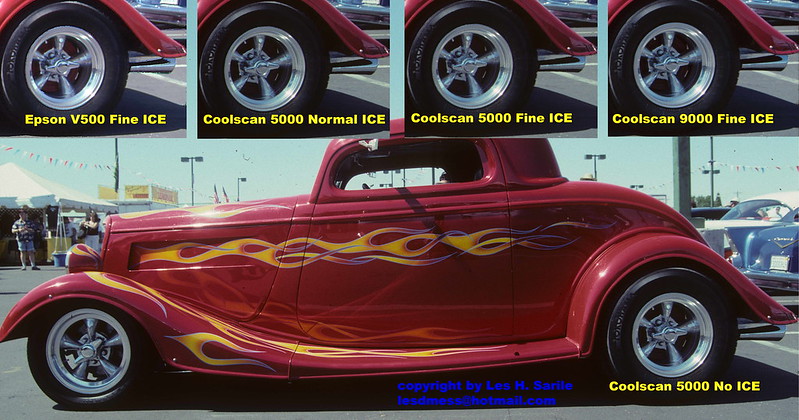
And fortunately for us, Coolscan+Nikonscan doesn't double the scan time when enabling ICE. And it's not as soft as say the Epson's . . . even when not using ICE . . . 😉

Coolscan 5000 scan res with and without ICE on Fuji RVP - Velvia 50

Fuji RVP50-03_18 Coolscan 5000 by Les DMess, on Flickr


V500 different scan res with and without ICE on Fuji RVP - Velvia 50

Fuji RVP50-03_18 Epson V500 by Les DMess, on Flickr


Best (and only one?) for use with Kodachrome too . . .

Kodak K64-029 ICE by Les DMess, on Flickr
 
This also occurs with the Plustek 135i, I dont have Silverfast but apparently the ICE works on it.

The oddest part is, the medicore Plustek scanning software bundled with it also doesn't use the IR dust removal layer properly.
 
Photrio.com contains affiliate links to products. We may receive a commission for purchases made through these links.
To read our full affiliate disclosure statement please click Here.

PHOTRIO PARTNERS EQUALLY FUNDING OUR COMMUNITY:



Ilford ADOX Freestyle Photographic Stearman Press Weldon Color Lab Blue Moon Camera & Machine
Top Bottom