• Welcome to Photrio!
    Registration is fast and free. Join today to unlock search, see fewer ads, and access all forum features.
    Click here to sign up

vignetting on 6x6 with beseler 45 mcrx 75 mm schneider

A coal wagon

A
A coal wagon

  • 0
  • 0
  • 0
Morning Birdie

D
Morning Birdie

  • 0
  • 0
  • 10

Forum statistics

Threads
203,140
Messages
2,850,457
Members
101,692
Latest member
eviosl
Recent bookmarks
1

thedeuk

Member
Allowing Ads
Joined
Jul 15, 2011
Messages
28
Location
venice, ca
Format
Multi Format
hello,
hoping someone can help. i have my beseler 45 mcrx set to the 2 1//4 setting. i'm using a 75 schneider. i have the enlarger mounted on a home made adjust-able and am printing 16x20. i can't seem to get rid of dark corners on the projection even with it wide open. do i have to do something with the actual condenser's or is there something else i can check? thank you.
 
Image circles increase in size as you stop down. What does it look like when you stop down to f/8 rather than wide open?
 
it seems the opposite. when I stop down the image circle decreases.
 
it seems like the lens plane needs to move further from the film plane in order to achieve full image coverage. this I would think means get a longer lens but I thought 75 is adequate for 6x6. help.
 
Two things, I cant find the specs for it, but I think the 80mm schneider is for 6x6 and the 75 is for 6x4.5. They are pretty conservative with their specs, so I'd expect if this is the case, the 75 would still work for 6x6. My beseler (a cb7) also has an adjustment above the film carrier that needs to be cranked up or down for different image sizes. It's got a little arrow that indicates on a piece of tape measure the proper positions of the head for different film sizes.
 
I have that too. I have on the correct format and have played around with moving it in either direction. same problem. thanks.
 
I think your lens is too short for 6x6. Since you have stated that the problem is not affected by how you set the upper bellows, then the lens must not be covering your film completely.

Have you actually made a print and noticed dark corners, or are you judging based solely on the image on the easel?

Are you positive the vignette is not on the negs?
 
positive it's not the neg. judging soley the easel. I guess it would actually make light corners un the print because there's no lighting the corners. that would be terrible. if I can do without having to buy a new lens it would be good. thanks.
 
positive it's not the neg. judging soley the easel. I guess it would actually make light corners un the print because there's no lighting the corners. that would be terrible. if I can do without having to buy a new lens it would be good. thanks.

Brain fart on my part. Yes, it would be light corners.
 
This can also result from the light source being out of position. What bulb do you have installed?
 
Beseler universal color head (condenser). the one that looks like comes with the enlarger.
 
I was referring to the bulb itself - if it is the wrong bulb or is out of position vertically, then the condensers aren't able to do their job properly.
 
Is the lens mounted on the board properly? On my LPL the lens mounts into a sort of cup-shaped thing and sometimes a lens works better if it's mounted with the cup inverted into the enlarger or sometimes better if it's sticking out like a bump. I use an 80mm for up to 6x9 so I'd be surprised if a 75mm can't do 6x6.
But double check it is 75mm as a standard 50mm lens does what you're talking about.
 
I had the same problem printing 2 1/4 with the Nikkor 75 on that enlarger. Everyone says that the lens should work, but in the end I found that shifting to an 80mm Rodenstock was the only way I could find to fix it. There should be a solution for you, but if you don't want to fight the machine, try a slightly longer lens - if you are still able to get to 16x20.
 
hi all,
thanks for your help. light source is 150 w light bulb and is positioned correctly. lens is mounted correctly. no mask in filter drawer. can anyone else confirm 75 mm won't work for 6x6 on beseler 45 mcrx?
 
Yes. Actually, 75mm will work if you don't mind the edges falling off.
 
so will 80 definitely work or do I need to go longer than that? thanks.
 
excellent I'll be renting one tomorrow. if it works than I'll be in the market to buy one and sell my 75. thanks everyone.
 
so the 80 seems to be working in way of i don't see anything on the final print. however, i do still see dark corners while wide open (5.6) on the projection but they're just outside the image area but on the border area (sloppy borders). i'm thinking i shouldn't see that at all because it shouldn't be that tight? maybe something wrong with the enlarger?
 
it seems the opposite. when I stop down the image circle decreases.

I did not see this post previously. If you really observe what looks like the image circle getting smaller as you stop down that suggests to me that the edges of the light source are the limiting factor, not the lens.
 
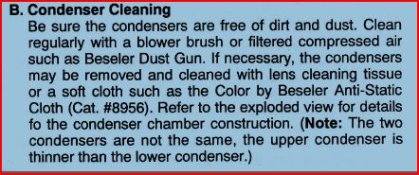
hmm. so does the bulb need to be closer or do i need to do something with the condensers? they all appear to be in the correct position. condensers are belly to belly and look as thought they fit in perfectly.
 
Most bulb sockets have adjustable positioning, to accommodate for differences in bulb sizes. With the neg carrier in place, adjust the bulb for even illumination on the easel. The small Ilford EM10 meter is perfect, otherwise just eyeball it as best you can.
 
I don't think the lamp is adjustable in the 45. You might want to double check the condensers.
 

Attachments

  • 45cond.JPG
    45cond.JPG
    40.4 KB · Views: 128
Photrio.com contains affiliate links to products. We may receive a commission for purchases made through these links.
To read our full affiliate disclosure statement please click Here.

PHOTRIO PARTNERS EQUALLY FUNDING OUR COMMUNITY:


Ilford ADOX Freestyle Photographic Stearman Press Weldon Color Lab Blue Moon Camera & Machine
Top Bottom