• Welcome to Photrio!
    Registration is fast and free. Join today to unlock search, see fewer ads, and access all forum features.
    Click here to sign up

VERBOTEN? Anyone here use a scanner for their contact sheets?

Toby's Bar

H
Toby's Bar

  • Tel
  • Apr 25, 2026
  • 0
  • 0
  • 11
Barber

A
Barber

  • 0
  • 0
  • 33

Recent Classifieds

Forum statistics

Threads
203,486
Messages
2,855,469
Members
101,866
Latest member
Afadjato
Recent bookmarks
0

Sparky

Member
Allowing Ads
Joined
Jun 19, 2005
Messages
2,096
Location
Los Angeles
Format
Multi Format
Okay - sensitive issue maybe? Don't worry - I won't discuss digi-stuff. Just wondering if others use a scanner to make their contact sheets... seems like a great time-saving measure. Anyone know where I can find some good discussions of the intricacies of this?

Or is the very mention of it a faux-pas?
 
Well, some people might make proof sheets that way, but they wouldn't be contact sheets.
 
I think it's likely that many people use scans to 'proof' their negatives, perhaps even to the extent of avoiding making contact sheets altogether. The trick is to make a scan that you know from experience will allow you to make a similar print. Even a minimal adjustment in levels or curves is a departure from the direct link from negative to print that you would experience in the darkroom. It's all too easy to PS a negative scan in ways that, though it can be done, you don't have the skill to reproduce traditionally A contact sheet has the distinct value of being made on the paper you will use to make a print, which will allow you to make some assumptions about what to expect in printing that a negative scan simply won't. At least make both, but don't bypass the contact print.
 
I've done it to get what I thought might be a quick positive view of a roll, but it actually took longer than just making a contact sheet the normal way, not including drying time. I didn't find the exercise terribly useful.
 
I've done it to get what I thought might be a quick positive view of a roll, but it actually took longer than just making a contact sheet the normal way, not including drying time. I didn't find the exercise terribly useful.

This was my experience, too.
 
I've done it to get what I thought might be a quick positive view of a roll, but it actually took longer than just making a contact sheet the normal way, not including drying time. I didn't find the exercise terribly useful.

yes - well - this is sort of what I'm in the middle of grappling with - and I'm finding myself having to so some fairly wild photoshop acrobatics to get a reasonable match - and, if I switch papers - god help me. I was just wondering if someone had a handy system down for this, or if it was just an exercise in futility. But I find making contact sheets by hand at least as fast, and lots more fun than on the comp.
 
Contact sheets are now just about my only use for RC paper.

A full sheet of 35mm or 120 film fits perfectly on a 24x30cm sheet, with a little room for notes. So does six 9x12cm or four 4x5", but 5x7" doesn't fit quite as well. And it's a lot faster than my scanner, too.
 
Yes - that's the way to do it... with RC I mean. I use RC to proof larger images too. It's great for cutting up to figure out the aspect ratio, etc of a final print you want to make - when you're just in the planning stages of it. I got lucky and got 10 boxes of new MGIV RC glossy for $5 each...! Woo hoo!!
 
Nein, es ist nicht verboten!
Actually, it's a viable method for me, because I get into my chemical darkrooom only every few months. Scans are a way of exploring one's negatives. As Jovo said, you shouldn't later try to replicate in the darkroom what you did with the scan digitally. On the other hand, the digital print's materiality will be mediocre compared to a good FB chemical print. But we were talking contact sheets, I digress.
No 135 filing sheet fits into the scanning area of my 8x10 scanner, though.
 
No, I have gotten into the habit of not making contact sheets at all with my 8x10 negs.

1) I use alt processes and my negs are usually too contrasty for silver geletin paper -- they look like crap.

2) After 30 years of looking at negatives, I have found my brain inverts them to positives anyway.

Vaughn
 
Just wondering if others use a scanner to make their contact sheets...
Yes, I've been doing it for years. I've even done a couple of articles about it: Shutterbug and AP, as far as I recall, but it's so long ago I've forgotten. What I like is the 'enlarged contact' (as David points out, they ain't contacts anyway) on A3.

A lot depends on what you think contacts are for. If they're just for reference, inkjets are fine, though they're a bit of a let-down when you put a loupe on them...

In fact, I sometimes even play with the image on screen: crop, dodge, burn, whatever. Of course it looks nothing like a silver halide print -- but if you're briefing a printer (Frances does almost all my printing) it's very useful.

To anyone who says, "You have to do your own printing," I'll add: yes, but I taught Frances to print, then she got better than I did...

Cheers,

R.

 
I find the "ring around" that is provided with the Canon pro 9000 and Photoshop CS2 a great way of exploring various interpretations of my negatives. It has become a far cheaper method than using precious fibre paper, that here in Oman is rather hard to get.
Unfortunately, B&W is viewed along with 'wind-up gramophones' as antique!
 
Sparky said:
... Just wondering if others use a scanner to make their contact sheets...
I did this from time to time, but what I realized was, that after a scan I found more dust on my negatives than after working with them for several hours in my darkroom. Now I inspect them on a light table and those that seem worth a closer look are enlarged on 4x6 (135) or on 7x9.4 (120).

ciao
-- Ruediger
 
I did this from time to time, but what I realized was, that after a scan I found more dust on my negatives than after working with them for several hours in my darkroom. ).
-- Ruediger
Dear Ruediger,

I always scan 'em in the sleeves (PrintFile) for this very reason.

Cheers,

R.
 
... I always scan 'em in the sleeves (PrintFile) for this very reason.
Ahhh, thanks Roger, I used the film scanning possibility (with film holder) of my flatbed scanner - which is overkill just for a "contact" sheet. The idea with just scanning them in sleeves is good.

However, I enjoy looking at the negatives and since I sit in front of a computer all the day ... for me, every minute spent in the darkroom is more exciting.

ciao
-- Ruediger
 
Dear Ruediger,

I always scan 'em in the sleeves (PrintFile) for this very reason.

Cheers,

R.

This is the way that I do it as well. I bought a cheap picture frame and use the glass to hold the negatives flat in the scanner. I wouldn't ever print from the scans, but it's a great way to check composition and especially facial expressions on portraits. I use the scans to determine which negatives aren't worth the effort to print which helps because I always have very limited time in my temporary darkroom.

Peter
 
I've been scaning/proofing my negatives for about ten years now.

I also built a small website running locally to display the images. I use that instead of proof books now because the proof books were starting to take up too much room. Now the proof sites with low res scans can all be housed on a DVD instead of the proof books which needed a bookcase.
 
I use XnView (shareware) to make proofs, rather than Photoshop -- I can stack the images closer together and have more control over the printed note info. I save the proofs as print-res PDFs and print them in bulk at a copy place.

I used to do this for my digi stuff too --good to have at least SOMEthing on paper -- but eventually to volume overwhelmed me.
 
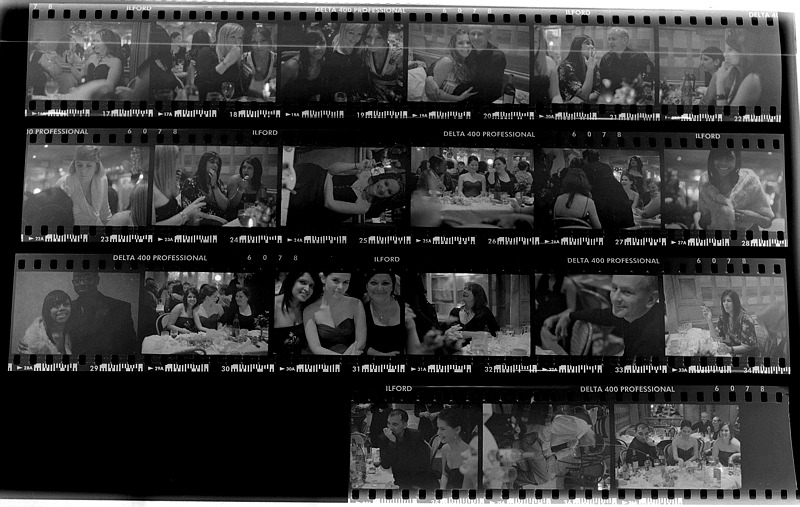
I put the sleeves on the light table and shoot them with the DSLR, then invert them + levels in photoshop. It gives unusable results as far as "picture" goes, but it's a great, indexable reminder and it gives a fairly good idea of the tones...
This one is a bad example, it flares a bit in the side, but it gives the idea..
Contact_2-800.jpg
 
I have done the lightbox digital method also. I recently picked up a Epson 1200Photo scanner with transparency templates for 135, 6x6, 6x9, 4x5 etc and 4x5 light source from a local thrift store for $5.98. Downloaded the drivers from Epson and scan all my "worthy" negatives this way. It replaced a HP Scanjet 7400c that I got for $3.98. That scanner was just too slow. 99.9% of my stuff isn't worth the chemicals or the paper to proof. I find this scanning cost effective for amateur use.
 
Photrio.com contains affiliate links to products. We may receive a commission for purchases made through these links.
To read our full affiliate disclosure statement please click Here.

PHOTRIO PARTNERS EQUALLY FUNDING OUR COMMUNITY:


Ilford ADOX Freestyle Photographic Stearman Press Weldon Color Lab Blue Moon Camera & Machine
Top Bottom