
• Welcome to Photrio!
    Registration is fast and free. Join today to unlock search, see fewer ads, and access all forum features.
    Click here to sign up

Two (at least) Negative problems!

Recent Classifieds

Forum statistics

Threads
202,885
Messages
2,847,044
Members
101,529
Latest member
Flo18
Recent bookmarks
0

Lanthanum

Member
Allowing Ads
Joined
Jun 27, 2014
Messages
54
Location
Australia
Format
35mm RF
Hello APUG community

I have been struggling with two issues with my B&W negatives and after trying a number of things I am hoping that you can help me.

These are HP5+, Ilford HC, 18 degrees for 7:38, water stop bath at 18 degrees, HYPAM fixer 5 minutes at 18 degrees, Ilford 'archival' wash technique (5,10,20) plus another 10 minutes slow circulating water bath also at 18 degrees, plus final Photo-Flo at 1:600. Camera is an M3 with 50mm lens.

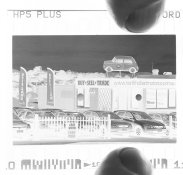
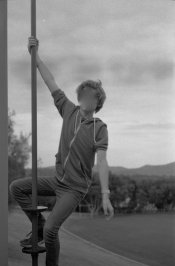
Here are two photos from the same roll which illustrate the problems:

attachment.php


(please ignore blurred face!)

and

attachment.php


The first picture has a dark band of what look like clouds, but were not present (to the eye).

The second picture has a pair of dark bands at the top of the frame.

Any ideas for what might be causing these problems? Thanks for any help!
 
How did you attach these photos. All I see is a little question mark inside a very small box. Click on it and nothing happens.
 
Trying again, not sure what happened, they show up on my screen. First one:

attachment.php
 

Attachments

  • 2016-01-31-0010 .jpg
    2016-01-31-0010 .jpg
    192.4 KB · Views: 226
You show inverted scans.

What do you see on the negatives themselves?
 
Welcome to APUG
 
Hello MattThank you for your question.I tried looking at them held up to a bright screen and using a watchmakers 10x loupe. To be honest, the areas in question are solid black and I am unable to resolve any detail with my eyes. Is there a better way to look at them?
 
Hello MattThank you for your question.I tried looking at them held up to a bright screen and using a watchmakers 10x loupe. To be honest, the areas in question are solid black and I am unable to resolve any detail with my eyes. Is there a better way to look at them?

If they are solid black, that tells me that light has got to the film where the black is.

That usually means a light leak either in the cassette, the camera or the developing tank.
 
Thanks Matt for your reply.

I am looking again and I can start to see some detail in the sky sections of the negatives, still not enough to resolve the areas as distinct from the other sky areas.

I wonder if I could photograph the negatives using a 1:2 magnification lens (best I have). I will give it a go.
 
Just thinking about it, if the trouble areas are darker in the positive (inverted negative), wouldn't that mean they are lighter on the negative, i.e. they are places where less light is reaching the negative?
 
Alternatively, where there is either mechanical damage (second?) or where less developer is reaching (first?) or some sort of shock (first?).
 
This is a cropped image using my iPhone as backlight of the second image (digital camera on tripod with overexposure of 3 stops from the metered reading).

attachment.php
 

Attachments

  • DRDW7727.jpg
    DRDW7727.jpg
    568.7 KB · Views: 194
I had the same problem scanning with a camera using my iPad as a backlight. Light would reflect off the metallic surfaces on the camera causing the same thing. The way I figured it out was the dark patches resembled the top of my digital camera. The solution was the mask off the area around the negative so that extra light didn't get to the camera. I also scan in a very dark room.
 
Hi BAC1967

I use a PrimeFilm XA for scanning. The photo above was just trying to get a direct photo of the negative without using the scanner. The PrimeFilm does have a viewing window over the scanning area, maybe I could try covering that?
 
Last edited by a moderator:
Try scanning as a transparency, we need to see the rebates as well, if you have a flat bed scan without a carrier.
You are correct about the transposition.
 
Hi Xmas

Thanks for your reply, much appreciated.

Try scanning as a transparency, we need to see the rebates as well, if you have a flat bed scan without a carrier.
You are correct about the transposition.

I don't have a flatbed, but this photo does show me holding the negative down on the screen of my phone:

attachment.php
 

Attachments

  • DRDW7727 (1).jpg
    DRDW7727 (1).jpg
    711.2 KB · Views: 176
Can you do the same with the other negative?

I don't see any problem with the negative you have shown us. Which makes me think your problem originates at the scanning stage.

Try scanning the negative after you have turned it around 180 degrees. If the problem areas move with the negative it will tell you one thing, but if they disappear or appear at a different location on the negative, it will tell you another thing.
 
Hello Matt, Ian and everyone

Thank you so so much for all your help!

Here is the 180 degree scan of the second image:

attachment.php


It certainly is different! I can still two areas at the top (but less prominent?) and there is an extra band. So the scanner is definitely a possible a suspect! What to do?

On the first image, Ian suggested in a wonderfully detailed PM (thank you kind sir) that it may be because of a lack of flow of developer to a part of the negative due to the negatives being too close together during development. I see the effect of image number 1 on frames 8,9,10,11,12,13 of the roll.

All have different 'false cloud' shapes, some across the negative, some more in one spot and one actually with a curved shape.

So I am thinking the second suspect is my loading technique on the development rolls? I am using a new Patterson System 4 tank for 2 rolls. This has the plastic ratcheting kind of reel. I develop 2 together, I use 580ml of developer, approx 18.5ml of Ilford HC, the rest water that has gone through a Paterson water filter.

I load the reels in a darkroom by feel. What should I look for that might be causing the negatives to get in close proximity? Since the effected frames are sequential, I assume I may have somehow flexed several of the frames on to the back side of the earlier frames?

Thanks once again for your help. I had begun to have 'thoughts from the dark side' (picking up the digital camera) so you are really helping me back to the light side :smile:
 

Attachments

  • 2016-02-01-0001.jpg
    2016-02-01-0001.jpg
    240 KB · Views: 148
Photrio.com contains affiliate links to products. We may receive a commission for purchases made through these links.
To read our full affiliate disclosure statement please click Here.

PHOTRIO PARTNERS EQUALLY FUNDING OUR COMMUNITY:


Ilford ADOX Freestyle Photographic Stearman Press Weldon Color Lab Blue Moon Camera & Machine
Top Bottom