• Welcome to Photrio!
    Registration is fast and free. Join today to unlock search, see fewer ads, and access all forum features.
    Click here to sign up

Try to develop B&W film

Recent Classifieds

Forum statistics

Threads
202,967
Messages
2,848,213
Members
101,562
Latest member
Photoj
Recent bookmarks
0

Bobkins

Member
Allowing Ads
Joined
Aug 11, 2014
Messages
58
Format
35mm
Hi Guys,

need help! :wink:


tried to develop film using Arista developer and fixer and this method

http://www.lomography.com/magazine/...sy-developing-of-black-and-white-film-at-home

for first time had a problem with loading film into a tank but anyway 3-4 photos
have been developed successfully

and I even liked result.

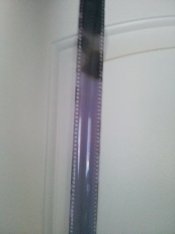
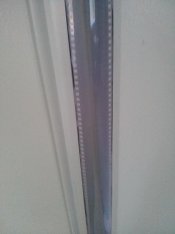
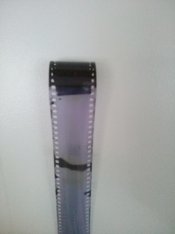
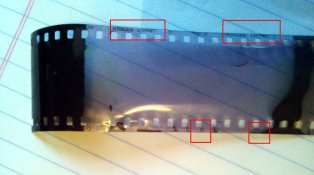
for second time I got almost completely white color roll of film except some black spots on beginning and on the middle.

did absolutely the same except decreased time from 7.15 min to 6.30 min as temperature little hotter

this is what I got :blink:

thank you!


CAM02685.jpg

CAM02685.jpg

CAM02686.jpg
 

Attachments

  • CAM02687.jpg
    CAM02687.jpg
    253.4 KB · Views: 212
11 Aug 2014

Bobkins:

To me this looks like either: (1) an unexposed roll of film, (2) a grossly under exposed roll of film, or (3) something wrong with the camera used to expose the film. How dense are the "roll markings" that are along the edge of the film?

Welcome to the darkroom, and keep on trying - don't give up!

Regards,
Darwin
 
It looks like this roll may not have advanced through the camera.
In the first picture you have a fogged area, could be due to the back getting opened, or some kind of darkroom error.
In the 4th picture the short area looks to be due to a reel loading error where the emulsion was touching the previous layer and keeping the developer from getting to it.

The edge markings look to be visible, though the density may be a bit low. That's an indication that you didn't mistake the fix for the developer. (something most everyone here has done at least once).

Do keep at it though.
 
11 Aug 2014

Bobkins:

To me this looks like either: (1) an unexposed roll of film, (2) a grossly under exposed roll of film, or (3) something wrong with the camera used to expose the film. How dense are the "roll markings" that are along the edge of the film?

Welcome to the darkroom, and keep on trying - don't give up!

Regards,
Darwin

thank you Darwin

roll marking -in attachment, looks ok?
 

Attachments

  • CAM02688.jpg
    CAM02688.jpg
    1 MB · Views: 189
It looks like this roll may not have advanced through the camera.
In the first picture you have a fogged area, could be due to the back getting opened, or some kind of darkroom error.
In the 4th picture the short area looks to be due to a reel loading error where the emulsion was touching the previous layer and keeping the developer from getting to it.

The edge markings look to be visible, though the density may be a bit low. That's an indication that you didn't mistake the fix for the developer. (something most everyone here has done at least once).

Do keep at it though.

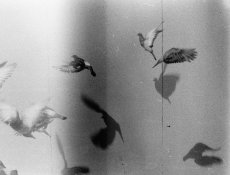
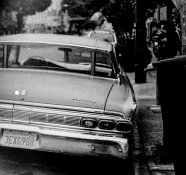
I use the same aperture priority Yashica Electro camera,
this is pics from first roll
 

Attachments

  • PICT0001.jpg
    PICT0001.jpg
    744.8 KB · Views: 160
  • PICT0002-2.jpg
    PICT0002-2.jpg
    709.1 KB · Views: 148
  • PICT0002 (3)-3.jpg
    PICT0002 (3)-3.jpg
    473.6 KB · Views: 145
pretty sure ur film did not advance through the camera. Make sure the end is securely latched to the take-up spool when you load.

Make DOUBLE sure that the rewind knob rotates backwards when you wind the film that first two blind shots. To be sure, after you close the camera back, but before you advance the film, turn the rewind crank in the direction of the arrow until you JUST feel resistance.

Stop, then advance the film normally. The rewind lever should go backwards. If it does not, your film is not advancing. Open camera, re-hook film end to take-up spool, close back, repeat.

Dont sweat it, we all screw up. I still, to this day, have to watch that rewind knob to make sure it is going backwards.
 
Hi Bobkins, as already others told you - film did not advance through the camera. I see you looked in lomography site for Beginners Guide - so I am guessing you have Lomography camera? Which camera you used?
I played with some Lomography cameras - and often the had problem that they did not advanced the film (if I remember it was some camera with 4 lenses that had this problem). What I did: tape the begin of the film with some small amount of Sellotape on plastic leader in the camera, so that it advance for sure.
 
he's using a Yashica Electro, Darko
 
pretty sure ur film did not advance through the camera. Make sure the end is securely latched to the take-up spool when you load.

Make DOUBLE sure that the rewind knob rotates backwards when you wind the film that first two blind shots. To be sure, after you close the camera back, but before you advance the film, turn the rewind crank in the direction of the arrow until you JUST feel resistance.

Stop, then advance the film normally. The rewind lever should go backwards. If it does not, your film is not advancing. Open camera, re-hook film end to take-up spool, close back, repeat.

Dont sweat it, we all screw up. I still, to this day, have to watch that rewind knob to make sure it is going backwards.

There is a risk that you wind the film back into the cassette inadvertently.

The more formal process is

attach the film leader to the take up spool
pin a sprocket hole of film to sprocket shaft tooth with one hand
tighten film in cassette with rewind knob with other when the resistance increases and you detect abrasion
then close back door

note some cameras auto load so you need to pin the film to the registration rails instead

With some bottom loaders you need a very small little finger.
 
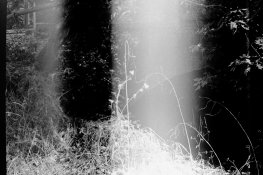
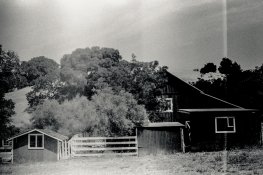
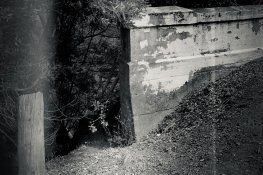
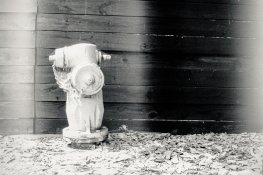
developed film roll number 3

white lines present on negatives,
the same appeared on roll 1

what is that can be, any ideas?

- camera has light leak?

- or something else?


thanks!
 

Attachments

  • PICT0027.jpg
    PICT0027.jpg
    340.3 KB · Views: 131
  • PICT0033-3.jpg
    PICT0033-3.jpg
    417.3 KB · Views: 111
  • PICT0037.jpg
    PICT0037.jpg
    512.3 KB · Views: 143
  • PICT0047.jpg
    PICT0047.jpg
    405.9 KB · Views: 133
Do they extend outside the 24x36 mm frame?

If they do the leak is probably through back door or into take up spool volume otherwise it is via frame...
 
Last edited by a moderator:
Dear Bobkins,

One of the downsides to old rangefinder cameras is that you can inadvertently leave the lens cap on while taking photos. You can guess how I learned this. ;-)

Neal Wydra
 
This can happen with new rangefinder cameras too ... :whistling:
 
Before we all dive to light leak, is it possible he's getting uneven development? What kind of spool are you using? Could sections be touching, and as such ending up less developed?
 
Before we all dive to light leak, is it possible he's getting uneven development? What kind of spool are you using? Could sections be touching, and as such ending up less developed?

No. The fogging has much greater effect in the shadows than highlights, it is clearly an additive effect. See also that thin line - definitely not a development effect. The straightness of the effect also implies that there is some sort of geometry involved in its creation.
 
Take it slow, dust your negatives before you scan, and stop rushing through jamming exposed film through reels before you have enough practice.
 
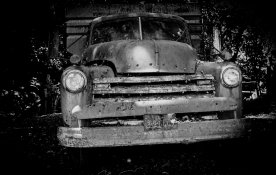
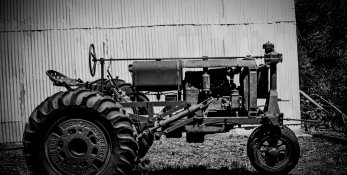
have sticked a seal (cut mouse pad) inside the camera,
white lines almost disappeared :laugh:
 

Attachments

  • PICT0017.jpg
    PICT0017.jpg
    495.9 KB · Views: 108
  • PICT0023.jpg
    PICT0023.jpg
    566.1 KB · Views: 113
  • PICT0041-2.jpg
    PICT0041-2.jpg
    984.1 KB · Views: 116
Photrio.com contains affiliate links to products. We may receive a commission for purchases made through these links.
To read our full affiliate disclosure statement please click Here.

PHOTRIO PARTNERS EQUALLY FUNDING OUR COMMUNITY:


Ilford ADOX Freestyle Photographic Stearman Press Weldon Color Lab Blue Moon Camera & Machine
Top Bottom