


• Welcome to Photrio!
    Registration is fast and free. Join today to unlock search, see fewer ads, and access all forum features.
    Click here to sign up

trouble printing contrasty neg

Forum statistics

Threads
203,275
Messages
2,852,199
Members
101,755
Latest member
andescapes
Recent bookmarks
0

timk

Member
Allowing Ads
Joined
Aug 26, 2009
Messages
202
Location
Melbourne
Format
Medium Format
Hi all, I've been playing around today with a neg that I haven't really had much love with. So I though i'd ask for some suggestions..

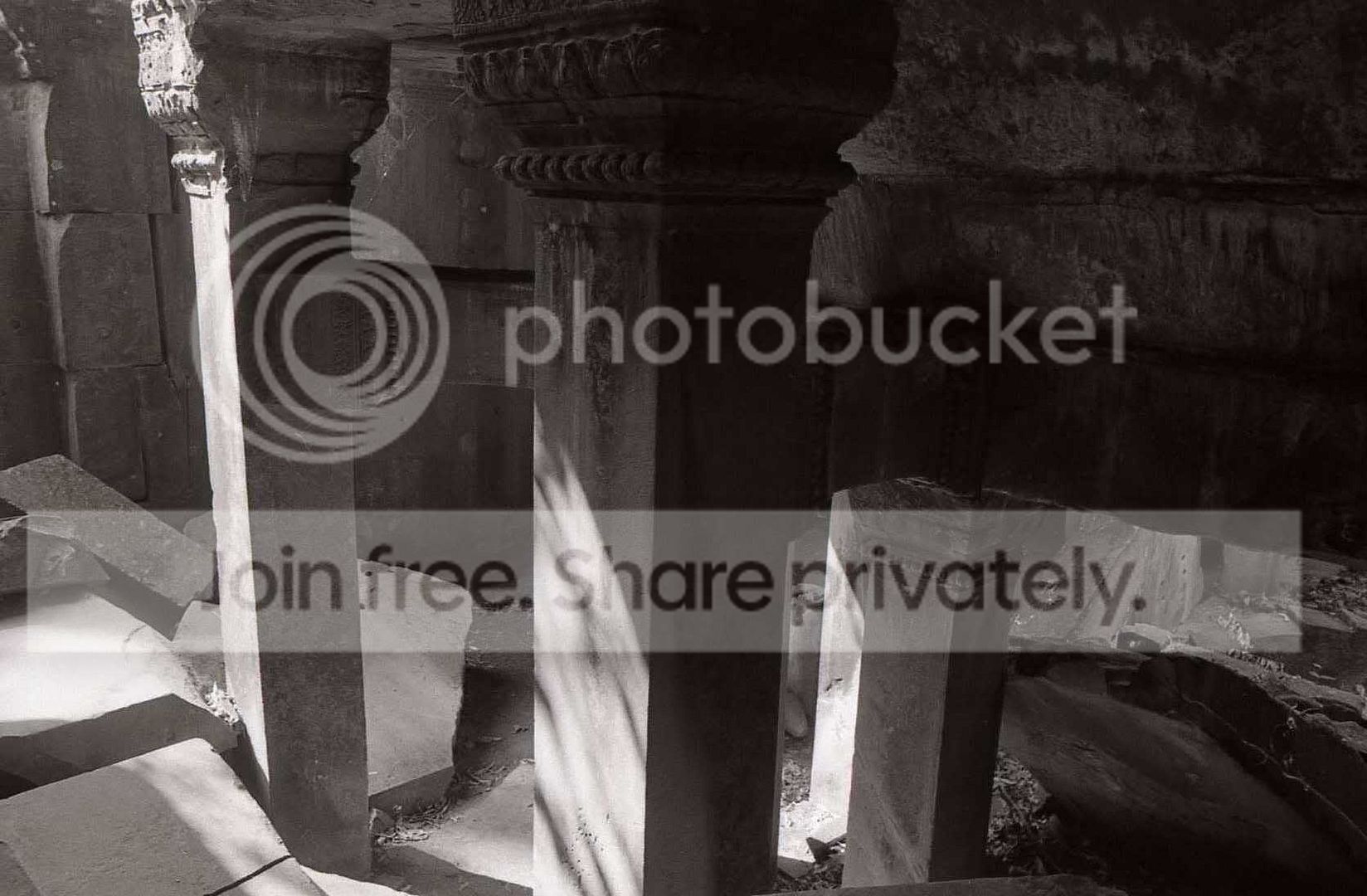
here is the scan... (the original neg is 35mm HP5+ developed in D76 1+1)
img241.jpg


I'm having massive contrast issues which aren't really too visible in the scan, the problem is the rock on the left, and the left face of the column are being blown out. :mad:

What I've done is increase the exposure a fair bit until I get detail back in the highlights. Then I've reduced the contrast. By the time I have gotten down to Grade 1, it's looking better, but the right side of the image (particularly the right face of the pillar closest to the camera) has lost too much detail in the shadows.

If I reduce the contrast below grade 1, the shadows improve, but the mid-tones become muddy. In fact, the midtones look great printed at grade 2 with less exposure (and so do the shadows) just the highlights are gone.

I've tried dodging the right side of the image and this also makes it better, but I'm wondering if there are any techniques I could try to tone down the highlights a bit so I don't have to use as much exposure (and hence less contrast)

I'm printing on Ilford MGIV FB Gloss in Ilford MG developer.

:confused:
 
If you like grade 2 then start there and do a split grade print, or burn in the corner.

Rick
 
An Ideal Candidate For ....

I'm printing on Ilford MGIV FB Gloss in Ilford MG developer.

To reduce shadow density while poring on the exposure
needed for some highlight density a post exposure pre-
development latent image bleach should be applied.
That method is known as the SLIMT. A short soak
in an Extremely dilute ferricyanide solution
serves for the bleaching.

I've used it only with Graded but it should also work
with VC. Dan
 
Split grade printing would be my choice. Try finding the best combination for soft/hard filtration for the shadows, the midtones and the highlights. From that, you can make a sequence of exposures, for both filters, where you will dodge/burn specific parts of the image. Another method that might help is preflashing.
 
Dear timk,

If dodging just won't get you there, consider trying a contrast mask.

Neal Wydra
 
I was having precisely this problem last week, ran a series of iterations of splite-grades (had never tried it before, so wanted to get a feel for it). Settled on a very nice split for that particular print on my fourth combination. Details aren't likely relevant to your situation here, but I'll second (or third) the suggestion that split-grade might be worth trying here.
 
I'm for split-grade but you could also consider pre-flashing the paper.
 
Split grade, absolutely. Classic kind of contrast range for this, IMHO. Test the low contrast filter till you get detail in the hot rock, then make a test strip at that exposure, and test the high contrast filter in the darker areas.
 
As others have mentioned ..... I would go for preflashing (I think this can also help with shadow detail aswell ?)

Looking at the scan, the contrast and detail doesn't actually look too bad.
Sometimes when shooting in very high contrast situations like this, there are no details in the highlights at the original scene, so trying to put texture in them when they're not there in real life is sometimes not possible. All you can do is tone them down in the printing but at the risk of making them muddy if they get too much exposure.

The very hot rock on the left leads out of the picture onto the print margin, which is paperbase white. Look to see if there's any difference in tone where the two meet ?
 
A preflash would be my initial choice, maybe to threshold, maybe -if the highlights are bombproof- a very slight (and I mean slight) fogging exposure. Good luck.
 
If dodging just won't get you there, consider trying a contrast mask.

Exactly what I was going to say.

......though I think dodging will get you there with enough hard work at it.

For this particular neg, I would attempt to make a high-contrast mask that has as little density as possible in the areas that will be stacked on to the thickest areas of the original neg (preferably no density at all). I would underexpose and overdevelop the masking film to obtain this sort of mask.
 
Last edited by a moderator:
The Easy Way or The Hard Way?

For this particular neg, I would attempt to make
a high-contrast mask that has as little density as
possible in the areas that will be stacked on to the
thickest areas of the original neg (preferably no
density at all). I would underexpose and
overdevelop the masking film to
obtain this sort of mask.

The same results are obtained using a post exposure
short soak in an Extremely dilute ferricyanide solution.
With a latent image ferricyanide works disproportionately.
The more exposed areas of the print are more reduced.
In effect the negative's thin areas gain density. That
is, in effect the paper has received less exposure
in it's dense areas.

With less exposure in the dense areas one may apply
the needed exposure for good highlight areas. Dan
 
The same results are obtained using a post exposure
short soak in an Extremely dilute ferricyanide solution.
With a latent image ferricyanide works disproportionately.
The more exposed areas of the print are more reduced.
In effect the negative's thin areas gain density. That
is, in effect the paper has received less exposure
in it's dense areas.

With less exposure in the dense areas one may apply
the needed exposure for good highlight areas. Dan

Good technique to know about...

A few questions:

What is the exact formula for the stock solution?

How dilute?

For how long do you rinse the bleach off?
 
An Article via Google

Good technique to know about... A few questions:
What is the exact formula for the stock solution?
How dilute? For how long do you rinse ...?

From Google search for, latent image bleaching .
The Unblinking Eye site.

I've made my stock up as a 1% solution but working
strengths are more in the order of .01% and less.
Very nearly none will do. Use one-shot,
rinse not needed.

Papers vary in their requirement. Ed has a good
description of the method. Dan
 
hi all, wow i didn't expect this many responses.... thanks for the feedback.

I was thinking about flashing the paper but I've never actually done it before, something to try next time I'm in the darkroom.

I'll also give split-grade printing a go, I've used this method before. Does it make any difference with split grade if I'm using a Colour head filtration settings for the contrast? or does split grade need the multi-grade filters?
 
You can use the colour head as usual....you do not need MG filters but be very, very gentle so as not
to double expose the print by moving the enlarger head. Same applies using filters but it is easier.

If its really difficult a very short pre-flash would / could help as well as split grade.

Simon ILFORD Photo / HARMAN technology Limited
 
Photrio.com contains affiliate links to products. We may receive a commission for purchases made through these links.
To read our full affiliate disclosure statement please click Here.

PHOTRIO PARTNERS EQUALLY FUNDING OUR COMMUNITY:


Ilford ADOX Freestyle Photographic Stearman Press Weldon Color Lab Blue Moon Camera & Machine
Top Bottom
