
• Welcome to Photrio!
    Registration is fast and free. Join today to unlock search, see fewer ads, and access all forum features.
    Click here to sign up

The Magic of Film processioning.

Do Not Come Here

A
Do Not Come Here

  • 6
  • 3
  • 57
Heavy

H
Heavy

  • 12
  • 5
  • 114

Recent Classifieds

Forum statistics

Threads
201,923
Messages
2,832,113
Members
101,019
Latest member
ferbert72
Recent bookmarks
0

Zedwardson

Member
Allowing Ads
Joined
Jul 7, 2014
Messages
102
Format
35mm
I know this sounds quaint.

I just developed my first roll of film since around 2008 or so. Funny enough, I knew I had some decent shots. and so I got the dark bag and got it ready, opened it up, struggled for only a short bit before getting the film into the spiral and rolled it into the spiral. Closing the tank up. Mixing a fresh batch of chemicals, ranging from the smelly fix and the yellowish Ilford stop. Finding out the thermometer that you own is as accurate as the news media, Carefully measuring out some 1+50 Rodinal, gauging 20 degrees C by hand, taking the plunge and pouring the developer into the tank and starting the timer. Stopping, fixing, the long wait as you do the wash.

Pull it out, and its that dark grey, pull out one and see clear images on the negative, you know that you haven't screwed up bad enough in your attempt that you ruined the film completely. Then hanging it to dry and waiting.

Its magical seeing those images on the film. Fixing a digital image in Photoshop just doesn't have the same awesome factor. Now I wonder why I ever stopped developing film.


- A happy analog photographer who smells like Fixer.

I will scan something, and most likely find out I have grain the size of marbles when it dries.
 
Last edited by a moderator:
OP
OP
Zedwardson

Zedwardson

Member
Allowing Ads
Joined
Jul 7, 2014
Messages
102
Format
35mm
For the experts, What did I do wrong to cause this issue, a number of frames have this issue, or is it a scanner issue? Water temp changes?

It was Fp4+ (issue being the hole in the photo)
 

Attachments

  • fp4003.jpg
    fp4003.jpg
    677.7 KB · Views: 211

David A. Goldfarb

Moderator
Moderator
Allowing Ads
Joined
Sep 7, 2002
Messages
20,021
Location
Honolulu, HI
Format
Large Format
It looks like maybe you had some debris (technically known as "schmutz") in the tank or in the fixer that settled on the film, or it could be something on the scanner glass, but you could rule out the latter by looking at the negative and seeing if something is really there. It should be a black spot on the neg, since it's white in the positive, and if it's something that was in the fixer or the wash, you could rewash the negs that have the problem.
 
OP
OP
Zedwardson

Zedwardson

Member
Allowing Ads
Joined
Jul 7, 2014
Messages
102
Format
35mm
Thanks, I bet it "schmutz" from the fixer. I will clean it up later and re scan, as it not on the glass. Thanks for letting me know. As there is a few of these i need to go get printed.
 

ntenny

Subscriber
Allowing Ads
Joined
Mar 5, 2008
Messages
2,520
Location
Portland, OR, USA
Format
Multi Format
Schmutz may be the Polynesian term or something; my name for that stuff isn't appropriate for a family newspaper.

I think most of us here know that "magic" vibe. It may be quaint but it's true nonetheless.

-NT
 

Dr Croubie

Member
Allowing Ads
Joined
Mar 21, 2013
Messages
1,986
Location
rAdelaide
Format
Multi Format
... not on the glass.

No matter how clean your scanner glass is, there's always something there.
I was scanning for months, and every so often I'd get a rather weird dot on my images, mostly 135s and 120s but not on every frame. It was only when I started doing more 4x5s that I realised it was on every fricken one, and always in the same place. No amount of cleaning the scanner glass, top or bottom, or ANR/wet-mounting glass did anything to help, I couldn't see any specs or crud anywhere.
Only 2 weeks ago I thought to pull the whole lid off, there was a spec of dust on top of the top glass (ie, inside the machine) blocking the top-light in the same spot. A well-aimed thwak on the glass dislodged it, but it's still somewhere in there unfortunately.
 

darkosaric

Member
Joined
Apr 15, 2008
Messages
4,568
Location
Hamburg, DE
Format
Multi Format
For the experts, What did I do wrong to cause this issue, a number of frames have this issue, or is it a scanner issue? Water temp changes?

It was Fp4+ (issue being the hole in the photo)

Make picture of the negative with digital camera of mobile phone - and post it, so that we can be sure it is a scanner or not.
 

Jaf-Photo

Member
Allowing Ads
Joined
Feb 12, 2014
Messages
495
Format
Medium Format
Most likely some particles from the development. For loose particles, I use a normal dust blower on the negative and the scanner glass (no touch as that leaves more marks).

But if it's stuck in the emulsion, you just have to edit it out in PS/LR. Easy enough.
 
OP
OP
Zedwardson

Zedwardson

Member
Allowing Ads
Joined
Jul 7, 2014
Messages
102
Format
35mm
I looked at the film, and it is on the negative. when I loaded the film I did not cut the end tab that attaches the film to the cartridge, and the dark spots that show up as white are bits of the adhesive that deposited on the film. My fault, but I learned something. I am happy that other then the odd deposits, the film came out better then I expected.
 

Hatchetman

Member
Allowing Ads
Joined
May 27, 2011
Messages
1,553
Location
Chicago, IL
Format
Multi Format
Isn't that a pisser when you find something like that on a negative? It's alway on one of the best shots on the roll too.
 

pentaxuser

Member
Joined
May 9, 2005
Messages
20,348
Location
Daventry, No
Format
35mm
If this a a 135 film then I assume it is Kodak. I have never seen an Ilford or Fuji film using tape on 135 film. If it is the tape and I hope it is, as tape can be cut off to avoid future issues then I wonder if it is different from the 120 tape which all makers use as I have never had a problem with 120 tape on either Ilford or Kodak.

Mind you on 120 I always fold the tape back over to stick to the unused film so its sticky surface is not free to be "washed" by dev, stop, fix or water during processing

pentaxuser
 

ROL

Member
Allowing Ads
Joined
Oct 27, 2005
Messages
795
Location
California
Format
Multi Format
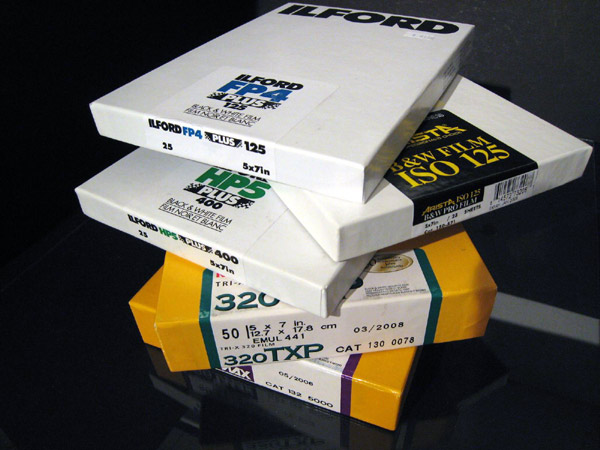
Film Processioning

I just don't know why it is that I'm the only one who seems to be able to read thread titles accurately*. I'm not sure it's quite magic, but here you go – an example of film processioning:

SheetFilmStack.jpg


* or has a spell checker.
 
OP
OP
Zedwardson

Zedwardson

Member
Allowing Ads
Joined
Jul 7, 2014
Messages
102
Format
35mm
If this a a 135 film then I assume it is Kodak. I have never seen an Ilford or Fuji film using tape on 135 film. If it is the tape and I hope it is, as tape can be cut off to avoid future issues then I wonder if it is different from the 120 tape which all makers use as I have never had a problem with 120 tape on either Ilford or Kodak.

Mind you on 120 I always fold the tape back over to stick to the unused film so its sticky surface is not free to be "washed" by dev, stop, fix or water during processing

pentaxuser

Its not tape, but what Ilford (it was Fp4+) uses to bind the film to the spool inside the cartridge with 135 film. I will simply clip that end bit next time I develop. I was coming in with low expectations on the quality I was going to get, so I am not displeased as overall the image looks great, minus the $##%# that got on the negatives. It still might be removable.

And apparently, my browsers spell checker was turned off when I posted last night.
 

Axle

Member
Allowing Ads
Joined
Nov 30, 2010
Messages
543
Location
Milton, ON
Format
Multi Format
I've been doing it regularly since 2012...and it's still magic to me. Same with Printing.
 

pentaxuser

Member
Joined
May 9, 2005
Messages
20,348
Location
Daventry, No
Format
35mm
Its not tape, but what Ilford (it was Fp4+) uses to bind the film to the spool inside the cartridge with 135 film.
.

It is some time since I last processed Ilford 135 but from what I remember the film was held "mechanically" so to speak to the centre of the spool. I think there was a sort of "trap" in the centre with a kind of one way system that prevented the user from pulling the end of the film out.

This may have changed but I cannot think of what binding material might be there that could stick to the film.

Can anyone help clear this up?

Thanks

pentaxuser
 

ntenny

Subscriber
Allowing Ads
Joined
Mar 5, 2008
Messages
2,520
Location
Portland, OR, USA
Format
Multi Format
I just don't know why it is that I'm the only one who seems to be able to read thread titles accurately*. I'm not sure it's quite magic, but here you go – an example of film processioning

That looks a little bit more like film prEcession to me. Or maybe it's nutating?

-NT
 
OP
OP
Zedwardson

Zedwardson

Member
Allowing Ads
Joined
Jul 7, 2014
Messages
102
Format
35mm
It is some time since I last processed Ilford 135 but from what I remember the film was held "mechanically" so to speak to the centre of the spool. I think there was a sort of "trap" in the centre with a kind of one way system that prevented the user from pulling the end of the film out.

This may have changed but I cannot think of what binding material might be there that could stick to the film.

Can anyone help clear this up?

Thanks

pentaxuser

Well I not going to waste a entire roll to find out, when I get back I will continue to hunt down the source of the debris.
 

emjo

Member
Allowing Ads
Joined
Aug 12, 2011
Messages
66
Format
Medium Format
The next wow-factor will come when you develop prints in the darkroom!!
 

Rick A

Subscriber
Allowing Ads
Joined
Mar 31, 2009
Messages
10,032
Location
Laurel Highlands
Format
8x10 Format
I've been working in dark rooms for over 50 years now, and it's still magic to see images on negatives, and to watch an image emerge on paper in a tray. As for clipping film rather than pulling it off the spool, I don't open cassettes any more, I pull the film as I load the reel, then use the lip of the cassette as a cutting guide in the dark. It's handy and neat, less crap to deal with. Oh yeah, easier to load onto a reel if you don't have to handle a wad of film in your hands while trying to get it right.
 

pentaxuser

Member
Joined
May 9, 2005
Messages
20,348
Location
Daventry, No
Format
35mm
Well I not going to waste a entire roll to find out, when I get back I will continue to hunt down the source of the debris.

Quite so but you won't need to. On the next film you can either prise off the end of the cassette cap and then after threading it into the reel simply cut off the end still in the centre of the spool or even more simply and this is what I find simplest, is to extract the leader, cut it square and then take off each corner of the leader, thread it into the reel still attached to the cassette and then when you have pulled out all of the film and it won't pull any further cut across the film at the mouth of the cassette.

At your leisure and in full room light you can prise off the cap and see how its held. I just don't think that there is anything that would produce debris.

I suppose it is just possible that if you were really to tear hard at the bit held in the centre of the spool then a piece might break off and settle on that part of the film that has exposed frames which is another good reason to just cut off the film from the mouth of the cassette.

I hope this helps

pentaxuser
 
OP
OP
Zedwardson

Zedwardson

Member
Allowing Ads
Joined
Jul 7, 2014
Messages
102
Format
35mm
I have found the issue.

My changing bag between the two sections is producing felt bunnies, tiny specks of fabric was going on the negative, a careful squeegee (I used to not doing it as my old fave film EFKE scratched) so I think I solved the problem.
 
Photrio.com contains affiliate links to products. We may receive a commission for purchases made through these links.
To read our full affiliate disclosure statement please click Here.

PHOTRIO PARTNERS EQUALLY FUNDING OUR COMMUNITY:


Ilford ADOX Freestyle Photographic Stearman Press Weldon Color Lab Blue Moon Camera & Machine
Top Bottom