Hi all,
I normally use T-max films (135 and 120) with T-max developer, occasionally pushing 400TMY for low light use. I read Steve Anchell's Darkroom Cookbook and wanted to give some different agitation techniques a try as I normally just follow the recommendations in the Kodak datasheet. One of the techniques, minimal agitation, involves continuous agitation in the first minute and then 10 seconds every 3 minutes, with a %50 increase in development time. This is supposed to increase acutance and grain, and also have a compensating effect on the highlights to stop them blocking up. In my case I exposed 400TMY 120 film at EI1600, and developed it at 21C for 12 minutes, continuous agitation in the first minute, followed by 10 seconds every 3 minutes.
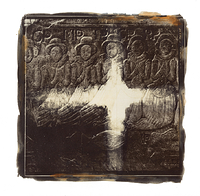
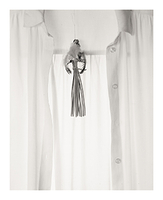
The results were that I seemed to get good shadow detail and high acutance and grain, but contrast is too high and highlights are blocked out so much that they don't scan properly (I haven't tried enlarging form these negatives yet). In the example below the skin tones are very overdeveloped:

In these two examples the overall contrast is too high. Both photos were underexposed as I forgot to account for bellows extension in these up close photographs, but even the the light coloured petals are blocked out completely, whereas red and dark purple flowers have no density:


Can anyone recommend a way to reduce development in the highlights or at least tame the contrast with this developer and film combination while retaining the high acutance and shadow detail? Should I increase dilution or decrease developing time? I would prefer to stick with T-max developer for the time being.
Regards, Simon.
I normally use T-max films (135 and 120) with T-max developer, occasionally pushing 400TMY for low light use. I read Steve Anchell's Darkroom Cookbook and wanted to give some different agitation techniques a try as I normally just follow the recommendations in the Kodak datasheet. One of the techniques, minimal agitation, involves continuous agitation in the first minute and then 10 seconds every 3 minutes, with a %50 increase in development time. This is supposed to increase acutance and grain, and also have a compensating effect on the highlights to stop them blocking up. In my case I exposed 400TMY 120 film at EI1600, and developed it at 21C for 12 minutes, continuous agitation in the first minute, followed by 10 seconds every 3 minutes.
The results were that I seemed to get good shadow detail and high acutance and grain, but contrast is too high and highlights are blocked out so much that they don't scan properly (I haven't tried enlarging form these negatives yet). In the example below the skin tones are very overdeveloped:
In these two examples the overall contrast is too high. Both photos were underexposed as I forgot to account for bellows extension in these up close photographs, but even the the light coloured petals are blocked out completely, whereas red and dark purple flowers have no density:
Can anyone recommend a way to reduce development in the highlights or at least tame the contrast with this developer and film combination while retaining the high acutance and shadow detail? Should I increase dilution or decrease developing time? I would prefer to stick with T-max developer for the time being.
Regards, Simon.