• Welcome to Photrio!
    Registration is fast and free. Join today to unlock search, see fewer ads, and access all forum features.
    Click here to sign up

Streaks and Kodak appearance on developed film

Moment of Spin

A
Moment of Spin

  • 2
  • 0
  • 64
Bad patch

H
Bad patch

  • 1
  • 1
  • 42

Recent Classifieds

Forum statistics

Threads
203,101
Messages
2,849,856
Members
101,668
Latest member
JeremiahPeterson
Recent bookmarks
1

Oliver Quillia

Member
Allowing Ads
Joined
May 17, 2018
Messages
12
Location
Bronx, NY
Format
Medium Format
Hi -

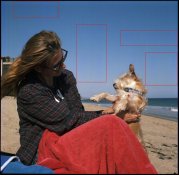
This has been happening to me for some time. In these attached examples, there are two problems I see. The first and most obvious are the vertical streaks in the shot.

At first I thought it was my lab- maybe they did not clean properly and the lines were chemical. But then when I developed my own black and white shot using Fuji Acros Neopan 100, I saw the same problem. Then I thought maybe it was from freezing my film. But the problem came back when I loaded and developed film that was not frozen. I then thought it was my Yashica D, but I got the same problem using my Yashica 124-G.

Not sure what is causing these streaks now. Maybe the pressure plate in the cameras?

The second problem is that you can see the KODAK printed words from the film (marquee boxed in red).

Does anyone know why these two things are happening?

Thanks in advance.
 

Attachments
  • error_photo.jpg
    error_photo.jpg
    126.5 KB · Views: 448
  • error_photo2.jpg
    error_photo2.jpg
    94.7 KB · Views: 444
Last edited:
Welcome to Photrio.
This looks like the wrapper offset problem that Kodak had significant problems with for a while. How old is the film and what type is it?
Here is one of many threads on the issue: https://www.photrio.com/forum/threa...ing-paper-problems-emulsions-affected.137251/
While that thread deals mostly with Kodak black and white film, there have also been some problems with colour emulsions.
Kodak has been replacing film that has either exhibited the problem or is unexposed and is part of known affected batches.
To contact Kodak Alaris the email to use is in that thread (in multiple locations) but for ease of reference it is profilm@kodakalaris.com.
 
How old is the film - ie expiry date? There were problems with Kodak backing papers a few years ago (now seemingly sorted) but all 120 film can potentially back print if left for multiple years after expiry.

Is your camera's film path absolutely clean of dirt/ corrosion etc? Looks a lot like mechanical damage from the camera.
 
Welcome to Photrio.
This looks like the wrapper offset problem that Kodak had significant problems with for a while. How old is the film and what type is it?
Here is one of many threads on the issue: https://www.photrio.com/forum/threa...ing-paper-problems-emulsions-affected.137251/
While that thread deals mostly with Kodak black and white film, there have also been some problems with colour emulsions.
Kodak has been replacing film that has either exhibited the problem or is unexposed and is part of known affected batches.
To contact Kodak Alaris the email to use is in that thread (in multiple locations) but for ease of reference it is profilm@kodakalaris.com.

Thanks for your response.

The film is new with a 2019 expiry date. Thanks for the kodak email. I will use it to retrieve more info and post back here.

Any idea about the streaks?

Thanks again.
 
How old is the film - ie expiry date? There were problems with Kodak backing papers a few years ago (now seemingly sorted) but all 120 film can potentially back print if left for multiple years after expiry.

Is your camera's film path absolutely clean of dirt/ corrosion etc? Looks a lot like mechanical damage from the camera.

Thanks for your response.

The film is new with a 2019 expiry date. I will inspect both Yashica's to see if they have dirt/corrosion.

Any idea about the streaks?

Thanks again.
 
looks like scratches either from your processor or camera. look at the negative emulsion surface for scratches n defects?
 
looks like scratches either from your processor or camera. look at the negative emulsion surface for scratches n defects?

Thanks for your response.

Looked at both my Yashica's D/124-G and they both are in pristine condition. The film paths are clear and nothing I can see that could cause these lines. That still doesn't mean that it is not the culprit, just that I don't notice anything.

Thanks again.
 
Thanks for your response.

The film is new with a 2019 expiry date. Thanks for the kodak email. I will use it to retrieve more info and post back here.

Any idea about the streaks?

Thanks again.

Unlikely to be the film, given you used different films. Only real choices are: how you handled the film; how the cameras handled the film; and the scanner on which it was scanned. Can you see the scratches when looking at the film with a loupe?
 
Unlikely to be the film, given you used different films. Only real choices are: how you handled the film; how the cameras handled the film; and the scanner on which it was scanned. Can you see the scratches when looking at the film with a loupe?

Yeah, agreed.

In both cases, the streaks are on the film. I can see them through the loupe. I think it may be my camera or even possibly to a lesser degree, using just out of the freezer film?

Thanks
 
Thanks for your response.

The film is new with a 2019 expiry date. Thanks for the kodak email. I will use it to retrieve more info and post back here.

Any idea about the streaks?

Thanks again.

And just today someone in another thread posted that Kodak solved this continuing paper crisis. That seems not the case.

Sorry to hear about your spoiled film. Welcome to Phototrio anyway. You'll find a lot of help and knowledge here.
 
And just today someone in another thread posted that Kodak solved this continuing paper crisis. That seems not the case.

Sorry to hear about your spoiled film. Welcome to Phototrio anyway. You'll find a lot of help and knowledge here.

Thanks. Very responsive and knowledgeable bunch here.
 
What camera and scanner took the photos you posted? Film defects aside, those images look very good. Nice and sharp with excellent scans.

Thanks.

I have found this issue using two Yashica medium format cameras - Yashica D and Yashica Mat 124-G. I'm thinking since I definitely know this latest batch came from the 124-G, I will load the D now with Kodak Portra 800 to see.

I use the Epson V700 for scanning and Silverfast 8 for software. I do some light tweaking in Photoshop.
 
Yeah, agreed.

In both cases, the streaks are on the film. I can see them through the loupe. I think it may be my camera or even possibly to a lesser degree, using just out of the freezer film?

Thanks

Quite possibly both. Wrapper offset is known to happen (no matter what the backing paper is) in conditions of high humidity & condensation on recently defrosted film would certainly qualify.

Regarding the scratches, do they line up between films? If they do, it's likely to be the camera. It's also possible you're loading the film incorrectly, putting the sensitive surface in contact with something it's not supposed to be in contact with.
 
Thanks for your response.

Looked at both my Yashica's D/124-G and they both are in pristine condition. The film paths are clear and nothing I can see that could cause these lines. That still doesn't mean that it is not the culprit, just that I don't notice anything.

Thanks again.

did you look at the negatives?

did you process the films? maybe where you developed your film scratched it?

what kind of scaner was used? that may have scratched the film?
 
And just today someone in another thread posted that Kodak solved this continuing paper crisis. That seems not the case.

This has become an obsessive vendetta on your part. You have actively ignored key evidence that is known to potentially cause problems (potentially including wrapper offset) that is quite separate from the issues Kodak had.
 
Welcome to APUG Photrio

Do you use a squeegee? That can streak film.
Check the film transport including rollers. That can streak film.
Do you use a surfactant like PhotoFlo properly diluted? That can eliminate streaking.


.
 
I have had problems in the past with squeegees and my streaking issues have dramatically decreased once I quite using them.

However, I have also had example where the film roll seems tighter than normal and takes more force than usual to pull through the film track. I am not sure what causes it but I suspect it is actually stretching the film. In this situation the streaks/scratches are normally seen at the beginning of the frame but not on the rest of the frame.

I have also learned over time to clean out my developing reels with soap and water and a toothbrush from time to time since I get some crud in the reel. Although this doesn't normally cause scratches on the emulsion I have seen strange marks where the film seems to bunch up when being fed into the reel.

Just some ideas to consider.
 
[QUOTE="Oliver Quillia, post: 2077481,
The second problem is that you can see the KODAK printed words from the film (marquee boxed in red).

[/QUOTE]

Do you mean that you can see the word Kodak in one or more of the boxes outlined in red boxes/rectangles? I have looked very hard but am having difficulty in seeing the word Kodak. In which if the red boxes is it?

Thanks

pentaxuser
 
The pressure plate should only be contacting the backing paper, but looking at my 124G, there is a small diameter roller at the top and bottom of the film gate, and also a "bar" that is part of the frame masking of the film gate. Those items contact the emulsion side. If one or the other roller were stuck and had some dirt on it, that could scratch, or if there is something stuck on either film gate bar parallel to the small rollers, that could scratch (and the scratches would be parallel to the film travel as we see here). I was slightly surprised the bars could contact the film, but my camera was just CLA'd by Mark Hama, so I am assuming it's correct. I've recently put two films through it without problems.

You mentioned the streaks are on the negatives, so presumably it's not bad "pixels" or dirt in the scanner. (If scanning yourself, that could also be checked by improvising to scan at a 90º angle to the norm and see if the streaks stay the same or turn 90º). With an eye loupe and a light angled off the surface, you might be able to confirm they are physical scratches, and also check which side of the film they are on.

I have (so far) eluded the wrapper offset business, but never have used the films that apparently had the most problems. I'm certain the comments above about storage and handling contributing to that make sense, but have no firsthand experience to offer. ( @pentaxuser: I had to pull the red outlined areas into a photo editor and greatly tweak to actually see text well enough to read it. The scratches seem far more visible.)
 
Last edited:
( @pentaxuser: I had to pull the red outlined areas into a photo editor and greatly tweak to actually see text well enough to read it. The scratches seem far more visible.)

Thanks Dave. What's a photo editor? I could certainly see blemishes but try as I might I couldn't see KODAK. I got worried as no-one else seemed to mention any problem with the word Kodak so assumed it was either my eyesight or my screen resolution but the latter is quite high and the former is still good enough to recognise the wife next to me in the bed in the morning but eyesight is controlled by the brain and after 40+ years it expects to see what it has seen for all those mornings. :D

pentaxuser
 
Quite possibly both. Wrapper offset is known to happen (no matter what the backing paper is) in conditions of high humidity & condensation on recently defrosted film would certainly qualify.

Regarding the scratches, do they line up between films? If they do, it's likely to be the camera. It's also possible you're loading the film incorrectly, putting the sensitive surface in contact with something it's not supposed to be in contact with.

Thank you. I feel it's come down to improperly feeding the film as well as me applying pressure to the roll when initially spooling it to make it as taut as possible. I will also refrigerate and not freeze the film. I use film often enough, I might as well not. Much thanks.
 
Welcome to APUG Photrio

Do you use a squeegee? That can streak film.
Check the film transport including rollers. That can streak film.
Do you use a surfactant like PhotoFlo properly diluted? That can eliminate streaking.

I do use a sponge squeegee and I'm mindful of not pressing too hard on it. This isn't my issue as I only dev B&W and have color film that has these streaks. I also use PhotoFlo and dilute it properly. Thanks.


.
 
I have had problems in the past with squeegees and my streaking issues have dramatically decreased once I quite using them.

However, I have also had example where the film roll seems tighter than normal and takes more force than usual to pull through the film track. I am not sure what causes it but I suspect it is actually stretching the film. In this situation the streaks/scratches are normally seen at the beginning of the frame but not on the rest of the frame.

I have also learned over time to clean out my developing reels with soap and water and a toothbrush from time to time since I get some crud in the reel. Although this doesn't normally cause scratches on the emulsion I have seen strange marks where the film seems to bunch up when being fed into the reel.

Just some ideas to consider.

Thanks. Yes. I do sometimes apply pressure to the film roll when loading to make it taut. I will not do this anymore. Thanks, too, for the tips on cleaning.
 
Photrio.com contains affiliate links to products. We may receive a commission for purchases made through these links.
To read our full affiliate disclosure statement please click Here.

PHOTRIO PARTNERS EQUALLY FUNDING OUR COMMUNITY:


Ilford ADOX Freestyle Photographic Stearman Press Weldon Color Lab Blue Moon Camera & Machine
Top Bottom