
• Welcome to Photrio!
    Registration is fast and free. Join today to unlock search, see fewer ads, and access all forum features.
    Click here to sign up

Strange drop shadow effect

Mackenzies Pocket

A
Mackenzies Pocket

  • 2
  • 0
  • 17
Flush

H
Flush

  • 2
  • 0
  • 24

Recent Classifieds

Forum statistics

Threads
202,910
Messages
2,847,425
Members
101,529
Latest member
Abjayan
Recent bookmarks
0

dimitriv

Member
Allowing Ads
Joined
Aug 11, 2015
Messages
1
Format
35mm Pan
Hi everyone,
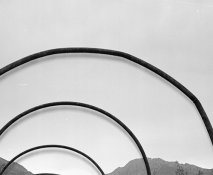
do You know what is the cause about the strange drop shadow effect on the attached image?

I tried several settings on my scanner and maybe I still have to find the right one.
Can you confirm that is a scan issue and not a negative development issue?
Thank you =)
 

Attachments

  • scansione.jpg
    scansione.jpg
    107.1 KB · Views: 183
Welcome to APUG :smile:.

Please attach the picture of the negative (whole negative) - taken against white light (for example computer screen - use empty word document).
Also please give some more details: film, developer, camera, camera settings (auto exposure, manual exposure...), did you use filter - if yes then which one.
 
It looks like you're trying to scan the neg on a flatbed without using a backlight. Negative scanners, even flatbed ones, generally have a light source on both sides to avoid things like shadows. What you may be looking at is the shadow of the scanner bulb projecting through the neg and shadowing onto the lid of the scanner. Film is generally just thick enough to create the shadow.
 
Photrio.com contains affiliate links to products. We may receive a commission for purchases made through these links.
To read our full affiliate disclosure statement please click Here.

PHOTRIO PARTNERS EQUALLY FUNDING OUR COMMUNITY:


Ilford ADOX Freestyle Photographic Stearman Press Weldon Color Lab Blue Moon Camera & Machine
Top Bottom
