• Welcome to Photrio!
    Registration is fast and free. Join today to unlock search, see fewer ads, and access all forum features.
    Click here to sign up

Splotches on negative

Recent Classifieds

Forum statistics

Threads
202,816
Messages
2,845,855
Members
101,544
Latest member
johnsaigon0
Recent bookmarks
0

palmettoexplorer

Member
Allowing Ads
Joined
Dec 16, 2017
Messages
10
Location
South Carolina
Format
Medium Format
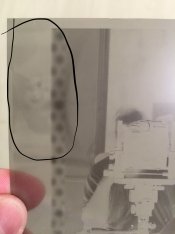
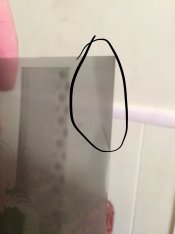
So I developed my first sheets of 4x5 last night. I first found out after they were done that I needed to clean out the film holders. I’ll fix that. They were covered in dust. Second...I circled a couple areas...what is this from? My thought was not enough chemical to cover the negatives...I used 500ml in a small Paterson tank. Ignore what looks like polka dots...just the circle area. Oh I used Arista developer

Thanks!
 

Attachments

  • 4F7232AB-EA1A-43BF-9E28-25A15AA9ECD3.jpeg
    4F7232AB-EA1A-43BF-9E28-25A15AA9ECD3.jpeg
    439.9 KB · Views: 144
  • 172A0C6F-F38E-47CD-B1B8-C13A458BEBC2.jpeg
    172A0C6F-F38E-47CD-B1B8-C13A458BEBC2.jpeg
    392.4 KB · Views: 155
Odd....the first looks like some kind of double exposure, and the second possible faint light fogging. Was the film fresh ?
 
You can check the solution requirements - just put 500ml in the tank and measure the depth with a ruler., and compare it with the film dimensions. Usually insufficient chemistry or a slipped sheet leaves a band across the film. Localized marks can come from residual chemistry on the film before the developer (not with clean, dry tanks). Sometimes touching the film surface with sweaty finders can delay take up of developer. Work out how the sheets were in the tank. That helps decide if the processing was at fault.

If you use a changing bag, be wary of pinholes or a luminous watch. I've seen both leave marks on film.

Cleaning holders - I find that the nozzle from the vacuum cleaner works well, possibly with a soft brush first if they are really messy. Don't forget to remove the dark slides and do those and the light trap. Then keep them in bags all the time except when loading/unloading, or exposing. Plain old zip-lock style bags work, though some people in dry climates prefer anti-static bags. If you have to wash a holder, don't get the felt trap wet. Use a Q-tip or damp cloth.

When I empty a holder I make sure to put the slide in in the 'unexposed' direction (white outside for me), and leave the loading flaps open, then put it in the bag. That gives me three options - empty, loaded, and loaded-exposed.

 
Did you prewet the film before developing?
 
The triangular spot looks like fogging to me. Are you seeing this with just one sheet, or multiple sheets?
 
To my eyes the first looks like a double exposure, I am certain that I can see another exposure of a figre there, The second looks to me as if there was not enough developer for the film.
I think there's a mirror in that one.
 
The first neg looks like uneven development to me. Maybe that spot on the film got wet or contaminated before the developer hit it? The stripe on the second neg looks like fogging from exposure to light.

After you clean your holders, make sure your loading environment is clean as well. Next time you develop, make sure you load in absolute darkness and handle the film with clean, dry hands, by the edges. Pour in the developer quickly and begin agitation immediately. Keep refining your technique and all your problems will magically disappear :smile:

FWIW, not enough developer results in a lighter stripe (less development) at the top of the neg, not a darker area like you have. Ignore the posts that suggest the stripe is due to not enough developer.

Best,

Doremus
 
Photrio.com contains affiliate links to products. We may receive a commission for purchases made through these links.
To read our full affiliate disclosure statement please click Here.

PHOTRIO PARTNERS EQUALLY FUNDING OUR COMMUNITY:


Ilford ADOX Freestyle Photographic Stearman Press Weldon Color Lab Blue Moon Camera & Machine
Top Bottom