Soft-Proofing Calibration β - the Script for the Perceptual Approach method of making a DN.

Simpler Time

A
Simpler Time

  • 1
  • 0
  • 35
Rural Ohio

Rural Ohio

  • 4
  • 0
  • 38

Recent Classifieds

Forum statistics

Threads
201,055
Messages
2,818,333
Members
100,496
Latest member
Incredulousk
Recent bookmarks
0

carioca

Member
Allowing Ads
Joined
Nov 16, 2005
Messages
114
Location
Paris
Format
Multi Format
I have just stumbled upon this thread, quite interesting.
Has there been a follow up on the script?

Sidney
 

ced

Member
Allowing Ads
Joined
Oct 10, 2011
Messages
866
Location
Belgica
Format
Multi Format
Dan can probably be seen online from time to time and is very helpful.
For me if I only had one layer to do it would be fine but gumprints need more than 2-3 or more layers and then it would work only once all the layers are complete.
So for me I'm not sure how you correct each layer if needed.
Download and play with it along with the detailed explanation Dan furnished for your process.
 

carioca

Member
Allowing Ads
Joined
Nov 16, 2005
Messages
114
Location
Paris
Format
Multi Format
Thanks for your reply, Ced.
I have very little knowledge about gum printing as I mostly work with 'one-shot' processes that do not require multiple passes (Cyano, Argyrotype, Carbon Transfer).
For those processes, I go a different route with the QuadToneRip software, which is a different beast.
With a multiple pass process, I believe you'd still need a corrected starter profile to begin with.
Have you tried to create an initial correction curve with the low density output and applying it repeatedly on the successive coats?

With Dan's workflow, how do you set up the best UV blocking color for a process?

Sidney
 
OP
OP
Dan Pavel

Dan Pavel

Member
Joined
Sep 11, 2017
Messages
245
Location
Constanta, Romania
Format
Multi Format
I have just stumbled upon this thread, quite interesting.
Has there been a follow up on the script?

Sidney

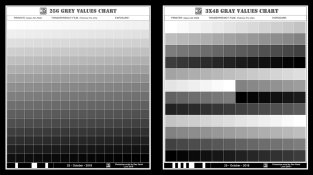
Yes, I have written an improved version of the script. It uses the pen tool of the Curves adjustment layer to make the curves with a lot more generator points. It has 2 options for the gray levels Charts - one with the full range of 256 grays and one with 48 laveles of gray but with 3 patches for each gray, positioned at a distance of each other. When scanning the second version of the chart the final value is the media of the 2 most close to each other values and the most different value is discarded. This way the possibility of wrong readings due to non uniform brushing or illumination (or other reasons) is very much diminished. In this new version the curves are made with much greater precision in PS by using 256 (first option chart) or 48 (second option chart) generator points instead of 16 (the first version of the script) or 14 (ChartThrob). The 2 variants of the chart are looking like this:
Chart.jpg
The new script works nicely in Photoshop CS6 and I am using it on regular bases. I have tested it in PS CC 2017 and one inner function doesn't work anymore in this version of PS ("crop and align"). I still have to figure-out how to replace it to make the script work fully in CC too. That's why I haven't posted it yet.

One can use his/her usual UV blocking color with my script. I haven't yet made a script to automatic choose the best UV blocking color (but it is on my agenda).
 
OP
OP
Dan Pavel

Dan Pavel

Member
Joined
Sep 11, 2017
Messages
245
Location
Constanta, Romania
Format
Multi Format
Ced, making an adjustment curve layer for multi-layer gum prints proves to be quite difficult. I have some ideas that might work but I haven't tested them yet. Let's open a new thread on this subject and see how people think it could be solved.
 

carioca

Member
Allowing Ads
Joined
Nov 16, 2005
Messages
114
Location
Paris
Format
Multi Format
Dan, thank you for this update.
I work with CS6, is your script available for testing?

Sidney
 
OP
OP
Dan Pavel

Dan Pavel

Member
Joined
Sep 11, 2017
Messages
245
Location
Constanta, Romania
Format
Multi Format
The download link for the updated version is :
https://drive.google.com/open?id=1W8HmlYYoo7Rru2omI3vTKsitE7LFIiat

Sorry for the delay but I had to remove some parts of the script that were only used for checking the functionality.

Download the ".zip: file, unzip it and copy the "Soft-ProofingCalibration" folder into your ".../Adobe/Adobe Photoshop CS6/Presets/Scripts ".

The folder contains two scripts and a "Required" folder with some image files, "pdf" files and an ".ini" file needed by the script to run and remember your options between sessions.
The two scripts will be available the next time you open PS CS6 in the "File->Scripts" menu under the names "Draw" and "Scan".

The 3x48 Chart is the Chart to be used in most situation. Using the 256 Chart only makes sense when you have a very even UV illumination, use very clean papers and a have a strictly controlled process.

The "Scan" script will produce 2 curves, a Soft-Proofing curve and an Adjustment curve. Use them as described earlier on this thread. The 2 curves have an "AMP" extension. When loading them into a Curves Adjustment Layer in PS take care to choose "AMP" as file extension from the "Load Curves Preset" -> "Load" -> "Files Type" panel, otherwise they are not visible.

This scripts only work in PS CS6 and possible CS5, Windows and Mac. However, I haven't tested them on Mac but I have used only function thet Adobe says are compatible with both OS. In this versions they don't work in CC.
 

carioca

Member
Allowing Ads
Joined
Nov 16, 2005
Messages
114
Location
Paris
Format
Multi Format
Thanks Dan for the updated version, I'll give it a try next time I'm in the lab.
It works well on Mac CS6, btw.

Sidney
 
Photrio.com contains affiliate links to products. We may receive a commission for purchases made through these links.
To read our full affiliate disclosure statement please click Here.

PHOTRIO PARTNERS EQUALLY FUNDING OUR COMMUNITY:



Ilford ADOX Freestyle Photographic Stearman Press Weldon Color Lab Blue Moon Camera & Machine
Top Bottom