
-
Welcome to Photrio!Registration is fast and free. Join today to unlock search, see fewer ads, and access all forum features.Click here to sign up
You are using an out of date browser. It may not display this or other websites correctly.
You should upgrade or use an alternative browser.
You should upgrade or use an alternative browser.
Slightly pink hue?
-
A
- Thread starter ToddB
- Start date

Recent Classifieds
-
For Sale Job Lot of Out of Production B&W Paper - UK only.
- Started by Gary Holliday
-
Sold Rollei RPX 135-36
- Started by Roger Thoms
-
For Sale Black & White Paper Sale - Open box - UK only
- Started by Gary Holliday
-
Sold Efke PL 100 M
- Started by Roger Thoms
-
For Sale Omega C760 XL Medium Format Condenser Enlarger with Schneider Enlarger Lens - UK
- Started by Gary Holliday
Forum statistics

What film? I know with films I have been using (Delta 400, Tmax 100) they have a slight tint but if there is a lot of pink it's a sign they're not fixed enough. I had to re-fix some negatives a few weeks ago.

if it's one of the "newer film types" (T Max/Delta) then you need to fix them for 50% longer to get rid of the Pink tint.
From memory when T Max first came out Kodak used to recomment using a particular solution to clear the pink tint form the film base....
From memory when T Max first came out Kodak used to recomment using a particular solution to clear the pink tint form the film base....
I forgot which film has the pink tint. I think it's Tmax. You just need to wash it longer. It will eventually come out. If your developer was tired, then you get totally clear or very thin film. If your fixer was tired, you get creamy film with sort of fogging looking thing all over.
I think what you are observing is the dye... which will wash out if you wash longer.
I think what you are observing is the dye... which will wash out if you wash longer.

- Joined
- Dec 10, 2009
- Messages
- 6,295
- Format
- Multi Format
It's common with Tmax. I have a green hue in my fix from processing Arista EDU.


So what happens if I don't refix it? Will anything bad happen? I've seen the same thing for the newer tri-x 120 I've bought, but the older tri-x is fine and I haven't changed anything in the process... Older like 6 months older... Vs new from store...
~Stone
The Noteworthy Ones - Mamiya: 7 II, RZ67 Pro II / Canon: 1V, AE-1 / Kodak: No 1 Pocket Autographic, No 1A Pocket Autographic
Sent from my iPhone using Tapatalk
~Stone
The Noteworthy Ones - Mamiya: 7 II, RZ67 Pro II / Canon: 1V, AE-1 / Kodak: No 1 Pocket Autographic, No 1A Pocket Autographic
Sent from my iPhone using Tapatalk

A refix is in order. You may experience image degradation if you dont.

a two-bath fixingandusing a washing aid followed by a 15-minute was will get rid of the pink, or live with it,because it does not that it harm anything.it is purely cosmetic.
- Joined
- Oct 14, 2010
- Messages
- 161
- Format
- Medium Format
Hello Todd;
Try the following, which has been covered many times! Presoaking, fixer, using Hypo Clearing Agent, and better washing. The Formulary sells a Tmax fixer. In my case turned out to be using old fixer. Now I mix new fixer every 60 days and use HCA, Steven.
Try the following, which has been covered many times! Presoaking, fixer, using Hypo Clearing Agent, and better washing. The Formulary sells a Tmax fixer. In my case turned out to be using old fixer. Now I mix new fixer every 60 days and use HCA, Steven.

It's so strange on another forum I saw someone say that the newer tri-x just had a pink hue and it was normal, something about the way they did something to it at the factory.
Two we are getting mixed signals, some say age will change the film, some say it won't matter and is aesthetic.
The reason I'm hesitant is more because I have already cut the film into individual pieces and so to re-fix properly I would have to do 15 rolls one image at a time or they will stick together... So I won't do it if its just aesthetic... I did both ilford D3200 and tri-x 400 and only the tri-x is pink.
~Stone
The Noteworthy Ones - Mamiya: 7 II, RZ67 Pro II / Canon: 1V, AE-1 / Kodak: No 1 Pocket Autographic, No 1A Pocket Autographic
Sent from my iPhone using Tapatalk
Two we are getting mixed signals, some say age will change the film, some say it won't matter and is aesthetic.
The reason I'm hesitant is more because I have already cut the film into individual pieces and so to re-fix properly I would have to do 15 rolls one image at a time or they will stick together... So I won't do it if its just aesthetic... I did both ilford D3200 and tri-x 400 and only the tri-x is pink.
~Stone
The Noteworthy Ones - Mamiya: 7 II, RZ67 Pro II / Canon: 1V, AE-1 / Kodak: No 1 Pocket Autographic, No 1A Pocket Autographic
Sent from my iPhone using Tapatalk
I'm not sure a slight pink hue is a bad thing. In my case they were pink enough (and therefore under-fixed enough) that they were cloudy, which was quite apparent when scanning and printing.
I suppose there are some long-term archival considerations but I don't really think that my negatives are that good, I will be doing the world a favour if they don't last.
I suppose there are some long-term archival considerations but I don't really think that my negatives are that good, I will be doing the world a favour if they don't last.
I've found with Tmax if there is a slight pink hue it will wash out with a 15 minute final wash. With more pink in the film I refix and it all goes away. I've never has any film when dried have a pink hue.
Yea this was a dry pink hue, it's VERY slight... And I don't have any clarity issues, images are crisp.
~Stone
The Noteworthy Ones - Mamiya: 7 II, RZ67 Pro II / Canon: 1V, AE-1 / Kodak: No 1 Pocket Autographic, No 1A Pocket Autographic
Sent from my iPhone using Tapatalk
~Stone
The Noteworthy Ones - Mamiya: 7 II, RZ67 Pro II / Canon: 1V, AE-1 / Kodak: No 1 Pocket Autographic, No 1A Pocket Autographic
Sent from my iPhone using Tapatalk
Refix! Some of my old negs, a decade or two old are unprintable now. They have nasty yellow-brown splotches. Bad fix will get ya.
You can refix and wash in a tray, if the negs are already cut. A plastic covered paper clip opened into an S, can be looped through a sprocket hole for hanging 35mm strips.
You can refix and wash in a tray, if the negs are already cut. A plastic covered paper clip opened into an S, can be looped through a sprocket hole for hanging 35mm strips.
to prevent light from bouncing off the film base back into the emulsion. it's called the anti halation layer. it's a good thing!

Sirius Glass
Subscriber
TMax and Delta need more time in Hypo. Some say 50%, I have sometimes had to double the time even with fresh Hypo.
Ralph says its good, sly says re-fix...
Also all of my images are 120 cut not 35mm so can't use paper clips...
~Stone
The Noteworthy Ones - Mamiya: 7 II, RZ67 Pro II / Canon: 1V, AE-1 / Kodak: No 1 Pocket Autographic, No 1A Pocket Autographic
Sent from my iPhone using Tapatalk
Also all of my images are 120 cut not 35mm so can't use paper clips...
~Stone
The Noteworthy Ones - Mamiya: 7 II, RZ67 Pro II / Canon: 1V, AE-1 / Kodak: No 1 Pocket Autographic, No 1A Pocket Autographic
Sent from my iPhone using Tapatalk
TMax and Delta need more time in Hypo. Some say 50%, I have sometimes had to double the time even with fresh Hypo.
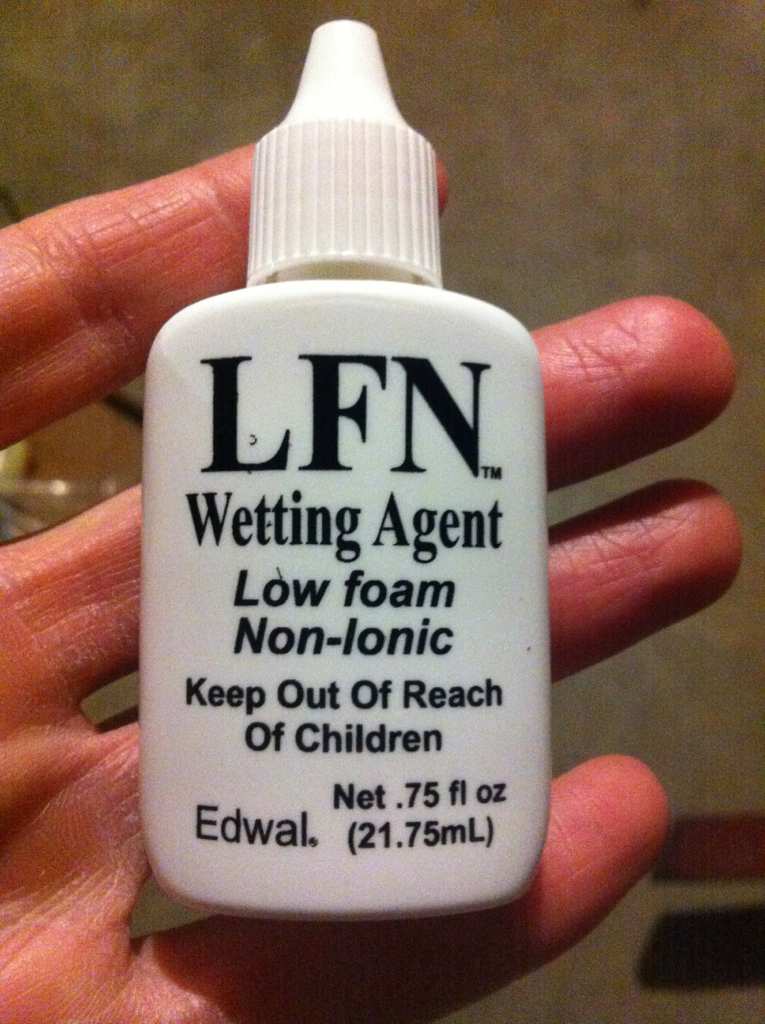
Dumb question, is this the same as hypo?
~Stone
The Noteworthy Ones - Mamiya: 7 II, RZ67 Pro II / Canon: 1V, AE-1 / Kodak: No 1 Pocket Autographic, No 1A Pocket Autographic
Sent from my iPhone using Tapatalk
Sirius Glass
Subscriber
Dumb question, is this the same as hypo?
~Stone
The Noteworthy Ones - Mamiya: 7 II, RZ67 Pro II / Canon: 1V, AE-1 / Kodak: No 1 Pocket Autographic, No 1A Pocket Autographic
Sent from my iPhone using Tapatalk
No, the wetting agent helps the water flow off the film without leaving streaks.
Sold by FreeStyle, one of APUG's sponsors http://www.freestylephoto.biz/sc_search.php?rfnp=30&q=hypo&rfnc=303&
pentaxuser
Member
TMax and Delta need more time in Hypo. /QUOTE]
This is the general view about TMax but I had never heard this being applicable to Delta. Ilford says nothing to indicate a 50% increase in fixer time and I have never noticed any issues with Delta film using the same times as I use for "old tech" film such as HP5+
pentaxuser
| Photrio.com contains affiliate links to products. We may receive a commission for purchases made through these links. To read our full affiliate disclosure statement please click Here. |
PHOTRIO PARTNERS EQUALLY FUNDING OUR COMMUNITY:  |