At first I thought
this was just a Silverfast issue. Now, I want to rule out if it could be related to a development issue because there was a minor mistake at the lab. They refunded my development:
The case:
- The lab confirmed that multiple black and white film rolls were accidentally developed in a Fuji FP150SC right before my C-41 film roll was developed.
- I received my film negatives with residue on them. We discussed it and their conclusion was that the residue came from the B&W rolls run right before mine. I used a microfiber cloth and my breath to gently wipe this residue off before scanning my film.
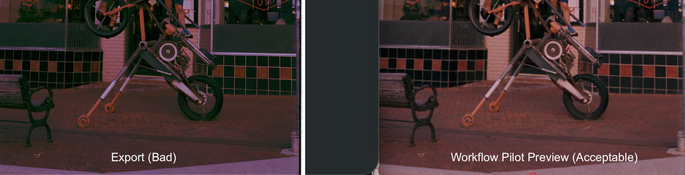
- In Silverfast, my Workflow Pilot preview shows a decent colored negative with colors matching my best memory of the scene. After scanning with multi-exposure mode on and without IR, the color is incorrect. It does not match the Workflow Pilot preview and has a strong red hue along with some other strange color/density differences.
Troubleshooting steps:
4. I used the same settings to scan several frames from other rolls I developed at home and the previews matched the export 1:1. The final colors look ok.
5. I tried scanning the raw, un-inverted negative and then using NLP to invert it. The colors were awful on the roll from the lab. Totally wrong. I found that strange considering the preview in Silverfast looked so good.
Note: I upgraded to Silverfast 9.29 (or whatever the latest version is) right before scanning for the first time today.
Do you have any immediate thoughts? I may be missing something obvious.
Scanner: Plustek 8300ai
Software: Silverfast 9
OS: Mac, Tahoe 26.5