• Welcome to Photrio!
    Registration is fast and free. Join today to unlock search, see fewer ads, and access all forum features.
    Click here to sign up

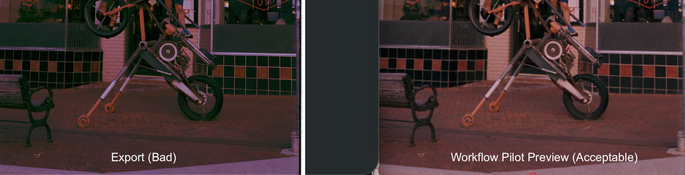
Silverfastcolors in the Workflow Pilot fail to match the export.

Fire escape.

H
Fire escape.

  • 2
  • 1
  • 10
22886.jpg

A
22886.jpg

  • 2
  • 0
  • 23

Recent Classifieds

Forum statistics

Threads
204,343
Messages
2,867,389
Members
102,231
Latest member
kimlee2027
Recent bookmarks
0
A repost of the text and image for the forum:

At first I thought this was just a Silverfast issue. Now, I want to rule out if it could be related to a development issue because there was a minor mistake at the lab. They refunded my development:

The case:

  1. The lab confirmed that multiple black and white film rolls were accidentally developed in a Fuji FP150SC right before my C-41 film roll was developed.
  2. I received my film negatives with residue on them. We discussed it and their conclusion was that the residue came from the B&W rolls run right before mine. I used a microfiber cloth and my breath to gently wipe this residue off before scanning my film.
  3. In Silverfast, my Workflow Pilot preview shows a decent colored negative with colors matching my best memory of the scene. After scanning with multi-exposure mode on and without IR, the color is incorrect. It does not match the Workflow Pilot preview and has a strong red hue along with some other strange color/density differences.
Troubleshooting steps:

4. I used the same settings to scan several frames from other rolls I developed at home and the previews matched the export 1:1. The final colors look ok.

5. I tried scanning the raw, un-inverted negative and then using NLP to invert it. The colors were awful on the roll from the lab. Totally wrong. I found that strange considering the preview in Silverfast looked so good.

Note: I upgraded to Silverfast 9.29 (or whatever the latest version is) right before scanning for the first time today.

Do you have any immediate thoughts? I may be missing something obvious.

Scanner: Plustek 8300ai

Software: Silverfast 9

OS: Mac, Tahoe 26.5

 

Attachments

  • Color Export Woes.png
    Color Export Woes.png
    1 MB · Views: 22
So you're running NLP on scans from the lab and scans you made yourself and now you're wondering why they look different? Is that it?
Sorry, the reddit post just adds confusion IMO, not much clarity.

Can you describe exactly what you're doing?
 
So you're running NLP on scans from the lab and scans you made yourself and now you're wondering why they look different? Is that it?
Sorry, the reddit post just adds confusion IMO, not much clarity.

No, not at all. The lab never scanned anything. Forget about my NLP check if that happens to confuse you.

First two questions:

1. Are you familiar with Using SilverFast?
2. Do you see the difference between the scan colors in the screenshot and agree the left looks different (and incorrect) compared to the right?

Can you describe exactly what you're doing?

Yes, I am scanning myself using a Plustek 8300ai and Silverfast. The initial image preview in Silverfast looks good. The file exported has poor color and strange density issues. The film was developed in C-41 contaminated by B&W film rolls.
 
I just did the latest software update for Silverfast that was intended to fix bugs and now the colors in the Workflow Pilot fail to match the export. Instead, I am getting JJBA style colors (bizarre). Have you seen this too? The export color is all wrong but the preview looks ok.

Is this your problem?

I had this issue a while back and Support sent me this article which solved the problem.
Silverfast support are pretty responsive and helpful - better than asking in a forum.

 
The file exported has poor color and strange density issues.
I see the difference between both snippets.

The main question is at what point you notice the difference. I assume you make the scan, then export it and then open it in a different app. At that point you probably see different colors. As to the assumptions - hence the question to make explicit what you're doing.

The first thing that comes to mind is that you're exporting JPGs or TIFFs in one color space and the external app/viewer you use subsequently to open the file interprets them in a different color space. If that's the problem, then there are a couple of things you can do, and the most straightforward/easy is to just force SilverFast to export your scans in sRGB space, which is the de facto default across platforms.

Color management problems are common, not specific to Silverfast, and it really helps to understand the basics of color management in order to navigate through this.
 
Last edited:
Is this your problem?

I had this issue a while back and Support sent me this article which solved the problem.
Silverfast support are pretty responsive and helpful - better than asking in a forum.


Are you able to see the screenshots on the Silverfast site? I cannot load them or find 'auto.' I will try this although I find it odd the problem is unique to this roll.
 
Photrio.com contains affiliate links to products. We may receive a commission for purchases made through these links.
To read our full affiliate disclosure statement please click Here.

PHOTRIO PARTNERS EQUALLY FUNDING OUR COMMUNITY:


Ilford ADOX Freestyle Photographic Stearman Press Weldon Color Lab Blue Moon Camera & Machine
Top Bottom