• Welcome to Photrio!
    Registration is fast and free. Join today to unlock search, see fewer ads, and access all forum features.
    Click here to sign up

Silverfast scanner help

Street photo Nashville

A
Street photo Nashville

  • 2
  • 0
  • 33
Rome

A
Rome

  • 2
  • 2
  • 55

Recent Classifieds

Forum statistics

Threads
202,543
Messages
2,842,138
Members
101,373
Latest member
sputman
Recent bookmarks
0

Brandon88

Member
Allowing Ads
Joined
Nov 14, 2020
Messages
8
Location
Melbourne
Format
35mm
I have just bought an Epson v600 to start scanning my own work, And I’m trying to work out why negatives are looking different than what should be with silverfast.

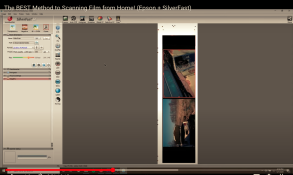
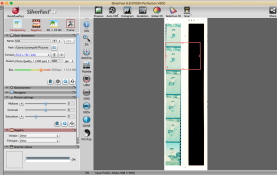
The first photo here is mine after scanning negatives, while the second one is a screenshot from YouTube with the same settings. The YouTube photo obviously looks correct while mine looks very weird.

Does anyone here use silverfast and know why this may be? Thanks
 

Attachments

  • 6BECBAAA-CA28-47CB-8EBF-F596DA4B92A1.png
    6BECBAAA-CA28-47CB-8EBF-F596DA4B92A1.png
    319.1 KB · Views: 129
  • 761C6E52-FC8A-4976-A243-28641162F8BE.png
    761C6E52-FC8A-4976-A243-28641162F8BE.png
    383.4 KB · Views: 120
Looks like you haven't set NegaFix to the proper settings for the film you're trying to scan. This panel is the tool that controls removal of the orange mask and initial settings for color and tone.
 
Your selection box needs to include the visible part of the image only. The selection box on you screen capture also includes the rebate and some blank space. This can throw off the algorithms the software uses. Try enclosing just the image and hitting preview to see if that fixes the problem.
 
What Wallendo said. Also, set your film type in the Negafix window in the bottom left-- it's currently Other/Other. Silverfast might get it right anyway once you've tightened up your frame selection.
 
Photrio.com contains affiliate links to products. We may receive a commission for purchases made through these links.
To read our full affiliate disclosure statement please click Here.

PHOTRIO PARTNERS EQUALLY FUNDING OUR COMMUNITY:


Ilford ADOX Freestyle Photographic Stearman Press Weldon Color Lab Blue Moon Camera & Machine
Top Bottom